- Incentivized review
The product is excellent; it has spectacular colors, even in well-lit rooms. It is a very good option for video games due to its refresh rate.
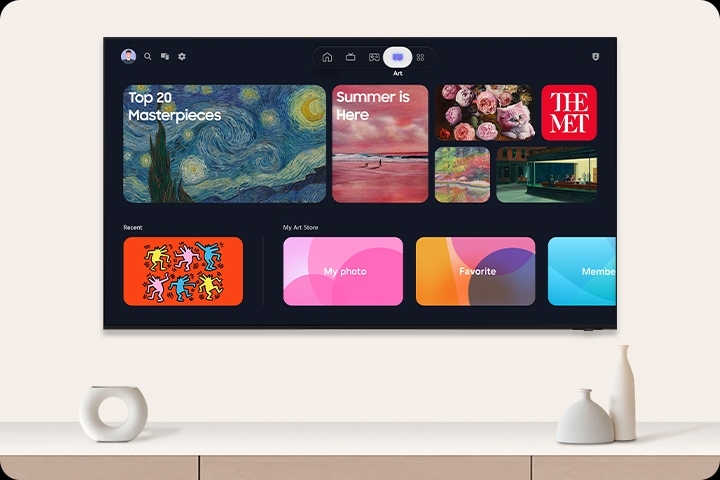
Unbeatable contrast with AI-powered pixel-level control, on a floating, glare-free screen that enhances your content and décor. Enjoy 5,000+ artworks1 from world-famous artists and collections, and you can reduce cable clutter on up to 8 HDMI devices with Wireless One Connect Ready2.
1Includes 30 free refreshed artworks monthly; paid subscription required to enjoy all the art from the Art Store. Samsung Account log-in and Wi-Fi connection are required.
2Wireless One Connect Box sold separately and must be connected to the TV wirelessly for full TV functionality. Wireless connection may be affected by surrounding environment, may not connect when enclosed or blocked by metal (e.g., from inside a metal cabinet) or by other physical objects such as walls. TV and Wireless One Connect require separate power cord connections.
Enjoy real black levels2 and authentic color, paired with Glare Free technology for a lifelike viewing experience that isn't hindered by distracting reflections from sunny windows or overhead lights.
2 Black level ≤ 0.005nit @ Dark room (based on ITU-R BT.2100-3). Greyscale discrimination AVG Δ E2000 ≤ 5 @ Bright room 500Lx. Gloss Unit ≤ 15GU (ex. Mirror 100GU). Certification on S95H and S90H.
Find the perfect piece of artwork from the world’s leading museums and artists such as The Met, MoMA, Salvador Dali, Keith Haring, Jean Michel Basquiat and more.6
6 Samsung Account log-in and Wi-Fi connection are required. Includes free 30 refreshed artworks monthly through Art Store Streams and over 70 ambient content supported complimentary throughout the year. Paid subscription required to enjoy all the art from the Art Store.
Transform your space with a premium TV that resembles a work of art. The FloatLayer Design mounts flush to the wall for a sleek, minimalist look. Featuring a refined bezel, it looks stunning whether on or off.
Powered by 128 neural networks to deliver AI-enhanced picture and sound, resulting in an exceptional 4K experience for streaming, gaming, live sports and more.3
3Utilizes AI-Based formulas to upscale to 4K resolution. Resulting picture may vary based on source content.
Dive into next-level immersion created by ultra-smooth, tear-free, low latency gaming with real-time response performance. Unlock the ultimate gaming experience with the powerful combination of Motion Xcelerator 165Hz8, AMD FreeSync Premium Pro9 and NVIDIA G-Sync10.
84K 165Hz is only available with PC-connected games that support such specifications (PC graphic card required). Performance may vary.
9Viewing experience may vary according to types of content and graphics processing unit, as well as network connection speeds and ping levels when gaming on the cloud.
10Viewing experience may vary according to types of content and graphics processing unit, as well as network connection speeds and ping levels.
Experience smooth visuals and blazing fast speeds for VRR gaming at up to 4K 165Hz.11
114K 165Hz is only available with PC-connected games that support such specifications (PC graphic card required). Performance may vary.
Validated by NVIDIA, this technology offers an advanced variable refresh rate (VRR) experience for ultra-smooth, fast gaming. It effectively minimizes screen tearing and stuttering, resulting in seamless gameplay.*
*Viewing experience may vary according to types of content and graphics processing unit, as well as network connection speeds and ping levels.
Experience seamless, lag-free gaming by reducing stutter and screen tearing with adaptive sync, while HDR support delivers vibrant, lifelike visuals for an immersive experience.12
12Only available with PC connected games that support such specifications (PC graphic card required). Performance may vary.
Feel like you're at the center of your favorite movie or show with spatial audio that moves around you and above you. Hear helicopters buzzing overhead or music like you're in a grand concert hall.
Stream, game and explore all your favorite content on One UI Tizen,17 an intuitive smart TV platform you can customize. With Samsung Knox securing your data18 and 7 years of automatic OS updates,19 enjoy peace of mind while accessing endless entertainment on a platform that’s always up to date.
17Samsung Account required for network-based smart services, including streaming apps and other smart features. Computer, mobile or other device may be necessary to create/log in to Samsung Account (free to download and create). Without Account log in, only external device connections (e.g., via HDMI) and terrestrial/over-the-air TV (only for TVs with tuners) available.
18Personal data includes directly input PIN-codes and passwords, and IoT device information shared through the SmartThings app. The latest software is required.
19Based on model year; requires Internet connection.
Content and services may vary by region and are subject to change without notice.
Agreement to Smart Hub Terms and Conditions and Privacy Policy is required before use.
Some content and services require registration and subscription.
Requires Samsung account.
Tizen OS upgrades will be supported for up to 7 years starting from 2026, for products released in the year 2026.
Please note that the upgrade does not cover hardware-related performance, features or durability.
Connect and control smart devices through your TV to simplify your day-to-day life with the built in SmartThings Hub. Get notifications about your devices right on screen, including a 3D Map View showing your entire smart home ecosystem at a glance.
24Samsung Account required for network-based smart services, including streaming apps and other smart features. Computer, mobile or other device may be necessary to create/log in to Samsung Account (free to download and create). Without Account log in, only external device connections (e.g., via HDMI) and terrestrial/over-the-air TV (only for TVs with tuners) available.
With the Wireless One Connect box (sold separately), you can connect up to 8 HDMI devices—wired or wirelessly—from up to 30 feet away for a tailored, clutter-free experience customized for your space.*
*Wireless One Connect Box sold separately and must be connected to the TV wirelessly for full TV functionality.
Recommended by 97% of customers.
AI-generated from customer ratings & reviews, and may include incentivized reviews.
This summary is AI-generated from ratings and reviews across multiple languages.
The product is excellent; it has spectacular colors, even in well-lit rooms. It is a very good option for video games due to its refresh rate.
Samsung S95H OLED Vision AI Smart 4K TV (65") First impression, Disappointing! After 10 days, Awful!! This is quite a shock as the Samsung S95H has been generally reviewed and rated as one of the three best 2026 TVs. I truly think my 2007 Sony KDL-46XBR5, although not as bright, still had better image quality. How connected: High-Speed Internet (1000Mbps) with wired Ethernet to the S95H (the S95H caps this at 100Mbps, and tests at 95 Mbps), Xfinity cable box (XG2v2-P) with 1080p, Peacock Premium through Xfinity (some 4K...
Mr L, Thank you for taking the time to share such detailed feedback on your S95H. We’re sorry to hear that the picture quality hasn’t met your expectations. While the S95H’s 4K AI Upscaling Pro enhances lower-resolution content, overall picture clarity and detail can still vary depending on the original source resolution, compression, and content quality. However, we understand your concerns extend beyond individual sources and would appreciate the opportunity to investigate further. Please contact Samsung Support at 1-800-SAMSUNG (8AM – 9PM EST Mon – Fri, 8AM – 6PM Sat) so our team can help evaluate the picture quality concerns you’ve described. You can also visit ‘Support’ on our website for: • Live Chat • Manuals, Software, & Warranty Info ~ Samsung Specialist
The picture is outstanding. The metal frame is ok. The sound is disappointing to say the least. And the settings menu gives no relief to that condition. Paid the extra money for the 95, originally was going for the 90, but 2 reviewers said the difference in the 2 models was the sound was really better on the 95. They must have been repeating talking points from Samsung. I really have to wonder how bad is the sound on the 90? I do not believe them anymore. Waste of money on my part. Could have bought a sound bar and woofer for the extra dollars spent on the 95. This is a open review, I will update it when I have more ...
The Samsung S95H delivers an outstanding picture right out of the gate. Contrast is deep and inky with true OLED blacks, and the colors pop with impressive vibrancy and richness that make content look cinematic. There’s a bit of a learning curve with the extensive features, AI settings, and picture options, but once dialed in it’s well worth the effort. Standout for me are the brightness and light-related settings—they’re noticeably easier on the eyes during longer viewing sessions and feel better for long-term comfort. Ove...
This OLED not only is super thin, super light and great picture, but has no problems in a room with a lot of natural light! Very little glare with bright indirect sunlight. Very happy with the purchase. Paired it with a 990 sound bar and its awesome.
My 5 year old 65" Samsung fell off the shelf I had it on when I was moving it so we could watch a show while eating, It broke so I looked at the new models and compared them with each other and decided to buy the top model. Even before I turned it on I saw the the old type stand had been replaced with one that is far more stable - an excellent improvement for those who but the TV on a shelf they may move. Then we turned it on and were blown away but the improvement in the picture between the new TV and the old one. In every...
I bought the Samsung S95H OLED after my 2022 Frame TV finally broke down, and honestly, it’s been a massive upgrade. I really missed having Art Mode so my living room wouldn't just have a giant black rectangle on the wall, so I initially looked at the 2026 Frame. However, after reading about all the ongoing One Connect box issues with the newer models, I decided to pass and went with the S95H instead. I’m so glad I did. Having the Art Store built right into an actual flagship OLED gives me the exact aesthetic I loved about ...
The TV looks great. Colors are great but it's all rather dark, as if there is not enough lights in the house. The art app have stunning pictures and art, but again, very dark, not at all dynamic even at high brieness. Only minimal differences between the 3 bright settings. I also noted that the screen does not keep the same picture when switching a channel or source. One other comment is that the "home" screen is so cluttered. The top is for shopping or offers. Then there are recommendations section. Way too cluttered in my humble opinion.
Gjgh, We’re sorry to hear you’re not fully satisfied with the picture quality on your Samsung S95H TV. If the image appears too dark, we suggest disabling certain energy-saving features, which can automatically adjust brightness and affect how the screen looks. Go to: Settings > All Settings > General & Privacy > Power and Energy Saving, then turn off Brightness Optimization, Energy Saving Solution, Motion Lighting, and/or Contrast Enhancer. You can also adjust the Picture Mode to better suit your environment: Press the 123/Settings key on the remote > Picture Mode • Standard – Default mode for general viewing • Dynamic – Brighter and clearer, ideal for well-lit rooms • Movie – Best for dark room viewing • Eco – Energy-saving mode • Filmmaker Mode – Preserves content as intended by creators To fine-tune brightness, go to: Home > top directional key > Settings > All Settings > Picture > Expert Settings, then adjust the Brightness level (0–50) to your preference. Also make sure your TV is running the latest firmware: Home > Home > top directional key > Settings > Support > Software Update > Update Now Regarding the settings you’ve mentioned, please confirm that your picture settings are being applied to all input sources, as they may currently only be affecting the source you’re viewing. To check this, press the 123/Settings button on your remote, then navigate to All Settings > Picture > Expert Settings > Apply Picture Settings, and select All Sources rather than Current Source. Please also make sure Anynet+ (HDMI-CEC) and Input Signal Plus are enabled for any connected HDMI devices. Anynet+ allows compatible external devices to communicate with and be controlled through your TV, while Input Signal Plus expands the HDMI input signal range to support enhanced picture quality from compatible devices. You can check these settings under All Settings > Connection > External Device Manager. We hope these tips are helpful. If you need any further assistance, please don’t hesitate to call us at 1-800-SAMSUNG (8AM – 9PM EST Mon – Fri, 8AM – 6PM Sat), or reach us via text anytime. You can also visit ‘Support’ on our website for:. You can also chat with one of our agents by clicking the ‘Support’ link on our website for: • Live Chat • Manuals, Software, & Warranty Info ~ Samsung Specialist