[Gear S] How to use the dialer to make a call?
تاريخ اخر تحديث : أبريل ١٥. ٢٠٢٢
Dialer function is provided in Galaxy Gear.
Please use the dialer refer to below
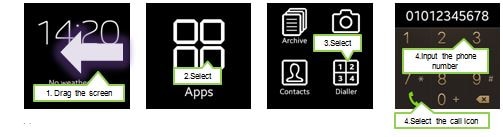
1) Drag the screen from right to left (or from left to right) until “Apps” is displayed
2) Run “Apps”
3) Select “Dialer”
4) Input Phone number and select the call icon
You may do the following also:
1) Touch and drag the screen from downside to upside in clock screen
2) Input Phone number and select the call icon

نشكركم على ابداء رأيكم و الملاحظات
يُرجى الإجابة عن كل الأسئلة.