How to connect the LED F5500 Series Smart TV to Wi-Fi?
تاريخ اخر تحديث : أبريل ١٨. ٢٠٢٢
Follow the steps to set up the WiFi connection.
1
Use the Remote control and press the Menu Button
2
Scroll down in the menu list displayed on the TV and select Network.
![How to connect the LED F5500 Series Smart TV to Wi-Fi?]()

3
Scroll down to, and press ENTER.
4
With Network type highlighted, press ENTER.
![How to connect the LED F5500 Series Smart TV to Wi-Fi?]()

Note: Change from wired to wireless
5
Select Wireless and Connect
6
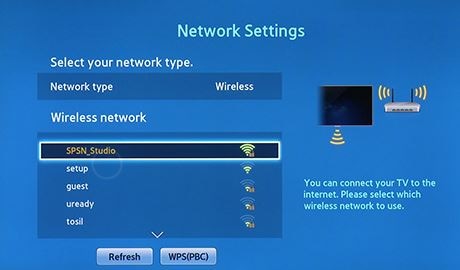
Scroll to and find your Access Point name. Then highlight it and press Enter.
![How to connect the LED F5500 Series Smart TV to Wi-Fi?]()
7
If it is a secure connection, enter the password. Click Done upon assuring the password is entered.
![How to connect the LED F5500 Series Smart TV to Wi-Fi?]()

8
Once a connection is established, the Network Settings Complete screen
will appear indicating you are ready to begin using your Smart TV's
Internet features.
![How to connect the LED F5500 Series Smart TV to Wi-Fi?]()

نشكركم على ابداء رأيكم و الملاحظات
يُرجى الإجابة عن كل الأسئلة.