Simplified app names in Galaxy One UI 6
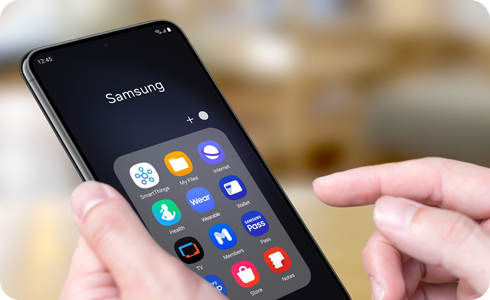
Why are Samsung app names shorter in Galaxy One UI 6?
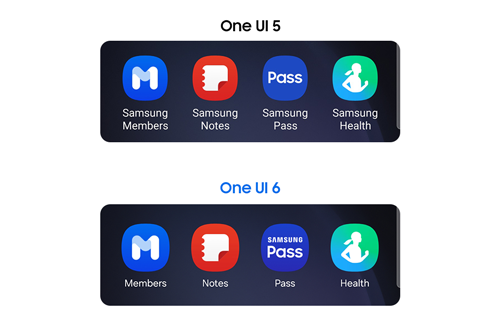
In Galaxy One UI 6 (powered by Android 14), Samsung has simplified app labels by removing "Samsung" and "Galaxy" prefixes from app names on home screens. This design change enhances visual clarity and helps users quickly identify apps without cluttering the interface.
1. What changed in Galaxy One UI 6 app labels?
With the release of Galaxy One UI 6, Samsung streamlined app labels to improve the user experience. Instead of displaying full names like "Samsung Music" or "Galaxy Store," apps now appear with shortened versions such as "Music" or "Store." This change ensures app names fit neatly within one line on home screens, creating a cleaner and more organized layout.
Important: While the visible labels are shorter, the actual app names remain unchanged. You can still search for apps using their full names in the App List or Settings menu.
2. Why did Samsung simplify app labels?
The simplification of app labels in Galaxy One UI 6 was designed to enhance usability and aesthetics. Here are the key reasons behind this change:
- Improved Visual Clarity: Shorter labels reduce clutter on home screens, making it easier to identify apps at a glance.
- Consistent Design: Simplified labels align with modern UI trends, offering a more cohesive look across Samsung devices.
- Enhanced Usability: Users can locate apps faster without being overwhelmed by lengthy names.
3. Which Samsung apps have updated labels in Galaxy One UI 6?
The following Samsung apps now display simplified labels in Galaxy One UI 6:
| App Name (Galaxy One UI 5) | App Name (Galaxy One UI 6) |
|---|---|
| Galaxy Store | Store |
| Samsung Members | Members |
| Samsung TV Plus | TV |
| Samsung Music | Music |
| Samsung Pay | Pay |
| Samsung Pass | Pass |
| Samsung Wallet | Wallet |
| Galaxy Wearable | Wearable |
| Samsung Notes | Notes |
| Samsung Kids | Kids |
| Samsung Flow | Flow |
| Samsung News | News |
| Samsung Global Goals | Global Goals |
| Samsung Cloud | Cloud |
| Samsung Health | Health |
Note: App availability may vary depending on your region or device model.
4. How can I search for apps with simplified labels?
Even though app labels are shorter, you can still search for apps using their full names. Follow these steps:
- Open the App List on your Galaxy device.
- Tap the search bar at the top of the screen.
- Enter the full app name (e.g., "Samsung Music") to locate the app.
You can also search for apps in Settings > Apps to find them quickly.
5. Supported Samsung Galaxy devices
The simplified app label feature is available on Galaxy devices running Galaxy One UI 6 (Android 14). This includes models such as the Galaxy S24, Galaxy S25, Galaxy S26, Galaxy Z Fold, Galaxy Z Flip, and Galaxy A series.
Related Samsung support topics
Galaxy One UI 5


Galaxy One UI 6


Thank you for your feedback!
Please answer all questions.