How to troubleshoot the Samsung TV that keeps turning off by itself
If your TV turns off by itself, there are several possible causes. Common reasons why a TV turns off by itself are related to your settings and the external devices connected to the TV.
Cold shutdown
Unplug the TV from the outlet for 30 seconds and when you plug it back in, plug it directly into a known working outlet. This is called a “cold shutdown” and should recalibrate the TV.
TVs and projectors that can connect to SmartThings can be turned on using compatible devices, sometimes automatically. However, if abnormal "power on" signals are sent through the wireless network, they will trigger this function and make the TV turn on.
If you do not want this function
Step 1. navigate to Settings
Step 2. Go to General and then Network
Step 3. Open Expert Settings
Step 4. Select Power On with Mobile and turn the setting off.
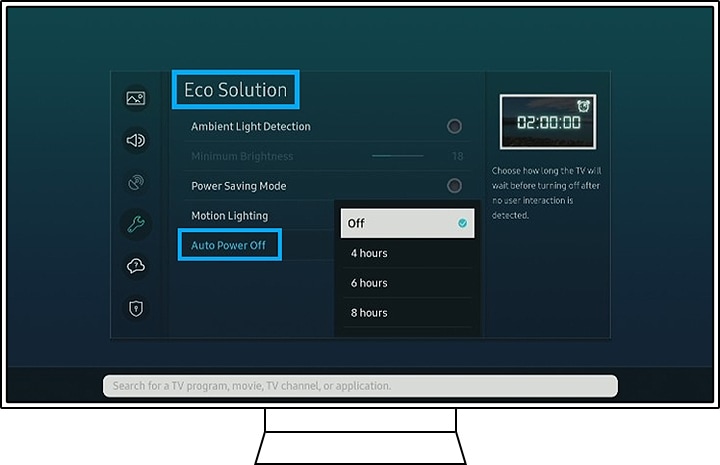
Eco Solution Configuration
The Eco Solution function turns off the TV to save energy when it detects no activity for a long time, follow the path below to check its settings:
Settings > General > Eco Solution > Auto power off > Turn off
Timer Settings
The Timer turns off the TV after a preset period of time, follow the path below to check its settings:
Settings > General > System Administrator > Time > Timer > Turn off

Software Updates
Keep your TV software updated, follow the path below to check its settings:
Settings > Support > Software update > Update now

- If a set-top box, game console, PC, or other external device was connected to your TV, disconnect the power cables from the external devices and reconnect them. The TV screen may display a black screen if the source your TV was connected to is turned off.
- When no external devices are connected to the TV, configure the Sources connected to the TV via the path: Settings > Source > TV
- Be sure to use a certified HDMI cable. If you use an HDMI cable that is not certified, the screen may appear black or a connection error may occur.
Find more related information here


Service Centers


Locate the nearest Samsung service center to have your product checked.
Thank you for your feedback!
Please answer all questions.
Contact Info
WhatsApp
![WhatsApp]()
![WhatsApp]()


Monday to Sunday
8:00 a.m. a 12:00 a.m.
LiveChat
![LiveChat]()
![LiveChat]()


Monday to Sunday
8:00 a.m. a 12:00 a.m.
Online
Call
Costa Rica: 00-800-1-726-7864
Ecuador: 1-800-72-6786
El Salvador: 800-0726-7864
Guatemala: 1-800-299-0033
Call
Honduras: 800-2791-9111
Jamaica: 1-800-726-7864
Nicaragua: 001-800-5077267
Panama: 800-0101
Call
Puerto Rico: 1-800-682-3180
Trinidad and Tobago: 1-800-726-7864
Venezuela: 0-800-100-5303
Dominican Republic: 1-800-751-2676