How to set available channels on your Samsung Smart TV
Last Update date : May 12. 2026
Notes:
- Do not use Auto Program if your Samsung TV is connected to a cable or satellite box.
- If the TV has saved channels, Auto Program will delete the existing list and save the newly scanned channels.
Scan for channels
The following instructions will help you scan for available TV channels using Auto Program.
1
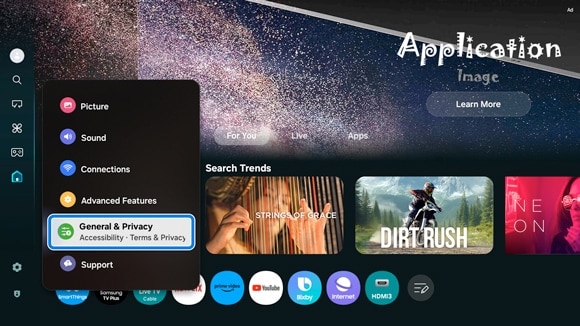
Navigate to and select Settings, then select All Settings, and then select General & Privacy.
![]()
2
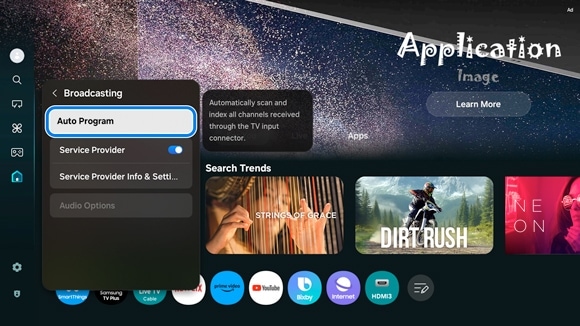
Select Broadcasting, and then select Auto Program.
![]()
3
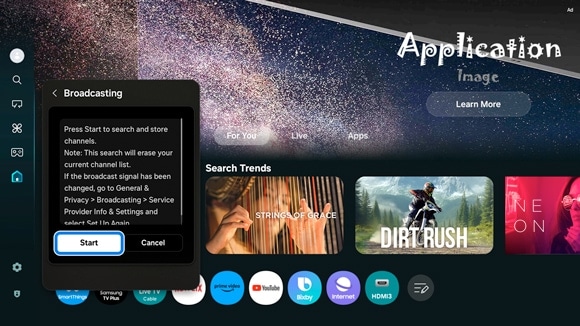
Select Start and follow the on-screen prompts to scan for channels.
![]()
Notes:
- The Broadcasting menu is only available when an antenna (coaxial) cable is connected to the TV and Connected Devices is set to TV.
- Depending on the region, this function may be labeled Auto Program or Auto Tuning.
- If the TV is not receiving all available channels, make sure the coaxial cable is securely connected to the TV.
Notes:
- If you are experiencing issues with your Samsung Smart TV, check for any available software updates, as they may resolve the problem.
- Screenshots and menu options may vary depending on the TV model and software version.


Service Centers


Locate the nearest Samsung service center to have your product checked.

Thank you for your feedback!
Please answer all questions.
Contact Info
LiveChat
![LiveChat]()
![LiveChat]()


Attention with our expert staff in Samsung products.
Monday to Sunday
8:00 a.m. a 12:00 a.m.
Monday to Sunday
8:00 a.m. a 12:00 a.m.
More communication Channels
There are a number of a different ways of contacting us via Live Chat, Email and more.
Face to face Support
Whether your product is in warranty or out of warranty, we're here to help.