What to do if your Samsung TV won't turn on
The red standby light is on
It is normal for the red standby light to be lit when the TV is turned off as long as it is plugged in and receiving power.
Step 1. Use the Remote Control:
- Point the remote at the TV and press the Power button.
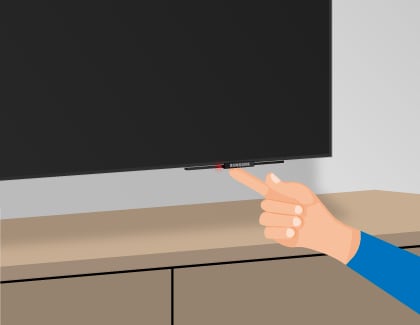
- If the TV does not turn on, try pressing the power button on the TV.
- The Power button’s location will vary depending on your TV’s model. See your user manual if you can´t locate the button.
Step 2. Pair remote to TV:
- Press and hold the Return and Play/Pause buttons simultaneously on the remote.
- Hold the buttons for at least 3 seconds.
- Release the buttons when you see a confirmation message or indicator on the TV screen.
- Test the remote by pressing a button (e.g., Power or Volume) to ensure it controls the TV.
- If pairing fails, refer to your user manual for specific instructions related to your TV model.

The red standby light is off
When the red standby light is off, the TV either doesn't have power, or it's turned on and the screen is just black. The red light turns off whenever the TV is powered on.
First, ensure that all the cabling is firmly inserted. Leave the TV unplugged for 30 seconds, and when plugging it back in, plug it directly into an outlet that you know works properly. If that didn't work, try another outlet

If the red standby light comes on, then your TV has power from the working outlet. This means there is an issue with the original outlet, or the surge protector if you were using one.
The red standby light is blinking or flashing

Here's a detailed troubleshooting guide for resolving power issues with your TV and One Connect Box:
Step 1. Unplug and Restart:
- Unplug both the TV and the One Connect Box from the power outlet.
- Wait for 30 seconds, then plug them back into a known working outlet.
- Avoid using a surge protector, as it may be worn out and not providing sufficient voltage. Replace it if necessary.
Step 2. Check the Red Standby Light:
- If the red standby light on the TV turns on, it indicates that the TV is receiving power from the outlet.
- If the red light does not turn on, the issue could be with the original outlet or the surge protector (if used).
Step 3. Troubleshoot Further:
- If the TV still won't turn on and the red standby light is blinking, this suggests an internal issue with the TV.
- Contact Samsung Support for further assistance in diagnosing and resolving the problem.


Service Centers


Locate the nearest Samsung service center to have your product checked.
Thank you for your feedback!
Please answer all questions.
Contact Info
LiveChat
![LiveChat]()
![LiveChat]()


Monday to Sunday
8:00 a.m. a 12:00 a.m.