How to clean the filters in a Samsung dishwasher

Last Update date : Sep 14. 2026

How do I clean the filters in my Samsung dishwasher?

Direct Answer: To clean the filters in your Samsung dishwasher, open the door, remove the lower rack, hold the propeller spray arm for safety, and turn the bottom filter assembly counterclockwise to lift it out. Separate the coarse and fine filters, rinse them under running water, gently brush off debris, and reinstall by turning clockwise until locked. Clean every 2–4 weeks to prevent bad odors and drainage clogs.
1. Why Is It Important to Clean Dishwasher Filters?

Regularly cleaning your dishwasher filters ensures optimal washing performance and prevents common operational issues, including:

  • Poor Drainage & Water Pooling: Clogged mesh prevents water from circulating and draining properly.
  • Unpleasant Odors: Trapped food waste decomposes inside the sump, leading to lingering smells.
  • Abnormal Noises: Blockages force the drain pump to work harder, generating unusual grinding or humming noises.
  • Reduced Cleaning Efficiency: Restrictive debris prevents dishes from getting fully clean during wash cycles.

2. How to Clean Dishwasher Filters

Follow these step-by-step instructions to safely remove and clean the filter assembly:

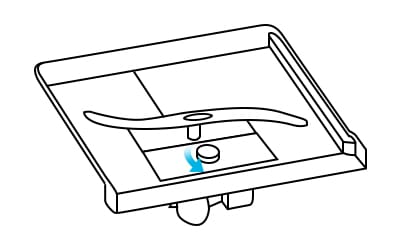
Turning the Samsung dishwasher filter assembly on the bottom counterclockwise
Turn the filter assembly counterclockwise to unlock and remove it from the bottom of the tub.
  1. Open the dishwasher door and pull out the lower rack to reveal the bottom filter area.
  2. Hold the lower spray arm (propeller) for safety, then turn the filter assembly at the bottom counterclockwise to unfasten it.
  3. Lift the entire filter assembly straight up out of the dishwasher tub.
  4. Detach the coarse filter and fine filter from the assembly for individual cleaning.
  5. Rinse both filters thoroughly under warm running water to flush out loose debris. Use a soft brush (like an old toothbrush) for stubborn particles.
  6. Inspect the sump base area inside the tub and clear away any foreign object or residue.
  7. Reassemble the coarse and fine filters back into the main filter frame.
  8. Insert the filter assembly back into the bottom of the dishwasher and turn it clockwise until it locks securely into place.

3. Additional Things to Check

  • Never run the dishwasher without filters: Operating without filters installed can allow debris to enter the drain pump and damage internal components.
  • Handle with care: Do not deform or press heavily on the fine mesh filter, as tears will reduce filtering effectiveness.
  • Safety precautions: Wear protective gloves when cleaning the sump area to avoid injuries from sharp objects like broken glass or bone fragments.
  • Preventive Maintenance: Periodically wipe down seals and clear spray nozzle holes for complete unit care.

4. Supported Samsung Dishwasher Models

These maintenance guidelines apply to most Samsung built-in and freestanding dishwasher models, including:

  • Samsung DW80K Series
  • Samsung DW50R Series
  • Samsung DW60B Series
  • Samsung DW60C Series

Note: Filter layouts and turning directions may vary slightly by specific model. Always check your model manual for exact variations.

Thank you for your feedback!