85" The Frame Pro LS03HW + 65" Mini LED M70H + TV Frame Bezel Bundle


Gallery popup


Scan this QR code with your phone and place the object in your space.
{{upgradeResult.displayModelName}}
{{upgradeResult.discountText1}}
{{upgradeResult.description1}}
{{upgradeResult.description2}}
{{offerFinance.title}}
{{offerFinance.learnMoreCta.text}}{{offerFinance.description}}
{{galaxyForeverResult.displayModelName}}
{{galaxyForeverResult.discountText1}}
{{galaxyForeverResult.description1}}
{{galaxyForeverResult.description2}}
Choose your color
Customizable bezels sold separately
Choose your skin color
Customizable skin sold separately
-
{{item.name}}
Out Of Stock
Mordern type
-
{{item.name}}
Out Of Stock
Beveled type
-
{{item.name}}
Out Of Stock
Skin color
-
{{item.name}}
Out Of Stock
Bezel type
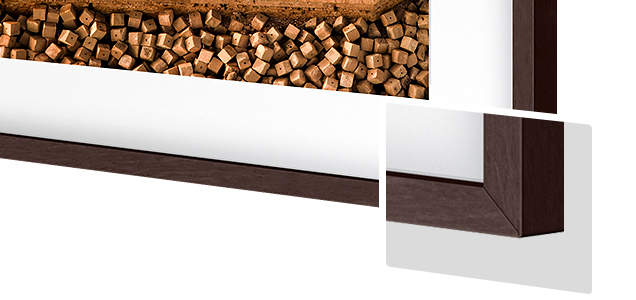
- Mordern type
The Frame's custom bezels magnetically click into place. Now, you can switch between styles in a snap.
Bezel type
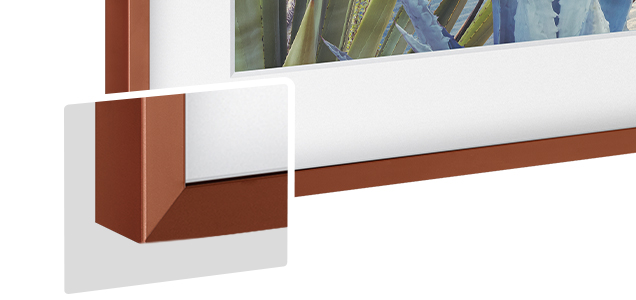
- Beveled type
The new Beveled type bezel design offers an elegant 45-degree angled inner edge bezel.
{{tradeIn.title}}
{{tradeIn.learnMoreCta.text}}{{tradeIn.description}}
Congratulations, your trade-in will be added to your order.
-
{{item.discountPriceTextTile}} {{item.discountPriceText}} {{item.discountText1}} {{item.abondementAmountText}} {{item.spotGuaranteeAmountText}} {{item.tradeinValueText}} {{item.exclusiveTradeinUnitOfferText}} {{item.extraTradeinOfferText}} {{item.exclusiveChannerTradeinOfferText}} {{item.extraTradeinVoucherText}} {{item.specialDiscountText}}
{{item.displayModelName}}
Values will vary based on model and condition of your old device. T&Cs apply.
Dealer stock quantity
You can check the stock quantity for each region
Please select city
{{assuredBuyBack.title}}
{{newAssuredBuyBack.title}}
{{newAssuredBuyBack.learnMoreCta.text}}{{newAssuredBuyBack.description}}
Please select Samsung Assured Buyback or no coverage
{{care.title}}
{{care.learnMoreCta.text}}{{care.description}}
Please select Samsung Care+ or No to continue
-
{{item.specialText}}
-
{{warranty.title}}
{{warranty.description}}
{{warrantyResult.displayModelName}}
{{warrantyResult.discountText1}}
{{warrantyResult.description1}}
{{warrantyVd.title}}
{{warrantyVd.description}}
{{warrantyVdResult.title}}
{{warrantyVdResult.priceDisplay}}
{{delivery.headline}}
{{delivery.errorMessage}}
{{deliveryResult.priorityText}}
{{deliveryResult.mainText}}
{{deliveryResult.subText}}
Standard installation charges may apply.Click here for more details.
{{deliveryResult.decText}}
{{item.disclaimer}}
{{tariffOptionResult.displayModelName}}
{{tariffOptionResult.discountText1}}
{{tariffOptionResult.description1}}
{{tariffOptionResult.description2}}
{{tariffOptionResult.description}}
{{tariffOptionResult.price}}
{{tariffOptionResult.disclaimer}}
{{embedAddon.title}}
{{embedAddon.description}}
-
{{item.name}}
{{item.modelCode}}
{{item.description}}
{{item.finalPrice}}
{{item.originalPrice}}{{item.savePrice}} Out Of Stock
-
{{item.name}}
{{item.modelCode}}
{{item.description}}
- {{item.dotList1}}
- {{item.dotList2}}
- {{item.dotList3}}
{{item.finalPrice}}
{{item.originalPrice}}{{item.savePrice}} Out Of Stock
{{message.item.tcCTAText}}
{{message.item.periodText}}
85" The Frame Pro LS03HW + 65" Mini LED M70H + TV Frame Bezel Bundle
{{arrchild.displayName}}
Features
Style The Frame for any room and any space
Switch up the color and style of the Frame with Customizable Frame


Customizable Frame


More colors, more styles, more you
Designed to look just like the edges of a picture frame, these customizable bezels make it easy to match The Frame to your taste, space or simply the artwork on display.
* Availability of bezel styles and colors may vary by TV size and region.

Choose your own color and design
Customize the bezel to your needs with various styling options. Select your preferred color among White, Teak, Brown and Sand Gold. Then pick the design of your choice, Modern or Beveled.
* Availability of bezel styles and colors may vary by TV size and region.

An effortless way to get a brand new look
Easily swap the bezel whenever you want a change — all it takes is a snap to switch things up. They attach to The Frame magnetically, so you can simply line them up and snap them on.


key features
-
Modern Frame Design with Wireless One Connect
-
Glare Free with Neo QLED
-
Bixby


The answer to your artistic style


Key features at a glance


Design
What makes art on The Frame look like real art?

Designed to blend in seamlessly like a real picture frame
Modern Frame Design with Wireless One Connect
With its sleek Modern Frame Design and the Wireless One Connect, The Frame Pro becomes the true centerpiece of your space. The wireless solution seamlessly transmits signals from your connected devices, so you get the ultimate, gallery look for your space without compromising performance.


Cable-free, compact, clean
Wireless One Connect
The Wireless One Connect Box acts as a hub for your connected devices while wirelessly transmitting signals to The Frame Pro. The connection remains strong regardless of direction — even when placed up to 10 meters from the TV — giving you the flexibility for a more personalized setup.
4K 144Hz uninterrupted wireless transmission is possible when the TV and Wireless One Connect are placed within a distance of 10 meters (or 33 feet) in the same space. Wireless performance may vary depending on the environment (including type of walls and furniture). Operating distance can vary depending on the usage environment. Wireless One Connect may not work well if there is an obstruction, such as a wall, hindering its connection to the TV within your home. Wireless One Connect may not work properly if placed inside a closed metal cabinet. TV and Wireless One Connect require a separate power connection.

A flush fit to the wall
Slim Fit Wall Mount
The Slim Fit Wall Mount brings The Frame near flush to the wall. Combined with the sleek profile of the TV, it helps create a refined gallery look in your home.


The distance between the wall and TV may vary depending on the wall type and installation method.
Match your space with customizable bezels
Customizable Frame
The Frame’s customizable bezels are designed to give your TV the look of a true picture frame. Being magnetic, they can be snapped on in seconds and help you easily personalize your TV. Choose from a selection for the set that matches your interior.
Customizable Frame sold separately. Supported Customizable Frame lineup may vary by country.


Customizable Frame sold separately. Supported Customizable Frame lineup may vary by country.
Height that fits your space
Height-adjustable Stand
With the Height Adjustable Stand, you can raise or lower The Frame to better align the screen with your eye level or create space for devices like a soundbar, giving you greater flexibility in how you set up your space.
Supports The Frame 43-85" models. Height Adjustable Stand is not supported on The Frame 32" model. The height adjustment range is 25 mm. Installation layout may vary depending on TV size and soundbar type. The image depicts The Frame 85" model.


Supports The Frame 43-85" models. Height Adjustable Stand is not supported on The Frame 32" model. The height adjustment range is 25 mm. Installation layout may vary depending on TV size and soundbar type. The image depicts The Frame 85" model.
Art
How does The Frame create a personalized art gallery at home?

Explore curated streaming art for free
Art Store Streams
Discover a world-class collection of streaming art from Samsung, available for free. Enjoy 30 handpicked artworks curated by professionals and thoughtfully themed to bring new inspiration to your screen each month.


Availability may vary by country. The time at which the 30 artwork are delivered each month may vary by region. The timing and frequency at which the artwork are delivered may vary by region. The number of free artwork delivered is subject to change without notice.
A global art gallery at home
Samsung Art Store
The Samsung Art Store offers over 5,000 high-quality masterpieces from renowned artists and institutions. Discover pieces that match your home settings and the mood you're in from ever-changing collections curated by Samsung’s art experts.


Where your artistic journey begins
Art Home
Art Home helps you organize, browse and manage your favorite pieces on The Frame. You can create playlists, group artworks by theme and adjust how they appear, allowing you to create a truly personalized art experience.
Art Home UI may vary by region and is subject to change without notice. Though the curations are updated regularly, the updates for the selection of available artwork may vary.


Art Home UI may vary by region and is subject to change without notice. Though the curations are updated regularly, the updates for the selection of available artwork may vary.
Brightness Sensor
The Frame’s brightness sensor adjusts screen brightness and color tone based on ambient light. As lighting in your room changes, the display adapts to keep your artworks' refined, polished look.
Brightness sensor performance may vary depending on the ambient brightness level.The sensor does not operate in an environment over 1000 lux.
Motion Sensor
The Frame automatically turns on to display your artwork when it detects movement — and powers off when you leave the room, conserving energy effortlessly.
Motion sensor gets activated after turning it on the setting and only operates in Art Mode. Motion sensor performance may vary depending on the light condition. Motion sensor not available in certain countries. (China, Thailand, Nepal, Ukraine)
Mat Canvas & My Photo
Exhibit your personal photos like art on The Frame's Matte Canvas. Transfer pictures from your smartphone or USB to your TV and shuffle between 5 different layouts and 16 color options in Art Mode. It's the perfect way to display all your best memories.
Wi-Fi, Bluetooth or other Internet connection, compatible Android or iOS device and SmartThings app required.
Picture Quality
How does The Frame's picture quality elevate the art it displays?

Elevate your TV viewing with brilliant visuals
Glare Free with Neo QLED
Experience deep contrast and breathtaking precision. The Frame’s Glare Free Neo QLED screen eliminates distractions while enhancing depth through ultra-fine light control. This advanced display ensures vivid colors and sharp textures are perfectly preserved for a truly immersive gallery feel.


Less reflection, more definition
Anti-Glare Technology
Don't let sunlight or reflections from nearby lamps interfere with your viewing experience. With Anti-Glare Technology, you can clearly see what's on screen, and appreciate the textured details of the art as they were meant to be. Enjoy the art as the art, the TV as the TV.


Based on testing standards set by UL, i.e., UGR<10 for reflection glare, UGR<22 for discomfort glare, UGR<34 for disability glare.


Enjoy ArtfulColor validated by PANTONE
Pantone Validated - ArtfulColor
Meet fully authentic color representation, validated by PANTONE. The Frame reproduces the rich and diverse colors you would see in gallery lighting, made to look realistic with the matte texture of the canvas.
Validation for TV color accuracy that expresses the same color under standard light source (D65 based) with paper texture.(Error within ΔE ≤ 3.0 level that a person cannot feel color difference)

Charge it with light
SolarCell Remote
With a solar panel on its back, our SolarCell Remote is charged by light — no need for disposable batteries. And with smart features like a built-in microphone and voice assistant, this remote is innovative in more ways than one.
The design and button layout of the SolarCell Remote may vary depending on the region and model. Support for button functionality may be discontinued at any time without notice. To charge the remote with solar energy, set the TV remote down with the solar panel facing up. Place it in your living room while your lights are turned on, or you can place it near a window where it will soak in natural sunlight. In case the remote's battery is depleted, you can charge it using a USB-C cable. To check the remaining battery level of the remote control, refer to the TV Menu (Settings > General & Privacy > Power & Energy Saving > Available Remote Battery).How does Samsung Vision AI elevate your experience with The Frame?


Discover the art you love, just by asking
Samsung Vision AI Companion
Find the artwork you want on The Frame with simple voice commands. Simply say the artist or style, and Samsung Vision AI Companion brings up matching pieces instantly. No typing or menus — just clear, precise voice search that helps you discover the right art, faster.


Feature available in certain regions and models.Availability, supported features, and user interface may vary by country, region, model and viewing conditions.Voice commands recognize English, French, Spanish, Portuguese, German, Italian, and Korean, but not all accents, dialects, and expressions are recognized.This feature provides AI-created content, with accuracy not guaranteed — please check results.Requires certain Bluetooth remote (sold separately on some models).In-box remote for some models does not support voice recognition. Requires either a Mobile Quick Remote or separately purchased Bluetooth remote.Feature accessible via the AI button, or the Home button (long press) on remote control without an AI button.
Enjoy 7 years of new TV experiences
Tizen OS upgrades will be supported for up to 7 years starting from 2026, for products released in the year 2026. Please note that the upgrade does not cover hardware-related performance, features or durability.

key features
-
Samsung Vision AI Companion
-
Mini LED
-
Pure Spectrum Color
-
Dynamic Sound Pack


The answer to your thrilling moments


Key features at a glance


Ask your companion anything. Samsung Vision AI is here.
Samsung Vision AI Companion
Getting assistance from AI is now more engaging with Vision AI Companion on your TV. Whether you ask about your content or everyday topics, it instantly delivers video and image responses through multiple AI agents — offering a rich, personalized experience on the big screen.


Feature available in certain regions and models. Availability, supported features, and user interface may vary by country, region, model and viewing conditions. Voice commands recognize English, French, Spanish, Portuguese, German, Italian, and Korean, but not all accents, dialects, and expressions are recognized. This feature provides AI-created content, with accuracy not guaranteed — please check results. In-box remote for this model does not support voice recognition. Requires either a Mobile Quick Remote or separately purchased Bluetooth remote. Feature accessible via the AI button, or the Home button (long press) on remote control without an AI button.
Picture Quality


Our advanced Mini LED Technology
Mini LED
Experience deeper contrast that brings scenes to life. Mini LED technology uses smaller backlights than regular LEDs to control light with greater accuracy, revealing finer details and realistic depth for a clear, immersive picture.


True-to-life, ultra-wide color delivered with Mini LED precision
Pure Spectrum Color
Enjoy clearer, more natural colors on Samsung Mini LED TVs. Pure Spectrum Color delivers pixel-level color accuracy with an expanded color gamut. Each hue appears rich and precise across the screen, maintaining depth and balance without oversaturation.


More about
Picture Quality


Striking contrast brought to life in powerful 4K
Mini LED Processor 4K
The Mini LED Processor 4K applies Samsung’s proprietary processing to deliver more finely detailed expression. It also upscales content with precision for immersive 4K clarity and optimizes sound to suit your viewing environment.
Viewing experience may vary according to types of content and format. Upscaling may not apply to PC connection and Game Mode.

Sharper highlights and deeper blacks in cinematic scale
Mini LED HDR
Enjoy richer depth and clearer detail across each scene. With Mini LED HDR, contrast is enhanced to bring out deeper shadows, brighter highlights and refined detail.
The range of Mini LED HDR luminance is based on internal testing standards and subject to change according to viewing conditions or specifications.

Watch your favorite content in 4K
4K Upscaling
Samsung's powerful 4K upscaling technology ensures you get up to 4K resolution for the content you love.
Viewing experience may vary according to types of content and format. Upscaling may not apply to PC connection and Game Mode.

Intelligently enhances color expression
Color Booster
Color Booster transforms the way you experience TV by intelligently enhancing color expression, making each scene more vivid and dynamic.
Image quality may vary depending on the quality of the original content.Gaming Experience


Improved picture clarity with smooth motion
Motion Xcelerator
Experience a clear picture with Motion Xcelerator as your TV estimates the movement between frames, then uses that information to improve motion smoothness for subsequent frames.


Sound


One immersive sound experience
Dynamic Sound Pack


Object Tracking Sound Lite
3D surround sound with our virtual top channel audio allows you to be immersed in the audio experience.

Adaptive Sound
Adaptive Sound has audio scenic intelligence that optimizes sound based on real-time scene analysis by content type.
Experience may vary depending on the content.

Q-Symphony
Q-Symphony unites your TV and soundbar to play sound simultaneously in perfect harmony. With AI trained on thousands of audio sources, it creates immersive surround sound that heightens your viewing experience.
Check for Q-Symphony compatibility on soundbar product specifications. Soundbar sold separately. The location and number of speakers may vary depending on the model.
One UI Tizen


Personalize your screen experience
One UI Tizen
One UI Tizen delivers a seamless and consistent Samsung device experience. Samsung Tizen OS lets you take advantage of the latest innovative Samsung features — including quick access to the content you love, convenient AI management and powerful protection with Samsung Knox Security. Plus, One UI Tizen will support Tizen OS upgrades for next seven years, bringing you the latest apps & services.


Content and services may vary by region and are subject to change without notice. Agreement to Smart Hub Terms and Conditions and Privacy Policy is required before use. Some content and services require registration and subscription. Requires Samsung account. Tizen OS upgrades will be supported for up to 7 years starting from 2026, for products released in the year 2026. Please note that the upgrade does not cover hardware-related performance, features or durability.
Enjoy 7 years of new TV experiences
Content and services may vary by region and are subject to change without notice. Agreement to Smart Hub Terms and Conditions and Privacy Policy is required before use. Some content and services require registration and subscription. Requires Samsung account. Tizen OS upgrades will be supported for up to 7 years starting from 2026, for products released in the year 2026. Please note that the upgrade does not cover hardware-related performance, features or durability.

The best of TV. All for free.
Samsung TV Plus
Dive into a vast collection of movies, hit shows and live news. Samsung TV Plus brings you livestream events, top-tier Creator Channels, and is a premier destination for K-content. It comes installed for free on your TV — no payment, subscription or setup required.
Channels may vary by country and are subject to change without notice. Supported Samsung devices may vary by country. Requires Samsung account. UI is subject to change without prior notice. Ads may appear on Samsung TV Plus. Available for free on Samsung Smart TVs released since 2016.


Channels may vary by country and are subject to change without notice. Supported Samsung devices may vary by country. Requires Samsung account. UI is subject to change without prior notice. Ads may appear on Samsung TV Plus. Available for free on Samsung Smart TVs released since 2016.
Your privacy. Secured.
Samsung Knox Security
Samsung Knox Security helps keep your TV protected at all times. Sensitive data such as passwords stays safeguarded, connected IoT devices are actively monitored and harmful apps or sites are blocked automatically. With ongoing security updates, your TV stays secure and ready for safe viewing.


Samsung Knox Security applies to Samsung TVs powered by Tizen®, launched since 2015.Latest software update is required.
SmartThings


Do the SmartThings!
SmartThings
Optimize your home devices for a smarter lifestyle. Enjoy a customized smart home experience with thousands of SmartThings-compatible devices that simplify your day-to-day life.


Images simulated for illustration purposes. Available technology, functions and features may vary by country, service provider, network environment or product, and are subject to change without notice. Requires a Wi-Fi, Bluetooth or other wireless network connection and login to Samsung account. Connected devices are sold separately. UI is subject to change without prior notice.
More about
SmartThings


Control your TV straight from your phone
Quick Remote
With Quick Remote in the SmartThings app, your phone works as a remote, letting you change channels, manage volume and more — straight from your mobile device. You can also access key Samsung Tizen TV features, explore media and adjust settings with ease.
Push notifications for mobile remotes for TVs are available on (Mobile) Android OS 10.0 and higher versions with (TV) 2020 Samsung TVs and later models, and operate when the mobile device is near the TV. Samsung Smart TV feature access is available on (TV) 2024 Samsung TVs and later models with (Mobile) Android OS 10.0 and higher versions or iOS 15.0 and higher versions.

Manage energy with intelligent analysis
AI Energy Mode
Make energy management easy with SmartThings. By turning on AI Energy Mode, it auto-detects surrounding light levels and analyzes usage behaviors to adjust the brightness. It also analyzes the content scene-by-scene to subtly adjust brightness and help manage energy consumption where possible.
Products shipped in Eco Mode have some AI Energy Mode functions enabled by default, so energy consumption levels when AI Energy Mode is turned on may appear lower compared to Standard Mode. AI Energy Mode does not work with Game Mode. Energy consumption may vary depending on content being displayed and surrounding brightness levels.

Transform your TV into a karaoke stage
Karaoke
Transform your TV into a karaoke stage, with your phone as the mic or wireless microphones. Start singing with friends and family, filling your living room with fun, energy and lively entertainment.
Designated microphone models provided by Samsung’s authorized partner are supported only and sold separately. With a single USB port on the TV, a maximum of 2 microphones are supported, and this functionality is limited to 2 USB ports in total. Requires SmartThings app to be installed on mobile, connected via the same Wi-Fi network as the TV set. Mobile mic is optimized only for Galaxy A with Android OS 16 or above and S series, foldable launched from 2023 and later models and iPhone 13 & above.Design


Elegant metal stream design to upgrade your space
MetalStream Design
Inspired by aircraft design, the MetalStream Design features a luxurious metal body. With no additional bezel required, a single sheet of metal is used to create a slim bezel, enabling a truly immersive experience.


Feature does not apply to certain models in Brazil and India. To determine whether the feature is applied, check for the rear design pattern on the product.