
85" Mini LED M80H 4K Samsung Vision AI Smart TV (2026)


Gallery popup


Scan this QR code with your phone and place the object in your space.
{{upgradeResult.displayModelName}}
{{upgradeResult.discountText1}}
{{upgradeResult.description1}}
{{upgradeResult.description2}}
{{offerFinance.title}}
{{offerFinance.learnMoreCta.text}}{{offerFinance.description}}
{{galaxyForeverResult.displayModelName}}
{{galaxyForeverResult.discountText1}}
{{galaxyForeverResult.description1}}
{{galaxyForeverResult.description2}}
Choose your color
Customizable bezels sold separately
Choose your skin color
Customizable skin sold separately
-
{{item.name}}
Out Of Stock
Mordern type
-
{{item.name}}
Out Of Stock
Beveled type
-
{{item.name}}
Out Of Stock
Skin color
-
{{item.name}}
Out Of Stock
Bezel type

- Mordern type
The Frame's custom bezels magnetically click into place. Now, you can switch between styles in a snap.
Bezel type

- Beveled type
The new Beveled type bezel design offers an elegant 45-degree angled inner edge bezel.
{{tradeIn.title}}
{{tradeIn.learnMoreCta.text}}{{tradeIn.description}}
{{tradeInResult.displayModelName}}
{{tradeInResult.discountText1}}
{{tradeInResult.discountText2}}
{{tradeInResult.discountText3}}
{{tradeInResult.discountText4}}
{{tradeInResult.discountText5}}
{{tradeInResult.discountText6}}
{{tradeInResult.specialDiscountText}}
{{tradeInResult.description}}
{{tradeInResult.contentText}}
DeleteDealer stock quantity
You can check the stock quantity for each region
Please select city
{{assuredBuyBack.title}}
{{newAssuredBuyBack.title}}
{{newAssuredBuyBack.learnMoreCta.text}}{{newAssuredBuyBack.description}}
Please select Samsung Assured Buyback or no coverage
{{care.title}}
{{care.learnMoreCta.text}}{{care.description}}
Please select Samsung Care+ or No to continue
-
{{item.specialText}}
-
{{warranty.title}}
{{warranty.description}}
{{warrantyResult.displayModelName}}
{{warrantyResult.discountText1}}
{{warrantyResult.description1}}
{{warrantyVd.title}}
{{warrantyVd.description}}
{{warrantyVdResult.title}}
{{warrantyVdResult.priceDisplay}}
{{delivery.headline}}
{{delivery.errorMessage}}
{{deliveryResult.priorityText}}
{{deliveryResult.mainText}}
{{deliveryResult.subText}}
Standard installation charges may apply.Click here for more details.
{{deliveryResult.decText}}
{{item.disclaimer}}
{{tariffOptionResult.displayModelName}}
{{tariffOptionResult.discountText1}}
{{tariffOptionResult.description1}}
{{tariffOptionResult.description2}}
{{tariffOptionResult.description}}
{{tariffOptionResult.price}}
{{tariffOptionResult.disclaimer}}
{{embedAddon.title}}
{{embedAddon.description}}
-
{{item.name}}
{{item.modelCode}}
{{item.description}}
{{item.finalPrice}}
{{item.originalPrice}}{{item.savePrice}} Out Of Stock
-
{{item.name}}
{{item.modelCode}}
{{item.description}}
- {{item.dotList1}}
- {{item.dotList2}}
- {{item.dotList3}}
{{item.finalPrice}}
{{item.originalPrice}}{{item.savePrice}} Out Of Stock
{{message.item.tcCTAText}}
{{message.item.periodText}}
Highlights

Samsung Vision AI Companion
Ask your companion anything. Samsung Vision AI is here.

AI Football Mode
Your command, your match — AI-enhanced football viewing

Mini LED
Our advanced Mini LED Technology

Motion Xcelerator 144Hz
Get smooth motion for games up to 4K 144Hz, 2K 240Hz with VRR
Features
The answer to your thrilling moments


Key features at a glance


Ask your companion anything. Samsung Vision AI is here.
Samsung Vision AI Companion
TV becomes an intelligent companion, with Vision AI Companion redefining screen interaction. Backed by 20+ years of TV insight, Vision AI Companion delivers context-aware, rich and dynamic answers — enhanced by leading AI agents like Gemini and Perplexity — all without interrupting what's on screen. It seamlessly adapts to daily routines, whether it's catching up on morning updates, tracking live sports moments, finding great nearby spots or discovering more about on-screen content. With AI, picture, sound and generative features are seamlessly connected and continuously evolving.


For illustrative purposes only. Feature available in certain regions and models. Availability, supported features and user interface may vary by country, region, model and viewing conditions. Voice commands recognize English, French, Spanish, Portuguese, German, Italian and Korean, but not all accents, dialects and expressions are recognized. This feature provides AI-created content, with accuracy not guaranteed — please check results. Requires certain Bluetooth remote (sold separately on some models). In-box remote for some models does not support voice recognition. Requires either a Mobile Quick Remote or separately purchased Bluetooth remote. Feature accessible via the AI button, or the Home button (long press) on remote control without an AI button.
Your command, your match — AI-enhanced football viewing
AI Football Mode
With AI Football Mode, you can watch football with picture and sound settings designed specifically for the sport. AI-driven optimization delivers richer colors, dynamic contrast and crystal-clear commentary — so you can follow the game's passes and cheers with professional-level clarity.


Feature availability and performance may vary depending on the content viewed and the apps used.
More about
Samsung Vision AI


Separate and control audio layers — voice and sound effects — with a single command
AI Sound Controller
AI Sound Controller uses AI to analyze real-time audio and separate it into two tracks — voice and sound effects. Using the on-screen menu or voice commands, you can then adjust the volume of each track to create a personalized listening experience for TV shows, movies and games.
Feature availability and performance may vary depending on the content viewed and the apps used.

Make your own mood-matching wallpapers with AI
Generative Wallpaper
With Generative Wallpaper, your TV can create stunning, one-of-a-kind images that reflect the moment and transform the ambiance of your home. Simply choose keywords for the atmosphere you want — whether you are hosting a party, enjoying time with family or relaxing — and let AI work its magic.
The number of generation attempts allowed per day may be limited.Feel the full power of AI in 4K
NQ4 AI Gen2 Processor
The NQ4 AI Gen2 Processor uses the power of 20 AI neural networks to optimize picture and sound quality. The result is impressive performance, whether you're streaming shows, playing video games or watching live sports.


Viewing experience may vary according to types of content and format. Upscaling may not apply to PC connection and Game Mode.


Picture Quality


Our advanced Mini LED Technology
Mini LED
Experience deeper contrast that brings scenes to life. Mini LED technology uses smaller backlights than regular LEDs to control light with greater accuracy, revealing finer details and realistic depth for a clear, immersive picture.


True-to-life, ultra-wide color delivered with Mini LED precision
Pure Spectrum Color
Enjoy clearer, more natural colors on Samsung Mini LED TVs. Pure Spectrum Color delivers pixel-level color accuracy with an expanded color gamut. Each hue appears rich and precise across the screen, maintaining depth and balance without oversaturation.


Sharper highlights and deeper blacks in cinematic scale
Mini LED HDR
Enjoy richer depth and clearer detail across each scene. With Mini LED HDR, contrast is enhanced to bring out deeper shadows, brighter highlights and refined detail.
More about
Picture Quality


Intelligently enhanced color expression with AI
Color Booster Pro
Color Booster Pro uses AI to recognize each scene and enhance color expression accordingly. The result is imagery that appears more vivid and dynamic, creating a viewing experience that feels remarkably realistic.


Enjoy HDR-like quality even with SDR content
Auto HDR Remastering
Using deep learning algorithms, Auto HDR Remastering learns to identify SDR and HDR content, and then converts SDR content into brilliant HDR-like quality. Now you can enjoy brighter highlights, clearer details and more vibrant colors throughout your viewing experience.


Upscale content into a 4K experience
4K AI Upscaling
Watch your favorite content in more brilliant detail with 4K AI Upscaling. The NQ4 AI Gen2 Processor can take content and enhance it up to 4K resolution with 20 AI neural networks — all while maintaining sharp and smooth picture quality.
Viewing experience may vary according to types of content and format. 4K AI Upscaling may not apply to PC connection and Game Mode.

Depth perceived just as a person’s eyes would
Real Depth Enhancer
Watch the figures on screen stand out with more realism. Real Depth Enhancer increases the contrast between the objects in the foreground from the background — mirroring how a human eye processes depth. So when you're watching a nature documentary, it really looks like the rhinos are marching toward you.
Gaming Experience


Get smooth motion for games up to 4K 144Hz, 2K 240Hz with VRR
Motion Xcelerator 144Hz
Enjoy seamless visuals at incredibly fast speeds with Motion Xcelerator 144Hz. Samsung’s unique dynamic refresh technology provides smooth motion performance for VRR games up to 4K 144 Hz or 2K 240Hz.


4K 144Hz, 2K 240Hz only available with PC-connected games that support such specifications. (PC graphic card required). Performance may vary. For 2K 240Hz, Game Mode must be enabled.
More about
Gaming Experience


Play smarter — perfect settings, every match
AI Gaming Optimizer
Dive straight into the action with AI Gaming Optimizer. Using real‑time screen analysis, it instantly recognizes your game’s genre and applies the optimal settings automatically — no menus, no hassle, just seamless, genre‑optimized performance.
The videos were generated with the assistance of AI tools.

Fine-tune your game settings as you play
Game Bar
Optimize your gameplay even more with Game Bar. Samsung TVs give you a handy in-game menu for settings like FPS, input lag, minimap zoom and more. It also lets you apply ultra-wide aspect ratios of 21:9 and 32:9 to expand your view on bigger screens.
Super Ultrawide GameView (21:9, 32:9) is available for certain PC and console games supporting ultrawide screens. Some game titles may not support this feature. Game Bar's Zoom-in mode is not supported for certain refresh rates. Game Bar UI is subject to change without prior notice.

Tear-free, stutter-free, low latency HDR gaming
FreeSync Premium
Built on AMD FreeSync™ core technology to reduce stutter and screen tearing, AMD FreeSync™ Premium provides a true HDR gaming experience. It produces exceptional high dynamic range visuals while maintaining low latency for effortlessly smooth gameplay.
Viewing experience may vary according to types of content and graphics processing unit, as well as network connection speeds and ping levels when gaming on the cloud.Sound


Enjoy sound intelligently optimized to your content and space
Adaptive Sound+
Adaptive Sound+ uses scene analysis to optimize audio in real time. It also recognizes your room and setup and fine-tunes sound to suit the space, giving you clearer voices, balanced tones and a more tailored listening experience.
Experience may vary depending on the content and environment.

Catch every word without distractions
Active Voice Amplifier
Enjoy clear dialogue, no matter what's going on around you. Our AI technology enhances voice clarity in response to ambient noise from your surroundings.


Immersive virtual sound that tracks the action
Object Tracking Sound Lite
3D surround sound with our virtual top channel audio allows you to be immersed in the audio experience.


TV and soundbar orchestrated in perfect harmony
Q-Symphony
Q-Symphony unites your TV and soundbar to play sound simultaneously in perfect harmony. With AI trained on thousands of audio sources, it creates immersive surround sound that heightens your viewing experience.
Check for Q-Symphony compatibility on soundbar product specifications.Soundbar sold separately. The location and number of speakers may vary depending on the model.One UI Tizen


Personalize your screen experience
One UI Tizen
One UI Tizen delivers a seamless and consistent Samsung device experience. Samsung Tizen OS lets you take advantage of the latest innovative Samsung features — including quick access to the content you love, convenient AI management and powerful protection with Samsung Knox Security. Plus, One UI Tizen will support Tizen OS upgrades for next seven years, bringing you the latest apps & services.


Content and services may vary by region and are subject to change without notice. Agreement to Smart Hub Terms and Conditions and Privacy Policy is required before use. Some content and services require registration and subscription. Requires Samsung account. Tizen OS upgrades will be supported for up to 7 years starting from 2026, for products released in the year 2026. Please note that the upgrade does not cover hardware-related performance, features or durability.
Enjoy 7 years of new TV experiences


Relive your favorite memories with Google Photos for Samsung TV
Google Photos for Samsung TV
Google Photos is the home for all your life’s memories. Rediscover your favorite photos, both new and old, with daily curated memories from Google Photos and enjoy seeing the people, trips and activities that matter most on your Samsung TV.


Requires user login to Google Photos on the device. Options to hide memories and enhance content filtering are provided. Feature availability may vary by region and model.
More about
One UI Tizen


Find world-famous galleries in your TV
Art Store
Art Store gives you access to over 5,000 works from the world's leading museums and artists. Samsung’s art experts curate selections throughout the year, helping you discover pieces that suit each season or moment.
Network connection and Samsung account login are required. Art Store is a paid subscription service, and the service may be limited or unavailable in certain countries/regions or for specific models. However, a limited number of free content may be provided depending on the country/region and product model. Content and detailed features may vary by country/region and product model and may be discontinued or changed without prior notice due to circumstances of partners or the company. The update cycle for paid and free content may vary by region.

Access useful info throughout the day even when your TV is off
Now Brief
Stay informed even when the TV is off. Your daily info screen uses widgets to show what matters at a glance — including the weather, daily agenda, reminders and smart-home updates. Activated by voice or when you approach your TV, it delivers information right when you need it.
Supported widgets vary by region and are subject to change without notice. Detection occurs when an adult-sized object moves approximately 30 cm or more within about 2 meters of the TV. Detection performance may vary depending on the surrounding environment.

Your privacy. Secured.
Samsung Knox Security
Samsung Knox Security helps keep your TV protected at all times. Sensitive data such as passwords stays safeguarded, connected IoT devices are actively monitored and harmful apps or sites are blocked automatically. With ongoing security updates, your TV stays secure and ready for safe viewing.
Samsung Knox Security applies to Samsung TVs powered by Tizen®, launched since 2015. Latest software update is required.SmartThings


Do the SmartThings!
SmartThings
Optimize your home devices for a smarter lifestyle. Enjoy a customized smart home experience with thousands of SmartThings-compatible devices that simplify your day-to-day life.


Images simulated for illustration purposes. Available technology, functions and features may vary by country, service provider, network environment or product, and are subject to change without notice. Requires a Wi-Fi, Bluetooth or other wireless network connection and login to Samsung account. Connected devices are sold separately. UI is subject to change without prior notice.
More about
SmartThings


Control your TV straight from your phone
Quick Remote
With Quick Remote in the SmartThings app, your phone works as a remote, letting you change channels, manage volume and more — straight from your mobile device. You can also access key Samsung Tizen TV features, explore media and adjust settings with ease.
Push notifications for mobile remotes for TVs are available on (Mobile) Android OS 10.0 and higher versions with (TV) 2020 Samsung TVs and later models, and operate when the mobile device is near the TV. Samsung Smart TV feature access is available on (TV) 2024 Samsung TVs and later models with (Mobile) Android OS 10.0 and higher versions or iOS 15.0 and higher versions.

Stay connected to your pets while you're away
Pet Care
Use your TV as a pet-sitting assistant while you're outside. Your TV can detect noises like barking through its microphone, and then automatically turn on your pet's favorite content to calm them down.
Real-time streaming on mobile devices is supported on Android OS 11.0 and higher versions or iOS 16.0 and higher versions, and is available on 2025 Samsung TVs and later models. It only works when the TV is turned off. TV must be connected to a power source to use this feature. TV and mobile device must be connected to SmartThings to send and receive notifications.

Your Galaxy media, instantly on the big screen
Storage Share
Enjoy your favorite moments on a bigger screen with ease. Storage Share lets you stream photos, videos and more from your Galaxy devices directly to your TV. With automatic detection of nearby devices, sharing content across Samsung devices feels seamless and effortless.
Each device must be registered with a single Samsung Account with Storage Share Settings On, Wi-Fi On, and Bluetooth On. Storage Share is supported in selected Galaxy phones and tablets released in 2023 or later, with One UI 7.0 and above. Storage Share supports only 1:1 connections between devices (e.g., TV–smartphone or TV–tablet). Multiple simultaneous connections are not supported.

Save energy use by intelligently analyzing your surrounding, behaviors and content
AI Energy Mode
Easy energy management with SmartThings. By turning on AI Energy Mode, it auto detects surrounding light levels and analyzes usage behaviors to adjust the brightness. It analyzes the content scene by scene to subtly adjust brightness and help save energy consumption where possible.
Energy saving rate may vary by region, model, screen size, viewing conditions, usage environment, and content type. Products shipped in Eco Mode have some AI Energy Mode functions enabled by default, so energy saving level by turning on AI Energy Mode may appear lower than actual. In environments exceeding 120 lux, some of the AI energy saving features may not operate, reducing energy saving rate. AI Energy Mode does not work with viewing priority modes like Game Mode and AI Mode. AI Energy Mode is based on internal test results verified by 3rd party (TÜV Rheinland).

Transform your TV into a karaoke stage
Karaoke
Transform your TV into a karaoke stage, with your phone as the mic or wireless microphones. Start singing with friends and family, filling your living room with fun, energy and lively entertainment.
Designated microphone models provided by Samsung’s authorized partner are supported only and sold separately. With a single USB port on the TV, a maximum of 2 microphones are supported, and this functionality is limited to 2 USB ports in total. Requires SmartThings app to be installed on mobile, connected via the same Wi-Fi network as the TV set. Mobile mic is optimized only for Galaxy A with Android OS 16 or above and S series, foldable launched from 2023 and later models and iPhone 13 & above.Design


Elegant metal stream design to upgrade your space
MetalStream Design
Inspired by aircraft design, the MetalStream Design features a luxurious metal body. With no additional bezel required, a single sheet of metal is used to create a slim bezel, enabling a truly immersive experience.


Feature does not apply to certain models in Brazil and India. To determine whether the feature is applied, check for the rear design pattern on the product.
Sustainability


Designed for everyone, accessible to all
Relumino Mode
Enjoy a clearer view with Relumino Mode. This visual aid solution dynamically emphasizes edges and improves contrast and color. It makes on-screen content easier to see for those with low vision, providing a more accessible viewing experience.
* Relumino Mode works on sources provided through DTV and HDMI only. It does not work on other sources, e.g.,OTTs. Image simulated for illustrative purposes only.

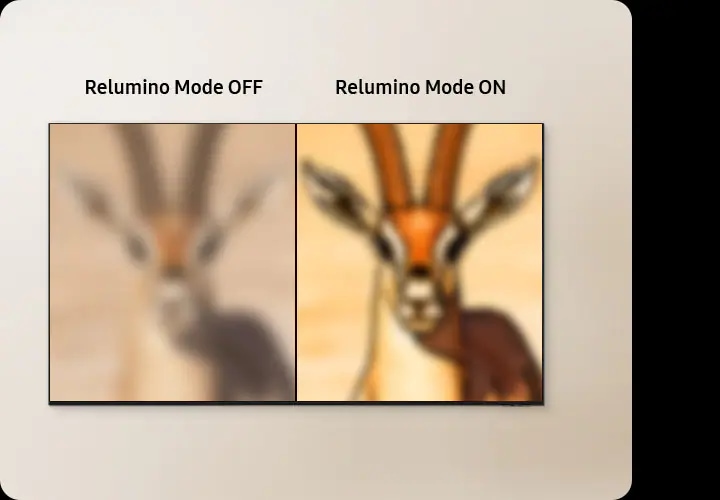
* Relumino Mode works on sources provided through DTV and HDMI only. It does not work on other sources, e.g.,OTTs. Image simulated for illustrative purposes only.
Specifications
-
LED
-
Screen Size
85"
-
Resolution
3840 x 2160
-
Refresh Rate
144 Hz (VRR Support)
-
DLG
240 Hz
-
Picture Engine
NQ4 AI Gen2 Processor
-
HDR (High Dynamic Range)
Mini LED HDR
-
HDR 10+
Support
-
AI HDR Remastering
Auto HDR Remastering
-
Contrast
Mini LED
-
Micro Dimming
Supreme Mini LED Dimming
-
Contrast Enhancer
Real Depth Enhancer
-
Motion Technology
Motion Xcelerator 144 Hz
-
Smart Calibration
Basic
-
AI Picture
AI Customization
-
AI Upscale
4K AI Upscaling
-
Supersize Picture Enhancer
Yes
-
HDR Brightness Optimizer
Yes
-
Color Booster
Color Booster Pro
-
Filmmaker Mode (FMM)
Yes
-
Object Tracking Sound
OTS Lite
-
Dolby 5.1 Decoder
MS12 2ch
-
Q-Symphony
Yes
-
Sound Output (RMS)
20 W
-
Speaker Type
2ch
-
Active Voice Amplifier
Active Voice Amplifier
-
Adaptive Sound
Adaptive Sound+
-
AI Sound Controller
AI Sound Controller
-
Operating System
Tizen™ Smart TV
-
Bixby
Yes
-
Far-Field Voice Interaction
Yes
-
Samsung TV Plus
Yes (SA,AE,EG Only)
-
Web Browser
Yes
-
SmartThings Hub / Matter Hub / IoT-Sensor Functionality / Quick Remote
Yes
-
Multi Device Experience
Mobile to TV, TV initiate mirroring, Sound Mirroring, Wireless TV On
-
Multi-View
up to 2 Videos
-
Apple AirPlay
Yes (w/o Syrian Arab Republic, Yemen)
-
Now brief
Voice / User Detection
-
Storage Share
Yes
-
Vision AI Companion
Yes (TR, AE, KW, QA, BH, OM)
-
Generative Wallpaper
Yes
-
Karaoke Mic
Yes
-
Google Cast
Yes (w/o Syrian Arab Republic, Yemen)
-
Soccer Mode
AI Soccer / Football Mode
-
Auto Game Mode (ALLM)
Yes
-
Game Motion Plus
Yes
-
VRR
Yes
-
Dynamic Black EQ
Yes
-
Surround Sound
Yes
-
Super Ultra Wide Game View
Yes
-
Game Bar
Yes
-
Mini Map Zoom
Yes
-
Light-sync
Yes (AE Only)
-
FreeSync
FreeSync Premium
-
HGiG
Yes
-
AI Auto Game Mode
Yes
-
AI Gaming Optimizer
Yes
-
Digital Broadcasting
DVB-T2CS2
-
Analog Tuner
Yes
-
TV Key
Yes
-
Wi-Fi
Yes (Wi-Fi 5)
-
Bluetooth
Yes (5.3)
-
HDMI
3
-
HDMI (High Frame Rate)
4K 144 Hz (for HDMI 1/2/3)
-
HDMI Audio Return Channel
eARC
-
Anynet+ (HDMI-CEC)
Yes
-
USB
1 x USB-A
-
Ethernet (LAN)
1
-
RF In (Terrestrial / Cable input / Satellite input)
1 / 1(Common Use for Terrestrial) / 1
-
Design
Metal Stream
-
Bezel Type
3 Bezel-less
-
Front Color
Black
-
Stand Type
Basic Feet
-
Stand Color
Black
-
Art Store
Yes
-
Embeded POP
Yes
-
EPG
Yes
-
Extended PVR
Yes
-
IP Control
Yes
-
OSD Language
Local Languages
-
Accessibillity - Voice Guide
English (UK),French (France),Hindi (India),Korean (Korea),Russian (Russia)
-
Audio Description
Yes
-
High Contrast
Yes
-
Zoom Menu and Text
Yes
-
SeeColors
Yes
-
Colors Inversion
Yes
-
Grayscale
Yes
-
Auto Picture Off
Yes
-
Magnification
Yes
-
Relumino
Yes
-
Closed Caption (Subtitle)
Yes
-
Multi-output Audio
Yes
-
Sign Language Zoom
Yes
-
Slow Button Repeat
Yes
-
Accessibility Remote
Yes
-
Learn TV Remote
Yes
-
Learn Menu Screen
Yes
-
Accessibility Shortcuts Edit
Yes
-
Auto Menu Sort
Yes
-
Power Consumption (Max)
280 W
-
Power Supply
AC100-240 V~ 50/60 Hz
-
Power Consumption (Stand-by)
0.50 W
-
Power Consumption (Typical)
141 W
-
Yearly Power Consumption (EU standard)
206 kWh
-
Eco Sensor
Yes
-
Auto Power Saving
Yes
-
Energy Efficiency
A+
-
Auto Power Off
Yes
-
Package Size (WxHxD)
2075 x 1200 x 180 mm
-
Set Size with Stand (WxHxD)
1889.9 x 1132.8 x 326 mm
-
Set Size without Stand (WxHxD)
1889.9 x 1083.5 x 77 mm
-
Stand (Basic) (WxD)
1411 x 326 mm
-
Stand (Minimum) (WxD)
954 x 326 mm
-
VESA Spec
400 x 300 mm
-
Package Weight
40.0 kg
-
Set Weight with Stand
29.0 kg
-
Set weight without Stand
28.5 kg
-
Support Full slim wall mount (Y22)
Yes
-
Webcam Support
Yes
-
Zigbee / Thread Module
Dongle Support
-
User Manual
Yes
-
Power Cable
Yes
Reviews
85" Mini LED M80H 4K Samsung Vision AI Smart TV (2026)
- Customers praise stunning picture quality with vibrant colors, deep blacks, and impressive contrast from Mini LED technology
- Reviewers commend smooth motion handling and high refresh rate that eliminate blur during sports and gaming
- Many appreciate the responsive, user-friendly smart interface and quick, effortless setup process
- Customers highlight excellent value for price and sleek, modern design that enhances living spaces
- A few report occasional remote control issues or rare compatibility concerns, though these are uncommon
Filters
Relevancy sort puts the best reviews at the top. We look at things like helpfulness votes, latest review, pictures and other traits that readers look for in their reviews.
Filters
278 Reviews
2026-05-18
Cranberry Township
2026-05-07
Upper Marlboro
2026-05-07
North Carolina
2026-07-30
2026-06-05
El Monte
2026-07-08
New york
2026-10-11
Imperial CA
2026-07-05
Peoria, AZ
2026-07-03
Samsung AU
Thank you for your wonderful review! We're delighted to hear your new Mini LED M80H was easy to set up and that both the picture and sound quality exceeded your expectations. It's especially great to know the built-in audio was impressive enough that you didn't need your separate sound system. We appreciate your recommendation and hope you enjoy many great viewing experiences.
2026-10-05
Michigan
Samsung Advisor
Hi Charlie88, We're very sorry to hear about your experience. Please know that your feedback will be shared with our internal teams. We hope you’ll consider Samsung again in the future. If you do, we’re always here to help with setup and support. Reach us at 1-800-SAMSUNG (8AM – 9PM EST Mon – Fri, 8AM – 6PM Sat) or visit our website to chat live and access manuals or software. ~Samsung Advisor
2026-09-21
2026-07-29
2026-07-27
Columbus Ohio
2026-07-02
Arlington
2026-07-16
Johannesburg, South Africa
2026-09-06
Atlanta, GA
2026-09-12
Philadelphia PA
2026-09-20
Weatherford,TX USA
2026-10-22
2026-05-05
2026-09-07
Douglasville, GA
2026-07-27
Illinois
2026-07-08
Tennessee
2026-09-02
Samsung Customer Care
Thank you for sharing your review and feedback regarding the port selection and setup experience on your Samsung Mini LED TV. We appreciate your insights regarding hardware connections and user interface navigation. To address postal code or network setup queries, as well as customize your home screen: * Go to Settings > General & Privacy > System Manager > Location to ensure the postal code matches your regional format. * Customize your home screen by navigating to Settings > General & Privacy > Start Screen Options to disable auto-start features or rearrange app icons to suit your viewing habits. * For audio connections, the TV supports HDMI eARC and Bluetooth audio connectivity for external audio systems. If you need any assistance fine-tuning your TV settings or connection options, please connect with us: 24/7 Live Chat: https://www.samsung.com/ca/support/live-chat-support Email Support: https://www.samsung.com/ca/support/emailsupport
2026-09-05
Samsung Advisor
Hi JoeA, Thank you for your feedback on the Samsung M80H TV. If the picture appears unclear, dull, or lacks definition, there are several settings you can adjust to improve clarity and overall image quality. Go to: Settings > All Settings > Picture > Expert Settings, and review these key settings: Picture Clarity Settings: While originally intended for motion handling, these can also impact overall clarity • Off: Disables motion enhancements • Auto: Automatically adjusts based on content • Custom: Lets you fine-tune: o Judder Reduction – Helps smooth out uneven motion o LED Clear Motion – Boosts sharpness in fast-moving content o Noise Reduction – Reduces distortion and enhances detail in lower-resolution sources Core Picture Settings • Brightness – Controls overall screen brightness • Contrast – Enhances the difference between bright and dark areas • Sharpness – Adjusts edge definition; closer to 20 increases detail • Color – Enhances depth and intensity of colors And don’t forget to check for the latest firmware, which may improve performance: Settings > Support > Software Update > Update Now These adjustments can make a noticeable difference in overall clarity. If you need further help tailoring the settings to your preferences or environment, please contact Samsung Support at 1-800-SAMSUNG (8AM – 9PM EST Mon – Fri, 8AM – 6PM Sat – Sun). LiveChat is also available via the ‘Support’ link on our website. ~ Samsung Advisor
2026-07-05
2026-09-04
Henniker, NH
2026-08-29
Samsung AU
Thank you for sharing such wonderful feedback! We’re thrilled to hear you’re loving the clarity, brightness, colours and detail of the picture. It’s fantastic to know movies and everyday viewing have been made even more enjoyable, and we really appreciate you sharing your experience. We hope you continue loving your new viewing setup!
2026-08-21
Samsung Advisor
Hi Jarby, We’re sorry to hear you’re not fully satisfied with the picture quality on your Samsung M80H TV. If the image appears too dark, we suggest disabling certain energy-saving features, which can automatically adjust brightness and affect how the screen looks. Go to: Settings > All Settings > General & Privacy > Power and Energy Saving, then turn off Brightness Optimization, Energy Saving Solution, Motion Lighting, and/or Contrast Enhancer. You can also adjust the Picture Mode to better suit your environment: Settings > All Settings > Picture > Picture Mode • Standard – Default mode for general viewing • Dynamic – Brighter and clearer, ideal for well-lit rooms • Movie – Best for dark room viewing • Eco – Energy-saving mode • Filmmaker Mode – Preserves content as intended by creators To fine-tune brightness, go to: Home > left directional key > Settings > All Settings > Picture > Expert Settings, then adjust the Brightness level (0–50) to your preference. Lastly, please make sure your TV is running the latest firmware: Home > Home > left directional key > Settings > Support > Software Update > Update Now We hope these tips help improve your viewing experience. If you need further support, feel free to contact us at 1-800-SAMSUNG (8AM – 9PM EST Mon – Fri, 8AM – 6PM Sat – Sun). LiveChat is also available via the ‘Support’ link on our website. ~ Samsung Advisor
2026-08-05
Samsung Advisor
Hi Jadex, Thank you for sharing your concerns. If your TV is announcing everything you do, the Voice Guide feature is likely turned on. This is an accessibility function designed to assist users who are visually impaired, and it may have been activated accidentally by holding down the Volume button on your remote. To turn off Voice Guide, go to: Home > left directional key > Settings > All Settings > General & Privacy > Accessibility > Voice Guide Settings > Voice Guide = OFF If there's anything else we can assist with, please don't hesitate to contact us at 1-800-SAMSUNG (8AM – 9PM EST Mon – Fri, 8AM – 6PM Sat – Sun). LiveChat agents are also available through the ‘Support’ link on our website. ~ Samsung Advisor
2026-05-18
2026-08-20
Boston, MA
2026-06-18
Samsung AU
Hi, thank you for your review. We're delighted to hear that your new Mini LED TV has become such an enjoyable addition to your bedroom. It's wonderful to know that the picture quality, colour performance, and responsiveness are exceeding your expectations. Thank you for choosing Samsung.
2026-05-20
Floydada TX
2026-06-22
2026-10-20
2026-09-08
2026-09-17
Samsung Customer Care
Thank you for sharing your feedback. We acknowledge your concern regarding your Mini LED TV turning off and on unexpectedly and the remote responsiveness. To troubleshoot power cycling, we recommend performing a power reset by unplugging the TV from the wall outlet for 60 seconds, then reconnecting it directly to a known working outlet without power strips. You can also re-pair your Samsung Smart Remote by pointing it at the TV and holding the Return and Play/Pause buttons simultaneously for at least 3 seconds. If the issue persists, our support specialists are ready to help you directly at www.samsung.com/ca/support/live-chat-support.
2026-09-17
Samsung Advisor
Hi Mike M, Thank you for your feedback. To better understand and assist you with the HDMI error you are seeing while watching a streaming service, please call us at 1-800-SAMSUNG (8AM – 9PM EST Mon – Fri, 8AM – 6PM Sat – Sun), or reach us via text anytime. You can also visit ‘Support’ on our website for: • Live Chat • Manuals, Software, & Warranty Info ~ Samsung Advisor
2026-07-17
2026-09-09
2026-07-05
MN
2026-08-05
BEDFORD, NH
2026-06-11
Samsung AU
Hi, thank you for your enthusiastic review! We're thrilled to hear that you're enjoying the vibrant colours, impressive brightness, and HDR performance of your Mini LED TV. It's wonderful to know that your movie-watching experience feels cinematic and that you're happy with your purchase. Thank you for choosing Samsung and sharing your feedback.
2026-05-27
Samsung AU
Hi there, thank you so much for your heartfelt feedback! We’re truly grateful for your kind words and thrilled to hear how much you’re enjoying your Samsung devices. Your support and recommendation mean a great deal to us. Thank you for being part of the Samsung community!
2026-10-18
South Windsor ct
2026-10-05
2026-09-08
2026-08-27
2026-09-03
Samsung Customer Care
Thank you for providing your feedback regarding picture performance and motion during fast-action sports on your Samsung Mini LED TV. To enhance motion smoothness and optimize fast-action sports viewing, we suggest the following adjustments: * Go to Settings > Picture > Expert Settings > Picture Clarity Settings. Set it to Custom and adjust Blur Reduction and Judder Reduction, or toggle LED Clear Motion for crisper fast-moving content. * Switch to Dynamic or Filmmaker Mode under Settings > Picture > Picture Mode depending on your room lighting and preference. * Ensure the source input is optimized by enabling Input Signal Plus under Settings > General & Privacy > External Device Manager > Input Signal Plus. If you would like additional assistance fine-tuning your display settings for sports and entertainment, our team is happy to help: 24/7 Live Chat: https://www.samsung.com/ca/support/live-chat-support Email Support: https://www.samsung.com/ca/support/emailsupport
2026-07-20
2026-08-10
Samsung Customer Care
Thank you for sharing your feedback and for being a loyal member of the Samsung family! Having your previous Samsung TV serve you for twelve years is incredible. We share your high expectations for this new M80H Mini LED TV and are confident it will provide a high-quality platform for years to come. You made an excellent observation regarding color intensity. Retail showrooms use bright overhead lighting, so televisions are set to a 'Store Demo' mode that artificially boosts brightness and saturation. At home, TVs default to a balanced 'Home Mode' designed to prevent eye strain and provide natural colors. However, if you prefer that punchy, 'store-like' brilliance, you can easily unlock it by adjusting a few settings: Switch to Dynamic Mode: Press Settings on your remote, navigate to Picture, and change the Picture Mode to Dynamic. This safely boosts contrast and color saturation for a vivid picture. Enable Contrast Enhancer: In your Expert Settings, set the Contrast Enhancer to Low or High to make highlights pop and add depth. If you ever have questions about fine-tuning your picture or exploring smart features, please connect with us via our official 24/7 Live Chat or Email Support. Enjoy your new TV!
2026-10-03
Tallahassee, Florida
2026-09-05
Newark, CA
2026-06-22
2026-10-20
Mcallen texas
Samsung Advisor
Hi Lizzie, Thank you for your feedback. To best understand the issues you are experiencing, please contact us at 1-800-SAMSUNG (8AM – 9PM EST Mon – Fri, 8AM – 6PM Sat), or reach us via text anytime. You can also visit ‘Support’ on our website for: • Live Chat • Manuals, Software, & Warranty Info ~ Samsung Advisor
2026-08-03
2026-07-29
2026-10-20
2026-07-31
2026-10-20
Mn
2026-10-20
Western NY
2026-07-05
Vero beach florida
Samsung Advisor
Hi Captain, Thank you for your feedback on the M80H TV remote. Remote. While the Solar Cell Remote may appear minimal, many buttons offer multiple or long-press functions to help simplify the design without sacrificing functionality. For example: • Settings/Number/Color: Allows you to easily access your TV's Quick Settings and input channel numbers. • Volume rocker: Push up/down to adjust volume. Press and release quickly to mute. • Long-press Volume button: Hold for more than 1 second to open Accessibility Shortcuts. • RETURN button: Press to go back to the previous menu or screen. While watching TV, it takes you back to the previous channel. These functions allow for a more streamlined experience without adding extra buttons. Please know we offer a built-in remote tutorial. Go to Settings > All Settings > General & Privacy > Accessibility > Learn TV Remote If you’d like more assistance with this feature, please reach Samsung Support at 1-800-SAMSUNG (8AM – 9PM EST Mon – Fri, 8AM – 6PM Sat – Sun). LiveChat agents are also available through the ‘Support’ link on our website. ~ Samsung Advisor
2026-09-20
NC
2026-09-05
Samsung Advisor
Hi living buzz, Thank you for your feedback on the M80H TV remote. While the Solar Cell Remote may appear minimal, many buttons offer multiple or long-press functions to help simplify the design without sacrificing functionality. For example: • Settings/Number/Color: Allows you to easily access your TV's Quick Settings and input channel numbers. • Volume rocker: Push up/down to adjust volume. Press and release quickly to mute. • Long-press Volume button: Hold for more than 1 second to open Accessibility Shortcuts. • RETURN button: Press to go back to the previous menu or screen. While watching TV, it takes you back to the previous channel. These functions allow for a more streamlined experience without adding extra buttons. Please know we offer a built-in remote tutorial. Go to Settings > All Settings > General & Privacy > Accessibility > Learn TV Remote If you’d like more assistance with this feature, please reach Samsung Support at 1-800-SAMSUNG (8AM – 9PM EST Mon – Fri, 8AM – 6PM Sat – Sun). LiveChat agents are also available through the ‘Support’ link on our website. ~ Samsung Advisor
2026-10-20
Woodbridge
2026-09-09
2026-05-23
2026-07-30
2026-09-07
2026-10-21
2026-06-03
Clayton
2026-09-26
2026-09-20
Louisville KY
2026-06-10
Samsung AU
Thank you for sharing your feedback. We're sorry to hear that your new TV has not met your expectations, particularly regarding the build quality and remote control design. We understand that customers expect a premium experience from Samsung products, and we appreciate your comments regarding the feel and usability of the remote. Feedback like yours helps us identify areas where improvements can be made. Thank you for taking the time to let us know about your experience.
2026-09-09
2026-09-22
Kansas City, MO
2026-09-09
2026-09-21
Samsung AU
Thank you for sharing your experience! We're glad to hear the setup process was easier this time around and that you're enjoying the updated remote. It's great to know you're noticing the improvements and are happy with your new TV. We hope you continue enjoying it!
2026-09-20
Clarksburg, MD
2026-05-28
2026-09-09
Samsung AU
Thank you for sharing your experience! We’re thrilled to hear that the technology has opened up a new viewing experience for you. It’s fantastic to know that you’re enjoying the fast response and that it has helped make your everyday viewing more seamless. We hope you continue discovering even more to enjoy.
2026-09-08
2026-07-05
Auburn, IN
2026-09-21
Delphos ohio
2026-09-09
2026-09-05
2026-09-07
2026-09-09
2026-07-29
2026-09-20
Pittsburgh
2026-09-10
2026-09-20
Bullhead City
2026-06-01
Fort Worth Texas
2026-09-09
2026-07-05
FL
2026-09-23
Camarillo, CA.
2026-09-05
2026-09-20
Calabash
Samsung Ambassador
Hi Cool Raul, We appreciate your input on the picture quality of Samsung’s M80H TV. If the color production isn’t meeting your expectations, there are several adjustments you can make to improve your viewing experience. First, please ensure your TV is running the latest firmware, as updates may include important picture quality enhancements. Go to: Home > Top directional button > Settings > Support > Software Update > Update Now Then, select a Picture Mode that best fits your environment: Home > Home > top directional key > Settings > All Settings > Picture > Picture Mode 1. Standard – Default mode for general viewing 2. Dynamic – Brighter and clearer in well-lit rooms 3. Eco – Optimized for energy saving 4. Movie – Best for watching in dark environments 5. Filmmaker Mode – Preserves content exactly as intended by creators You can also enhance your experience by enabling AI Mode, which automatically adjusts picture and sound based on your surroundings and usage patterns: Settings > All Settings > Advanced Features > AI Mode Settings > AI Mode If these adjustments don’t improve your picture quality, feel free to contact Samsung Customer Support at 1-800-SAMSUNG (8AM – 9PM EST Mon – Fri, 8AM – 6PM Sat – Sun). You can also LiveChat with an agent or find helpful guides by visiting the ‘Support’ section of our website. ~ Samsung Ambassador
2026-09-18
Samsung AU
Thank you for sharing your feedback! We’re pleased to hear that you’re enjoying the performance and AI capabilities. We’re sorry to hear that the remote control included with your TV didn’t meet your expectations, particularly regarding voice functionality.
These reviews are managed by Bazaarvoice and comply with the Bazaarvoice Authenticity Policy, which is supported by anti-fraud technology and human analysis. Details at
https://www.bazaarvoice.com/trustmark/User manual & downloads
* Key feature may different from Key Spec


