How to change your Samsung account country or region
You can change your Samsung account country or region through your account settings using a web browser.
Once changed, your devices will be signed out, and some services or features may be affected depending on the selected region.
Notes:
- After changing your country or region, you must wait 180 days (about 6 months) before you can revert back to the original country or region, or change to another country or region.
- Devices connected to your Samsung account will be automatically signed out once the country of usage is changed, and you will be prompted to sign in again.
Change account country or region
Follow the instructions below to change the country or region on your Samsung account.
By computer
Step 1. Go to account.samsung.com and log into your account.

Step 2. Click on Profile.

Step 3. Scroll down and click Edit personal information.
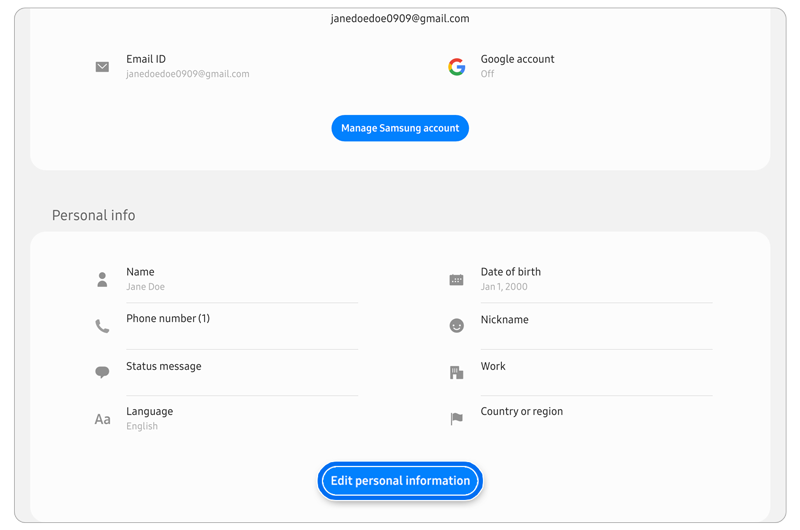
Step 4. Click on Country or region.

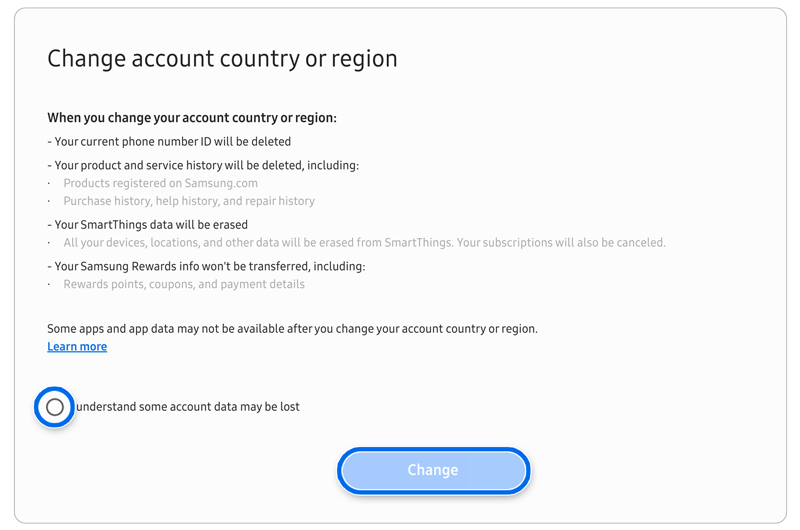
Step 5. Select the desired region and country, then click Change.

Step 6. Read the information provided on screen. Click the checkbox, and then click Change.
By phone
Step 1. Open your internet browser on your phone.
Step 2. Go to account.samsung.com and follow the same steps above.
Note: An update should be available in December 2023 that will allow users to use an app on their phones to change the country or region on their Samsung account.
Note: Restrictions may apply in the following cases–
Family group or child accounts cannot change the country or region.
Accounts with a Galaxy Store seller profile must submit a request through the customer center.
Accounts under GDPR processing in Europe may have temporary restrictions.
Accounts using phone number ID only may be restricted.
Accounts below the permitted age limit cannot change the country or region.
Chinese accounts cannot use the country change feature, and non-China accounts cannot switch to China Mainland.
Thank you for your feedback!
Please answer all questions.