5C/5E error code on Samsung washing machine Troubleshooting Guide

A 5C or 5E error code on your Samsung washing machine indicates a drainage issue. This is usually caused by a clogged filter, blocked drain hose, or incorrect hose installation.
Clean the drain pump filter
The drain pump filter prevents debris from entering the pump. If it is blocked, the machine may not drain properly, leaving clothes wet or causing longer cycle times.


1. Locate the small access door on the front of the washing machine.


2. Place a towel on the floor and prepare a shallow container.


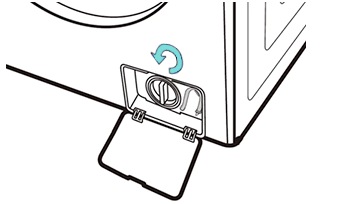
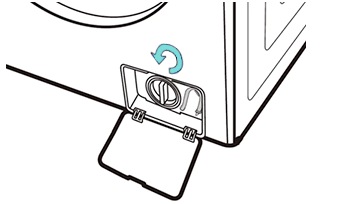
3. Open the access door using your hand or a coin, depending on the model.


4. Pull out the emergency drain hose, remove the cap, and drain the water into the container.
5. Reattach the cap and secure the hose back in place.


6. Turn the drain filter counterclockwise to remove it.
7. Remove debris and rinse the filter with warm water.
8. Clean the filter housing with a damp cloth.


9. Reinsert the filter and turn it clockwise to lock it.
10. Close the access door.
Check drain hose installation
Improper installation can prevent proper drainage.
- Ensure the hose is securely fixed with clips.
- Make sure the hose height is at least 60 cm above the floor.
- Confirm the standpipe fully covers the hose.
- Check that the hose is not bent or kinked.

Clear a blocked drain hose
A clogged hose can stop water from draining.
- Turn off the washing machine and unplug it.
- Remove all laundry from the drum.
- Pull the machine away from the wall.
- Locate the drain hose at the back of the machine.
- Disconnect the hose from both ends.
- Remove any blockages using a suitable tool.
- Reconnect the hose securely.
- Run a test cycle to confirm proper drainage.
Thank you for your feedback!
Please answer all questions.