What to look for in a gaming monitor


Table of Contents
High Refresh Rate


Low Response Time


Adaptive Sync Technology


Superior Picture Quality


* Video simulated for illustrative purposes.
Let’s take a closer look at different refresh rates and which one might be right for you:
· 100Hz-120Hz: Entry-level gaming
A refresh rate range of 100Hz to 120Hz provides a noticeable improvement over the standard 60Hz, delivering smoother visuals and reduced motion blur. This range is ideal for casual gamers or those who enjoy a balance between smooth gameplay and affordability. While not as fluid as monitors with higher refresh rates, it still offers a significant upgrade for genres like turn-based strategies or slower-paced games. For more fast-paced or competitive gaming, moving up to a higher refresh rate will further enhance fluidity and responsiveness.
· 144Hz-200Hz: The sweet spot for most gamers
A refresh rate of 144Hz is widely considered the gold standard for gaming. It offers a significant improvement over 60Hz monitors by delivering smoother visuals and reducing motion blur. This refresh rate is especially beneficial for genres such as first-person shooters, racing games, and action titles, where fast movements are common. Upgrading to a 200Hz refresh rate can further enhance the experience by making the visuals even more fluid.
· 240Hz, 360Hz and Beyond: The ultimate monitor for competitive gamers
For those who play at a professional level or in eSports competitions, refresh rates starting at 240Hz and going up to 360Hz or higher can make a world of difference. These ultra-high refresh rates make each movement appear more fluid and reduce input lag to a minimum. The Samsung Odyssey OLED G6 (G60SF), the world’s first 500Hz OLED monitor, takes this even further — delivering lightning-fast responsiveness for players who demand the ultimate competitive edge.
How does response time affect my gaming?
The response time of a monitor measures how long it takes for a pixel to change color. Faster response times mean the monitor updates its images more quickly, which is super important when playing a fast or competitive game.
Response time doesn't matter as much for people doing level browsing or office work. But for gaming, you'll want a fast response time: under 1 ms (millisecond). Samsung’s Odyssey lineup is designed to give you that edge. The Odyssey G9 (G91F) delivers a swift 1ms response time, ensuring sharp visuals in intense matches. For those who want even greater speed, the Odyssey OLED range — including the Odyssey OLED G8 (G81SF) and OLED G6(G60SF) — achieves an incredible 0.03ms, keeping every frame crystal clear so you can react instantly and stay ahead of the competition.
In this way, a fast response time will help keep your image clear from ghosting, trailing effects or blur that can distract you from the competition.


What is G-Sync and FreeSync?²
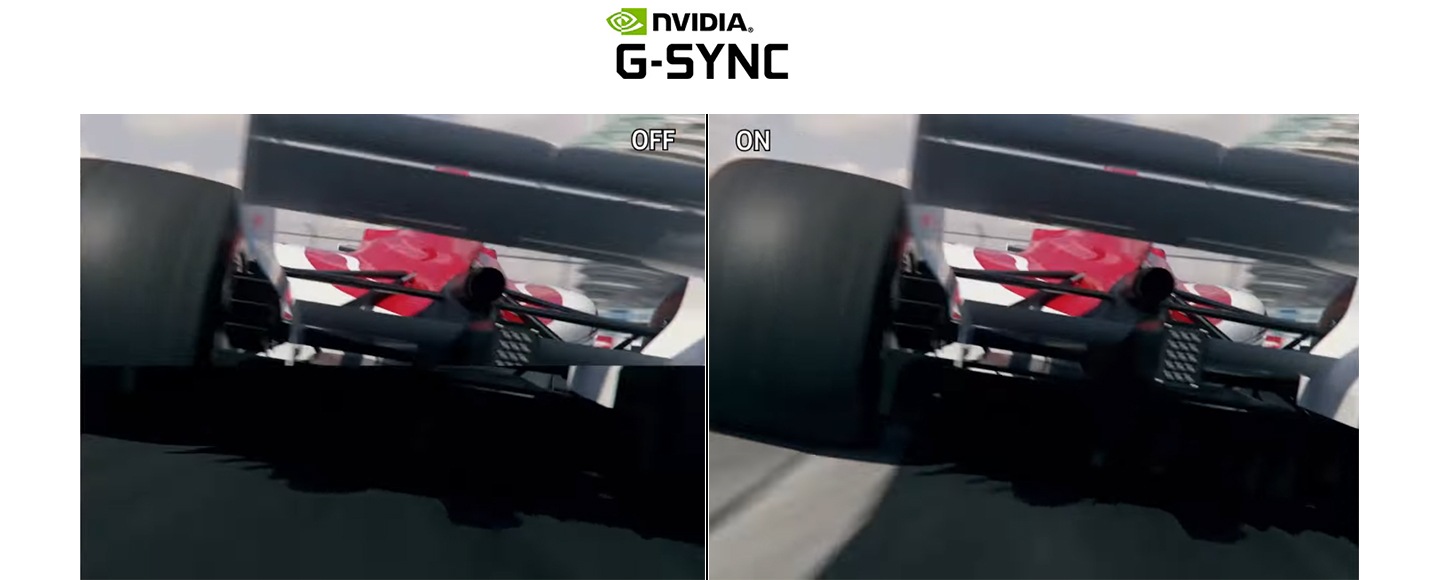
Screen tearing happens when the monitor displays portions of multiple frames simultaneously, causing a split or “tear” in the image. Adaptive sync technologies like G-Sync and FreeSync help prevent screen tearing and stuttering by matching the monitor's refresh rate with the frame rate output from the GPU. G-Sync is developed by NVIDIA for use with its GPUs, and FreeSync is created by AMD for its GPUs.
A number of Samsung Odyssey monitors — including Odyssey 3D (G90XF), OLED G8 (G81SF), and OLED G6 (G60SF) — support AMD FreeSync Premium (or Premium Pro) and are also compatible with NVIDIA G-Sync. This dual support means your gameplay stays smooth no matter which GPU you use. Whether you’re locked into a high-speed shooter or exploring the vast details of an open-world adventure, Odyssey monitors keep scenes stable, tear-free and fully immersive. Like the Samsung Odyssey lineup, many modern gaming monitors support both G-Sync and FreeSync, allowing gamers to choose the compatible technologies based on their hardware and preferences.

* Video simulated for illustrative purposes.
What is the best monitor size for gaming?
When choosing the ideal monitor size, it's important to consider your gaming style, the types of games you play, and the space available in your gaming setup. The right size will not only improve immersion but also affect how you perceive and react to on-screen events. Here’s an expanded look at different size categories:
28" and Smaller
See everything quickly
Monitors ranging from 22 to 28 inches are ideal for gamers with limited space or those who prefer a more compact setup. While they may not provide the same immersive experience as larger screens, they are practical for setups where space is a priority. For certain game genres like RTS or MOBA, having a more contained view can be beneficial, as it allows players to easily monitor the entire display and make quick, strategic decisions. Samsung offers a wide range of monitors under 28 inches that cater to gamers’ needs across different segments. In particular, the 27-inch category includes options like 3D, OLED and LCD, curved and flat models, as well as various refresh rate choices.


32" - 34"
Balance space and experience
Monitors between 32 and 34 inches strike a balance between screen space and immersion, offering a more expansive view without overwhelming your desk. This size works well for a range of game genres, from action-adventure to RPGs, enhancing the sense of depth and detail. Higher resolutions, like 4K, are also supported, giving you sharper visuals for an enjoyable gaming experience. Samsung complements this with a diverse 32-inch gaming lineup across different panel types, resolutions and refresh rates, allowing gamers to choose a model that best fits their preferences.


37" and Bigger
Immersion and multitasking
Monitors 37 inches and larger offer a truly immersive gaming experience, with expansive displays that enhance both gameplay and multitasking. These screens are ideal for genres like simulation and open-world games, where a wider field of view adds depth and realism. While they require more desk space and a powerful GPU, the level of immersion and flexibility for multitasking make them a top choice for serious gamers. Samsung meets these needs with a diverse large-format lineup, offering 37, 40, 43, 49, 55 and even 57-inch models in various aspect ratios and resolutions, giving users the flexibility to choose the perfect fit for their setup.


Full HD, FHD or 1080P (1920x1080)
Simple and practical
Full HD (1080p) is a common choice for gamers looking for a balance between image quality and system demands. It allows for smooth performance without the need for high-end hardware, but lacks the sharpness of higher resolutions like QHD or 4K. The Samsung Odyssey G3 (G30D) is one of the standout FHD gaming monitors, offering a 180Hz refresh rate, 1ms (MPRT) response time and AMD FreeSync support for smooth, responsive gameplay. Though it may not be ideal for gamers seeking the best visual quality, Full HD is a practical option for those with simpler setups.


Quad HD, or QHD (2560x1440)
Accessible gaming performance
Quad HD, or 1440p, provides a step up in image quality compared to Full HD, offering more pixels for increased detail and clarity. This resolution is popular among gamers who want a sharper picture without the demanding requirements of 4K resolution. It’s considered a "sweet spot" for many gamers who seek a balance between performance and visual quality. The Samsung Odyssey OLED G6 (G60SF) builds on this sweet spot, pairing QHD clarity with a QD-OLED panel and ultra-fast 500Hz refresh rate for sharp, responsive gameplay.


4K
(3840x2160)
Extreme detail and visual quality
For gamers who want the most detailed and realistic visuals, 4K resolution — also known as Ultra High Definition (UHD) — delivers four times the pixel count of Full HD. This results in incredibly sharp images and an immersive gaming experience. However, 4K gaming requires a powerful GPU to achieve high frame rates, especially in graphically demanding titles. The Samsung Odyssey OLED G8 (G81SF) 27-inch monitor does this by pairing 4K UHD with a QD-OLED panel, delivering 166 PPI for next-level detail and clarity. If you want one of the best visual experiences and have the hardware to support it, 4K is the ideal choice.


Ultrawide Screens
(21:9/ 32:9)
Expansive and immersive gaming
Ultrawide monitors, like the 21:9 Ultra WQHD, WUHD (5K2K), or the 32:9 Dual QHD and Dual UHD models, offer an expansive field of view compared to standard 16:9 screens. These broader displays provide a more immersive gaming experience, particularly in genres such as simulation and racing. For example, the 49″ Samsung Odyssey G9 (G91F) offers a panoramic view for full immersion with its 32:9 Dual QHD 1000R ultrawide curved display. The wider screen real estate also allows for enhanced multitasking, making ultrawide monitors a versatile choice for both gaming and productivity.


OLED vs IPS vs VA. Which is best for gaming?
Each panel type has its own strengths — speed and contrast for OLED, color accuracy for IPS, and affordability and immersion for VA — so it depends on what you prioritize:
OLED
With individually lit pixels, perfect blacks, infinite contrast, superior color accuracy, and an ultra-fast response time, OLED panels excel in competitive, fast-paced games. The Samsung Odyssey OLED G6 (G60SF), a QD-OLED QHD gaming monitor with a 500Hz refresh rate, 0.03ms response time, and Glare Free³ technology, delivers both speed and stunning clarity for high-performance play.
IPS
Known for accurate colors and wide viewing angles, IPS panels are a versatile choice for gamers who also value sharp visuals. The Samsung Odyssey G7(G70F), a fast IPS monitor, offers 4K UHD resolution and Dual Mode support (4K at 180Hz or FHD at 360Hz), giving players flexibility to optimize between visual fidelity and ultra-high frame rates.
VA
With high contrast and deep blacks at a more accessible price point, VA panels shine in cinematic, story-driven games. The Samsung Odyssey G9 (G91F), a 49-inch curved super-ultrawide monitor with Dual QHD resolution and a 144Hz refresh rate, delivers expansive immersion that pulls players right into the action.
If you want an edge over your competitors, OLED is unmatched. For a balanced mix of vibrant color and speed, IPS is the best fit. And if you’re after sweeping immersion and strong contrast at a more affordable level, VA is a powerful option.
Which is better for gaming: curved or flat monitors?
Curved screens
Immersion and comfort
"For those who value both immersion and comfort, curved monitors offer a clear advantage. Curved gaming monitors, like the Samsung Odyssey Neo G9, are designed to enhance immersion by wrapping the display around your field of vision. This curvature matches the natural shape of the human eye, reducing edge distortion and creating a more realistic, immersive experience. Curved screens also help reduce eye strain by maintaining a consistent distance from your eyes to the screen.
The larger the screen or ultra-wide monitor, the more pronounced the immersive effect becomes, especially with tighter curves like 1000R. This makes curved monitors particularly beneficial for gaming genres that thrive on immersion, such as open-world games and driving simulators."


Flat screens
A clean and simple setup
For those who prioritize simplicity, flat monitors are a practical choice. Flat gaming monitors are ideal for gamers who need a minimal, space-saving solution that fits neatly into any setup. With a clean and simple design, they provide consistent image quality across the display, making them perfect for split-screen co-op gaming or for strategy and multiplayer games that don’t require the immersive feel of curved screens. This makes flat screens a practical choice for those who prioritize simplicity and versatility in their gaming environment.


FAQ
-
What is the ideal monitor size for gaming?The best monitor size depends on your gaming style and setup. Monitors 27 inches and smaller are ideal for competitive gaming where fast reactions are important. Monitors in the 28-34 inch range offer a more immersive experience for a variety of genres, while larger monitors (43 inches and above) are suited for simulation and open-world games.
-
Is a 4K gaming monitor worth it?If you want to create the best gaming setup and experience possible, then a 4K gaming monitor can be worth it, as it offers a high-resolution display with 4 times the number of pixels compared to a 1080p monitor, resulting in clearer and more detailed images. However, 4K gaming also requires a more powerful GPU to run games smoothly at this higher resolution and may not be necessary for some players who are satisfied with lower resolutions. It is ultimately up to the player to decide whether the added visual quality is worth the cost and performance requirements.
-
Is a 144Hz monitor or a 165Hz monitor better for gaming?A 165Hz monitor is better for gaming than a 144Hz monitor, as it has a higher refresh rate, and a higher refresh rate results in smoother, more fluid gameplay. However, the difference in performance between 144Hz and 165Hz is not too noticeable and may not be worth the extra cost for some players. The choice between the two would ultimately depend on the player's budget and preferences.
-
What is a good refresh rate for gaming?
For most gamers, a refresh rate of 144Hz or higher is recommended, while competitive players may benefit from 240Hz or more for a smoother, more responsive gameplay.
Refresh Rate Recommendations:
100–120Hz
• Best for: Casual to moderately competitive gaming (RPGs, strategy games, less demanding FPS)
• Benefits: Smoother experience than standard 60Hz
• Recommended monitor: Essential Monitor S3 (S32GF) (120Hz)
144–200Hz
• Best for: Fast-paced competitive games (FPS, fighting, racing, action titles)
• Benefits: Improved smoothness and responsiveness for precise tracking
• Recommended monitor:
- Odyssey G9 (G91F) – 144Hz, Ultrawide 32:9 screen
- Odyssey G5 (G50F) – 180Hz, QHD
240Hz and Higher
• Best for: Highly competitive gamers seeking peak responsiveness (High-speed FPS and esports titles)
• Benefits: Maximum smoothness. Ideal for fast reaction times, requires powerful GPU
• Recommended monitor:
- Odyssey OLED G8 (G81SF) – 240Hz, QD-OLED in 4K -
Which is better for gaming: a curved or flat monitor?Curved monitors enhance immersion by wrapping around your field of view, making them ideal for genres like open-world and driving games. Flat monitors, on the other hand, are a great option for setups with limited space and could be ideal for gamers who mainly play strategy, battle, or multiplayer games that don’t require the immersive experience of curved screens. Ultimately, the choice between curved and flat monitors comes down to personal preference and the type of gaming experience you're seeking.
-
Are OLED monitors good for gaming?Yes, OLED monitors are known for their excellent gaming performance due to deep blacks, high contrast ratios, and ultra-fast response times. These features make OLED ideal for visually demanding games and competitive gaming where image quality and speed are crucial. Samsung’s OLED gaming monitors — like the Odyssey OLED G8 (G81SF) and OLED G6 (G60SF) — feature QD-OLED panels with Glare Free3 technology for clear visibility without reflections, along with OLED Safeguard, which prevents burn-ins and ensures lasting performance. Combined with high refresh rates and vivid color accuracy, they deliver stellar performance for fast-paced shooters, racing games and graphically intensive genres.
-
How important is resolution in gaming?Resolution is crucial for visual clarity in gaming. Higher resolutions provide sharper and more detailed images but require more powerful hardware to run smoothly. The right resolution for you depends on your system's capabilities and the types of games you play.
-
Can you play games on a gaming monitor without a PC?
Yes, you can play games on a gaming monitor without a PC by connecting a different video source. Gaming monitors are designed to work with a variety of devices, including consoles, handheld gaming devices and streaming devices. Samsung’s smart-enabled Odyssey monitors make it even easier to play a variety of games. Many models, such as the G80SD and G95SD, feature Gaming Hub, a cloud gaming platform that lets you play popular titles from well-known gaming services like Xbox Game Pass Ultimate and NVIDIA GeForce NOW — without a console or gaming PC. Gaming Hub even recommends games based on what you play, so you can find new favorites easily and quickly.
* Gaming Hub is available in limited countries, with app availability differing by country. Accessing Gaming Hub is free of charge. Subscription may be required to access content offered by game streaming service on the Gaming Hub platform.
-
What type of monitor is best for gaming?
Choosing the right gaming monitor comes down to what you value most — speed, picture quality or contrast. Samsung offers a wide range of OLED, IPS and VA models, each designed to give gamers the edge in different ways.
OLED – For the most immersive experience
• Advantages: Perfect blacks, infinite contrast, dazzling HDR and ultra-fast response times
• Ideal for: Gamers seeking cinematic visuals, rich colors and next-gen performance
• Recommended model: Samsung Odyssey OLED G8 (G81SF) QD-OLED in 4K UHD, 240Hz, 0.03ms
IPS – Accurate visuals and versatility
• Advantages: Vivid colors, wide viewing angles and high refresh rates for smooth competitive play
• Ideal for: Competitive gamers and creators who need a monitor that excels in both play and productivity
• Recommended model: Samsung Odyssey G7 (G70F)Fast IPS, 4K UHD, Dual Mode (4K 180Hz or FHD 360Hz)
VA – Balances performance and affordability
• Advantages: Deep blacks, high contrast and great overall visuals at a more affordable price
• Ideal for: RPG and story-driven gamers who want immersion without overspending
• Recommended model: Samsung Odyssey G9 (G91F) — 49"" curved ultrawide, 144Hz refresh rate
At the end of the day, the best gaming monitor is the one that fits your play style, budget and the kind of experience you want to enjoy — whether that’s OLED brilliance, IPS versatility or VA value.
-
What's better for gaming: a monitor or a TV?
For competitive or fast-paced games, a gaming monitor is generally the better choice thanks to its speed and responsiveness, while for casual or cinematic gaming, a TV’s larger screen can feel more immersive.
1) Refresh Rate & Response Time
Monitors now have refresh rates from 144Hz to 500Hz and ultra-fast response times as low as 0.03–1ms. This ensures smooth gameplay with minimal input lag, ideal for FPS, MOBA and strategy titles. TVs have improved, with some models supporting 120Hz or even 144Hz, but monitors still deliver faster responsiveness overall.2) Screen Size & Resolution
TVs, typically 55–85 inches or larger, create a more cinematic experience for story-driven games and relaxed setups. Monitors range from 24–49 inches but provide much higher pixel density (PPI), offering sharper visuals at close range — ideal for desk gaming.3) Usage Scenarios
For competitive play that demands precision and quick reactions, monitors are the superior option. For immersive storytelling, couch gaming or all-in-one entertainment, TVs provide the big-screen experience.In short, monitors emphasize speed and accuracy, while TVs focus on immersion. The right choice depends on whether you value competitive advantage or cinematic gameplay.
Got questions about monitors? Check out our quick-tip articles below for answers:
- 1. Screen images simulated for illustrative purposes.
- 2. Video simulated for illustrative purposes.
- 3. Verified as Glare-Free by UL based on the verification methods used by UL. For more information on the verification methods used, please visit https://verify.ul.com/verifications/732. "Glare Free" terminology comes from the UL standards for certification and may not accurately describe the feature's performance. Comparison based on internal test results.
