Problems after software update
If your Samsung phone starts behaving unexpectedly after a software update, it is usually due to temporary system glitches or leftover cache files. Following a few steps in order usually resolves the issue.
Restart the device
1. Turn your phone off completely
2. Turn it back on to perform a soft reboot
3. Wait a few minutes for the system to settle and optimize apps
2. Wipe cache partition
1. Turn off your Samsung device
2. Press and hold Volume Up + Power key

3. Release the buttons when the Android Recovery screen appears

4. Use Volume Down to highlight Wipe cache partition
5. Press the Power button to select it
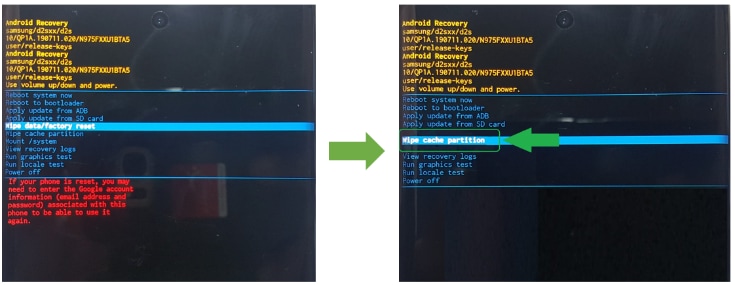
6. Select Yes to confirm
7. Select Reboot system now
Factory reset (if needed)
1. Back up all your important data
2. Go to Settings and perform a factory reset
3. Confirm the reset to remove leftover or conflicting system files
Notes:
Wiping cache does not delete personal data
Factory reset should only be used if the issue continues after other steps
Post-update lag or glitches are often temporary and resolve after system optimization
Thank you for your feedback!
Please answer all questions.