Simplified app names in Galaxy One UI 6
Last Update date : Apr 13. 2026
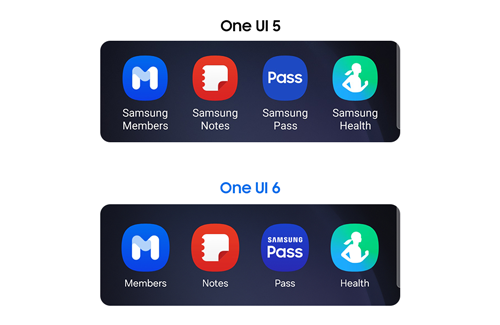
In Galaxy One UI 6 (Android 14), app names are simplified on the home screen to make them easier to read and recognise. Words like “Samsung” and “Galaxy” are removed from app labels, helping users find apps more quickly.
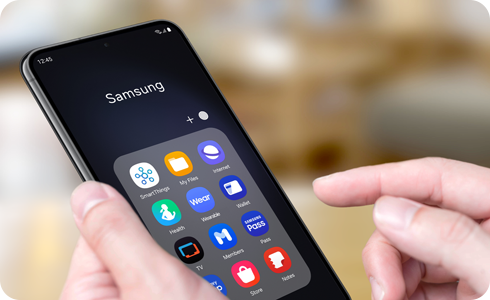
What changed in Galaxy One UI 6 app names?
- App labels are shortened to a
- Words like “Samsung” and “Galaxy” are removed from displayed names.
- The home screen and app screen appear cleaner and more organised.
Note: The actual app names have not changed—only how they are displayed.
Galaxy One UI 5


Galaxy One UI 6


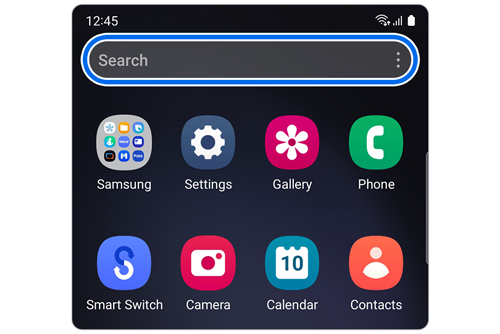
How to find apps with full names
- Open the Apps screen.
- Use the search bar to search by the full app name.
- Or go to Settings > Apps.
- View the full app names in the app list.


Samsung apps with revised labels
|
App Name (Galaxy One UI 5) |
App Name (Galaxy One UI 6) |
|---|---|
|
Galaxy Store |
Store |
|
Samsung Members |
Members |
|
Samsung TV Plus |
TV |
|
Samsung Music |
Music |
|
Samsung Pay |
Pay |
|
Samsung Pass |
Pass |
|
Samsung Wallet |
Wallet |
|
Galaxy Wearable |
Wearable |
|
Samsung Notes |
Notes |
|
Samsung Kids |
Kids |
|
Samsung Flow |
Flow |
|
Samsung News |
News |
|
Samsung Global Goals |
Global Goals |
|
Samsung Cloud |
Cloud |
|
Samsung Health |
Health |
Notes
- App availability may vary by country.
- Changes apply to Galaxy devices running One UI 6 (Android 14).
- UI appearance may differ depending on device model and region.
Thank you for your feedback!
Please answer all questions.