
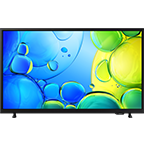




Watch in vibrant colour on our sleek and slim design
*Samsung TV has been ranked No.1 selling TV Brand for 18 consecutive years by Omdia.
Top 4 Features
Dynamic Crystal Colour
Everything you watch comes to life in over a billion colours
AirSlim Design
Stunningly slim and sleek
Samsung Knox Security
Your privacy, secured
Endless Free Content
Access free channels with Samsung TV Plus and more
Dynamic Crystal Colour
See crystal clear, lifelike colour come to life
Whether you're bingeing on a boxset or feasting on a blockbuster, you’ll see everything in crystal clear and lifelike colour. Dynamic Crystal Colour delivers rich and vibrant images in over one billion shades – 64 times more than conventional UHD TVs.
AirSlim Design
A stunningly slim and sleek design
You don’t just want your TV to look good when it's on - you want it to blend into your room when it's off too. This TV has a slim design with a clean cable solution, so it will look stunning from any angle.
Samsung Knox Security
Your privacy. Secured.
Samsung Knox ensures that confidential and sensitive data stays safe, with multi-layered security; automatic blocking of harmful attacks; and constant audits, updates and monitoring*. It even protects all the Home IoT devices connected to your TV**. It's your privacy, secured.
*Security software update is guaranteed for at least three years from product launch. Latest software update is required.
**Must be connected to Samsung TV via SmartThings.
Smart TV powered by Tizen*
Your favourite apps on the best-selling Samsung Smart TV**
Dive into a huge collection of 4K films, TV shows, and all your catch-up TV apps – including Netflix, RTE Player, Disney+, Apple TV and NOW apps*** – all in one place.
*Samsung account required to access our network-based smart services and apps.
**Samsung TV has been ranked No.1 selling TV Brand for 18 consecutive years by Omdia.
***Subscriptions required. Some apps may not be available at launch. 3rd party content providers may remove apps from the Smart TV platform or stop updating them at any time.
Endless Free Content
Access over 200+ free channels
Enjoy news, sports, movies, entertainment, music, kids’ shows and more. With new content continuously added,
there’s always more to explore.
*Channel number correct as of May, 2024. Downloading apps, signing up, and logging in may be required to access channels provided by third-parties.
*Requires Samsung account.
Samsung TV Plus
Entertainment for every day. Always for free.
Watch 1000s of TV shows and movies, for free, with Samsung TV Plus. Get instant access to live and on demand entertainment like The Jamie Oliver Channel and The Graham Norton Show. Stream the latest news on CNN and catch-up on kids shows, sports highlights and more with no strings attached.
*Samsung account and internet connection required.
Picture Quality
4K Upscaling
Watch your favourite content in 4K
Whether you are watching your favourite YouTube videos or streaming the latest boxset, experience everything you love in near 4K picture quality thanks to powerful 4K upscaling.
*Upscaling may not apply to PC connection and Game Mode.
The Samsung Crystal UHD Processor 4K chip is on display in the middle amidst many colorful plates and ornaments.
Crystal Processor 4K
Upgrade the picture and sound quality
Think of the processor as the brain of the TV. This processor works in the background to boost the quality to 4K detail and optimise the sound depending on what's playing. Streaming movies or watching live sport, you’ll feel part of the action.
HDR powered by HDR10+
See depth and detail in every scene
HDR - or High Dynamic Range – opens up previously hidden depth and detail in the lightest and darkest scenes. HDR is the range from the lightest to the darkest areas of the picture, and the wider the range the more lifelike the image.
Contrast Enhancer
Enhanced depth and colour
Enjoy striking images with enhanced depth and colour contrast ratio.
Sound
A person on a motorcycle is zipping past from one side to another. Built-in speakers follow the sound of the motorcycle as it moves.
Object Tracking Sound Lite
Sound that tracks the action on-screen
Object Tracking Sound Lite chooses which of the TVs front speakers the sound comes through depending on where the action is happening on screen. So you can hear a car fly along your screen or the crowd cheering all around you.
Soundwaves beneath the TV change in shape as the TV sound adapts to the news, orchestra and basketball game being displayed.
Adaptive Sound
Enjoy sound perfected to what you're watching
Whether you're watching dialogue, sports, the news or the latest blockbuster - your audio needs are different. Adaptive Sound recognises the content on screen and adjusts the sound to what you're watching.
Only sound from the Soundbar was activated when Q-Symphony was off, but sound from both the TV and Soundbar turned on when Q-Symphony turned on.
Samsung Q-Symphony
Samsung TVs and soundbars play together in perfect harmony
Heighten your viewing experience with the benefit of great sound quality delivered from both the TV speakers and soundbar, at the same time. Get the audio experience your Samsung TV deserves.
*Compatible Samsung Soundbar required.
Elevate your sound experience
Cinematic Q-Series Soundbar
3D surround sound for the ultimate cinematic experience
Experience clear picture and smooth performance. Samsung’s clear motion rate algorithms predict and automatically compensate frames, so your picture adapts as fast as your game.
*85" supports Motion Xcelerator 120Hz. Viewing experience may vary according to types of content and format.
Two screens with the Auto Low Latency Mode On and Off during gameplay. As jump is pushed on the controller, the character on the screen with the feature On jumps faster than it does on the screen with the feature Off.
Auto Low Latency Mode (ALLM)
Knows when you're ready to play
Never miss an overtaking move in your favourite racing game thanks to incredibly low input lag. Your TV knows when you're ready to play so it automatically switches to minimise input lag.
Tizen OS
Multiple Voice Assistants
Control your TV with your favourite Voice Assistant
Control your TV with your favourite Voice Assistant - with Bixby and Alexa built-in to your TV. Ask them to change the volume, find that new series, bring up your holiday photos, or check on your connected devices in your smart home. The possibilities are endless – you just need to ask.
* Bixby/Alexa built-in
**Samsung account required. Amazon, Alexa, and all related logos are trademarks of Amazon.com, Inc. or its affiliates.
Samsung Daily+
Manage your daily activities
Samsung Daily+ brings together apps such as SmartThings, Workspace and Samsung Health so that you can easily manage your daily activities and lifestyle from the comfort of your TV.
*Samsung account and internet connection required.
SmartThings
Control your smart home from your TV
From game consoles and smart lighting, to speakers and 1000s of smart devices, Samsung Smart TV gives you control at the touch of a button*. You can even monitor home cameras, or see who’s at the door from the comfort of your sofa. All to make your life easier, more secure, and more connected.
*Requires Samsung Account, SmartThings app, Internet connection, and SmartThings enabled devices.
Security & Conscious Living
SolarCell One Remote
Control all your devices with one solar-powered remote
Consciously crafted, the universal remote can control all of your compatible devices. It charges on indoor light and keeps its charge from Radio-Frequency power harvesting, so you don't need any disposable batteries*.
*Must be charged via USB C cable (sold separately) if battery is fully drained.
When AI Energy Mode is off, the surroundings around the TV appear bright. A smartphone screen displaying AI Energy Mode pops up, and it switches from Off to On. With adaptive brightness and AI Energy Mode activated, the energy level decreases significantly, and the scale shifts from day to night.
AI Energy Mode
Monitor and reduce your energy consumption*.
Save energy* with AI Energy Mode and SmartThings**. With AI Energy Mode, your TV adjusts the brightness depending on the content you are watching and the surrounding light levels in your room*** to reduce overall energy consumption. Then, you can monitor the energy usage of your TV and other compatible devices through Map View on your TV.
*Energy saving may vary according to model, viewing conditions or types of content. Does not work with gameplay or viewing priority modes. Energy savings based on internal test results and may vary.
**Requires SmartThings app, Internet connection, and SmartThings enabled devices.
***Adaptive Brightness will not operate in environments exceeding 80 lux.
Buy direct. Get more.
Specifications
Resolution
4K (3,840 x 2,160)
HDMI
3
USB
2 x USB-A
LED
Screen Size
55"
Refresh Rate
50Hz
Resolution
4K (3,840 x 2,160)
Processor
Crystal Processor 4K
HDR (High Dynamic Range)
HDR
HDR 10+
Support
Contrast
Mega Contrast
Micro Dimming
UHD Dimming
Contrast Enhancer
Yes
Motion Technology
Motion Xcelerator
Upscaling
4K Upscaling
Filmmaker Mode (FMM)
Yes
Object Tracking Sound
OTS Lite
Samsung Q-Symphony
Yes
Audio Pre-selection Descriptor
Yes
Sound Output (RMS)
20W
Speaker Type
2CH
Adaptive Sound
Adaptive Sound
Operating System (OS)
Tizen™ Smart TV
Bixby
Yes
Built-in Voice Assistant
Alexa (GB, DE, FR, IT, ES, AT, IE)
Works with AI Speaker
Alexa (GB, DE, FR, IT, ES, AT, IE), Google Assistant (GB, FR, DE, IT, ES, CH, AT, NL, SE, NO, DK, FI, PT, IE, BE, LU)
Samsung TV Plus
Yes (GB, FR, DE, IT, ES, CH, AT, NL, SE, NO, DK, FI, PT, IE, BE, LU)
27 European Languages + Russian(only when connecting to Network in EE,LV,LT)
Accessibillity - Voice Guide
UK English, Finnish, France French, German, Greek, Hungarian, Italian, Norwegian, Polish, Portugal Portuguese, Romanian, Slovak, Spain Spanish, Swedish, Czech, Danish, Dutch, Korean
Low Vision Support
Audio Description, Zoom Menu and Text, High Contrast, SeeColors, Color Inversion, Grayscale, Picture Off
Hearing Impaired Support
Closed Caption (Subtitle), Multi-output Audio, Sign Language Zoom
Motor Impaired Support
Slow Button Repeat, Remote Control App. for All
Power Supply
AC220-240V~ 50/60Hz
Power Consumption (Max)
160 W
Power Consumption (Stand-by)
0,50 W
Eco Sensor
Yes
Power Consumption (Typical)
80,0 W
Yearly Power Consumption (EU standard)
111 kWh
Auto Power Off
Yes
Auto Power Saving
Yes
Energy Efficiency Class
G
Package Size (WxHxD)
1399 x 846 x 148 mm
Set Size with Stand (WxHxD)
1232.1 x 747.8 x 228.8 mm
Set Size without Stand (WxHxD)
1232.1 x 708.8 x 25.7 mm
Stand (Basic) (WxD)
904.1 x 228.8 mm
VESA Spec
200 x 200 mm
Package Weight
19,90 kg
Set Weight with Stand
15,80 kg
Set Weight without Stand
15,5 kg
Remote Controller Model
TM2360E (UK Add TM1240A)
Slim Fit Wall-mount Support
Yes
Optional Stand Support (Y20 Studio)
Yes
Mini Wall Mount Support
Yes
Full Motion Slim Wall Mount Support (Y22)
Yes
Webcam Support
Yes
Zigbee / Thread Module
Dongle Support
User Manual
Yes
Power Cable
Yes
Reviews
55” Crystal UHD DU8070 4K Smart TV (2024)
Product rating : 4.0
Recommended by 83% of customers.
5.045%
4.022%
3.022%
2.011%
1.00%
FeaturesProduct Ratings : 2.5
PerformanceProduct Ratings : 4.0
DesignProduct Ratings : 4.4
ValueProduct Ratings : 4.6
AI Soccer ModeProduct Ratings : 5.0
AI SoundProduct Ratings : 5.0
AI UpscalingProduct Ratings : 5.0
Vision AI CompanionProduct Ratings : 5.0
Filters
Relevancy sort puts the best reviews at the top. We look at things like helpfulness votes, latest review, pictures and other traits that readers look for in their reviews.
Filters
9 Reviews
Craigzilla
Product Ratings : 4
(Number of Ratings :9,999)
2025-05-25
Ilkley, West Yorkshire
size : 55
Product Ratings : 4(Number of Ratings :9,999)
I was considering buying a QLED TV but I am on a tight budget so I opted for a Crystal UHD model and I couldn’t be more pleased. The picture is really good and not much drop off when viewing at an angle. One issue was that the TV kept switching back to the built in speakers randomly when I had changed it to Optical out, but this seems to have stopped happening now.
We are over the moon to see you are loving your Crystal UHD 4K Smart TV!
Thanks to Dynamic Crystal Colour, it will deliver rich and vibrant images in over one billion shades, helping you bring your viewing experience to a whole new life!
If you ever have any questions, our helpful Support Teams are on hand to help. You can find their contact details and opening hours here: https://www.samsung.com/uk/support/contact/ ^LB at Samsung Support
Giuseppe1955
Product Ratings : 3
(Number of Ratings :9,999)
2026-01-15
size : 55
Product Ratings : 3(Number of Ratings :9,999)
Ho comprato la televisione a maggio ora a gennaio ho bisogno di assistenza (può succedere) ma il mio grado di soddisfazione finale dipenderà dallo svolgimento e dall’esito della suddetta pratica
Un buon televisore , ovviamente avendo televisori samsung 65" di qualità e costo superiori si notano le differenze, ma ottimo per la destinazione d'uso
I'll start with an answer to what is probably the most common question about this model: What's the difference between the 8000 and 8070? The 8000 has a terrestrial tuner (Freeview HD in the UK), the 8070 also has that plus an additional tuner for satellite input (Freesat HD in the UK).
I bought this model because it has Freeview and Freesat. The worst thing about this model is that you cannot take full advantage of the additional tuner and switch between Freeview and Freesat inputs without going through setup again, deleting and rescanning all channels from scratch.
There are appalling bugs in user interface:
1. If you accidentally press the Samsung TV Plus button on the remote control, it deletes the Freesat channels, so you have to go through setup again, deleting and rescanning all channels from scratch. I'm planning to take the remote control apart just to remove this button.
2. Accessing the Freesat TV guide cuts out all video and audio.
3. Enabling subtitles should simple, via the dedicated remote control button. Unfortunately it takes you to a large accessibility menu which speaks over the program that you were already struggling to hear.
4. On some Freesat channels the subtitles don't work. Eg. GB News (channel 216). However, my Humax HD Freesat box displays the subtitles without issue.
Just for info, I'm using the latest software version 1201.
Currently there are far more HD channels on Freesat than on Freeview. So, despite all of the above, if you're about to purchase the 8000 model anyway, I'd recommend getting the 8070 instead simply because it's the same price.
We're sorry to see that you aren't fully enjoying your DU8070 TV due to broadcast issues. To switch between different broadcast inputs, please select the 'Channel List' button in the middle of your remote. Please note that the usability of this function does depend on the incoming broadcast signal.
We would not recommend dismantling the remote, for your safety and to retain the usability and warranty.
Thank you for your feedback regarding the process to turn subtitles on. To enable subtitles, please head to Settings > All settings > General & privacy > Accessibility > Subtitle settings > Try now, however, some channels may not have subtitle data.
For further support with the deletion of channels, or any other issues that remain following the above guidance, please reach out to our Support Teams, who will be happy to help. You can find their contact details and operating hours here: https://www.samsung.com/uk/support/contact/ ^SK at Samsung Support
These reviews are managed by Bazaarvoice and comply with the Bazaarvoice Authenticity Policy, which is supported by anti-fraud technology and human analysis. Details at