How to display the watermark and the date and time on the picture captured by Galaxy camera
Last Update date : Apr 14. 2026
You can add a watermark and display the date and time on photos using the Galaxy Camera settings. This helps you personalise your pictures and track when they were taken.
Add watermark and date/time on photos
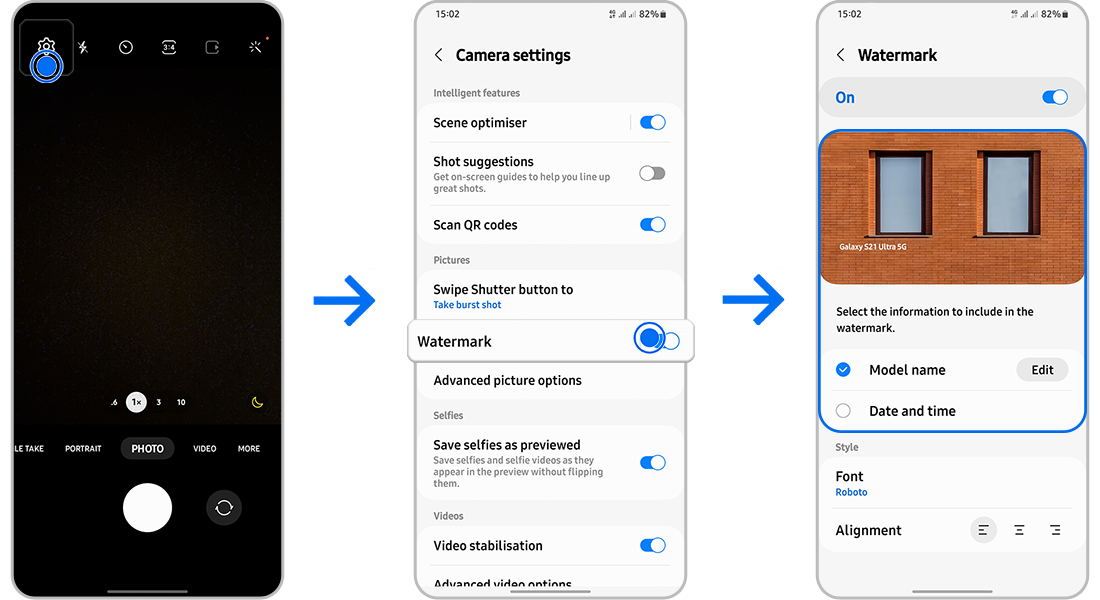
- Open the Camera app and tap the Settings (gear icon).
- Tap Watermark, turn it on, and edit the Model name if needed.
- Turn on Date and time, then preview the changes on the sample image.
Notes
- The watermark applies to all new photos after enabling the feature.
- You can customise the watermark text and format.
- Feature availability may vary by device and software version.
Thank you for your feedback!
Please answer all questions.