How can I improve audio quality on my Samsung Galaxy Buds2
Poor sound on Galaxy Buds2 is usually caused by incorrect fit, interference, dirt buildup, or outdated software. Adjusting fit and cleaning the earbuds can quickly improve audio quality.
Check 1. Make sure that you wear the earbuds properly and adjust them to fit your ears
Step 1: Check the L and R labels and place each earbud correctly
Step 2: Adjust the earbuds to fit securely in your ears
Step 3: Use the Galaxy Wearable app fit test if needed
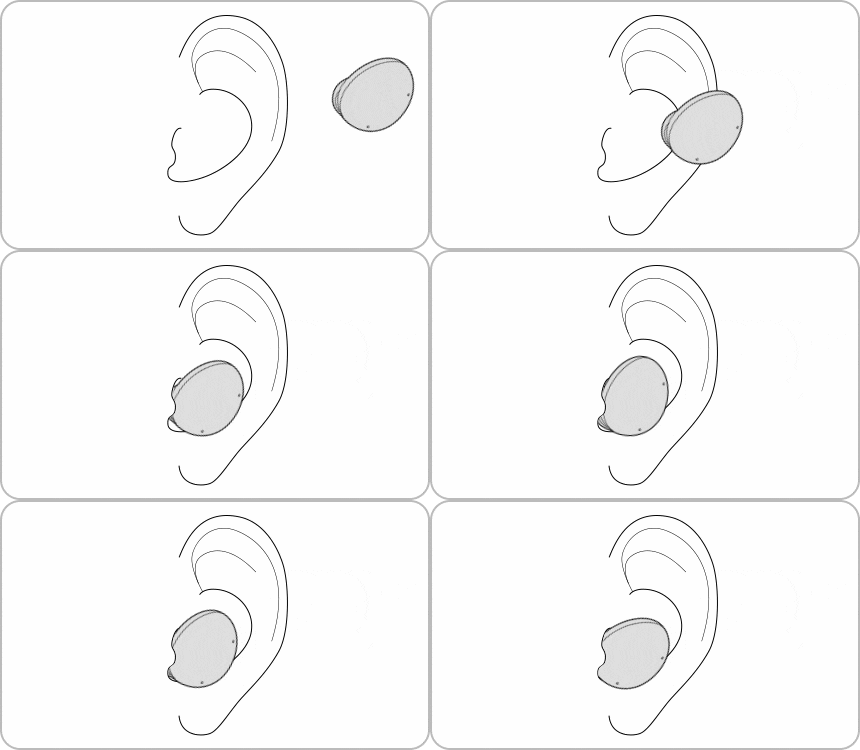
Notes:
A proper seal improves sound quality and noise canceling.
Step 1: Keep your phone and earbuds close together
Step 2: Move away from crowded or high-interference areas
Step 3: Reconnect Bluetooth if needed
Notes:
Interference or distance can reduce audio quality.


Step 1: Increase volume on your connected device
Step 2: Adjust sound settings if needed
Notes:
Low device volume may affect overall audio output.
Step 1: Open the Galaxy Wearable app
Step 2: Tap Earbuds settings
Step 3: Tap Earbuds software update
Step 4: Tap Update
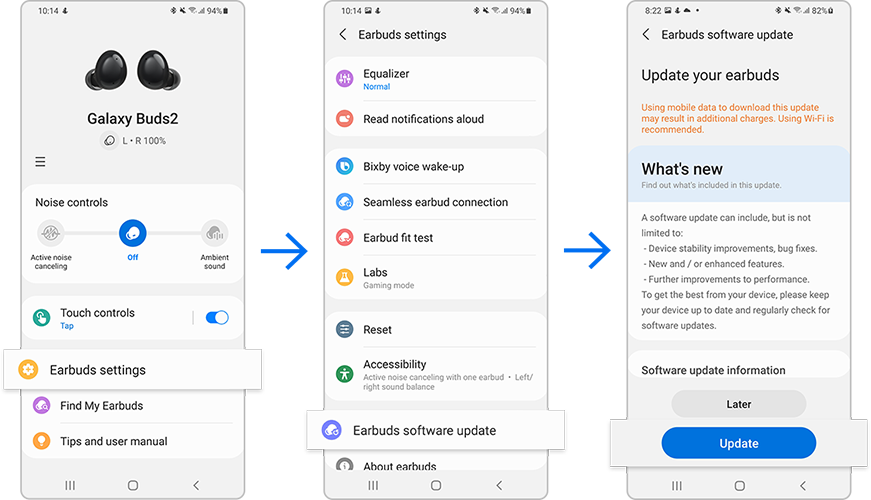
Notes:
Updates improve performance and fix audio-related issues.
Note: Device screenshots and menus may vary depending on the device model and software version.

Thank you for your feedback!
Please answer all questions.