How to Fix Fan Noise on a Samsung Refrigerator
Why is my Samsung refrigerator making fan noise when closed?
If your Samsung refrigerator is making whining, buzzing, or grinding noises while the door is closed but stops when opened, it could be due to the cooling fan encountering obstructions or operating under stress. This guide explains common causes and how to resolve them effectively.
1. Why does the fan noise stop when the door opens?
The fan in your Samsung refrigerator automatically shuts off when the door is opened to conserve energy. If the noise occurs only when the door is closed, it suggests the fan is running under unusual conditions—such as being unbalanced, obstructed, or working harder than necessary due to poor sealing or ventilation.
2. How to fix fan noise in your Samsung refrigerator
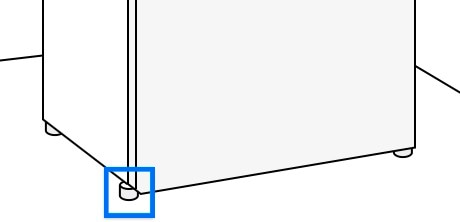
- Check and adjust the refrigerator leveling: Ensure both front wheels are touching the ground. If only one wheel is touching, the fridge is unbalanced. Adjust the front feet to raise the front of the fridge to its maximum height, then level it from side to side.
- Inspect the door seals: Examine the gaskets around the fridge doors for dirt, debris, or damage. A damaged or dirty seal reduces insulation, forcing the fan to work harder to maintain temperature.
- Clear vents inside the fridge: Remove any food items blocking rear vents. Maintain at least 5 cm of clearance around all vents to prevent frost buildup and ensure proper airflow.
- Allow time for adjustments: After completing the above steps, let the refrigerator run for at least 24 hours to see if the noise resolves.
3. Additional things to check
- Fan motor condition: If the noise persists, the fan motor may be worn out or malfunctioning. This typically requires professional service.
- Internal obstructions: Check for loose items or debris near the fan housing that might cause interference.
- Temperature settings: Ensure the fridge is set to an appropriate temperature (usually 3–4°C). Overcooling can strain the fan.
4. Supported Samsung refrigerator models
These troubleshooting steps apply to most modern Samsung refrigerators, including side-by-side, French door, and top-mount models. Compatible with models such as RF28R7351SG, RF29RB7351SG, and other recent Samsung fridge families.
5. When to contact Samsung support
If the fan noise continues after checking leveling, seals, and vents, or if you suspect a mechanical issue with the fan motor, contact Samsung Support for professional assistance. Our technicians can diagnose and repair internal components safely.
Related Samsung support topics

Thank you for your feedback!
Please answer all questions.