Can’t activate the Multi window feature
Important Note: The information on this page is for Hong Kong products only. Models, sequences or settings will vary depending on location and/or where the product had been purchased. To be redirected to your local support page please click here.
Q: I can’t activate the Multi window feature of Galaxy S5. There is no response when I try to touch and drag the activation switch to the right to enable the feature. Is my device faulty?
A : If you cannot activate the Multi window feature, please check whether Easy mode on device is enabled or not.
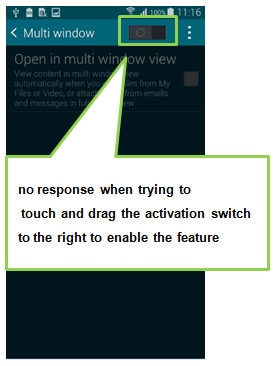
Easy mode lets you use your device with a simpler home screen layout and straight forward application interactions, but it limits some of the features available.
As a result, if Easy mode is enabled, you can’t use Multi window feature
[How to check whether the Easy mode is on or off]
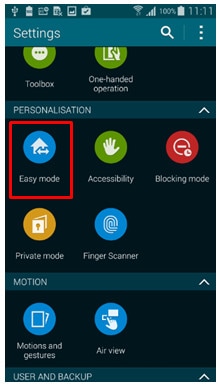
1.In the settings area of the device tap on “easy Mode”
2.Tap here to enable (or if enabled, disable) Easy Mode
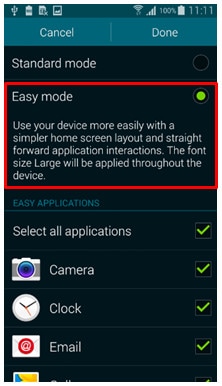
※ Easy mode lets you use your device with a simpler home screen layout
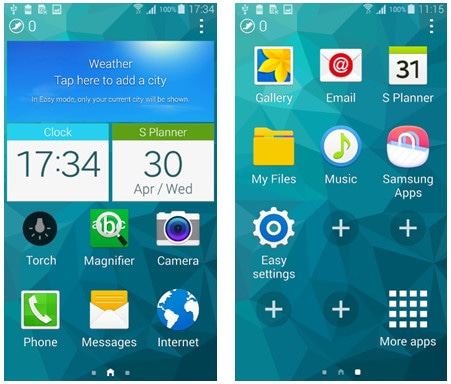
※Please note:
When using Easy mode it is still possible to have the home screen set to the normal Touch Wizz Home, and not the Touch Wizz easy home screen mode – which can in some cases lead to misunderstanding as the device may at first glance to appear to not be in Easy Mode, when is actually is.
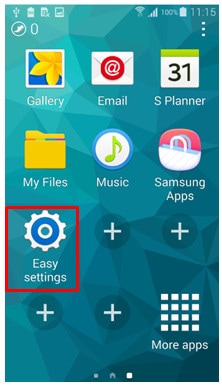
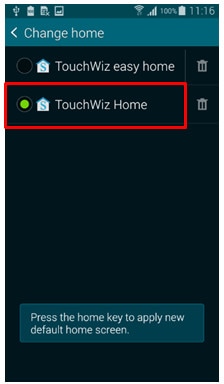
[How to change TouchWiz Home screen mode]
1.Tap “Easy Settings” .
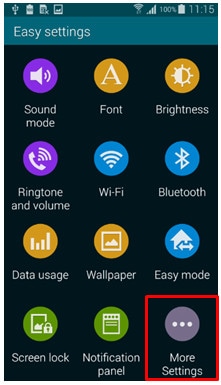
2. Tap "More Settings".
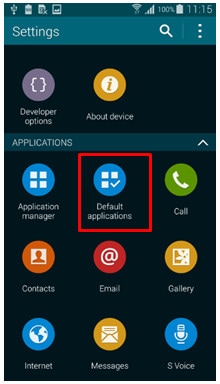
3. Tap "Default applications".
4. Tap "Home" to change home style.
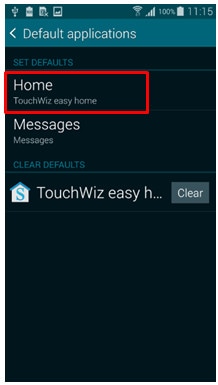
5. Tap "TouchWiz Home".
If the above information does not match what your product is showing, you may check the User Manual for your product. If you are unable to solve the problem, please contact us for further assistance.
Thank you for your feedback!
Please answer all questions.
RC01_Static Content : This text is only displayed on the editor page