How do I add widgets to the Home screen?
Important Note: The information on this page is for Hong Kong products only. Models, sequences or settings will vary depending on location and/or where the product had been purchased. To be redirected to your local support page please click here.
What are Widgets
Widgets are small apps that launch specific app functions to provide information and convenient access on your Home screen.
Steps to Add Widgets onto Home Screen
Method 1. Tap and Hold on an empty space of the home screen until the "widgets" button appears
Method 2: Pinch on the Home screen diagonally with two fingers

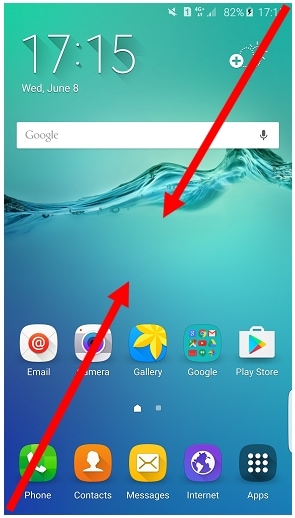
* Please note that some smartphone models may only support one of the above methods.


If the above information does not match what your product is showing, you may check the User Manual for your product. If you are unable to solve the problem, please contact us for further assistance.
Thank you for your feedback!
Please answer all questions.
RC01_Static Content : This text is only displayed on the editor page