How do I check if my GALAXY A3/A5/A7 support Dual SIM?
Important Note: The information on this page is for Hong Kong products only. Models, sequences or settings will vary depending on location and/or where the product had been purchased. To be redirected to your local support page please click here.
There are three possible ways to check whether your device supports dual SIM cards or not.
Method I
Dial *#06# ; if the Smartphone supports dual SIM, then there will be 2 IMEI numbers; if not, then there will only be 1 IMEI number.
Single SIM card Model

Dual SIM cards Model
Method II
Tap Apps > Settings to check whether there is an item called "SIM card manager".
Dual SIM card models contain SIM card manager but single-SIM models do not.

Method III
If you are not sure if your device supports Dual SIM functionality or not, you can also check the details on the SIM and SD card trays.
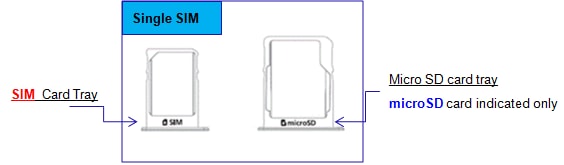

Please note, for Dual SIM Micro SD card tray, it is NOT possible to insert both SD card and SIM card into the card tray together. The tray can only hold one card at a time.
If the above information does not match what your product is showing, you may check the User Manual for your product. If you are unable to solve the problem, please contact us for further assistance.
Thank you for your feedback!
Please answer all questions.
RC01_Static Content : This text is only displayed on the editor page