How do I clean my Galaxy phone?
Last Update date : Feb 02. 2026
Important Note: The information on this page is for Hong Kong products only. Models, sequences or settings will vary depending on location and/or where the product had been purchased. To be redirected to your local support page please click here.
Please refer to the guidelines outlined below to clean and maintain your Galaxy phone.
To clean your phone, here are a few guidelines to follow.
- Before cleaning, power down your Galaxy smartphone, remove any case or cover, and unplug any cables or accessories.
- Use a soft, lint free, microfibre cloth such as a camera lens cleaning cloth to gently wipe the exterior surface of the phone.

- Avoid getting moisture in any opening and do not apply liquid solutions directly to your phone. If necessary, dampen the corner of your cloth with a small amount of distilled water or disinfectant, such as a hypochlorous acid – based (50-80ppm) or alcohol-based (more than 70% ethanol or isopropyl alcohol) product, and gently wipe the front and back of your phone without applying too much pressure. Avoid excessive wiping.
- Do not use compressed air, and do not apply or spray bleaches or liquid solutions directly on your phone.
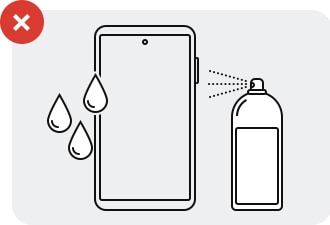
- This cleaning recommendation is only intended for the glass, ceramic and metal surfaces of your phone; it is not recommended for soft accessories, i.e. those that are made of leather, rubber or plastic.
Note:
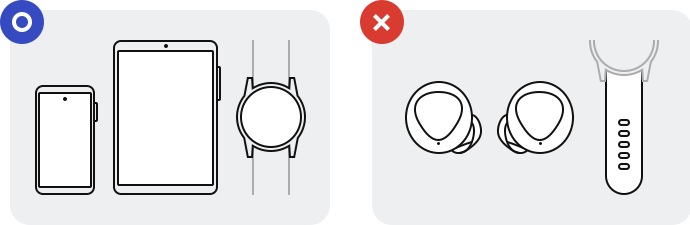
- Guidelines applies to : Galaxy smartphones , Galaxy tablets and the Galaxy Watch (excluding watch straps).
- Guidlines not applicable for : Galaxy Buds, keyboards (external keyboard and those of Galaxy laptops), plastic straps for wearables, and any other Samsung product not explicitly listed.
Disclaimer :
- Samsung cannot guarantee as to the efficacy of the proposed guidelines. Cleaning results may vary and may not kill all bacteria, germs and viruses.
If the above information does not match what your product is showing, you may check the User Manual for your product. If you are unable to solve the problem, please contact us for further assistance.
Thank you for your feedback!
Please answer all questions.
RC01_Static Content : This text is only displayed on the editor page