Curved Monitors


Filters
Filters



Frequently asked questions
-
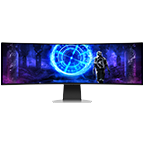
What is a Samsung curved monitor?A Samsung curved monitor features a curved screen design that wraps more naturally around your field of vision for a more immersive and comfortable viewing experience. Samsung offers curved monitors across its Odyssey and ViewFinity series.
-
How does a curved monitor improve the viewing experience?Curved monitors are designed to keep more of the screen within your natural field of view, helping improve immersion and viewing comfort. The curved design can also make larger screens feel more natural to view during extended use.
-
Are curved monitors better for gaming?Yes, Samsung curved monitors are designed to deliver immersive gaming experiences with features such as high refresh rates, fast response times and ultra-wide displays available on selected Odyssey models.
-
What curvature types are available (e.g., 1000R, 1800R)?Samsung curved monitors are available in different curvature options depending on the model, including 1000R and 1800R designs. Selected Odyssey gaming monitors feature a 1000R curve designed to closely match the natural field of view of the human eye for enhanced immersion.
-
Do curved monitors reduce eye strain?Curved monitors can help improve viewing comfort by keeping screen content at a more consistent viewing distance across the display. Select Samsung curved monitors also include Eye Saver Mode and Flicker Free technology for added viewing comfort during extended use.
-
Are curved monitors suitable for office work?Yes, Samsung curved monitors are suitable for office work, productivity and content creation. The wider and more immersive display can help users work across multiple applications more comfortably.
-
What sizes are available in Samsung curved monitors?Samsung curved monitors are available in a variety of sizes, including 27-inch, 32-inch, 34-inch, 49-inch and larger ultra-wide displays depending on the model lineup.
-
Can curved monitors be used for multitasking?Yes, Samsung curved monitors support multitasking with ultra-wide aspect ratios and features such as Picture-by-Picture (PBP) and Picture-in-Picture (PIP) on selected models.
-
Are curved monitors better than flat monitors?Curved and flat monitors are designed for different viewing preferences. Curved monitors provide a more immersive experience and can improve comfort on larger displays, while flat monitors may be preferred for certain professional workflows and compact setups.
-
Do Samsung curved monitors support high refresh rates?Yes, selected Samsung curved monitors support high refresh rates, including up to 240Hz on Odyssey gaming monitors, for smoother motion and responsive gameplay.
-
Can I buy a Samsung curved monitor with a 0% monthly installment plan?Yes. Interest-free installment plans are available for up to 12 months using select credit cards. You can select an available installment option at the payment stage during checkout.
-
Are there any offers available on Samsung curved monitors?Offers may vary by monitor and current Samsung Philippines promotion. Eligible monitor trade-ins can receive up to ₱5,000 off, and any additional savings are shown on the relevant product page.
-
Which Samsung curved monitor configuration offers the best value?The best configuration depends on screen size, resolution, curvature and intended use. Samsung offers curved monitors for gaming, productivity and creative work.
-
What payment options are available when buying a Samsung curved monitor in the Philippines?The Samsung Online Store supports available card payment options, including 0% installment plans for up to 12 months using select credit cards. The applicable options are shown during checkout.
-
What benefits do I get when buying a curved monitor from Samsung Philippines?Buying direct includes Samsung Rewards points on Online Store purchases, eligible Appliance Trade-Up savings, 0% installment plans for up to 12 months using select credit cards and official Samsung warranty. Samsung Care+ is available separately for eligible products.
-
What features do Samsung Odyssey curved monitors offer?Samsung Odyssey includes curved gaming-monitor options. Depending on the model, the range offers different curvature levels and gaming-oriented specifications.
-
How do I register my Samsung curved monitor?Product registration and support options are available through Samsung Support. Registration requirements may vary by monitor.
-
What details are required to register a Samsung curved monitor?The information required for product registration can vary by monitor. Check Samsung Support for the registration requirements applicable to your product.
-
Which curved monitor specifications are important for everyday use?Consider curvature, screen size, resolution, connectivity and intended use. Curved monitors are available with different curvature options depending on the model.
-
Are Samsung curved monitors suitable for professional and creative work?Samsung curved monitors can be suitable for office work, productivity and content creation. The best choice depends on your resolution, screen-space and workflow requirements.
-
What is the difference between a Samsung QLED monitor and a curved monitor?QLED refers to display technology, while curved refers to the physical shape of the display. These terms describe different monitor characteristics.
-
Are Samsung curved monitors suitable for PC gaming?Yes. Selected Samsung curved monitors support gaming-focused features such as higher refresh rates depending on the model.
-
What should I consider when choosing a Samsung curved monitor for long-term use?Consider curvature, resolution, screen size, connectivity and whether the monitor will primarily be used for gaming, productivity, entertainment or a combination of uses.
All specifications and descriptions provided herein may be different from the actual specifications and descriptions for the product. Samsung reserves the right to make changes to this document and the product described herein, at anytime, without obligation on Samsung to provide notification of such change. All functionality, features, specifications, GUI and other product information provided in this document including, but not limited to, the benefits, design, pricing, components, performance, availability, and capabilities of the product are subject to change without notice or obligation. The contents seen on or with the product are oftentimes simulated and are for demonstration purposes only.