What to do when calls disconnect or there’s no network signal on your Galaxy device
Last Update date : Apr 28. 2026
If your calls disconnect or your Galaxy device has no network signal, the issue may be related to device settings or your carrier. Follow the steps below to troubleshoot the problem.
Check your device settings
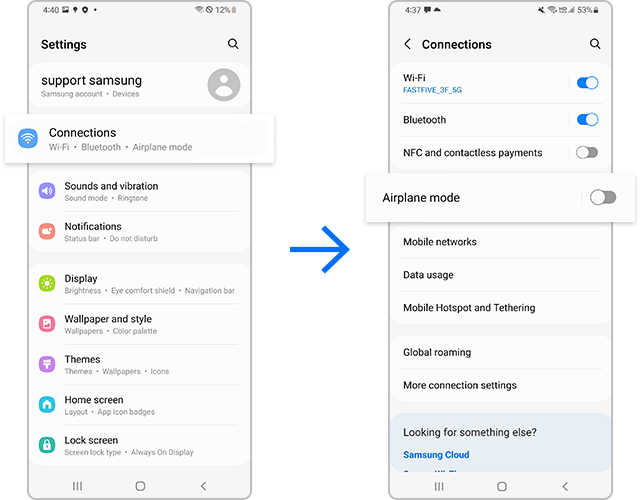
Turn off Airplane mode
1. Open Settings and tap Connections.
2. If Airplane mode is enabled, turn it off and check your signal.
Check if unknown or private numbers are blocked


Reset network settings
You may need to reset your network settings if your calls disconnect, or your device keeps losing network signal.


Note:
- This will reset Wi-Fi, Bluetooth, and mobile network settings.


Notes
- Network issues may be caused by carrier coverage or service interruptions.
- Resetting network settings will remove saved Wi-Fi networks and Bluetooth connections.
- Device menus may vary depending on model and software version.

Thank you for your feedback!
Please answer all questions.