Frequently asked questions about signing into Samsung account after Galaxy One UI 6.1 update
Important Note: The information on this page is for Hong Kong products only. Models, sequences or settings will vary depending on location and/or where the product had been purchased. To be redirected to your local support page please click here.
If you updated your software to One UI 6.1 without signing in to your Samsung account, you will be prompted to sign into your Samsung account in order to use certain Advanced intelligence (AI) features. If you have a Samsung account, enter your ID and password and set up two-step verification to sign in.
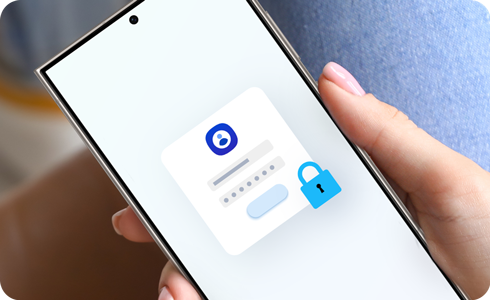
You can receive a two-step verification code in a notification on a secondary Galaxy device that is connected to the same Samsung account as your primary device. If you don't have a secondary Galaxy device or want to receive your two-step verification code in a different way (text message, backup code, etc.), proceed as follows.
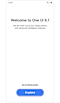

Step 1. After updating to One UI 6.1, select Explore.
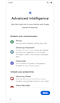

Step 2. Scroll down and tap Next.
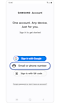

Step 3. Select Email or phone number.
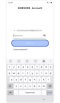

Step 4. Enter your email address and password > tap Sign in.
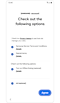

Step 5. Check terms and conditions > Tap Agree.
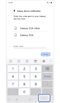

Step 6. Tap the down arrow icon to close the keyboard window.
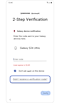

Step 7. Tap ‘Didn’t receive a verification code?’.
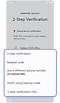

Step 8. Choose a two-step verification method.
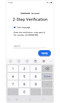

Step 9. Enter the verification code > Tap Verify.
In the below two cases, you can retrieve it by accessing the Samsung Account website through another mobile device or PC, or by skipping the Samsung Account login on that device.
- If you forgot your account's ID and password during the initial setup phase after updating One UI 6.1.
- You have locked your account by entering your password incorrectly multiple times during the sign-in process.
How to skip signing in to your Samsung account on Galaxy One UI 6.1
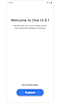

Step 1. After updating to One UI 6.1, select Explore.
Step 2. Scroll down and tap Next.
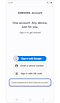

Step 3. Tap Forgot password or don’t have an account?
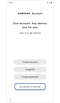

Step 4. Tap Set up later in Settings.
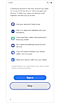

Step 5. Scroll down and tap Skip.
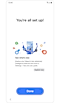

Step 6. Tap Done.
Notes:
- If you don't have a Samsung account, you can sign up for a Samsung account during the initial setup phase after updating to One UI 6.1. Follow the link to learn more about the Samsung account signup process and verification.
- Images used are simulated for illustrative purposes and the actual UI may vary by OS version, device model, region, etc.
If the above information does not match what your product is showing, you may check the User Manual for your product. If you are unable to solve the problem, please contact us for further assistance.
Thank you for your feedback!
Please answer all questions.
RC01_Static Content : This text is only displayed on the editor page