How to connect HDMI cable in Samsung H series TV
Last Update date : Feb 02. 2026
इस लेख को हिंदी में देखने के लिए कृपया यहाँ क्लिक करें
STEP 1. CONNECTING HDMI CABLE
CLICK HERE to learn about connecting a DVI device to an HDMI port on a Samsung H series TV.
a). Find the HDMI IN 1 connection port on your TV.
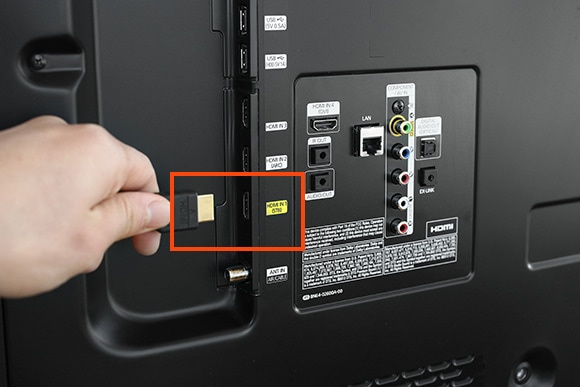
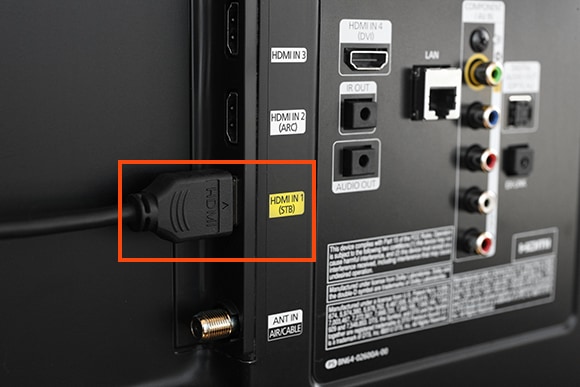
b). Plug one end of the HDMI cable into the HDMI IN 1 port on your TV.
c). Then, Find the HDMI port on your device.
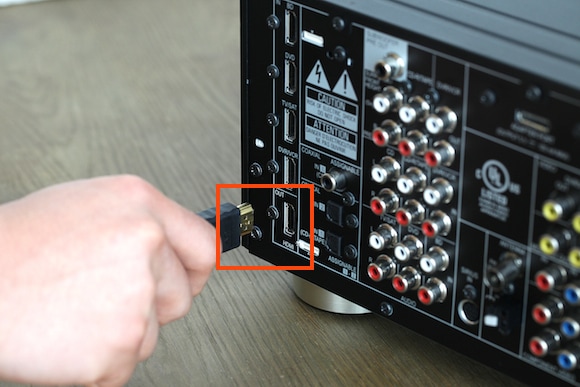
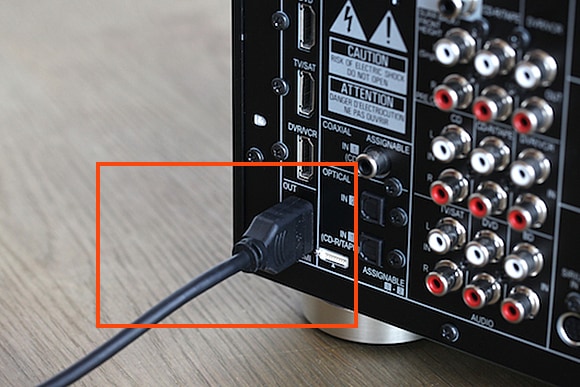
d). Connect the other end of the HDMI cable to your device.
Watch Video:
Explore how-to video for your TV on our offical Samsung India YouTube channel, click here.
Other topics you may be interested in:
Thank you for your feedback!
Please answer all questions.
Contact Info
Digital Service Center
![DSC icon image]()
![DSC icon image]()


Get customized support, access to DIY videos and FAQs, or schedule a callback request to connect with an expert.

Scan to access
Scan to access
WhatsApp
![WhatsApp image icon]()
![WhatsApp image icon]()


WhatsApp us for services-related interaction.
Languages offered : English/ हिन्दी/ Indian Regional Languages
Available 24 Hours / 7 days
WhatsApp@ 1-800-5-726-7864

Scan to access
Languages offered : English/ हिन्दी/ Indian Regional Languages
Available 24 Hours / 7 days
WhatsApp@ 1-800-5-726-7864
Scan to access


Remote Service
![Image of RM icon]()
![Image of RM icon]()


Remote diagnostics by our specially trained technicians for your Galaxy device and Samsung TV
CEO Office
![Image of CEO icon]()
![Image of CEO icon]()


Share feedback to CEO office & relevant team will get in touch with you promptly.
Phone Support (India)
![image of phone dialer]()
![image of phone dialer]()


Available: 9 AM to 7 PM (All 7 days)
Phone Support (Bangladesh, Sri Lanka, Nepal)
![Image of caller icon]()
![Image of caller icon]()
RC01_Static Content : This text is only displayed on the editor page