How to register your Samsung TV
इस लेख को हिंदी में देखने के लिए कृपया यहाँ क्लिक करें
Did you get a new Samsung Smart TV? Ensure to register your TV and enjoy more services for our customers. We will explain the advantages of registering your product and how to register yours on the TV.
Advantages of registering your TV
Registering your products gives you faster support and access to all of the services for your registered products in one account. Your account offers the following additional advantages:
- Product details are immediately available to Samsung Customer Service so that documents can be found easily and queries can be processed more quickly.
- Download the latest manuals, FAQs and instructions.
- Find online solutions to your concerns by creating a service request yourself.
- Track your service status online.

Step 2. Log in your Samsung account. You can use the same Samsung account that you signed up on your mobile device.
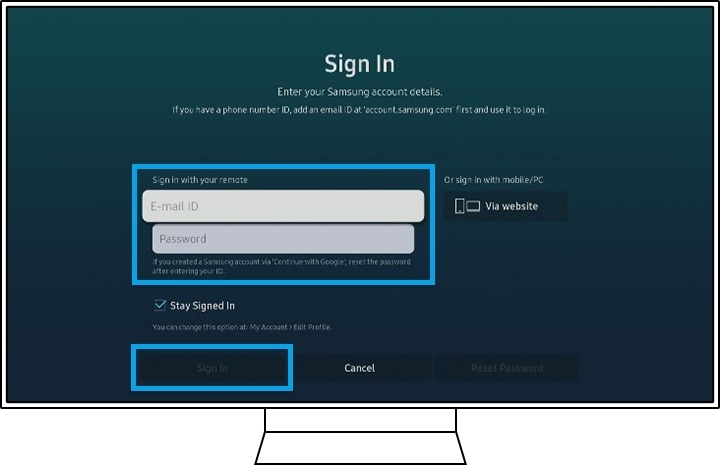
Note: If you don’t have Samsung account, you need to sign up an account to proceed product registering.
Step 3. Select TV Registration in My Account.

Step 4. Select Agree & Register button after reading on your TV screen.

Step 5. When the registration is finished, push enter to close.

Note: The device screenshots and menu are only samples in English - they are also available in the language of your country.
Note: QR code, barcode, Model number and Serial number on the sticker is usually on the side or back of the product or packaging. Also, you can check QR code, Model number and Serial number using remote control: Home > Settings > Support > About this TV.
Troubleshooting Registration Failure
- Using a VPN can make a connection problem. We recommend not using a VPN while registering.
- If you fail to register your product using the Samsung Members app, uninstall and reinstall the app.
Note:
- The device screenshots and menu may vary depending on the device model and software version.
- You can also register your product on the Samsung.com.
Thank you for your feedback!
Please answer all questions.
Contact Info
Digital Service Center
![DSC icon image]()
![DSC icon image]()



Scan to access
WhatsApp
![WhatsApp image icon]()
![WhatsApp image icon]()


Languages offered : English/ हिन्दी/ Indian Regional Languages
Available 24 Hours / 7 days
WhatsApp@ 1-800-5-726-7864

Scan to access


Remote Service
![Image of RM icon]()
![Image of RM icon]()


CEO Office
![Image of CEO icon]()
![Image of CEO icon]()


Phone Support (India)
![image of phone dialer]()
![image of phone dialer]()


Phone Support (Bangladesh, Sri Lanka, Nepal)
![Image of caller icon]()
![Image of caller icon]()
RC01_Static Content : This text is only displayed on the editor page