




Filters
Filters


FAQ
-
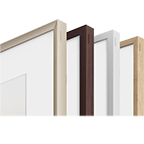
Can I customize the bezel of The Frame to match my home décor?It supports customisable magnetic bezels that can be easily snapped on in different colors to suit your room style or artwork preference.
-
Does The Frame use an anti-glare display so artwork looks clear even in bright rooms?Yes. The Frame features a Matte Display that minimizes reflections and glare, helping artwork appear true-to-texture and clear under bright lighting.
-
What is Art Mode?When turned off, The Frame switches to Art Mode, showcasing artwork from the Art Store, transforming the TV into a dynamic piece of wall art.
-
Can I place The Frame in different orientations and positions?Yes. The Frame offers a Multi‑Position Stand that allows various setups: traditional viewing, lean‑back style, and even vertical orientation to mimic the feel of a framed portrait.
-
Can The Frame be mounted flush to the wall like a real picture frame?Yes. It includes a Slim Fit Wall Mount, enabling the TV to hang nearly flush against the wall for a seamless, art-like appearance.
-
What buying options are available for Samsung The Frame TVs in New Zealand?Samsung The Frame TVs are available in New Zealand in a broad selection of sizes, including standard The Frame models and The Frame Pro. Compare the screen sizes, display features and installation options on Samsung.com to find the right fit for your room.
-
How can I order a Samsung The Frame TV online?Choose your preferred The Frame model and screen size on Samsung.com, add it to your basket where available and follow the checkout steps. Newly launched models may be listed for pre-order, so check the product page for current availability and delivery information.
-
Should I choose a 55-inch or 65-inch The Frame TV?A 55-inch The Frame can be a lovely fit for a smaller room, while a 65-inch screen creates a larger, more immersive view. The best choice depends on your space, viewing distance and how prominently you want the TV to feature on the wall.
-
Where can I check the specifications of a 65-inch The Frame TV?Open the product page for the 65-inch The Frame TV you are considering. It will list the picture and sound features, smart functions, connections, dimensions and installation details.
-
Can a 55-inch The Frame TV suit a smaller living room?Yes. A 55-inch The Frame can suit a smaller living room if the viewing distance feels comfortable and the TV fits the available wall space. Check the full dimensions and mounting requirements before deciding.
-
Is a 65-inch The Frame TV suitable for everyday viewing?Yes. A 65-inch The Frame is well suited to everyday streaming, films and sport when you sit around two metres away. Its Matte Display helps reduce reflections in bright rooms, while Art Mode allows it to display artwork when you are not watching television.
-
Can I use a compatible phone to control The Frame TV?Yes. Install the SmartThings app on a compatible Android or iOS phone, connect the phone and TV to the same Wi-Fi network, and register the TV. You can then control the TV and send your own photos to The Frame for display in Art Mode.
*Mother's Day Sale Promotion is valid only on selected products starting from 2:00pm, 13 April – 2:00pm, 11 May 2026. Offer valid until the promotion duration or stock lasts. Not stackable with any other promotion. T&Cs apply.
eVoucher Code valid until 02:00pm, 11 May 2026 and for a minimum cart value of $500. T&Cs apply.
* Key feature may different from Key Spec.
* App availability may vary by region and is subject to change at any time without notice.
* Flexible interest-free options with simple monthly repayments.
* Q Card: 12/24/36 Months Interest Free - Available on Long Term Finance (LTF) for online only. Min Spend $200/$600/$800 respectively. Lending criteria, $50 annual Account Fee, fees, T&Cs apply. $55 Establishment Fee applies to your first LTF transaction, $35 Advance Fee applies to subsequent LTF transactions. Min payments of 3 % of the monthly closing balance or $10 (whichever is greater) are required throughout interest free period. Paying only the minimum monthly payments will not fully repay the loan before the end of the interest free period. Standard Interest Rate of 28.95 % p.a. applies to outstanding balance at the end of LTF Interest Free Period. Other interest rates and fees may apply, please visit www.qcard.co.nz for further details. Rates and fees subject to change. Columbus Financial Services Limited and Consumer Finance Limited reserve the right to amend, suspend or terminate the offer and these T&Cs at any time without notice.
* Afterpay: Afterpay late fees, eligibility criteria and terms & conditions apply. Purchase up to a maximum cart value of $3000 NZD. Visit www.afterpay.com/en-NZ/terms-of-service for full terms.
**** Trade-in is only available with instant payment (Credit Card). After Pay, Q Card, G Pay, Finance Now, NOW Rewards Visa etc. are not available for transactions involving Trade-in or Trade-in bonus. For more information and T&Cs, visit the website at Samsung NZ | Trade-in and save. All Trade-in transactions will be subject to the full Trade-in Terms and Conditions, and may be subject to a Non-Return Charge, Device Condition Charge, or Rejection of Adjusted Value Charge, as applicable and as outlined in the Trade-in Terms and Conditions.