How to recover Samsung account ID or password?
Last Update date : Apr 23. 2026
If you forgot your Samsung account ID or password, you can recover it using your recovery email, phone number, or security question to regain access.
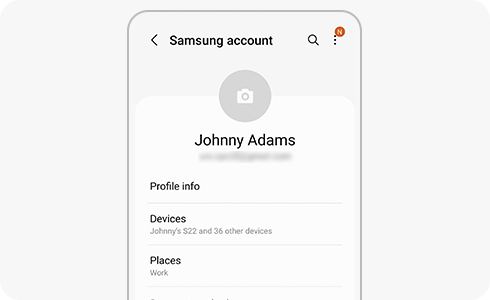
How to recover your Samsung account ID
1
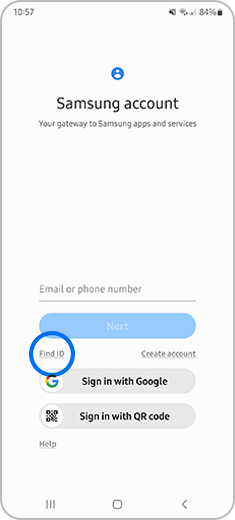
Step 1.Launch Samsung account ant tap “Find ID”.
![]()
2
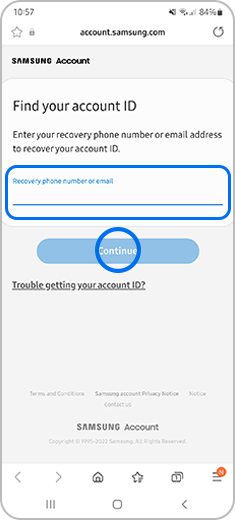
Step 2. Enter your Recovery phone number or email and tap “Continue”.
![]()
3
Step 3. Enter the requested data and tap “Continue”.
![]()

How to reset your Samsung account password
1
Step 1. Launch Samsung account and tap “Forgot password?”.
![]()

2
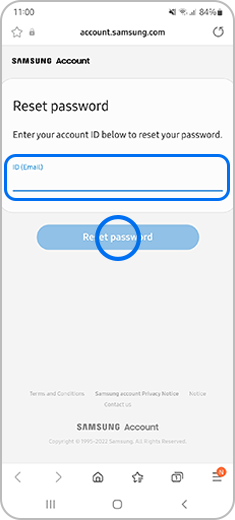
Step 2. Enter your ID (Email) and tap “Reset password”.
![]()
3
Step 3. If you did not verify your phone number when you registered for the Samsung account, you must enter your email address and click the “Continue”.
![]()

How to recover password using security question
1
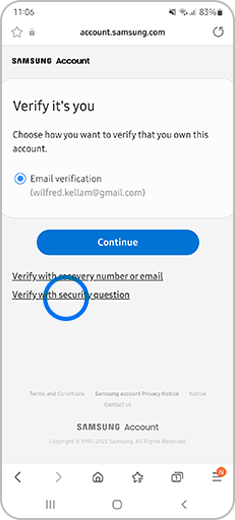
Step 1. At the Verify it´s you screen, tap “Verify with security question”.
![]()
2
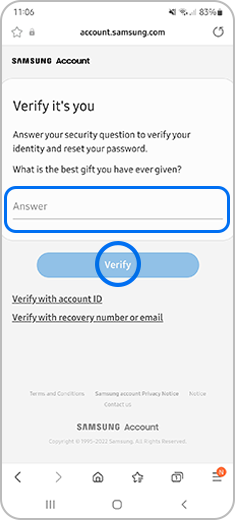
Step 2. Enter your Answer and tap “Verify”. If you answer is correct, you will be able to reset your password immediately.
![]()
Notes:
- A password reset email will be sent to your registered email address.
- Contact support if you cannot access your email or receive the reset email.
Thank you for your feedback!
Please answer all questions.