Why is my Samsung phone not charging with a wired charger
Wired charging issues are usually caused by damaged cables, debris in the charging port, or incorrect settings. Checking these common causes can quickly restore charging.
Check 1. Check your charger or charging cable
- Use a Samsung authorized charger and cable
- Check for damage like cracks or exposed wires
- Reconnect the cable firmly to the device
- Try a different charger or cable
- Test charging from a wall outlet instead of a PC

Notes:
Incompatible or damaged accessories are a common cause of charging issues.
Check 2. Remove foreign debris from the charging port
Step 1. Turn off your device.
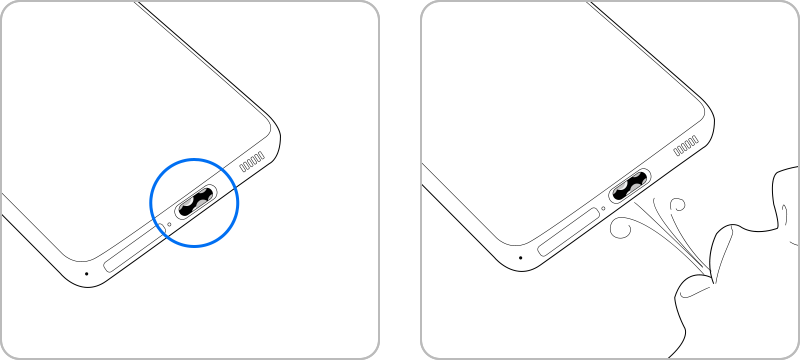
Step 2. Using a flashlight, look inside the charging port. If there is dust or debris near the metal terminal, cleaning is required.
Step 3. Gently blow into the charging port to remove the dust and debris.
Step 4. If your charging port is completely blocked, seek professional help from your nearest service center.
Notes:
Dust or lint can prevent proper connection between the cable and device.
Check 3. Fast charging option


Note:
- You cannot enable or disable this feature while charging.
- Fast charging will not be enabled when connected to a PC or USB device that does not support Fast charging.
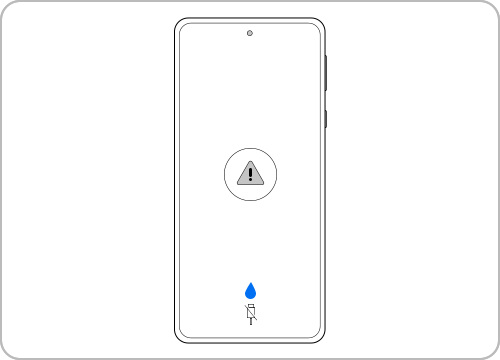
Check 4. Moisture detected error notification
- Disconnect the charger
- Dry the device using a clean cloth
- Leave it in a ventilated area to dry completely
Note: Device screenshots and menus may vary depending on the device model and software version.

Thank you for your feedback!
Please answer all questions.