गैलेक्सी डिवाइस पर एप्स स्क्रीन में होने वाले बदलावों के लिए गाइड
To read this article in english, click here
One UI 7 पर चलने वाले गैलेक्सी डिवाइसों में एप्स स्क्रीन लेआउट और नेविगेशन अनुभव में कई बदलाव किए गए हैं। इन अपडेट्स में एप सॉर्टिंग, सर्च बार की स्थिति और स्क्रीन स्क्रॉलिंग व्यवहार में समायोजन शामिल हैं। यह गाइड इन सुविधाओं का संक्षिप्त विवरण प्रदान करेगी, जिसमें दक्षता और उपयोगिता बढ़ाने के उद्देश्य से किए गए सुधारों पर प्रकाश डाला जाएगा।

नोट: अपडेट सॉफ्टवेयर संस्करण, डिवाइस मॉडल, क्षेत्र आदि के आधार पर भिन्न हो सकते हैं।
खोज (सर्च) बार की स्थिति
गैलेक्सी डिवाइसों में सर्च बार को नीचे की ओर स्थानांतरित कर दिया गया है, जिससे एक हाथ से उपयोग करने वाले उपयोगकर्ताओं के लिए उपयोगिता में सुधार हुआ है और हाथ की स्थिति को समायोजित करने की आवश्यकता के बिना ही इसे एक्सेस किया जा सकता है।
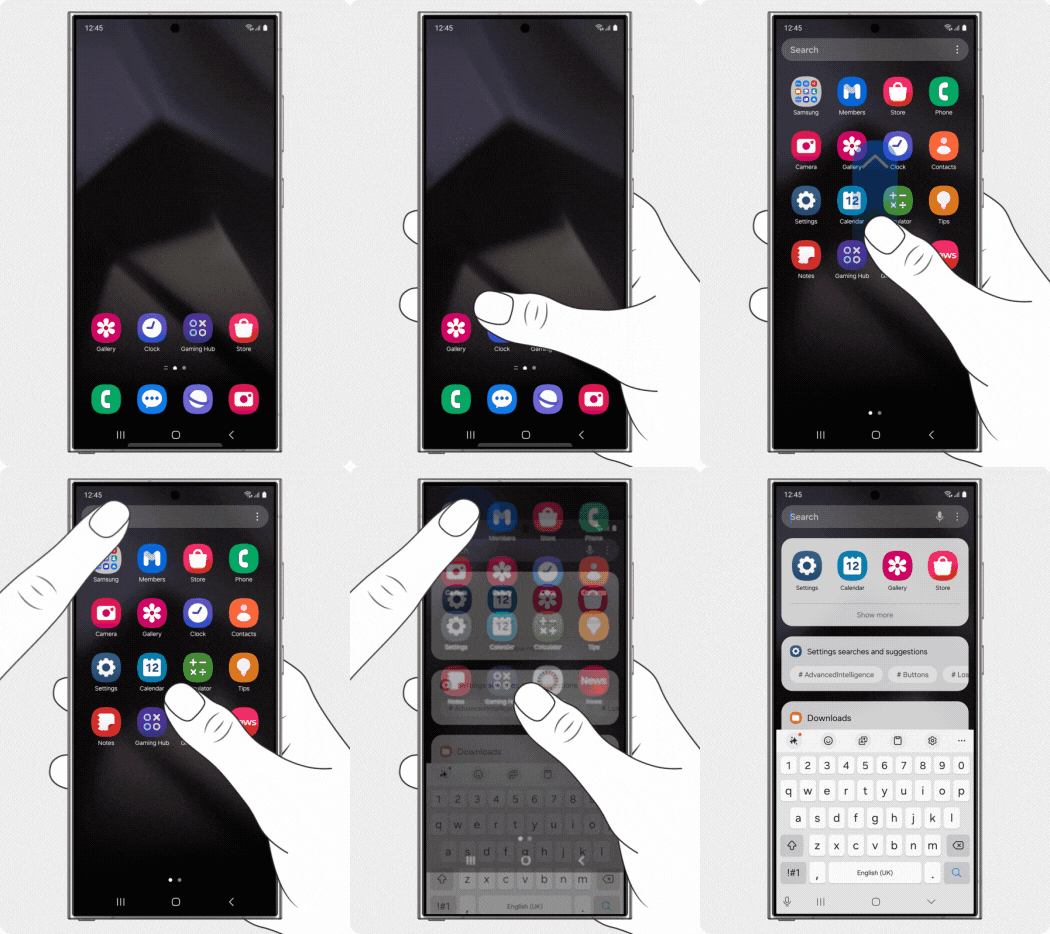
One UI 6


One UI 7 में एक हाथ से उपयोग करने की सुविधा को बेहतर बनाया गया है।
एप्स स्क्रीन वर्टिकल स्क्रॉल सपोर्ट
अब Samsung गैलेक्सी डिवाइसों पर एप्स स्क्रीन वर्णमाला क्रम में व्यवस्थित होने पर ऊर्ध्वाधर स्क्रॉलिंग का समर्थन करती है, जो पिछले सॉफ़्टवेयर संस्करणों में मौजूद क्षैतिज स्क्रॉलिंग की जगह लेती है।
टिप्पणियाँ:
- कस्टम क्रम में सॉर्ट किए जाने पर क्षैतिज स्क्रॉलिंग पहले की तरह ही रहती है।
- Samsung गैलेक्सी सीरीज में कस्टम ऑर्डर सॉर्टिंग डिफ़ॉल्ट सॉर्टिंग विधि है।


One UI 6 हॉरिजॉन्टल स्क्रॉल
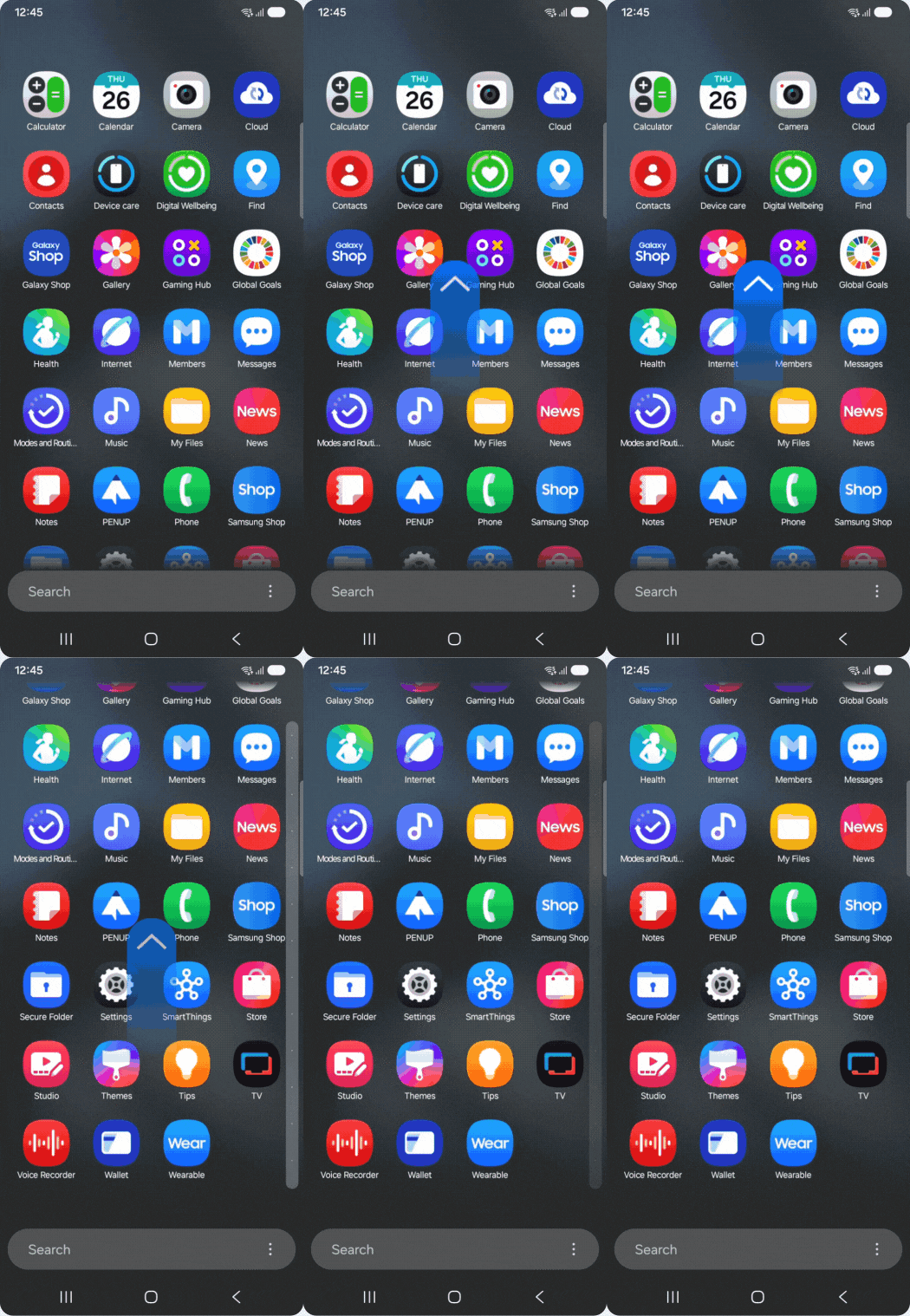
One UI 7 वर्टिकल स्क्रॉल
स्क्रॉल ओरिएंटेशन कैसे बदलें


1. एप्स स्क्रीन में, अधिक विकल्प (तीन ऊर्ध्वाधर बिंदु) पर टैप करें > सॉर्ट पर टैप करें।


2. वर्णमाला क्रम पर टैप करें।


3. वर्टिकल स्क्रॉल का उपयोग करके एप्स खोजें।
Thank you for your feedback!
Please answer all questions.
Contact Info
Digital Service Center
![DSC icon image]()
![DSC icon image]()



Scan to access
WhatsApp
![WhatsApp image icon]()
![WhatsApp image icon]()


Available 24 Hours / 7 days
WhatsApp@ 1-800-5-726-7864

Scan to access
Chat
![Samsung India Support WebChat icon]()
![Samsung India Support WebChat icon]()


Languages offered: English/ हिन्दी/ Indian Regional Languages


Remote Service
![Image of RM icon]()
![Image of RM icon]()


CEO Office
![Image of CEO icon]()
![Image of CEO icon]()


Phone Support (India)
![image of phone dialer]()
![image of phone dialer]()


Phone Support (Bangladesh, Sri Lanka, Nepal)
![Image of caller icon]()
![Image of caller icon]()
RC01_Static Content : This text is only displayed on the editor page