AI Smart GEO WindFree™ Heat Pump System 2.5 kW


Gallery popup


Please scan the QR Code with your mobile device, then place the product image in desired place.
{{upgradeResult.displayModelName}}
{{upgradeResult.discountText1}}
{{upgradeResult.description1}}
{{upgradeResult.description2}}
{{offerFinance.title}}
{{offerFinance.learnMoreCta.text}}{{offerFinance.description}}
{{galaxyForeverResult.displayModelName}}
{{galaxyForeverResult.discountText1}}
{{galaxyForeverResult.description1}}
{{galaxyForeverResult.description2}}
Bezel_Choose your color
Customizable bezels sold separately
Choose your skin color
Customizable skin sold separately
-
{{item.name}}
Out Of Stock
Modern Type
-
{{item.name}}
Out Of Stock
Beveled Type
-
{{item.name}}
Out Of Stock
Skin color
-
{{item.name}}
Out Of Stock
Bezel type
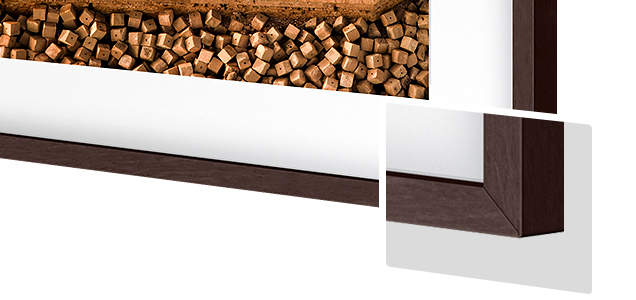
- Modern Type
The Frame's custom bezels magnetically click into place. Now, you can switch between styles in a snap.
Bezel type
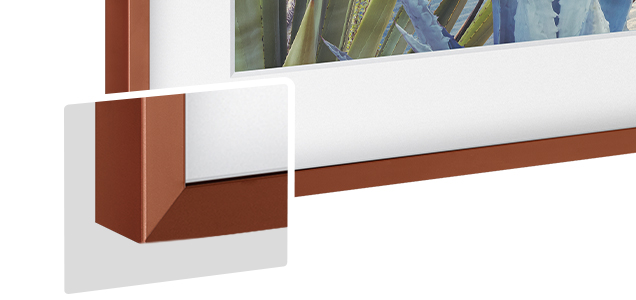
- Beveled Type
The new Beveled type bezel design offers an elegant 45-degree angled inner edge bezel.
{{tradeIn.title}}
{{tradeIn.learnMoreCta.text}}{{tradeIn.description}}
{{tradeInResult.displayModelName}}
{{tradeInResult.discountText1}}
{{tradeInResult.discountText2}}
{{tradeInResult.discountText3}}
{{tradeInResult.discountText4}}
{{tradeInResult.discountText5}}
{{tradeInResult.discountText6}}
{{tradeInResult.specialDiscountText}}
{{tradeInResult.description}}
{{tradeInResult.contentText}}
DeleteDealer stock quantity
You can check the stock quantity for each region
Please select city
{{assuredBuyBack.title}}
{{newAssuredBuyBack.title}}
{{newAssuredBuyBack.learnMoreCta.text}}{{newAssuredBuyBack.description}}
Please select Samsung Assured Buyback or no coverage
{{care.title}}
{{care.learnMoreCta.text}}{{care.description}}
Please select Samsung Care+ or No to continue
-
{{item.specialText}}
-
{{warrantyResult.displayModelName}}
{{warrantyResult.discountText1}}
{{warrantyResult.description1}}
{{warrantyVdResult.title}}
{{warrantyVdResult.priceDisplay}}
{{delivery.headline}}
{{delivery.errorMessage}}
{{deliveryResult.priorityText}}
{{deliveryResult.mainText}}
{{deliveryResult.subText}}
Standard installation charges may apply.Click here for more details.
{{deliveryResult.decText}}
{{item.disclaimer}}
{{tariffOptionResult.displayModelName}}
{{tariffOptionResult.discountText1}}
{{tariffOptionResult.description1}}
{{tariffOptionResult.description2}}
{{tariffOptionResult.description}}
{{tariffOptionResult.price}}
{{tariffOptionResult.disclaimer}}
{{embedAddon.title}}
{{embedAddon.description}}
-
{{item.name}}
{{item.modelCode}}
{{item.description}}
{{item.finalPrice}}
{{item.originalPrice}}{{item.savePrice}} Out Of Stock
-
{{item.name}}
{{item.modelCode}}
{{item.description}}
- {{item.dotList1}}
- {{item.dotList2}}
- {{item.dotList3}}
{{item.finalPrice}}
{{item.originalPrice}}{{item.savePrice}} Out Of Stock
{{message.item.tcCTAText}}
{{message.item.periodText}}
Features
Air Conditioner
Buying Guide
Find the Right Aircon size and capacity for Your Home


The most critical step is determining the correct size and capacity for your space. An undersized unit will struggle to cool the room, while an oversized one will cool too quickly without properly removing humidity, leading to a clammy feeling and wasted energy.


How to measure your room?
Simply measure the length and width of the room in meters and multiply the two numbers to get the area in square meters (sqm).
Length (m) x Width (m) = Area (sqm).


*Room sizing is approximate only, there are many variables that will affect the sizing of your air conditioning, such as orientation, use of the space, dimensions of the space, construction materials, insulations, equipment in the space, etc.
Get a new split system air conditioner you need without the hassel. Here's how it works


1. Browse and Order
Browse our website to find the split system that suits your needs, then place your order online. Need more help finding the right size? Contact our partner installer for free consultation.
[Green AC | 0800 00 6080 | info@greenac.nz]
Note: Our base installation service is only available to Auckland orders base installation as a bundled service (a fee will be included in the final price).

2. Delivery
You unit will be delivered on the day you selected at checkout.
Note: Delivery and Installation may not occur on the same day.

3. Installation
After order confirmation, and if you have chosen our install package, please reach out to our partner installation team to arrange a suitable installation date.
[Green AC | 0800 00 6080 | info@greenac.nz]
Note: Additional charges may apply following an inspection of the location.
Stay comfortably cool
WindFree™ Cooling
Powerful Wind free™ Cooling is designed to cool you down fast. When the desired temperature is reached, our innovative Wind free™ Technology helps maintain
the cool air quietly to give you the ultimate comfort by dispersing air through the thousands of micro-holes.


Quiet & powerfully innovative for ultimate comfort
WindFree™ Quiet
Feel comfortably cool without disturbing your daily life. WindFreeTM heat pumps powerfully and quietly disperse air through thousands of micro holes covering the front panel.


- * ASHRAE (American Society of Heating, Refrigerating, and Air-Conditioning Engineers) defines “Still Air” as air currents at speeds below 0.15m/s that lack the presence of cold drafts.
** Tested by Samsung on the AR07B9350MA3 model in accordance with internal protocols. Results provided to and interpreted by Intertek, comparing the power consumption of Fast Cooling mode vs. WindFree™ Cooling mode. Results may vary depending on the actual usage conditions.
*** Based on internal testing. Tested on the AR12TXCAAWKNEU model. WindFree™ mode generates only 23dB of noise, compared to 26dB with the Samsung conventional model. - * ASHRAE (American Society of Heating, Refrigerating, and Air-Conditioning Engineers) defines “Still Air” as air currents at speeds below 0.15m/s that lack the presence of cold drafts.
** Tested by Samsung on the AR07B9350MA3 model in accordance with internal protocols. Results provided to and interpreted by Intertek, comparing the power consumption of Fast Cooling mode vs. WindFree™ Cooling mode. Results may vary depending on the actual usage conditions.
*** Based on internal testing. Tested on the AR12TXCAAWKNEU model. WindFree™ mode generates only 23dB of noise, compared to 26dB with the Samsung conventional model.
Enjoy Good Sleep
WindFree™ Good Sleep
The WindFree Good Sleep mode can help you to create the ideal sanctuary for sleeping – without an unpleasant cold air flow or noise. Its temperature control and micro hole air dispersion with WindFree Cooling can help you to set the environment for a deep, undisturbed sleep to wake up feeling fully refreshed. ** Make the most of your “Good Sleep” with Samsung Watch connectivity! Tracking your sleep score at night? Let WindFree adjust the rooms climate depending on your sleep cycle to ensure you wake up and make the most of your day!


* ASHRAE (American Society of Heating, Refrigerating, and Air-Conditioning Engineers) defines “Still Air” as air currents at speeds below 0.15m/s that lack the presence of cold drafts.
** Tested by Samsung on the AR07B9350MA3 model in accordance with internal protocols. Results provided to and interpreted by Intertek, comparing the power consumption of Fast Cooling mode vs. WindFree™ Cooling mode. Results may vary depending on the actual usage conditions.
*** Based on internal testing. Tested on the AR12TXCAAWKNEU model. WindFree™ mode generates only 23dB of noise, compared to 26dB with the Samsung conventional model.
AI


Comfort meets smart
AI Auto
Experience an intelligent way of living with AI Auto. To help make life simple and efficient the Airise can automatically optimise the various modes by analysing the room conditions and usage patterns*. Based on your preferred and the outside temperature, it automatically switches to the most appropriate mode**, including WindFree™ Cooling, Fast & normal heating and cooling. Our AI technology offers an intelligent way to enhance your comfort. Utilising WindFree, AI Auto works to create the ideal climate for your living requirements. By using our AI technology to recognise your daily habits it will adjusts its patterns. Switching on the AC every Tuesday night after a sports practice – AI auto will recommend an earlier start to ensure the room is at the right temperature for your “cool down”!
* A Wi-Fi connection and a Samsung account are required.** Stores user data, preferences and usage patterns to suggest the most useful options.
*** When a Wi-Fi connection is not available, the preferred mode is based on the result of big data analysis.
Digital Inverter Technology


Warm the room rapidly
Fast Heating
Heat rooms rapidly from corner to corner, so you are always comfortable whenever you want and wherever you are. When activated, the Fast Heating mode quickly distributes warm air across an entire room. Its unique design means it reaches the desired temperature faster than conventional models*.
* Based on internal testing of the AR12TXEABWKNSA model using Fast Mode compared with the conventional AQ12EASER model, measuring the time taken to increase the room temperature from 9°C to 20°C.

Designed to cool, faster, farther & wider
Fast Cooling
Cool rooms quickly from corner to corner, so you're always comfortable. Digital Inverter Boost technology cools the air faster, also dispersing the air farther, reaching up to 15 meters.
* Tested on the AR12TXCAAWKEU model compared with the Samsung conventional model, measuring the time taken to reduce the room temperature from 33degC to 25degCSmartThings


Intelligently connect and control
Built-In Wi-Fi with SmartThings
Intelligently connect and control to help ensure your home is comfortable at any time using the Samsung SmartThings App. You can control and monitor the air conditioner remotely with just a touch*. Create routines with your other Samsung devices to take the load off your daily tasks. Want to ensure the house is comfortable on the way home from work? Utilise SmartThings connectivity to set the ideal climate for your return home. You can also control it with your voice using a voice assistant**, such as Samsung Bixby***, Amazon Alexa**** or Google Assistant*****. It even suggests the best settings.
* Available on Android and iOS devices. A Wi-Fi connection and a Samsung account are required.** A Wi-Fi connection is required
*** Bixby is Samsung’s brand of artificial intelligence (AI) / Internet of Things (IoT) voice assistant. Bixby service availability may vary depending on country. Bixby recognizes selected languages and certain accents/dialects. The user interface may change and differ by device. The availability of Bixby features and content providers may vary depending on the country/carrier/language/device model/OS version. A Samsung account log-in and data network connection (Wi-Fi or data network) are required.
**** Amazon, Alexa and all related logos are trademarks of Amazon.Com, Inc. or its affiliates.
***** Google is a trademark of Google LLC.


Come home to comfort
Welcome Cooling
Feel comfortably cool as soon as you get home. Welcome Cooling, part of the SmartThings App*, detects your location by tracking your smartphone’s GPS**. If you come within a preset distance, it automatically sets the room temperature at the desired level, using your preferred mode and settings.
* Available on Android and iOS devices. A Wi-Fi connection and a Samsung account are required.** This function may be affected by the GPS conditions.
Filtration


Air purification with Quad-Care filters
Quad-Care PM2.5 Filter
Keep your air conditioner working efficiently with less effort. The Quad-Care filter is located outside, on the top, so it can easily be taken out and cleaned. Its dense mesh keeps the Heat Exchanger clean and an anti-bacterial coating helps protect you against dangerous airborne contaminants*.
* Tested by Intertek for anti-bacteria properties, the Chungbuk National University (Korea), witnessed by Intertek, for anti-virus properties, the Japan test lab (ITEA) for anti-allergy properties and the Korea test lab (KITECH) for PM2.5 dust collection. The filter performance is based on testing of the filter material and not a specific model.Data has been measured under specific testing conditions and may vary depending on environmental factors and individual use.
Hygiene


Hygienic self-cleaning filter system
Freeze Wash
Maintain the optimum performance with the push of a button. Freeze Wash* quickly freezes the Heat Exchanger and then defrosts the ice. Finally, it dries up any moisture. And it alerts you when it is time for a clean**.
* The Freeze Wash function is only available on certain WindFree™ models.** Only available on certain models that have Wi-Fi connectivity.


Keep fresh
Auto Clean (3-Steps)
Keep the inside of the air conditioner hygienic with minimal involvement. After it has been working, the Auto Clean function automatically dries the Heat Exchanger using a 3-step process. It removes moisture by blowing air for between 10 to 30 minutes***. Preventing build of bacteria and odours.
* Models without WindFree™ mode will operate with the blade open, if additional cleaning is required.** Only available in WindFree™ models that have a humidity sensor.
*** The Auto Clean time will vary depending on the condition of the air conditioner.
Thoughtful design
Smart operation
R32 Refrigerant
Next generation refrigerant
MEPS Compliant
Meets government minimum energy performance standards
D.R.E.D Demand Response Enabled Device
All Samsung Wall Mounted Split Systems enable D.R.E.D. with the option of DRM1, DRM2, and DRM3 levels


FAQ
-
When buying a Samsung wall air conditioner, consider the following:
• Airflow technology: Check if it uses WindFree or conventional cooling modes.
• Energy efficiency: Look for models with good energy ratings to save on bills
• Heating function: Choose a unit with heating if you need year-round climate control.
• Air filtration: Features that reduce dust and allergens for cleaner air.
• Noise level: Quiet operation is important for comfort, especially in bedrooms.
• Smart control: Compatibility with apps like SmartThings for remote control.
• Ease of cleaning: Filters and parts should be easy to clean and maintain. -
Samsung WindFree AC works differently from a conventional AC by gently spreading air for a comfortable, draft-free cooling experience.
• WindFree AC: In addition to blowing direct air strongly, it gently spread cool air through thousands of tiny holes to maintain a even temperature without blowing.
• Conventional AC: Blows air directly and strongly, which can cause uneven cooling and uncomfortable drafts.
This makes WindFree AC more comfortable and pleasant for indoor use. -
The Bespoke AI WindFree offers advanced comfort and energy-saving features:
Combines WindFree cooling with AI-powered comfort for a customised experience.
AI Fast & Comfort Cooling1 automatically adjusts settings based on room conditions.
AI Energy Mode2 reduces power consumption.
Comfort Drying controls humidity without over-cooling the room, keeping your space dry and pleasant even in damp weather.
SmartThings app3 lets you control, schedule, and monitor energy use from your phone.
Learn more about Bespoke AI WindFree
1. To use AI Auto Cooling a Wi-Fi connection and SmartThings are required. SmartThings server stores user data, preferences and usage patterns to suggest the most useful options. Available on Android and iOS devices. A Wi-Fi connection and a Samsung account are required.
2. Must activate AI Energy Mode through the SmartThings app. Actual savings may vary by usage patterns and environment and the set temperature may increase by up to 2 degrees. A Wi-Fi connection and a Samsung account are required.
3. Available on Android and iOS devices. A Wi-Fi connection and a Samsung account are required. -
Samsung WindFree air conditioners have smart AI functions that make cooling comfortable and efficient:
• AI Fast & Comfort Cooling4: Analyzes your usage patterns and room conditions to activate Fast Cooling and then switch to WindFree Cooling to maintain an ideal temperature.
• AI Energy Mode5: Automatically adjusts cooling levels based on your habits and room conditions to save energy without sacrificing comfort.
• SmartThings integration6: Allows you to control, schedule, and monitor your air conditioner remotely from your phone.
All these features work together with WindFree technology to keep your space cool and draft-free, while saving energy and making daily use easier.
4. To use AI Auto Cooling a Wi-Fi connection and SmartThings are required. SmartThings server stores user data, preferences and usage patterns to suggest the most useful options. Available on Android and iOS devices. A Wi-Fi connection and a Samsung account are required.
5. Must activate AI Energy Mode through the SmartThings app. Actual savings may vary by usage patterns and environment and the set temperature may increase by up to 2 degrees. A Wi-Fi connection and a Samsung account are required.
6. Available on Android and iOS devices. A Wi-Fi connection and a Samsung account are required. -
• Clean the filters every two weeks or as needed to keep airflow smooth.
• Wipe the indoor and outdoor units gently with a soft cloth to remove dust.
• Clear any debris around the outdoor unit to ensure proper ventilation.
• Have a professional technician authorised by Samsung inspect the coils, refrigerant, and gas levels once a year.
Product Manual or Service Center -
Before installing a Samsung AC, check the following:
Make sure the space fits the indoor unit size with enough room for airflow.
Confirm the wall is strong enough to hold the unit securely.
Avoid placing near heat sources or blocking airflow.
Hire a professional technician authorised by Samsung to ensure correct placement and safety.
Please note that a professional installer may refuse to install the product if the home setup does not meet the product's requirements.
Product Manual or Service Center