


Scan this QR code with your phone and place the product image in your desired space
Congratulations, your trade-in discount has been applied. smb
<%= title %> <% if (!!discountAmount) { %> <%= discountAmount %> <% } %> <% if (!!tradeInAmount && !!additionalDiscount) { %> <%= tradeInAmount %> <%= additionalDiscount %> <% } %>
<%= deviceSummary %>
<% if (quantityChangeable) { %>

Add Samsung Care+ for Business
Learn moreYou love it, we cover it. Protection for your new Galaxy device from the people who know it best
Please select Samsung Care + for Business or "No Coverage"
-
<% options.forEach((option) => { %>
-
<% if(hasChildren) { %>
<% } else { %> <% } %>
<% }) %>
*All prices include insurance premium tax
key features
-
Micro RGB Technology
-
Micro RGB AI Engine
-
Micro RGB Precision Colour 100
-
Samsung Vision AI Companion


The answer to greatness


Key features at a glance


Picture Quality


Greatness comes in small things
Micro RGB Technology
Using a micro-sized RGB colour backlight, Samsung Micro RGB TVs deliver true-to-life colours with remarkable accuracy. Combined with local dimming technology that precisely controls RGB colour and brightness, the images on the screen come alive with incredible richness and depth.


Colours come alive with the AI Engine
Micro RGB AI Engine
See shades refined with intelligent processing. By leveraging AI to precisely control each RGB colour, the Micro RGB AI Engine helps create overwhelmingly vivid picture quality.1


Realistic picture with accurate colours
Micro RGB Precision Colour 100
Through Micro RGB Technology and the Micro RGB AI Engine, Samsung Micro RGB TV achieves the world's first 100% BT.2020 Wide Colour Gamut coverage. Certified by VDE for the world's first Micro RGB Precision Colour, it ensures colours are finely and precisely controlled for a viewing experience that is nearly indistinguishable from reality.2


More about
Picture Quality


Unmatched depth, enhanced realism and vibrant contrast
Micro RGB HDR+
Experience unparalleled contrast and colour on Samsung Micro RGB TVs. Micro RGB HDR+ enhances subtle details in both bright and dark scenes, delivering your content's original depth for a more immersive, true-to-life viewing experience. 3


Upscale content into a 4K experience
4K AI Upscaling
Watch your favourite content in more brilliant detail with 4K AI Upscaling. The Micro RGB AI Engine can take content and enhance it up to 4K resolution with 20 AI neural networks — all while maintaining sharp and smooth picture quality. 4


Richer and more vibrant colours powered by AI
Micro RGB Colour Booster Pro
Watch your content come to life with Micro RGB Colour Booster Pro. Powered by AI, this advanced colour enhancement technology intelligently recognises and enhances scenes with dull tones, providing a vivid colour experience that feels as real as seeing it in person. 5


Enjoy HDR-like quality even with SDR content
Auto HDR Remastering
Using deep learning algorithms, Auto HDR Remastering learns to identify SDR and HDR content, and then converts SDR content into brilliant HDR-like quality. Now you can enjoy brighter highlights, clearer details and more vibrant colours throughout your viewing experience. 6


Enjoy authentic colour validated by PANTONE, only on Samsung screens
PANTONE Validated
Meet fully authentic colour validated by PANTONE. As a trusted symbol of colour fidelity by industry experts, ‘PANTONE Validated’ certifies the accurate expression of 2,140 PANTONE colours and 110 skin tone shades. Enjoy more accurate, comfortable viewing on a ‘PANTONE Validated’ TV. 7


Depth perceived just as a person’s eyes would
Real Depth Enhancer
Watch the figures on screen stand out with more realism. Real Depth Enhancer increases the contrast between the objects in the foreground from the background — mirroring how a human eye processes depth. So when you're watching a nature documentary, it really looks like the rhinos are marching toward you.


Immerse yourself in the optimal picture settings tailored to your preference
AI Customisation Mode
With AI Customisation Mode, the AI Processor can automatically detect the type of content you’re watching — sports, movies or everyday viewing — and adjust picture settings according to your preferences. 8


Ask your companion anything. Samsung Vision AI is here.
Samsung Vision AI Companion
Getting assistance from AI is now more engaging with Vision AI Companion on your TV. Whether you ask about your content or everyday topics, it instantly delivers video and image responses through multiple AI agents — offering a rich, personalised experience on the big screen.9


More about
Samsung Vision AI


Your command, your match — AI-enhanced football viewing
AI Football Mode
With AI Football Mode, you can watch football with picture and sound settings designed specifically for the sport. AI-driven optimisation delivers richer colours, dynamic contrast and crystal-clear commentary — so you can follow the game's passes and cheers with professional-level clarity. 10


Separate and control audio layers — voice and sound effects — with a single command
AI Sound Controller
AI Sound Controller uses AI to analyse real-time audio and separate it into two tracks — voice and sound effects. Using the on-screen menu or voice commands, you can then adjust the volume of each track to create a personalised listening experience for TV shows, movies and games. 11


Make your own mood-matching wallpapers with AI
Generative Wallpaper
With Generative Wallpaper, your TV can create stunning, one-of-a-kind images that reflect the moment and transform the ambiance of your home. Simply choose keywords for the atmosphere you want — whether you are hosting a party, enjoying time with family or relaxing — and let AI work its magic. 12
Gaming Experience


Get smooth motion for games up to 144Hz
Motion Xcelerator 144Hz
Enjoy seamless visuals at incredibly fast speeds with Motion Xcelerator 144Hz. Samsung’s unique dynamic refresh technology provides smooth motion performance for VRR games up to 4K 144Hz.13


More about
Gaming Experience


Play smarter — perfect settings, every match
AI Gaming Optimiser
Dive straight into the action with AI Gaming Optimiser. Using real‑time screen analysis, it instantly recognises your game’s genre and applies the optimal settings automatically — no menus, no hassle, just seamless, genre‑optimised performance. 14


Tear-free, stutter-free, low latency HDR gaming
FreeSync Premium Pro
Built on AMD FreeSync™ core technology to reduce stutter and screen tearing, AMD FreeSync™ Premium Pro provides a true HDR gaming experience. It combines smooth gaming at peak performance and exceptional high dynamic range visuals, all while maintaining low latency for seamless gameplay. 15


Fine-tune your game settings as you play
Game Bar
Optimise your gameplay even more with Game Bar. Samsung TVs give you a handy in-game menu for settings like FPS, input lag, minimap zoom and more. It also lets you apply ultra-wide aspect ratios of 21:9 and 32:9 to expand your view on bigger screens. 16
Sound


Surround sound that pulls you into the scene
Dolby Atmos®
Dolby Atmos surrounds you with multi-dimensional sound that pulls you deeper into the action. By projecting audio with heightened depth and clarity, your TV delivers an impressive listening experience that feels rich, spacious and remarkably lifelike.


More about
Sound


Sound optimised and remastered to your content and space
Adaptive Sound Pro
Listen to sound just as the creators intended, with clear voices and balanced tones. Your TV's AI processor recognises different sounds, like dialogue and background music, and optimises them for their type and your room's acoustics, before ultimately refining them with audio remastering technology. 17


Catch every word without distractions
Active Voice Amplifier Pro
Enjoy clearer dialogue, even in distracting surroundings. Active Voice Amplifier Pro uses AI to isolate voice from ambient noise and background sound within content — then optimises speech, keeping conversations clear and easy to follow.


Immersive virtual sound that tracks the action
Object Tracking Sound Lite
3D surround sound with our virtual top channel audio allows you to be immersed in the audio experience.


TV and soundbar orchestrated in perfect harmony
Q-Symphony
Q-Symphony unites your TV and soundbar to play sound simultaneously in perfect harmony. With AI trained on thousands of audio sources, it creates immersive surround sound that heightens your viewing experience. 18
One UI Tizen


Personalise your screen experience
One UI Tizen
One UI Tizen delivers a seamless and consistent Samsung device experience. Samsung Tizen OS lets you take advantage of the latest innovative Samsung features — including quick access to the content you love, convenient AI management and powerful protection with Samsung Knox Security. Plus, One UI Tizen will support Tizen OS upgrades for next seven years, bringing you the latest apps & services.19


Enjoy 7 years of new TV experiences20


More about
One UI Tizen


The best of TV. All for free.
Samsung TV Plus
Dive into a vast collection of movies, hit shows and live news. Samsung TV Plus brings you livestream events, top-tier Creator Channels, and is a premier destination for K-content. It comes installed for free on your TV — no payment, subscription or setup required. 21


Find world-famous galleries in your TV
Art Store
Art Store gives you access to over 5,000 works from the world's leading museums and artists. Samsung’s art experts curate selections throughout the year, helping you discover pieces that suit each season or moment. 22


Access useful info throughout the day even when your TV is off
Now Brief
Stay informed even when the TV is off. Your daily info screen uses widgets to show what matters at a glance — including the weather, daily agenda, reminders and smart-home updates. Activated by voice or when you approach your TV, it delivers information right when you need it. 23


Your privacy. Secured.
Samsung Knox Security
Samsung Knox Security helps keep your TV protected at all times. Sensitive data such as passwords stays safeguarded, connected IoT devices are actively monitored and harmful apps or sites are blocked automatically. With ongoing security updates, your TV stays secure and ready for safe viewing. 24
SmartThings


Do the SmartThings!
SmartThings
Optimise your home devices for a smarter lifestyle. Enjoy a customised smart home experience with thousands of SmartThings-compatible devices that simplify your day-to-day life.25


More about
SmartThings


Control your TV straight from your phone
Quick Remote
With Quick Remote in the SmartThings app, your phone works as a remote, letting you change channels, manage volume and more — straight from your mobile device. You can also access key Samsung Tizen TV features, explore media and adjust settings with ease. 26


Stay connected to your pets while you're away
Pet Care
Use your TV as a pet-sitting assistant while you're outside. Your TV can detect noises like barking through its microphone, and then automatically turn on your pet's favourite content to calm them down. 27


Your Galaxy media, instantly on the big screen
Storage Share
Enjoy your favourite moments on a bigger screen with ease. Storage Share lets you stream photos, videos and more from your Galaxy devices directly to your TV. With automatic detection of nearby devices, sharing content across Samsung devices feels seamless and effortless. 28


Manage energy with intelligent analysis
AI Energy Mode
Make energy management easy with SmartThings. By turning on AI Energy Mode, it auto-detects surrounding light levels and analyses usage behaviours to adjust the brightness. It also analyses the content scene-by-scene to subtly adjust brightness and help manage energy consumption where possible. 29


Transform your TV into a karaoke stage
Karaoke
Transform your TV into a karaoke stage, with your phone as the mic or wireless microphones. Start singing with friends and family, filling your living room with fun, energy and lively entertainment. 30
Design


Bold presence, sleek silhouette – the monolith you feel, the edge you see
Monolith Edge Design
Monolith Edge Design combines a solid body for unmatched durability with thin, tapered corners that create a visually slender profile. The precision‑engineered edges give Samsung Micro RGB TV a powerful, premium look while maintaining a comfortable, low‑profile feel in the living room.


Sustainability


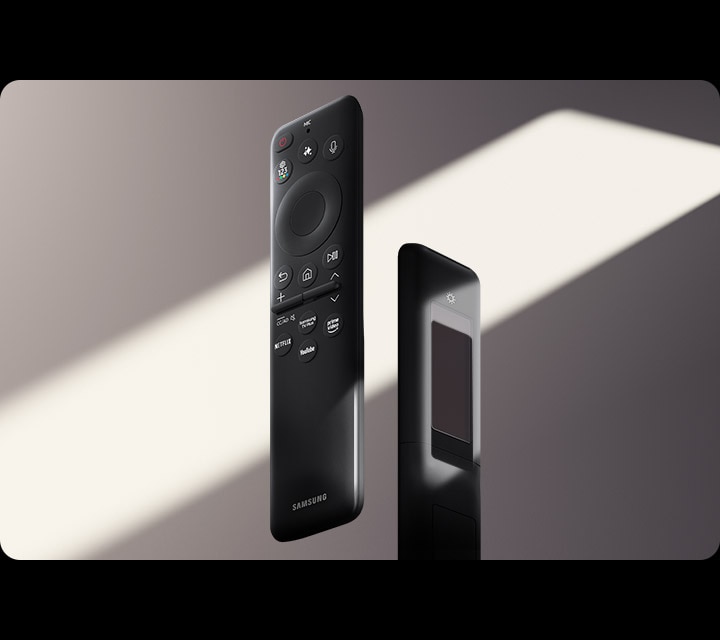
Charge it with light
SolarCell Remote
With a solar panel on its back, our SolarCell Remote is charged by light — no need for disposable batteries. And with smart features like a built-in microphone and voice assistant, this remote is innovative in more ways than one.31

Specifications
-
Product Type Micro RGB
-
Display 85"
-
Resolution 3840 x 2160
Support
Find answers to the questions you have about the product
-
Installation Guide
- ver 2601260
- 0.97 MB
- Apr 23. 2026
ENGLISH -
Simple User Guide
- ver 2601080
- 0.18 MB
- Apr 23. 2026
ENGLISH -
Remote control Guide
- ver 2601070
- 0.12 MB
- Apr 23. 2026
ENGLISH -
User Manual
- ver 2603130
- 3.41 MB
- Apr 23. 2026
ENGLISH
{{family.currentModel.displayName}}
{{family.currentModel.modelCode}}
Price with discount: {{model.prices.currentPriceDisplay}}
Price before: {{model.prices.priceDisplay}}
-
{{summary.title}}
-
{{summary.title}}


