- Business Home /
- Support /
- Laptops /
- Notebooks /
- Series 2 Notebook (NP200A5BI)
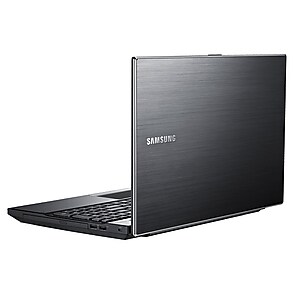
Series 2 Notebook
Edit product modelmake selection
- Series 2
- Notebook 7 Spin
- Model
- NP740U3LI
- NP740U5LE
- Notebook 9
- Model
- NP900X3NI
- NP900X3TI
- NP900X5TI
- Series 2
- Model
- NP200A5BI
- NP200B4AI
- NP200B4BI
- NP-P530I
- NP-Q330
- Series 3
- Model
- NP300E4E
- NP300E5C
- NP355E5C
- NP355E7C
- NP355V5C
- Series 4
- Model
- NP400B2BI
- NP400B4BI
- Series 5
- Model
- NP530U3C
- NP-P560I
- NP-P580
- Series 6
- Model
- NP600B4BI
- NP600B4C
- NP600B5BH
- Series 7
- Model
- NP700Z3CH
- NP700Z5CH
- NP700Z7CH
- Series 9
- Model
- NP900X3A
- NP900X4B
- [SELECT]
Product info
Manual, downloads, specs and register
Series 2 Notebook (NP200A5BI) edit- Series 2
- Notebook 7 Spin
- Model
- NP740U3LI
- NP740U5LE
- Notebook 9
- Model
- NP900X3NI
- NP900X3TI
- NP900X5TI
- Series 2
- Model
- NP200A5BI
- NP200B4AI
- NP200B4BI
- NP-P530I
- NP-Q330
- Series 3
- Model
- NP300E4E
- NP300E5C
- NP355E5C
- NP355E7C
- NP355V5C
- Series 4
- Model
- NP400B2BI
- NP400B4BI
- Series 5
- Model
- NP530U3C
- NP-P560I
- NP-P580
- Series 6
- Model
- NP600B4BI
- NP600B4C
- NP600B5BH
- Series 7
- Model
- NP700Z3CH
- NP700Z5CH
- NP700Z7CH
- Series 9
- Model
- NP900X3A
- NP900X4B
- [SELECT]
Register
Gain access to exclusive offers and perks, apps and services, world-class customer support and more.
register nowManuals
DEC 19,2011
5.71 MB
DEC 19,2011
5.45 MB
DEC 19,2011
10.59 MB
DEC 19,2011
11.77 MB
DEC 19,2011
16.48 MB
DEC 19,2011
11.61 MB
Downloads
MAY 09,2012
- Click the attached file and press ''Save'' button. Then press ''Browse...'' button and select the place where you want to save the selected file.
- After downloading the file, find the downloaded file and right_click on the file. On pop_up menu, select ''Extract All...'' option.
- On ''Extraction Wizard'', press ''Next'' button and press ''Browse...'' button. Select a folder to extract file and press ''Next'' again.
- After the file has been sucessfully extracted, see the extracted files. Run ''Setup.exe'' file or ''setup.exe'' file in the folder.
- This software may not be appropriate depending on the computer model.
Thanks
13.09 MB
MAY 09,2012
- Click the attached file and press ''Save'' button. Then press ''Browse...'' button and select the place where you want to save the selected file.
- After downloading the file, find the downloaded file and right_click on the file. On pop_up menu, select ''Extract All...'' option.
- On ''Extraction Wizard'', press ''Next'' button and press ''Browse...'' button. Select a folder to extract file and press ''Next'' again.
- After the file has been sucessfully extracted, see the extracted files. Run ''Setup.exe'' file or ''setup.exe'' file in the folder.
- This driver may not be appropriate depending on the computer model.
Thanks.
135.93 MB
JAN 18,2012
- Click the attached file and press ''Save'' button. Then press ''Browse...'' button and select the place where you want to save the selected file.
- After downloading the file, find the downloaded file and right_click on the file. On pop_up menu, select ''Extract All...'' option.
- On ''Extraction Wizard'', press ''Next'' button and press ''Browse...'' button. Select a folder to extract file and press ''Next'' again.
- After the file has been sucessfully extracted, see the extracted files. Run ''Setup.exe'' file or ''setup.exe'' file in the folder.
- This driver may not be appropriate depending on the computer model.
Thanks.
275.13 MB
MAY 09,2012
- Click the attached file and press ''Save'' button. Then press ''Browse...'' button and select the place where you want to save the selected file.
- After downloading the file, find the downloaded file and right_click on the file. On pop_up menu, select ''Extract All...'' option.
- On ''Extraction Wizard'', press ''Next'' button and press ''Browse...'' button. Select a folder to extract file and press ''Next'' again.
- After the file has been sucessfully extracted, see the extracted files. Run ''Setup.exe'' file or ''setup.exe'' file in the folder.
-This driver may not be appropriate depending on the computer model.
Thanks.
2.19 MB
MAY 09,2012
- Click the attached file and press ''Save'' button. Then press ''Browse...'' button and select the place where you want to save the selected file.
- After downloading the file, find the downloaded file and right_click on the file. On pop_up menu, select ''Extract All...'' option.
- On ''Extraction Wizard'', press ''Next'' button and press ''Browse...'' button. Select a folder to extract file and press ''Next'' again.
- After the file has been sucessfully extracted, see the extracted files. Run ''Setup.exe'' file or ''setup.exe'' file in the folder.
- This driver may not be appropriate depending on the computer model.
Thanks.
2.54 MB
JAN 18,2012
- Click the attached file and press ''Save'' button. Then press ''Browse...'' button and select the place where you want to save the selected file.
- After downloading the file, find the downloaded file and right_click on the file. On pop_up menu, select ''Extract All...'' option.
- On ''Extraction Wizard'', press ''Next'' button and press ''Browse...'' button. Select a folder to extract file and press ''Next'' again.
- After the file has been sucessfully extracted, see the extracted files. Run ''Setup.exe'' file or ''setup.exe'' file in the folder.
- This driver may not be appropriate depending on the computer model.
Thanks.
2.54 MB
DEC 23,2011
- Click the attached file and press ''Save'' button. Then press ''Browse...'' button and select the place where you want to save the selected file.
- After downloading the file, find the downloaded file and right_click on the file. On pop_up menu, select ''Extract All...'' option.
- On ''Extraction Wizard'', press ''Next'' button and press ''Browse...'' button. Select a folder to extract file and press ''Next'' again.
- After the file has been sucessfully extracted, see the extracted files. Run ''Setup.exe'' file or ''setup.exe'' file in the folder.
- This software may not be appropriate depending on the computer model.
Thanks
12.64 MB
MAY 09,2012
- Click the attached file and press ''Save'' button. Then press ''Browse...'' button and select the place where you want to save the selected file.
- After downloading the file, find the downloaded file and right_click on the file. On pop_up menu, select ''Extract All...'' option.
- On ''Extraction Wizard'', press ''Next'' button and press ''Browse...'' button. Select a folder to extract file and press ''Next'' again.
- After the file has been sucessfully extracted, see the extracted files. Run ''Setup.exe'' file or ''setup.exe'' file in the folder.
- This software may not be appropriate depending on the computer model.
Thanks
20.69 MB
DEC 23,2011
- Click the attached file and press ''Save'' button. Then press ''Browse...'' button and select the place where you want to save the selected file.
- After downloading the file, find the downloaded file and right_click on the file. On pop_up menu, select ''Extract All...'' option.
- On ''Extraction Wizard'', press ''Next'' button and press ''Browse...'' button. Select a folder to extract file and press ''Next'' again.
- After the file has been sucessfully extracted, see the extracted files. Run ''Setup.exe'' file or ''setup.exe'' file in the folder.
- This software may not be appropriate depending on the computer model.
Thanks
16.38 MB
DEC 23,2011
- Click the attached file and press ''Save'' button. Then press ''Browse...'' button and select the place where you want to save the selected file.
- After downloading the file, find the downloaded file and right_click on the file. On pop_up menu, select ''Extract All...'' option.
- On ''Extraction Wizard'', press ''Next'' button and press ''Browse...'' button. Select a folder to extract file and press ''Next'' again.
- After the file has been sucessfully extracted, see the extracted files. Run ''Setup.exe'' file or ''setup.exe'' file in the folder.
- This software may not be appropriate depending on the computer model.
Thanks
49.94 MB
MAY 09,2012
- Click the attached file and press ''Save'' button. Then press ''Browse...'' button and select the place where you want to save the selected file.
- After downloading the file, find the downloaded file and right_click on the file. On pop_up menu, select ''Extract All...'' option.
- On ''Extraction Wizard'', press ''Next'' button and press ''Browse...'' button. Select a folder to extract file and press ''Next'' again.
- After the file has been sucessfully extracted, see the extracted files. Run ''Setup.exe'' file or ''setup.exe'' file in the folder.
- This software may not be appropriate depending on the computer model.
Thanks
5.48 MB
DEC 23,2011
- Click the attached file and press ''Save'' button. Then press ''Browse...'' button and select the place where you want to save the selected file.
- After downloading the file, find the downloaded file and right_click on the file. On pop_up menu, select ''Extract All...'' option.
- On ''Extraction Wizard'', press ''Next'' button and press ''Browse...'' button. Select a folder to extract file and press ''Next'' again.
- After the file has been sucessfully extracted, see the extracted files. Run ''Setup.exe'' file or ''setup.exe'' file in the folder.
- This software may not be appropriate depending on the computer model.
Thanks
10.52 MB
MAY 09,2012
- Click the attached file and press ''Save'' button. Then press ''Browse...'' button and select the place where you want to save the selected file.
- After downloading the file, find the downloaded file and right_click on the file. On pop_up menu, select ''Extract All...'' option.
- On ''Extraction Wizard'', press ''Next'' button and press ''Browse...'' button. Select a folder to extract file and press ''Next'' again.
- After the file has been sucessfully extracted, see the extracted files. Run ''Setup.exe'' file or ''setup.exe'' file in the folder.
- This driver may not be appropriate depending on the computer model.
Thanks.
3.87 MB
JAN 18,2012
- Click the attached file and press ''Save'' button. Then press ''Browse...'' button and select the place where you want to save the selected file.
- After downloading the file, find the downloaded file and right_click on the file. On pop_up menu, select ''Extract All...'' option.
- On ''Extraction Wizard'', press ''Next'' button and press ''Browse...'' button. Select a folder to extract file and press ''Next'' again.
- After the file has been sucessfully extracted, see the extracted files. Run ''Setup.exe'' file or ''setup.exe'' file in the folder.
- This driver may not be appropriate depending on the computer model.
Thanks.
3.87 MB
DEC 23,2011
- Click the attached file and press ''Save'' button. Then press ''Browse...'' button and select the place where you want to save the selected file.
- After downloading the file, find the downloaded file and right_click on the file. On pop_up menu, select ''Extract All...'' option.
- On ''Extraction Wizard'', press ''Next'' button and press ''Browse...'' button. Select a folder to extract file and press ''Next'' again.
- After the file has been sucessfully extracted, see the extracted files. Run ''Setup.exe'' file or ''setup.exe'' file in the folder.
- This software may not be appropriate depending on the computer model.
Thanks
448.21 MB
FEB 28,2012
- Click the attached file and press ''Save'' button. Then press ''Browse...'' button and select the place where you want to save the selected file.
- After downloading the file, find the downloaded file and right_click on the file. On pop_up menu, select ''Extract All...'' option.
- On ''Extraction Wizard'', press ''Next'' button and press ''Browse...'' button. Select a folder to extract file and press ''Next'' again.
- After the file has been sucessfully extracted, see the extracted files. Run ''Setup.exe'' file or ''setup.exe'' file in the folder.
- This driver may not be appropriate depending on the computer model.
Thanks.
90.33 MB
JAN 18,2012
- Click the attached file and press ''Save'' button. Then press ''Browse...'' button and select the place where you want to save the selected file.
- After downloading the file, find the downloaded file and right_click on the file. On pop_up menu, select ''Extract All...'' option.
- On ''Extraction Wizard'', press ''Next'' button and press ''Browse...'' button. Select a folder to extract file and press ''Next'' again.
- After the file has been sucessfully extracted, see the extracted files. Run ''Setup.exe'' file or ''setup.exe'' file in the folder.
- This driver may not be appropriate depending on the computer model.
Thanks.
10.83 MB
MAY 09,2012
- Click the attached file and press ''Save'' button. Then press ''Browse...'' button and select the place where you want to save the selected file.
- After downloading the file, find the downloaded file and right_click on the file. On pop_up menu, select ''Extract All...'' option.
- On ''Extraction Wizard'', press ''Next'' button and press ''Browse...'' button. Select a folder to extract file and press ''Next'' again.
- After the file has been sucessfully extracted, see the extracted files. Run ''Setup.exe'' file or ''setup.exe'' file in the folder.
- This driver may not be appropriate depending on the computer model.
Thanks.
5.13 MB
JAN 18,2012
- Click the attached file and press ''Save'' button. Then press ''Browse...'' button and select the place where you want to save the selected file.
- After downloading the file, find the downloaded file and right_click on the file. On pop_up menu, select ''Extract All...'' option.
- On ''Extraction Wizard'', press ''Next'' button and press ''Browse...'' button. Select a folder to extract file and press ''Next'' again.
- After the file has been sucessfully extracted, see the extracted files. Run ''Setup.exe'' file or ''setup.exe'' file in the folder.
- This driver may not be appropriate depending on the computer model.
Thanks.
5.07 MB
DEC 23,2011
- Click the attached file and press ''Save'' button. Then press ''Browse...'' button and select the place where you want to save the selected file.
- After downloading the file, find the downloaded file and right_click on the file. On pop_up menu, select ''Extract All...'' option.
- On ''Extraction Wizard'', press ''Next'' button and press ''Browse...'' button. Select a folder to extract file and press ''Next'' again.
- After the file has been sucessfully extracted, see the extracted files. Run ''Setup.exe'' file or ''setup.exe'' file in the folder.
- This software may not be appropriate depending on the computer model.
Thanks
2.24 MB
DEC 23,2011
- Click the attached file and press ''Save'' button. Then press ''Browse...'' button and select the place where you want to save the selected file.
- After downloading the file, find the downloaded file and right_click on the file. On pop_up menu, select ''Extract All...'' option.
- On ''Extraction Wizard'', press ''Next'' button and press ''Browse...'' button. Select a folder to extract file and press ''Next'' again.
- After the file has been sucessfully extracted, see the extracted files. Run ''Setup.exe'' file or ''setup.exe'' file in the folder.
- This software may not be appropriate depending on the computer model.
Thanks
3.26 MB
DEC 23,2011
- Click the attached file and press ''Save'' button. Then press ''Browse...'' button and select the place where you want to save the selected file.
- After downloading the file, find the downloaded file and right_click on the file. On pop_up menu, select ''Extract All...'' option.
- On ''Extraction Wizard'', press ''Next'' button and press ''Browse...'' button. Select a folder to extract file and press ''Next'' again.
- After the file has been sucessfully extracted, see the extracted files. Run ''Setup.exe'' file or ''setup.exe'' file in the folder.
- This software may not be appropriate depending on the computer model.
Thanks
198.19 MB
MAY 09,2012
- Click the attached file and press ''Save'' button. Then press ''Browse...'' button and select the place where you want to save the selected file.
- After downloading the file, find the downloaded file and right_click on the file. On pop_up menu, select ''Extract All...'' option.
- On ''Extraction Wizard'', press ''Next'' button and press ''Browse...'' button. Select a folder to extract file and press ''Next'' again.
- After the file has been sucessfully extracted, see the extracted files. Run ''Setup.exe'' file or ''setup.exe'' file in the folder.
- This software may not be appropriate depending on the computer model.
Thanks
24.04 MB
MAY 09,2012
- Click the attached file and press ''Save'' button. Then press ''Browse...'' button and select the place where you want to save the selected file.
- After downloading the file, find the downloaded file and right_click on the file. On pop_up menu, select ''Extract All...'' option.
- On ''Extraction Wizard'', press ''Next'' button and press ''Browse...'' button. Select a folder to extract file and press ''Next'' again.
- After the file has been sucessfully extracted, see the extracted files. Run ''Setup.exe'' file or ''setup.exe'' file in the folder.
- This software may not be appropriate depending on the computer model.
Thanks
101.24 MB
DEC 23,2011
- Click the attached file and press ''Save'' button. Then press ''Browse...'' button and select the place where you want to save the selected file.
- After downloading the file, find the downloaded file and right_click on the file. On pop_up menu, select ''Extract All...'' option.
- On ''Extraction Wizard'', press ''Next'' button and press ''Browse...'' button. Select a folder to extract file and press ''Next'' again.
- After the file has been sucessfully extracted, see the extracted files. Run ''Setup.exe'' file or ''setup.exe'' file in the folder.
- This software may not be appropriate depending on the computer model.
Thanks
101.23 MB
MAY 09,2012
- Click the attached file and press ''Save'' button. Then press ''Browse...'' button and select the place where you want to save the selected file.
- After downloading the file, find the downloaded file and right_click on the file. On pop_up menu, select ''Extract All...'' option.
- On ''Extraction Wizard'', press ''Next'' button and press ''Browse...'' button. Select a folder to extract file and press ''Next'' again.
- After the file has been sucessfully extracted, see the extracted files. Run ''Setup.exe'' file or ''setup.exe'' file in the folder.
- This software may not be appropriate depending on the computer model.
Thanks
4.75 MB
MAY 09,2012
- Click the attached file and press ''Save'' button. Then press ''Browse...'' button and select the place where you want to save the selected file.
- After downloading the file, find the downloaded file and right_click on the file. On pop_up menu, select ''Extract All...'' option.
- On ''Extraction Wizard'', press ''Next'' button and press ''Browse...'' button. Select a folder to extract file and press ''Next'' again.
- After the file has been sucessfully extracted, see the extracted files. Run ''Setup.exe'' file or ''setup.exe'' file in the folder.
- This software may not be appropriate depending on the computer model.
Thanks
35.88 MB
MAY 09,2012
- Click the attached file and press ''Save'' button. Then press ''Browse...'' button and select the place where you want to save the selected file.
- After downloading the file, find the downloaded file and right_click on the file. On pop_up menu, select ''Extract All...'' option.
- On ''Extraction Wizard'', press ''Next'' button and press ''Browse...'' button. Select a folder to extract file and press ''Next'' again.
- After the file has been sucessfully extracted, see the extracted files. Run ''Setup.exe'' file or ''setup.exe'' file in the folder.
- This software may not be appropriate depending on the computer model.
Thanks
8.72 MB
DEC 23,2011
- Click the attached file and press ''Save'' button. Then press ''Browse...'' button and select the place where you want to save the selected file.
- After downloading the file, find the downloaded file and right_click on the file. On pop_up menu, select ''Extract All...'' option.
- On ''Extraction Wizard'', press ''Next'' button and press ''Browse...'' button. Select a folder to extract file and press ''Next'' again.
- After the file has been sucessfully extracted, see the extracted files. Run ''Setup.exe'' file or ''setup.exe'' file in the folder.
- This software may not be appropriate depending on the computer model.
Thanks
8.72 MB
DEC 23,2011
- Click the attached file and press ''Save'' button. Then press ''Browse...'' button and select the place where you want to save the selected file.
- After downloading the file, find the downloaded file and right_click on the file. On pop_up menu, select ''Extract All...'' option.
- On ''Extraction Wizard'', press ''Next'' button and press ''Browse...'' button. Select a folder to extract file and press ''Next'' again.
- After the file has been sucessfully extracted, see the extracted files. Run ''Setup.exe'' file or ''setup.exe'' file in the folder.
- This software may not be appropriate depending on the computer model.
Thanks
37.67 MB
MAY 09,2012
- Click the attached file and press ''Save'' button. Then press ''Browse...'' button and select the place where you want to save the selected file.
- After downloading the file, find the downloaded file and right_click on the file. On pop_up menu, select ''Extract All...'' option.
- On ''Extraction Wizard'', press ''Next'' button and press ''Browse...'' button. Select a folder to extract file and press ''Next'' again.
- After the file has been sucessfully extracted, see the extracted files. Run ''Setup.exe'' file or ''setup.exe'' file in the folder.
- This software may not be appropriate depending on the computer model.
Thanks
26.68 MB
DEC 23,2011
- Click the attached file and press ''Save'' button. Then press ''Browse...'' button and select the place where you want to save the selected file.
- After downloading the file, find the downloaded file and right_click on the file. On pop_up menu, select ''Extract All...'' option.
- On ''Extraction Wizard'', press ''Next'' button and press ''Browse...'' button. Select a folder to extract file and press ''Next'' again.
- After the file has been sucessfully extracted, see the extracted files. Run ''Setup.exe'' file or ''setup.exe'' file in the folder.
- This software may not be appropriate depending on the computer model.
Thanks
26.68 MB
MAY 09,2012
- Click the attached file and press ''Save'' button. Then press ''Browse...'' button and select the place where you want to save the selected file.
- After downloading the file, find the downloaded file and right_click on the file. On pop_up menu, select ''Extract All...'' option.
- On ''Extraction Wizard'', press ''Next'' button and press ''Browse...'' button. Select a folder to extract file and press ''Next'' again.
- After the file has been sucessfully extracted, see the extracted files. Run ''Setup.exe'' file or ''setup.exe'' file in the folder.
- This driver may not be appropriate depending on the computer model.
Thanks.
94.63 MB
JAN 18,2012
- Click the attached file and press ''Save'' button. Then press ''Browse...'' button and select the place where you want to save the selected file.
- After downloading the file, find the downloaded file and right_click on the file. On pop_up menu, select ''Extract All...'' option.
- On ''Extraction Wizard'', press ''Next'' button and press ''Browse...'' button. Select a folder to extract file and press ''Next'' again.
- After the file has been sucessfully extracted, see the extracted files. Run ''Setup.exe'' file or ''setup.exe'' file in the folder.
- This driver may not be appropriate depending on the computer model.
Thanks.
86.16 MB
MAY 09,2012
- Click the attached file and press ''Save'' button. Then press ''Browse...'' button and select the place where you want to save the selected file.
- After downloading the file, find the downloaded file and right_click on the file. On pop_up menu, select ''Extract All...'' option.
- On ''Extraction Wizard'', press ''Next'' button and press ''Browse...'' button. Select a folder to extract file and press ''Next'' again.
- After the file has been sucessfully extracted, see the extracted files. Run ''Setup.exe'' file or ''setup.exe'' file in the folder.
- This driver may not be appropriate depending on the computer model.
Thanks.
106.24 MB
JAN 18,2012
- Click the attached file and press ''Save'' button. Then press ''Browse...'' button and select the place where you want to save the selected file.
- After downloading the file, find the downloaded file and right_click on the file. On pop_up menu, select ''Extract All...'' option.
- On ''Extraction Wizard'', press ''Next'' button and press ''Browse...'' button. Select a folder to extract file and press ''Next'' again.
- After the file has been sucessfully extracted, see the extracted files. Run ''Setup.exe'' file or ''setup.exe'' file in the folder.
- This driver may not be appropriate depending on the computer model.
Thanks.
99.53 MB
SEP 22,2011
- Please click the attached file and select the ''download''. Save the file in a folder and double click it.
- After activating the file, you can see the Windows messages. Please follow the steps and the BIOS update process will start.
- After BIOS update, the System will restart automatically. During the POST, please press F2 to enter the System Setup menu, click F9(Load Setup Default), and then press F10(Save and Exit).CAUTION : MAKE SURE NEVER TURN OFF(OR RESET) YOUR SYSTEM DURING THE BIOS UPDATE.
Thank you.
2.11 MB
MAY 09,2012
- Click the attached file and press ''Save'' button. Then press ''Browse...'' button and select the place where you want to save the selected file.
- After downloading the file, find the downloaded file and right_click on the file. On pop_up menu, select ''Extract All...'' option.
- On ''Extraction Wizard'', press ''Next'' button and press ''Browse...'' button. Select a folder to extract file and press ''Next'' again.
- After the file has been sucessfully extracted, see the extracted files. Run ''Setup.exe'' file or ''setup.exe'' file in the folder.
- This driver may not be appropriate depending on the computer model.
Thanks.
219.38 MB
JAN 18,2012
- Click the attached file and press ''Save'' button. Then press ''Browse...'' button and select the place where you want to save the selected file.
- After downloading the file, find the downloaded file and right_click on the file. On pop_up menu, select ''Extract All...'' option.
- On ''Extraction Wizard'', press ''Next'' button and press ''Browse...'' button. Select a folder to extract file and press ''Next'' again.
- After the file has been sucessfully extracted, see the extracted files. Run ''Setup.exe'' file or ''setup.exe'' file in the folder.
- This driver may not be appropriate depending on the computer model.
Thanks.
77.68 MB
JAN 18,2012
- Click the attached file and press ''Save'' button. Then press ''Browse...'' button and select the place where you want to save the selected file.
- After downloading the file, find the downloaded file and right_click on the file. On pop_up menu, select ''Extract All...'' option.
- On ''Extraction Wizard'', press ''Next'' button and press ''Browse...'' button. Select a folder to extract file and press ''Next'' again.
- After the file has been sucessfully extracted, see the extracted files. Run ''Setup.exe'' file or ''setup.exe'' file in the folder.
- This driver may not be appropriate depending on the computer model.
Thanks.
63.35 MB
MAY 09,2012
- Click the attached file and press ''Save'' button. Then press ''Browse...'' button and select the place where you want to save the selected file.
- After downloading the file, find the downloaded file and right_click on the file. On pop_up menu, select ''Extract All...'' option.
- On ''Extraction Wizard'', press ''Next'' button and press ''Browse...'' button. Select a folder to extract file and press ''Next'' again.
- After the file has been sucessfully extracted, see the extracted files. Run ''Setup.exe'' file or ''setup.exe'' file in the folder.
-This driver may not be appropriate depending on the computer model.
Thanks.
33.73 MB
JAN 18,2012
- Click the attached file and press ''Save'' button. Then press ''Browse...'' button and select the place where you want to save the selected file.
- After downloading the file, find the downloaded file and right_click on the file. On pop_up menu, select ''Extract All...'' option.
- On ''Extraction Wizard'', press ''Next'' button and press ''Browse...'' button. Select a folder to extract file and press ''Next'' again.
- After the file has been sucessfully extracted, see the extracted files. Run ''Setup.exe'' file or ''setup.exe'' file in the folder.
- This driver may not be appropriate depending on the computer model.
Thanks.
33.73 MB
JAN 18,2012
- Click the attached file and press ''Save'' button. Then press ''Browse...'' button and select the place where you want to save the selected file.
- After downloading the file, find the downloaded file and right_click on the file. On pop_up menu, select ''Extract All...'' option.
- On ''Extraction Wizard'', press ''Next'' button and press ''Browse...'' button. Select a folder to extract file and press ''Next'' again.
- After the file has been sucessfully extracted, see the extracted files. Run ''Setup.exe'' file or ''setup.exe'' file in the folder.
- This driver may not be appropriate depending on the computer model.
Thanks.
33.73 MB
MAY 09,2012
- Click the attached file and press ''Save'' button. Then press ''Browse...'' button and select the place where you want to save the selected file.
- After downloading the file, find the downloaded file and right_click on the file. On pop_up menu, select ''Extract All...'' option.
- On ''Extraction Wizard'', press ''Next'' button and press ''Browse...'' button. Select a folder to extract file and press ''Next'' again.
- After the file has been sucessfully extracted, see the extracted files. Run ''Install.exe'' file or ''install.exe'' file in the folder.
-This driver may not be appropriate depending on the computer model.
Thanks.
34.80 MB
JAN 18,2012
- Click the attached file and press ''Save'' button. Then press ''Browse...'' button and select the place where you want to save the selected file.
- After downloading the file, find the downloaded file and right_click on the file. On pop_up menu, select ''Extract All...'' option.
- On ''Extraction Wizard'', press ''Next'' button and press ''Browse...'' button. Select a folder to extract file and press ''Next'' again.
- After the file has been sucessfully extracted, see the extracted files. Run ''Setup.exe'' file or ''setup.exe'' file in the folder.
- This driver may not be appropriate depending on the computer model.
Thanks.
43.16 MB
JAN 18,2012
- Click the attached file and press ''Save'' button. Then press ''Browse...'' button and select the place where you want to save the selected file.
- After downloading the file, find the downloaded file and right_click on the file. On pop_up menu, select ''Extract All...'' option.
- On ''Extraction Wizard'', press ''Next'' button and press ''Browse...'' button. Select a folder to extract file and press ''Next'' again.
- After the file has been sucessfully extracted, see the extracted files. Run ''Setup.exe'' file or ''setup.exe'' file in the folder.
- This driver may not be appropriate depending on the computer model.
Thanks.
48.30 MB
Specs
Series 2 Notebook (NP200A5BI)
Specification
Series 2 Notebook (NP200A5BI)
Processor
Intel® Core™ i3-2350M Processor , Intel® Core™ i5-2450M Processor
2.30 GHz , 2.45GHz
3MB, 3MB L3
Design
Black
Display
15.6"
1366 x 768, HD LED-backlit, Non Glare
220 nit
System Memory
4GB, 8GB
DDR3
8GB
Storage
500GB 5400 RPM
Graphics
Intel® HD Graphics 3000
Sound & Camera
3 W Stereo Speaker (1.5 W x 2), 3W Stereo speaker (1.5wx2)
1.3 MP HD
Wireless
802.11 b/g/n
Bluetooth v3.0 High Speed
I/O Ports
Yes
Yes
Yes
3 x USB 2.0
4-in-1 (SD, SDHC, SDXC, MMC)
Yes
Input Devices
Scroll Scope, Flat Type
Power
90 Watt
6 Cell / Li-Ion
4400
Up to 6 hours*
Dimensions
14.4" x 9.4" x 1.17" ~ 1.24"
Weight
5.40 lbs, 5.40 lbs.
Warranty
1 Year Standard Parts and Labor
Disclaimer
*Battery life will vary depending on the product model, configuration, power management settings, applications used and wireless settings. The maximum capacity of the battery will decrease with time and use. Test results based on MobileMark, *Battery life will vary depending on the product model, configuration, power management settings, applications used and wireless settings. The maximum capacity of the battery will decrease with time and use. Test results based on MobileMark.
Interactive guide
Repairs & service
Send your device in for repairs or visit a Customer Service Location.


1. Limitations apply; visit http://www.samsung.com/us/support/premium-care/terms-and-conditions/ for full terms and conditions.
