- Business Home /
- Support /
- Laptops /
- Ultrabooks /
- Series 5 Ultrabook (NP530U4BI)
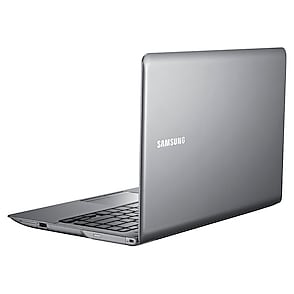
Series 5 Ultrabook
Edit product modelmake selection
- Series 5
- Series 5
- Model
- NP530U3C
- NP530U4BI
- NP540U3C
- Series 9
- Model
- NP900X3B
- NP900X3C
- NP900X3D
- NP900X3E
- NP900X4C
- NP900X4D
- [SELECT]
Product info
Manual, downloads, specs and register
Series 5 Ultrabook (NP530U4BI) edit- Series 5
- Series 5
- Model
- NP530U3C
- NP530U4BI
- NP540U3C
- Series 9
- Model
- NP900X3B
- NP900X3C
- NP900X3D
- NP900X3E
- NP900X4C
- NP900X4D
- [SELECT]
Register
Gain access to exclusive offers and perks, apps and services, world-class customer support and more.
register nowManuals
MAY 14,2012
11.71 MB
MAY 14,2012
10.04 MB
MAY 14,2012
15.30 MB
MAY 14,2012
10.04 MB
MAY 14,2012
15.30 MB
MAY 14,2012
11.71 MB
OCT 26,2012
18.36 MB
OCT 26,2012
19.07 MB
OCT 26,2012
18.26 MB
Downloads
FEB 28,2012
- Click the attached file and press ''Save'' button. Then press ''Browse...'' button and select the place where you want to save the selected file.
- After downloading the file, find the downloaded file and right_click on the file. On pop_up menu, select ''Extract All...'' option.
- On ''Extraction Wizard'', press ''Next'' button and press ''Browse...'' button. Select a folder to extract file and press ''Next'' again.
- After the file has been sucessfully extracted, see the extracted files. Run ''Setup.exe'' file or ''setup.exe'' file in the folder.
- This software may not be appropriate depending on the computer model.
Thanks
13.09 MB
FEB 24,2012
- Click the attached file and press ''Save'' button. Then press ''Browse...'' button and select the place where you want to save the selected file.
- After downloading the file, find the downloaded file and right_click on the file. On pop_up menu, select ''Extract All...'' option.
- On ''Extraction Wizard'', press ''Next'' button and press ''Browse...'' button. Select a folder to extract file and press ''Next'' again.
- After the file has been sucessfully extracted, see the extracted files. Run ''Setup.exe'' file or ''setup.exe'' file in the folder.
-This driver may not be appropriate depending on the computer model.
Thanks.
34.10 MB
DEC 13,2011
- Click the attached file and press ''Save'' button. Then press ''Browse...'' button and select the place where you want to save the selected file.
- After downloading the file, find the downloaded file and right_click on the file. On pop_up menu, select ''Extract All...'' option.
- On ''Extraction Wizard'', press ''Next'' button and press ''Browse...'' button. Select a folder to extract file and press ''Next'' again.
- After the file has been sucessfully extracted, see the extracted files. Run ''Setup.exe'' file or ''setup.exe'' file in the folder.
-This driver may not be appropriate depending on the computer model.
Thanks.
71.95 MB
FEB 28,2012
- Click the attached file and press ''Save'' button. Then press ''Browse...'' button and select the place where you want to save the selected file.
- After downloading the file, find the downloaded file and right_click on the file. On pop_up menu, select ''Extract All...'' option.
- On ''Extraction Wizard'', press ''Next'' button and press ''Browse...'' button. Select a folder to extract file and press ''Next'' again.
- After the file has been sucessfully extracted, see the extracted files. Run ''Setup.exe'' file or ''setup.exe'' file in the folder.
- This software may not be appropriate depending on the computer model.
Thanks
14.87 MB
FEB 24,2012
- Click the attached file and press ''Save'' button. Then press ''Browse...'' button and select the place where you want to save the selected file.
- After downloading the file, find the downloaded file and right_click on the file. On pop_up menu, select ''Extract All...'' option.
- On ''Extraction Wizard'', press ''Next'' button and press ''Browse...'' button. Select a folder to extract file and press ''Next'' again.
- After the file has been sucessfully extracted, see the extracted files. Run ''Setup.exe'' file or ''setup.exe'' file in the folder.
-This driver may not be appropriate depending on the computer model.
Thanks.
2.54 MB
DEC 13,2011
- Click the attached file and press ''Save'' button. Then press ''Browse...'' button and select the place where you want to save the selected file.
- After downloading the file, find the downloaded file and right_click on the file. On pop_up menu, select ''Extract All...'' option.
- On ''Extraction Wizard'', press ''Next'' button and press ''Browse...'' button. Select a folder to extract file and press ''Next'' again.
- After the file has been sucessfully extracted, see the extracted files. Run ''Setup.exe'' file or ''setup.exe'' file in the folder.
-This driver may not be appropriate depending on the computer model.
Thanks.
2.54 MB
FEB 28,2012
- Click the attached file and press ''Save'' button. Then press ''Browse...'' button and select the place where you want to save the selected file.
- After downloading the file, find the downloaded file and right_click on the file. On pop_up menu, select ''Extract All...'' option.
- On ''Extraction Wizard'', press ''Next'' button and press ''Browse...'' button. Select a folder to extract file and press ''Next'' again.
- After the file has been sucessfully extracted, see the extracted files. Run ''Setup.exe'' file or ''setup.exe'' file in the folder.
- This software may not be appropriate depending on the computer model.
Thanks
20.07 MB
FEB 28,2012
- Click the attached file and press ''Save'' button. Then press ''Browse...'' button and select the place where you want to save the selected file.
- After downloading the file, find the downloaded file and right_click on the file. On pop_up menu, select ''Extract All...'' option.
- On ''Extraction Wizard'', press ''Next'' button and press ''Browse...'' button. Select a folder to extract file and press ''Next'' again.
- After the file has been sucessfully extracted, see the extracted files. Run ''Setup.exe'' file or ''setup.exe'' file in the folder.
- This software may not be appropriate depending on the computer model.
Thanks
25.84 MB
FEB 28,2012
- Click the attached file and press ''Save'' button. Then press ''Browse...'' button and select the place where you want to save the selected file.
- After downloading the file, find the downloaded file and right_click on the file. On pop_up menu, select ''Extract All...'' option.
- On ''Extraction Wizard'', press ''Next'' button and press ''Browse...'' button. Select a folder to extract file and press ''Next'' again.
- After the file has been sucessfully extracted, see the extracted files. Run ''Setup.exe'' file or ''setup.exe'' file in the folder.
- This software may not be appropriate depending on the computer model.
Thanks
49.94 MB
FEB 28,2012
- Click the attached file and press ''Save'' button. Then press ''Browse...'' button and select the place where you want to save the selected file.
- After downloading the file, find the downloaded file and right_click on the file. On pop_up menu, select ''Extract All...'' option.
- On ''Extraction Wizard'', press ''Next'' button and press ''Browse...'' button. Select a folder to extract file and press ''Next'' again.
- After the file has been sucessfully extracted, see the extracted files. Run ''Setup.exe'' file or ''setup.exe'' file in the folder.
- This software may not be appropriate depending on the computer model.
Thanks
126.27 MB
FEB 28,2012
- Click the attached file and press ''Save'' button. Then press ''Browse...'' button and select the place where you want to save the selected file.
- After downloading the file, find the downloaded file and right_click on the file. On pop_up menu, select ''Extract All...'' option.
- On ''Extraction Wizard'', press ''Next'' button and press ''Browse...'' button. Select a folder to extract file and press ''Next'' again.
- After the file has been sucessfully extracted, see the extracted files. Run ''Setup.exe'' file or ''setup.exe'' file in the folder.
- This software may not be appropriate depending on the computer model.
Thanks
12.33 MB
FEB 28,2012
- Click the attached file and press ''Save'' button. Then press ''Browse...'' button and select the place where you want to save the selected file.
- After downloading the file, find the downloaded file and right_click on the file. On pop_up menu, select ''Extract All...'' option.
- On ''Extraction Wizard'', press ''Next'' button and press ''Browse...'' button. Select a folder to extract file and press ''Next'' again.
- After the file has been sucessfully extracted, see the extracted files. Run ''Setup.exe'' file or ''setup.exe'' file in the folder.
- This software may not be appropriate depending on the computer model.
Thanks
5.48 MB
FEB 28,2012
- Click the attached file and press ''Save'' button. Then press ''Browse...'' button and select the place where you want to save the selected file.
- After downloading the file, find the downloaded file and right_click on the file. On pop_up menu, select ''Extract All...'' option.
- On ''Extraction Wizard'', press ''Next'' button and press ''Browse...'' button. Select a folder to extract file and press ''Next'' again.
- After the file has been sucessfully extracted, see the extracted files. Run ''Setup.exe'' file or ''setup.exe'' file in the folder.
- This software may not be appropriate depending on the computer model.
Thanks
123.68 MB
JUN 02,2012
- Click the attached file and press ''Save'' button. Then press ''Browse...'' button and select the place where you want to save the selected file.
- After downloading the file, find the downloaded file and right_click on the file. On pop_up menu, select ''Extract All...'' option.
- On ''Extraction Wizard'', press ''Next'' button and press ''Browse...'' button. Select a folder to extract file and press ''Next'' again.
- After the file has been sucessfully extracted, see the extracted files. Run ''Setup.exe'' file or ''setup.exe'' file in the folder.
-This driver may not be appropriate depending on the computer model.
Thanks.
5.33 MB
JUN 02,2012
- Click the attached file and press ''Save'' button. Then press ''Browse...'' button and select the place where you want to save the selected file.
- After downloading the file, find the downloaded file and right_click on the file. On pop_up menu, select ''Extract All...'' option.
- On ''Extraction Wizard'', press ''Next'' button and press ''Browse...'' button. Select a folder to extract file and press ''Next'' again.
- After the file has been sucessfully extracted, see the extracted files. Run ''Setup.exe'' file or ''setup.exe'' file in the folder.
-This driver may not be appropriate depending on the computer model.
Thanks.
6.44 MB
FEB 24,2012
- Click the attached file and press ''Save'' button. Then press ''Browse...'' button and select the place where you want to save the selected file.
- After downloading the file, find the downloaded file and right_click on the file. On pop_up menu, select ''Extract All...'' option.
- On ''Extraction Wizard'', press ''Next'' button and press ''Browse...'' button. Select a folder to extract file and press ''Next'' again.
- After the file has been sucessfully extracted, see the extracted files. Run ''Setup.exe'' file or ''setup.exe'' file in the folder.
-This driver may not be appropriate depending on the computer model.
Thanks.
4.88 MB
DEC 13,2011
- Click the attached file and press ''Save'' button. Then press ''Browse...'' button and select the place where you want to save the selected file.
- After downloading the file, find the downloaded file and right_click on the file. On pop_up menu, select ''Extract All...'' option.
- On ''Extraction Wizard'', press ''Next'' button and press ''Browse...'' button. Select a folder to extract file and press ''Next'' again.
- After the file has been sucessfully extracted, see the extracted files. Run ''Setup.exe'' file or ''setup.exe'' file in the folder.
-This driver may not be appropriate depending on the computer model.
Thanks.
4.88 MB
FEB 24,2012
- Click the attached file and press ''Save'' button. Then press ''Browse...'' button and select the place where you want to save the selected file.
- After downloading the file, find the downloaded file and right_click on the file. On pop_up menu, select ''Extract All...'' option.
- On ''Extraction Wizard'', press ''Next'' button and press ''Browse...'' button. Select a folder to extract file and press ''Next'' again.
- After the file has been sucessfully extracted, see the extracted files. Run ''Setup.exe'' file or ''setup.exe'' file in the folder.
-This driver may not be appropriate depending on the computer model.
Thanks.
3.96 MB
DEC 13,2011
- Click the attached file and press ''Save'' button. Then press ''Browse...'' button and select the place where you want to save the selected file.
- After downloading the file, find the downloaded file and right_click on the file. On pop_up menu, select ''Extract All...'' option.
- On ''Extraction Wizard'', press ''Next'' button and press ''Browse...'' button. Select a folder to extract file and press ''Next'' again.
- After the file has been sucessfully extracted, see the extracted files. Run ''Setup.exe'' file or ''setup.exe'' file in the folder.
-This driver may not be appropriate depending on the computer model.
Thanks.
3.87 MB
FEB 28,2012
- Click the attached file and press ''Save'' button. Then press ''Browse...'' button and select the place where you want to save the selected file.
- After downloading the file, find the downloaded file and right_click on the file. On pop_up menu, select ''Extract All...'' option.
- On ''Extraction Wizard'', press ''Next'' button and press ''Browse...'' button. Select a folder to extract file and press ''Next'' again.
- After the file has been sucessfully extracted, see the extracted files. Run ''Setup.exe'' file or ''setup.exe'' file in the folder.
- This software may not be appropriate depending on the computer model.
Thanks
433.20 MB
MAR 02,2012
- Click the attached file and press ''Save'' button. Then press ''Browse...'' button and select the place where you want to save the selected file.
- After downloading the file, find the downloaded file and right_click on the file. On pop_up menu, select ''Extract All...'' option.
- On ''Extraction Wizard'', press ''Next'' button and press ''Browse...'' button. Select a folder to extract file and press ''Next'' again.
- After the file has been sucessfully extracted, see the extracted files. Run ''Setup.exe'' file or ''setup.exe'' file in the folder.
-This driver may not be appropriate depending on the computer model.
Thanks.
19.97 MB
DEC 14,2011
- Click the attached file and press ''Save'' button. Then press ''Browse...'' button and select the place where you want to save the selected file.
- After downloading the file, find the downloaded file and right_click on the file. On pop_up menu, select ''Extract All...'' option.
- On ''Extraction Wizard'', press ''Next'' button and press ''Browse...'' button. Select a folder to extract file and press ''Next'' again.
- After the file has been sucessfully extracted, see the extracted files. Run ''Setup.exe'' file or ''setup.exe'' file in the folder.
-This driver may not be appropriate depending on the computer model.
Thanks.
4.81 MB
DEC 14,2011
- Click the attached file and press ''Save'' button. Then press ''Browse...'' button and select the place where you want to save the selected file.
- After downloading the file, find the downloaded file and right_click on the file. On pop_up menu, select ''Extract All...'' option.
- On ''Extraction Wizard'', press ''Next'' button and press ''Browse...'' button. Select a folder to extract file and press ''Next'' again.
- After the file has been sucessfully extracted, see the extracted files. Run ''Setup.exe'' file or ''setup.exe'' file in the folder.
-This driver may not be appropriate depending on the computer model.
Thanks.
10.68 MB
FEB 28,2012
- Click the attached file and press ''Save'' button. Then press ''Browse...'' button and select the place where you want to save the selected file.
- After downloading the file, find the downloaded file and right_click on the file. On pop_up menu, select ''Extract All...'' option.
- On ''Extraction Wizard'', press ''Next'' button and press ''Browse...'' button. Select a folder to extract file and press ''Next'' again.
- After the file has been sucessfully extracted, see the extracted files. Run ''Setup.exe'' file or ''setup.exe'' file in the folder.
- This software may not be appropriate depending on the computer model.
Thanks
136.37 MB
FEB 24,2012
- Click the attached file and press ''Save'' button. Then press ''Browse...'' button and select the place where you want to save the selected file.
- After downloading the file, find the downloaded file and right_click on the file. On pop_up menu, select ''Extract All...'' option.
- On ''Extraction Wizard'', press ''Next'' button and press ''Browse...'' button. Select a folder to extract file and press ''Next'' again.
- After the file has been sucessfully extracted, see the extracted files. Run ''Setup.exe'' file or ''setup.exe'' file in the folder.
-This driver may not be appropriate depending on the computer model.
Thanks.
5.16 MB
DEC 13,2011
- Click the attached file and press ''Save'' button. Then press ''Browse...'' button and select the place where you want to save the selected file.
- After downloading the file, find the downloaded file and right_click on the file. On pop_up menu, select ''Extract All...'' option.
- On ''Extraction Wizard'', press ''Next'' button and press ''Browse...'' button. Select a folder to extract file and press ''Next'' again.
- After the file has been sucessfully extracted, see the extracted files. Run ''Setup.exe'' file or ''setup.exe'' file in the folder.
-This driver may not be appropriate depending on the computer model.
Thanks.
5.07 MB
FEB 28,2012
- Click the attached file and press ''Save'' button. Then press ''Browse...'' button and select the place where you want to save the selected file.
- After downloading the file, find the downloaded file and right_click on the file. On pop_up menu, select ''Extract All...'' option.
- On ''Extraction Wizard'', press ''Next'' button and press ''Browse...'' button. Select a folder to extract file and press ''Next'' again.
- After the file has been sucessfully extracted, see the extracted files. Run ''Setup.exe'' file or ''setup.exe'' file in the folder.
- This software may not be appropriate depending on the computer model.
Thanks
3.26 MB
FEB 28,2012
- Click the attached file and press ''Save'' button. Then press ''Browse...'' button and select the place where you want to save the selected file.
- After downloading the file, find the downloaded file and right_click on the file. On pop_up menu, select ''Extract All...'' option.
- On ''Extraction Wizard'', press ''Next'' button and press ''Browse...'' button. Select a folder to extract file and press ''Next'' again.
- After the file has been sucessfully extracted, see the extracted files. Run ''Setup.exe'' file or ''setup.exe'' file in the folder.
- This software may not be appropriate depending on the computer model.
Thanks
159.00 MB
FEB 28,2012
- Click the attached file and press ''Save'' button. Then press ''Browse...'' button and select the place where you want to save the selected file.
- After downloading the file, find the downloaded file and right_click on the file. On pop_up menu, select ''Extract All...'' option.
- On ''Extraction Wizard'', press ''Next'' button and press ''Browse...'' button. Select a folder to extract file and press ''Next'' again.
- After the file has been sucessfully extracted, see the extracted files. Run ''Setup.exe'' file or ''setup.exe'' file in the folder.
- This software may not be appropriate depending on the computer model.
Thanks
24.04 MB
FEB 28,2012
- Click the attached file and press ''Save'' button. Then press ''Browse...'' button and select the place where you want to save the selected file.
- After downloading the file, find the downloaded file and right_click on the file. On pop_up menu, select ''Extract All...'' option.
- On ''Extraction Wizard'', press ''Next'' button and press ''Browse...'' button. Select a folder to extract file and press ''Next'' again.
- After the file has been sucessfully extracted, see the extracted files. Run ''Setup.exe'' file or ''setup.exe'' file in the folder.
- This software may not be appropriate depending on the computer model.
Thanks
101.60 MB
FEB 28,2012
- Click the attached file and press ''Save'' button. Then press ''Browse...'' button and select the place where you want to save the selected file.
- After downloading the file, find the downloaded file and right_click on the file. On pop_up menu, select ''Extract All...'' option.
- On ''Extraction Wizard'', press ''Next'' button and press ''Browse...'' button. Select a folder to extract file and press ''Next'' again.
- After the file has been sucessfully extracted, see the extracted files. Run ''Setup.exe'' file or ''setup.exe'' file in the folder.
- This software may not be appropriate depending on the computer model.
Thanks
102.31 MB
FEB 28,2012
- Click the attached file and press ''Save'' button. Then press ''Browse...'' button and select the place where you want to save the selected file.
- After downloading the file, find the downloaded file and right_click on the file. On pop_up menu, select ''Extract All...'' option.
- On ''Extraction Wizard'', press ''Next'' button and press ''Browse...'' button. Select a folder to extract file and press ''Next'' again.
- After the file has been sucessfully extracted, see the extracted files. Run ''Setup.exe'' file or ''setup.exe'' file in the folder.
- This software may not be appropriate depending on the computer model.
Thanks
4.75 MB
FEB 28,2012
- Click the attached file and press ''Save'' button. Then press ''Browse...'' button and select the place where you want to save the selected file.
- After downloading the file, find the downloaded file and right_click on the file. On pop_up menu, select ''Extract All...'' option.
- On ''Extraction Wizard'', press ''Next'' button and press ''Browse...'' button. Select a folder to extract file and press ''Next'' again.
- After the file has been sucessfully extracted, see the extracted files. Run ''Setup.exe'' file or ''setup.exe'' file in the folder.
- This software may not be appropriate depending on the computer model.
Thanks
8.72 MB
FEB 28,2012
- Click the attached file and press ''Save'' button. Then press ''Browse...'' button and select the place where you want to save the selected file.
- After downloading the file, find the downloaded file and right_click on the file. On pop_up menu, select ''Extract All...'' option.
- On ''Extraction Wizard'', press ''Next'' button and press ''Browse...'' button. Select a folder to extract file and press ''Next'' again.
- After the file has been sucessfully extracted, see the extracted files. Run ''Setup.exe'' file or ''setup.exe'' file in the folder.
- This software may not be appropriate depending on the computer model.
Thanks
43.76 MB
FEB 28,2012
- Click the attached file and press ''Save'' button. Then press ''Browse...'' button and select the place where you want to save the selected file.
- After downloading the file, find the downloaded file and right_click on the file. On pop_up menu, select ''Extract All...'' option.
- On ''Extraction Wizard'', press ''Next'' button and press ''Browse...'' button. Select a folder to extract file and press ''Next'' again.
- After the file has been sucessfully extracted, see the extracted files. Run ''Setup.exe'' file or ''setup.exe'' file in the folder.
- This software may not be appropriate depending on the computer model.
Thanks
4.09 MB
FEB 24,2012
- Click the attached file and press ''Save'' button. Then press ''Browse...'' button and select the place where you want to save the selected file.
- After downloading the file, find the downloaded file and right_click on the file. On pop_up menu, select ''Extract All...'' option.
- On ''Extraction Wizard'', press ''Next'' button and press ''Browse...'' button. Select a folder to extract file and press ''Next'' again.
- After the file has been sucessfully extracted, see the extracted files. Run ''Setup.exe'' file or ''setup.exe'' file in the folder.
-This driver may not be appropriate depending on the computer model.
Thanks.
95.26 MB
DEC 13,2011
- Click the attached file and press ''Save'' button. Then press ''Browse...'' button and select the place where you want to save the selected file.
- After downloading the file, find the downloaded file and right_click on the file. On pop_up menu, select ''Extract All...'' option.
- On ''Extraction Wizard'', press ''Next'' button and press ''Browse...'' button. Select a folder to extract file and press ''Next'' again.
- After the file has been sucessfully extracted, see the extracted files. Run ''Setup.exe'' file or ''setup.exe'' file in the folder.
-This driver may not be appropriate depending on the computer model.
Thanks.
102.70 MB
FEB 24,2012
- Click the attached file and press ''Save'' button. Then press ''Browse...'' button and select the place where you want to save the selected file.
- After downloading the file, find the downloaded file and right_click on the file. On pop_up menu, select ''Extract All...'' option.
- On ''Extraction Wizard'', press ''Next'' button and press ''Browse...'' button. Select a folder to extract file and press ''Next'' again.
- After the file has been sucessfully extracted, see the extracted files. Run ''Setup.exe'' file or ''setup.exe'' file in the folder.
-This driver may not be appropriate depending on the computer model.
0.05 MB
DEC 13,2011
- Click the attached file and press ''Save'' button. Then press ''Browse...'' button and select the place where you want to save the selected file.
- After downloading the file, find the downloaded file and right_click on the file. On pop_up menu, select ''Extract All...'' option.
- On ''Extraction Wizard'', press ''Next'' button and press ''Browse...'' button. Select a folder to extract file and press ''Next'' again.
- After the file has been sucessfully extracted, see the extracted files. Run ''Setup.exe'' file or ''setup.exe'' file in the folder.
-This driver may not be appropriate depending on the computer model.
Thanks.
58.67 MB
FEB 24,2012
- If you have any pre-installed touch pad driver, please remove it first.(In the case you formatted the HDD and install new driver, please go to step3.) * By click the menu [Control Panel -> Add / Remove Programs], you can find whether your system has a pre-installed touch pad driver. * If you find [Synaptics Pointing Device Driver] or [ETDWare PS/2 x86...] in the list [Control Panel -> Add / Remove Programs], please remove them. By double-clicking the driver name in the list, you can delete them.
- Reboot the System after removing the pre-installed touch pad driver.
- Install the new touchpad driver you''ve downloaded.
- Please boot your system again.
- This driver may not be appropriate depending on the computer model.
Thanks.
178.52 MB
DEC 13,2011
- Click the attached file and press ''Save'' button. Then press ''Browse...'' button and select the place where you want to save the selected file.
- After downloading the file, find the downloaded file and right_click on the file. On pop_up menu, select ''Extract All...'' option.
- On ''Extraction Wizard'', press ''Next'' button and press ''Browse...'' button. Select a folder to extract file and press ''Next'' again.
- After the file has been sucessfully extracted, see the extracted files. Run ''Setup.exe'' file or ''setup.exe'' file in the folder.
-This driver may not be appropriate depending on the computer model.
Thanks.
178.52 MB
FEB 17,2012
- Click the attached file and press ''Save'' button. Then press ''Browse...'' button and select the place where you want to save the selected file.
- After downloading the file, find the downloaded file and right_click on the file. On pop_up menu, select ''Extract All...'' option.
- On ''Extraction Wizard'', press ''Next'' button and press ''Browse...'' button. Select a folder to extract file and press ''Next'' again.
- After the file has been sucessfully extracted, see the extracted files. Run ''Setup.exe'' file or ''setup.exe'' file in the folder.
-This driver may not be appropriate depending on the computer model.
Thanks.
5.03 MB
DEC 13,2011
- Click the attached file and press ''Save'' button. Then press ''Browse...'' button and select the place where you want to save the selected file.
- After downloading the file, find the downloaded file and right_click on the file. On pop_up menu, select ''Extract All...'' option.
- On ''Extraction Wizard'', press ''Next'' button and press ''Browse...'' button. Select a folder to extract file and press ''Next'' again.
- After the file has been sucessfully extracted, see the extracted files. Run ''Setup.exe'' file or ''setup.exe'' file in the folder.
-This driver may not be appropriate depending on the computer model.
Thanks.
5.03 MB
DEC 13,2011
- Please click the attached file and select the ''download''. Save the file in a folder and double click it.
- After activating the file, you can see the Windows messages. Please follow the steps and the BIOS update process will start.
- After BIOS update, the System will restart automatically. During the POST, please press F2 to enter the System Setup menu, click F9(Load Setup Default), and then press F10(Save and Exit).CAUTION : MAKE SURE NEVER TURN OFF(OR RESET) YOUR SYSTEM DURING THE BIOS UPDATE.
Thank you.
2.11 MB
FEB 24,2012
- Click the attached file and press ''Save'' button. Then press ''Browse...'' button and select the place where you want to save the selected file.
- After downloading the file, find the downloaded file and right_click on the file. On pop_up menu, select ''Extract All...'' option.
- On ''Extraction Wizard'', press ''Next'' button and press ''Browse...'' button. Select a folder to extract file and press ''Next'' again.
- After the file has been sucessfully extracted, see the extracted files. Run ''Setup.exe'' file or ''setup.exe'' file in the folder.
-This driver may not be appropriate depending on the computer model.
Thanks.
218.93 MB
DEC 13,2011
- Click the attached file and press ''Save'' button. Then press ''Browse...'' button and select the place where you want to save the selected file.
- After downloading the file, find the downloaded file and right_click on the file. On pop_up menu, select ''Extract All...'' option.
- On ''Extraction Wizard'', press ''Next'' button and press ''Browse...'' button. Select a folder to extract file and press ''Next'' again.
- After the file has been sucessfully extracted, see the extracted files. Run ''Setup.exe'' file or ''setup.exe'' file in the folder.
-This driver may not be appropriate depending on the computer model.
Thanks.
71.23 MB
DEC 13,2011
- Click the attached file and press ''Save'' button. Then press ''Browse...'' button and select the place where you want to save the selected file.
- After downloading the file, find the downloaded file and right_click on the file. On pop_up menu, select ''Extract All...'' option.
- On ''Extraction Wizard'', press ''Next'' button and press ''Browse...'' button. Select a folder to extract file and press ''Next'' again.
- After the file has been sucessfully extracted, see the extracted files. Run ''Setup.exe'' file or ''setup.exe'' file in the folder.
-This driver may not be appropriate depending on the computer model.
Thanks.
81.31 MB
FEB 24,2012
- Click the attached file and press ''Save'' button. Then press ''Browse...'' button and select the place where you want to save the selected file.
- After downloading the file, find the downloaded file and right_click on the file. On pop_up menu, select ''Extract All...'' option.
- On ''Extraction Wizard'', press ''Next'' button and press ''Browse...'' button. Select a folder to extract file and press ''Next'' again.
- After the file has been sucessfully extracted, see the extracted files. Run ''Setup.exe'' file or ''setup.exe'' file in the folder.
-This driver may not be appropriate depending on the computer model.
Thanks.
34.64 MB
DEC 13,2011
- Click the attached file and press ''Save'' button. Then press ''Browse...'' button and select the place where you want to save the selected file.
- After downloading the file, find the downloaded file and right_click on the file. On pop_up menu, select ''Extract All...'' option.
- On ''Extraction Wizard'', press ''Next'' button and press ''Browse...'' button. Select a folder to extract file and press ''Next'' again.
- After the file has been sucessfully extracted, see the extracted files. Run ''Setup.exe'' file or ''setup.exe'' file in the folder.
-This driver may not be appropriate depending on the computer model.
Thanks.
130.12 MB
Specs
Series 5 Ultrabook (NP530U4BI)
Specification
Series 5 Ultrabook (NP530U4BI)
Operating System
Windows® 7 Professional (64-bit)
Processor
Intel® Core™ i5-2467M Processor
1.6GHz, turbo up to 2.3GHz
3MB
Design
Silver / Silver
Display
14"
1366 x 768
300 nit SuperBright™ Technology
System Memory
4GB
DDR3
8GB
Storage
500GB
Graphics
Intel® HD Graphics 3000
Sound & Camera
3 W Stereo Speaker (1.5 W x 2)
1.3MP HD
Wireless
Intel 802.11a/b/g/n
Wireless Chipset: Intel Centrino Advanced-N 6230
Bluetooth v3.0
I/O Ports
Yes
Yes
Yes
Yes
Yes
Power
6 cell / Li-Po
6120
Security & Safety
Yes
Dimensions
13.1" x 9.0" x 0.82"
Weight
3.94 lbs.
Warranty
1 Year Standard Parts and Labor
Interactive guide
Repairs & service
Send your device in for repairs or visit a Customer Service Location.


1. Limitations apply; visit http://www.samsung.com/us/support/premium-care/terms-and-conditions/ for full terms and conditions.
