How to show the navigation bar on a Galaxy device
How to Show the Navigation Bar on My Samsung Galaxy Device
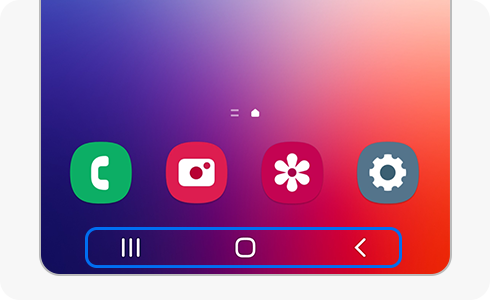
The navigation bar on your Samsung Galaxy device provides quick access to the Home, Back, and Recent apps screens. If the navigation bar is hidden, you can easily bring it back using swipe gestures or adjusting display settings. Follow the steps below to ensure your navigation bar is visible and properly configured.
1. Why Is My Navigation Bar Hidden?
The navigation bar may be hidden due to the following reasons:
- You have enabled swipe gestures instead of the traditional navigation bar.
- Certain apps or full-screen modes hide the navigation bar temporarily.
- Your device orientation (portrait or landscape) affects navigation bar visibility.
2. How to Show the Navigation Bar Using Swipe Gestures
If the navigation bar is hidden, you can temporarily display it using swipe gestures:
- Swipe up from the bottom edge of your screen.
- The navigation bar will appear briefly, allowing you to access the Home, Back, and Recent apps screens.
3. How to Permanently Enable the Navigation Bar
To permanently show the navigation bar instead of swipe gestures, follow these steps:
- Open the Settings app on your Samsung Galaxy device.
- Scroll down and tap on Display.
- Select Navigation Bar.
- Choose Navigation Buttons to enable the traditional navigation bar.
4. How to Customize the Navigation Bar Layout
You can rearrange the buttons on the navigation bar to suit your preferences:
- Go to Settings > Display > Navigation Bar.
- Tap on Button Order.
- Select your preferred layout:
- Recent – Home – Back
- Back – Home – Recent
5. When Does the Navigation Bar Disappear Temporarily?
The navigation bar may be hidden in the following scenarios:
- While using full-screen apps or games.
- When your device is in landscape mode for media playback.
- If swipe gestures are enabled and you're not actively interacting with the screen.
6. Supported Samsung Galaxy Devices
The navigation bar settings and swipe gestures are available on most Samsung Galaxy devices, including the Galaxy S24, Galaxy S25, Galaxy Z Fold, Galaxy Z Flip, and Galaxy A series.
Related Samsung Support Topics
Thank you for your feedback!
Please answer all questions.