Microphone options for Galaxy Pro Video mode
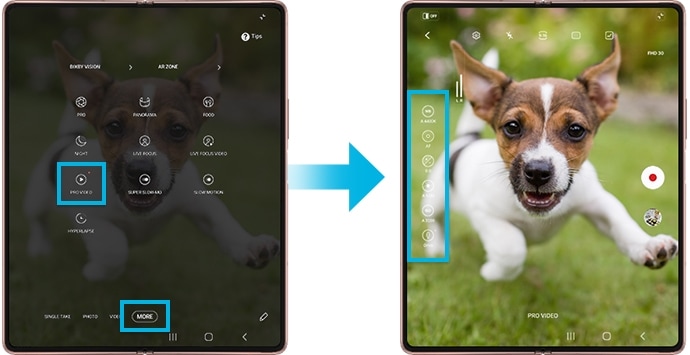
The Pro Video feature on your Samsung Galaxy phone allows you to control microphone settings while filming, ensuring clear and crisp audio. With multi-source microphone options, you can capture sound from different directions or connect external audio devices for enhanced recording quality.
1. Why Use Microphone Options for Pro Videos?
Using microphone options in Pro Video mode helps you tailor audio capture to your filming environment. Whether you're recording in a crowded area or focusing on specific sounds, these settings ensure your audio matches your video's needs.
2. How to Change Microphone Settings in Pro Video Mode
- Open the Camera app on your Samsung Galaxy device.
- Switch to Pro Video mode.
- Tap the microphone icon to access audio input options.
- Select your preferred microphone setting (e.g., OMNI, Front, Rear, USB, BT, or BT Mix).
- Adjust the decibel slider to control input volume.
- Tap Record to start filming.
3. What Are the Audio Input Options?
- OMNI: Captures sound from all directions equally, ideal for ambient recordings.
- Front: Focuses on sounds coming from the front of the phone, perfect for interviews or forward-facing scenes.
- Rear: Captures sounds from behind the phone, useful for recording while facing away from the subject.
- USB: Records audio from a connected USB-C device, such as a microphone or wired headset.
- BT: Captures audio from a Bluetooth-connected device, like a wireless microphone.
- BT Mix: Combines audio from both the phone's microphone and a Bluetooth device for layered sound.
4. Supported Samsung Galaxy Devices
This feature is available on the following Samsung Galaxy devices:
- Note20 5G, Note20 Ultra 5G
- Z Flip series, Z Fold series
- S21, S22, S23, S24, and S25 series
5. Additional Things to Check
Ensure your device is updated to the latest software version for optimal performance. If you're using an external microphone, verify that it's properly connected and compatible with your device.
6. Related Samsung Support Topics
Thank you for your feedback!
Please answer all questions.