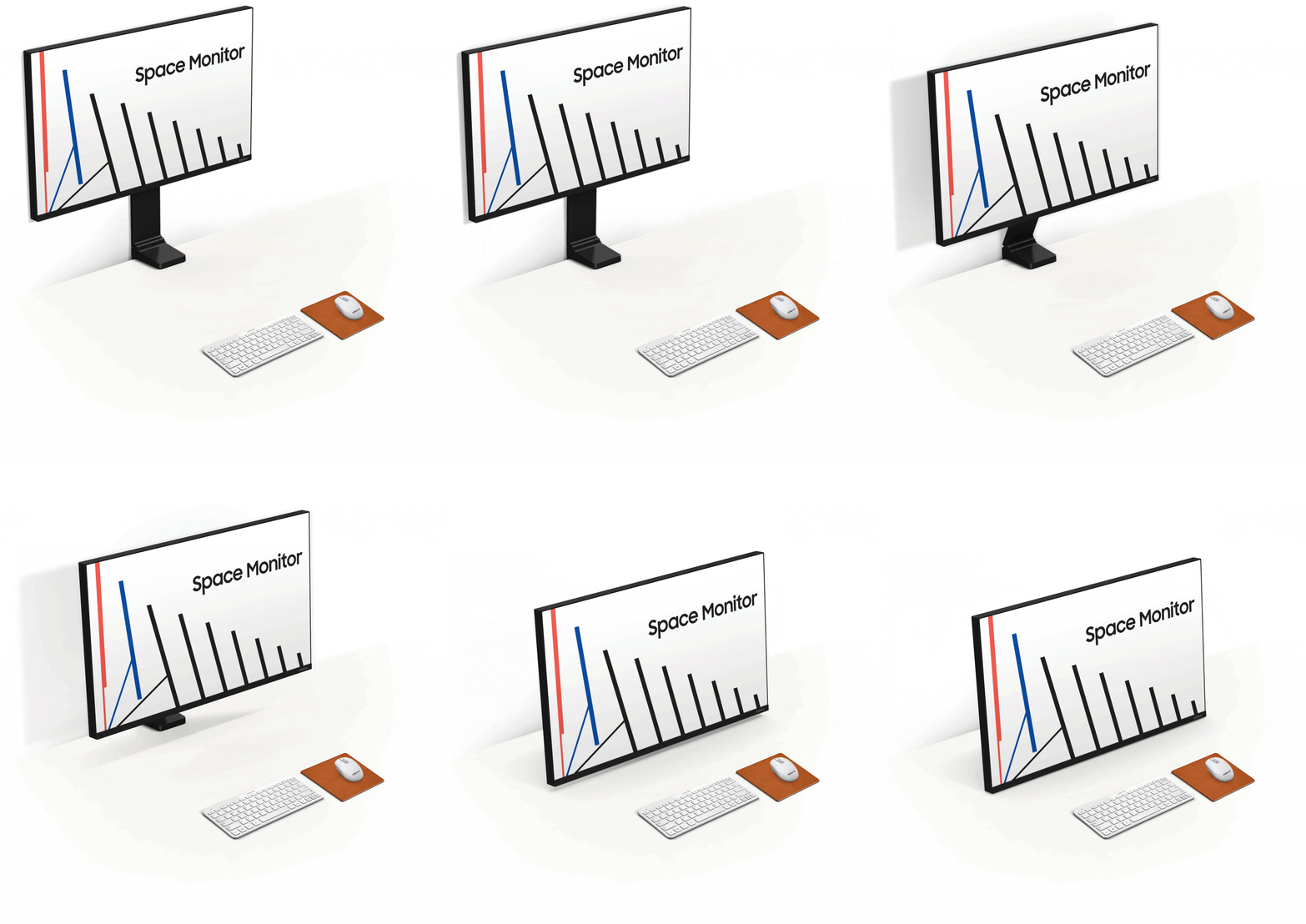
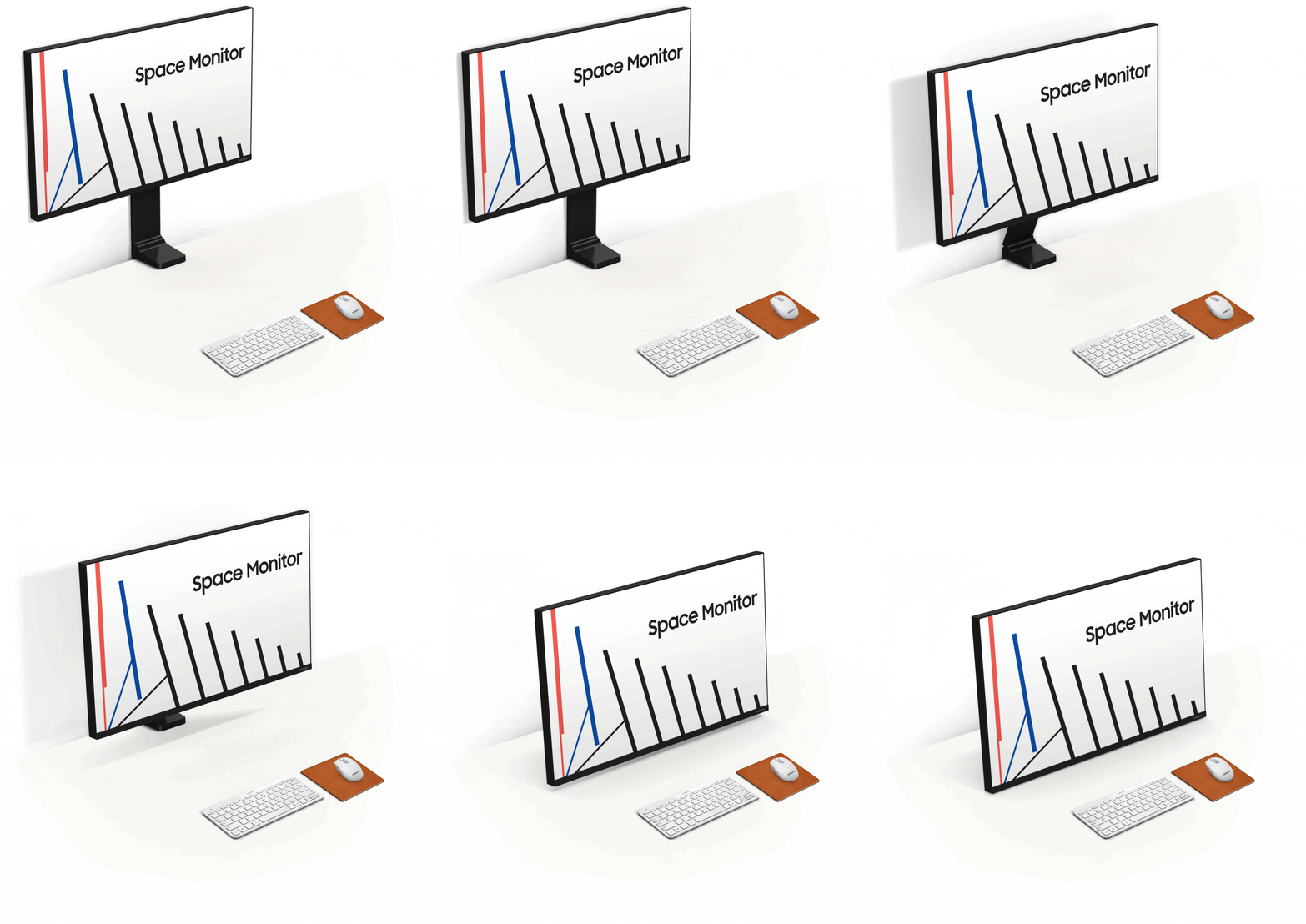
The Space S27R750 (27")

{{priceAnchor.priceWrapper.info.noLineOrignal}}

{{priceAnchor.priceWrapper.info.totalPrice}}
{{priceAnchor.priceWrapper.info.totalPriceMonthly}}

{{priceAnchor.priceWrapper.info.ceExchangePrice}}

{{priceAnchor.priceWrapper.info.orignalPriceAddText}}
UVP {{priceAnchor.priceWrapper.info.orignalPrice}}
{{priceAnchor.priceWrapper.info.disclaimer}}

Wähle deine Größen

The Space S27R750 (27")
27"

{{item.name}}

{{item.summaryPrice}}

Samsung Reward Punkte

Samsung Rewards Punkte können auf Samsung.com eingelöst werden. Noch kein Mitglied? Du kannst dich anmelden, sobald du deine Bestellung abgeschlossen und deine Punkte eingelöst hast. Noch kein Samsung Rewards Mitglied? Kein Problem, du kannst dich beim Bezahlvorgang anmelden und deine Prämienpunkte sammeln. Samsung Reward Punkte basieren auf der Mitgliedschaftsstufe und haben ein maximales Limit.
Samsung Rewards Punkte können auf Samsung.com eingelöst werden. Noch kein Mitglied? Du kannst dich anmelden, sobald du deine Bestellung abgeschlossen und deine Punkte eingelöst hast. Noch kein Samsung Rewards Mitglied? Kein Problem, du kannst dich beim Bezahlvorgang anmelden und deine Prämienpunkte sammeln.

{{rewards.formatted.totalPoint}}

{{rewards.rewardsDescription}}

{{price.priceWrapper.info.totalPrice}} {{price.priceWrapper.info.vatText}}

{{price.priceWrapper.info.orignalPriceAddText}}

UVP {{price.priceWrapper.info.orignalPrice}}

Inkl. MwSt., zzgl. Versandkosten

Inkl. MwSt., Kostenloser Versand ab 60€

Earn 5% back in rewards

{{price.priceWrapper.info.walkoutQtyText}}

{{price.priceWrapper.info.homeDeliveryQtyText}}

{{price.priceWrapper.info.salesPitch}}

{{price.priceWrapper.info.text}}

{{price.priceWrapper.info.text2}}

{{price.priceWrapper.info.text3}}

{{price.priceWrapper.info.shippingOrBack}}

{{price.priceWrapper.info.taxPriceDisplay}}

{{upgrade.title}}

{{upgrade.learnMoreCta.text}}

{{upgrade.description}}

{{upgradeResult.displayModelName}}

{{upgradeResult.discountText1}}

{{upgradeResult.description1}}

{{upgradeResult.description2}}

{{offerFinance.title}}

{{offerFinance.learnMoreCta.text}}

{{offerFinance.description}}

{{galaxyForever.title}}

{{galaxyForever.learnMoreCta.text}}

{{galaxyForever.description}}

{{galaxyForeverResult.displayModelName}}

{{galaxyForeverResult.discountText1}}

{{galaxyForeverResult.description1}}

{{galaxyForeverResult.description2}}

Wähle deine Farbe

Individuell gestaltbare Rahmen separat erhältlich

Wähle die Farbe deines Skins.

Personalisierbarer Skin separat erhältlich

  • {{item.name}}

    Ausverkauft

Modern (kostenlos)

  • {{item.name}}

    Ausverkauft

Abgeschrägt

  • {{item.name}}

    Ausverkauft

Skin-Farbe

  • {{item.name}}

    Ausverkauft

{{shippingOrBack.shippingOrBack}}
{{deliveryMessage.deliveryMessage}}

{{tradeIn.title}}

{{tradeIn.learnMoreCta.text}}

{{tradeIn.description}}

You have maximum number of Trade-in in cart already. If you wish to add in Trade-in, please remove from cart.

{{tradeInResult.displayModelName}}

{{tradeInResult.discountText1}}

{{tradeInResult.discountText2}}

{{tradeInResult.discountText3}}

{{tradeInResult.discountText4}}

{{tradeInResult.discountText5}}

{{tradeInResult.discountText6}}

{{tradeInResult.specialDiscountText}}

{{tradeInResult.description}}

{{tradeInResult.contentText}}

Dealer stock quantity

You can check the stock quantity for each region

Please select city

Only {0} left in stock.

Sorry, this product is not currently available in selected city.

{{assuredBuyBack.title}}

{{newAssuredBuyBack.title}}

{{newAssuredBuyBack.learnMoreCta.text}}

{{newAssuredBuyBack.description}}

Please select Samsung Assured Buyback or no coverage

{{care.title}}

{{care.learnMoreCta.text}}

{{care.description}}

Bitte wähle "Samsung Care+" oder "Nein", um fortzufahren

  • {{item.specialText}}

Selbstbehalt im Schadensfall (variiert nach Modell)

{{warranty.title}}

{{warranty.learnMoreCta.text}}

{{warranty.description}}

{{warrantyResult.displayModelName}}

{{warrantyResult.discountText1}}

{{warrantyResult.description1}}

{{warrantyVd.description}}

{{warrantyVdResult.title}}

{{warrantyVdResult.priceDisplay}}

{{delivery.headline}}

{{delivery.errorMessage}}

Auswählen

{{deliveryResult.priorityText}}

{{deliveryResult.mainText}}

{{deliveryResult.subText}}
Standard installation charges may apply.Click here for more details.

{{deliveryResult.decText}}

{{item.disclaimer}}

{{tariffOption.headline}}

Mehr erfahren

{{tariffOption.description}}

{{tariffOptionResult.displayModelName}}

{{tariffOptionResult.discountText1}}

{{tariffOptionResult.description1}}

{{tariffOptionResult.description2}}

{{tariffOptionResult.description}}

{{tariffOptionResult.price}}

{{tariffOptionResult.disclaimer}}

{{embedAddon.title}}

{{embedAddon.description}}

  • {{item.imgAlt}} {{item.imgAlt}}
    {{item.iconTitle}}

    {{item.name}}

    {{item.modelCode}}

    {{item.description}}

    {{item.finalPrice}}

    {{item.originalPrice}} {{item.savePrice}} Ausverkauft
  • {{item.imgAlt}} {{item.imgAlt}}
    {{item.iconTitle}}

    {{item.name}}

    {{item.modelCode}}

    {{item.description}}

    • {{item.dotList1}}
    • {{item.dotList2}}
    • {{item.dotList3}}

    {{item.finalPrice}}

    {{item.originalPrice}} {{item.savePrice}} Ausverkauft
{{message.item.offerTitle}}

{{message.item.offerTooltip}}

{{message.item.linkText}}

{{message.item.tcCTAText}}

{{message.item.periodText}}

{{finance.item.emiText}} {{finance.item.emiText}}

{{finance.item.offerTooltip}}

{{finance.item.cta.label}}

Highlights

WQHD Resolution

WQHD (2560x1440)

Robust Hinge

Klemmhalterung

Zero-Level HAS

Individuelle Höhe

144 Hz Refresh Rate

Hohe Bildwiederholrate

Funktionen

Gewinnen Sie mehr Arbeitsfläche

 Gewinnen Sie mehr Arbeitsfläche  Gewinnen Sie mehr Arbeitsfläche

Platzsparendes Design

Wird der Bildschirm nicht gebraucht, kann er flach an die Wandgeschoben werden - somit ist der gesamte Arbeitsplatz frei. Den Space Monitor beim Arbeiten ganz einfach heranziehen und individuell einstellen. Der ideale Monitor für Homeoffice und Arbeitsplatz.

Mehr Platz zum Arbeiten

Der Samsung Space Monitor lenkt die Aufmerksamkeit auf das Wesentliche und ermöglicht somit mehr Platz zum Arbeiten bis zu 40% mehr Fläche als mit einem Bildschirm derselben Grösse (Samsung SD850).

WQHD Auflösung

Mit einer bis zu 1,7 Mal höheren Pixeldichte als Full HD, liefert WQHD nicht nur sehr detaillierte und scharfe Bilder, sondern kreiert auch eine größere Fläche, um effizienter arbeiten zu können oder einfach im Internet zu surfen.

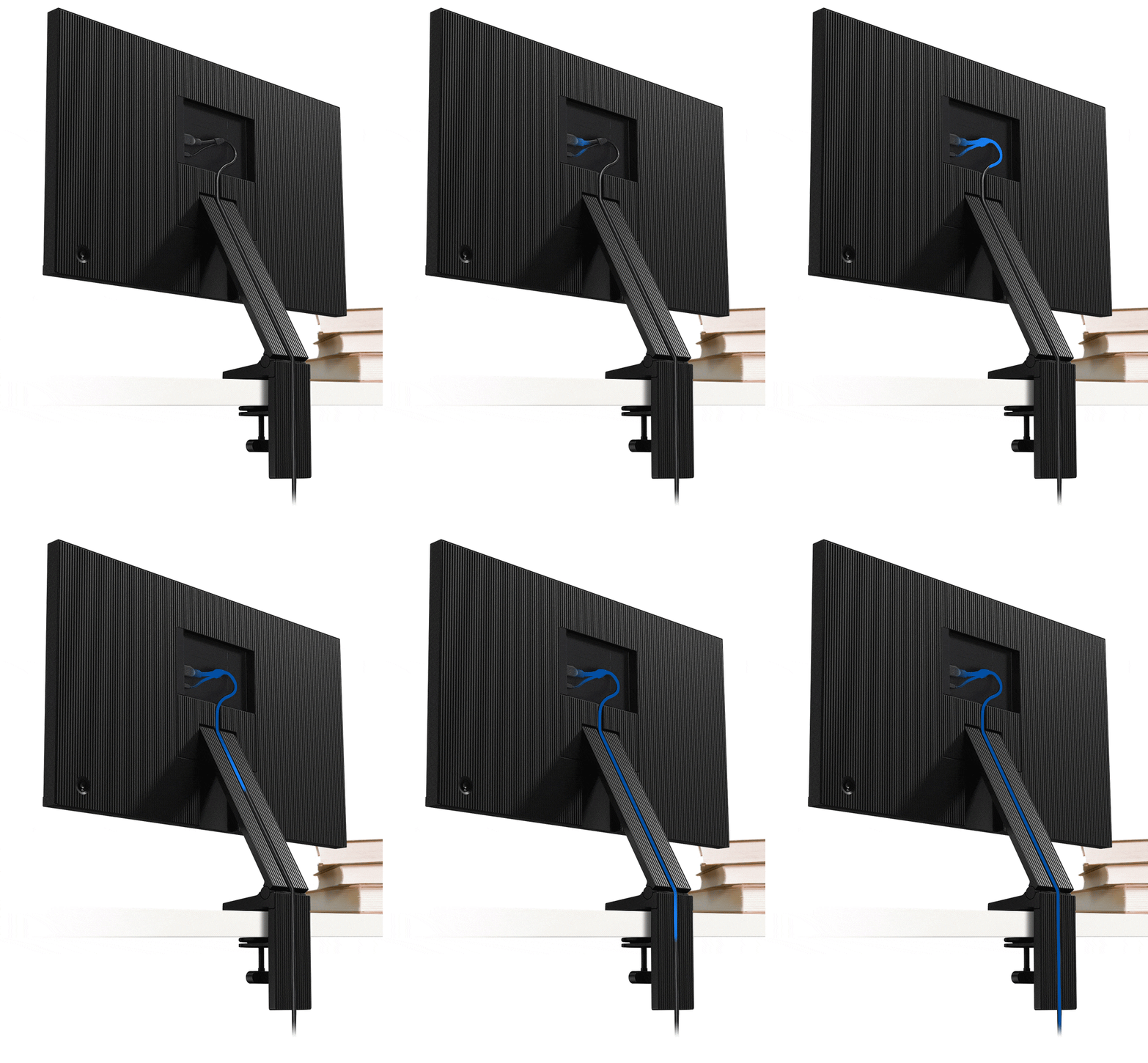
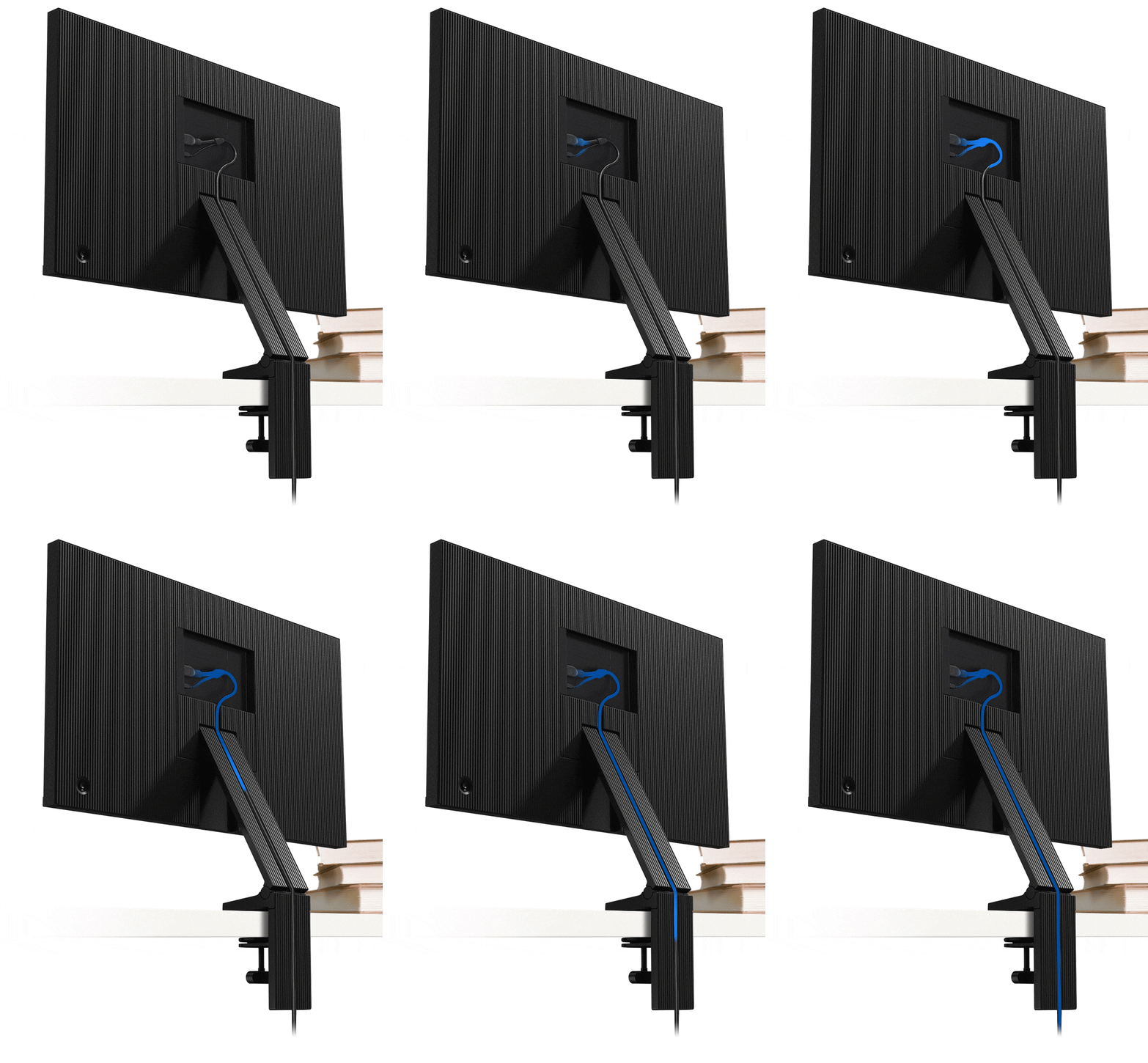
Versteckte Kabel

Der Schwenkfuß des Samsung Space Monitors verstaut das Strom- und HDMI Y-Kabel diskret im Gehäuse, um Kabelsalat vorzubeugen und Ihren Arbeitsplatz ordentlich zu halten.

Stilvoller Look

Mit seinem fast rahmenlosen Design integriert sich der Samsung Space Monitor stilvoll in jedem Arbeitsplatz – oder Zuhause.

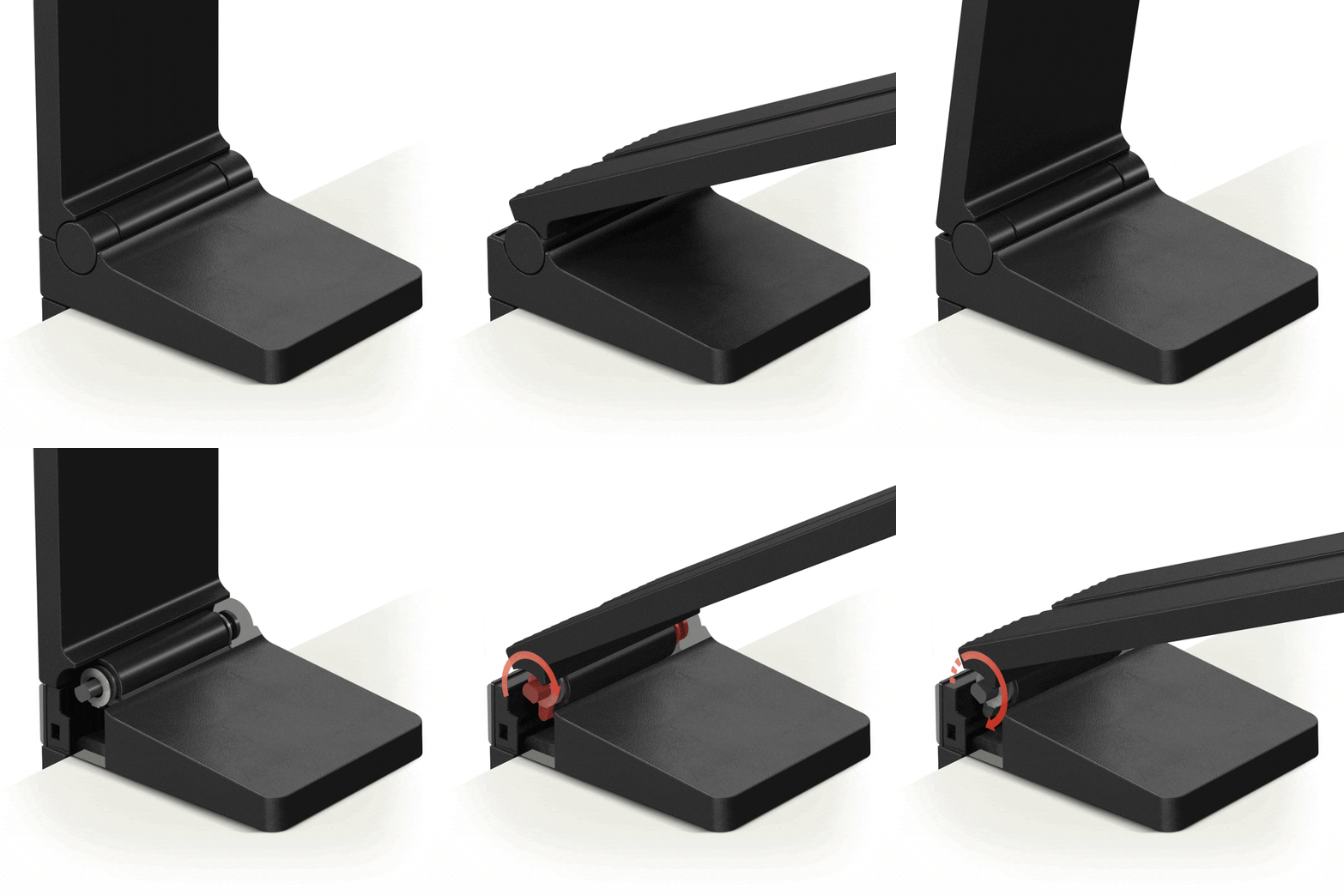
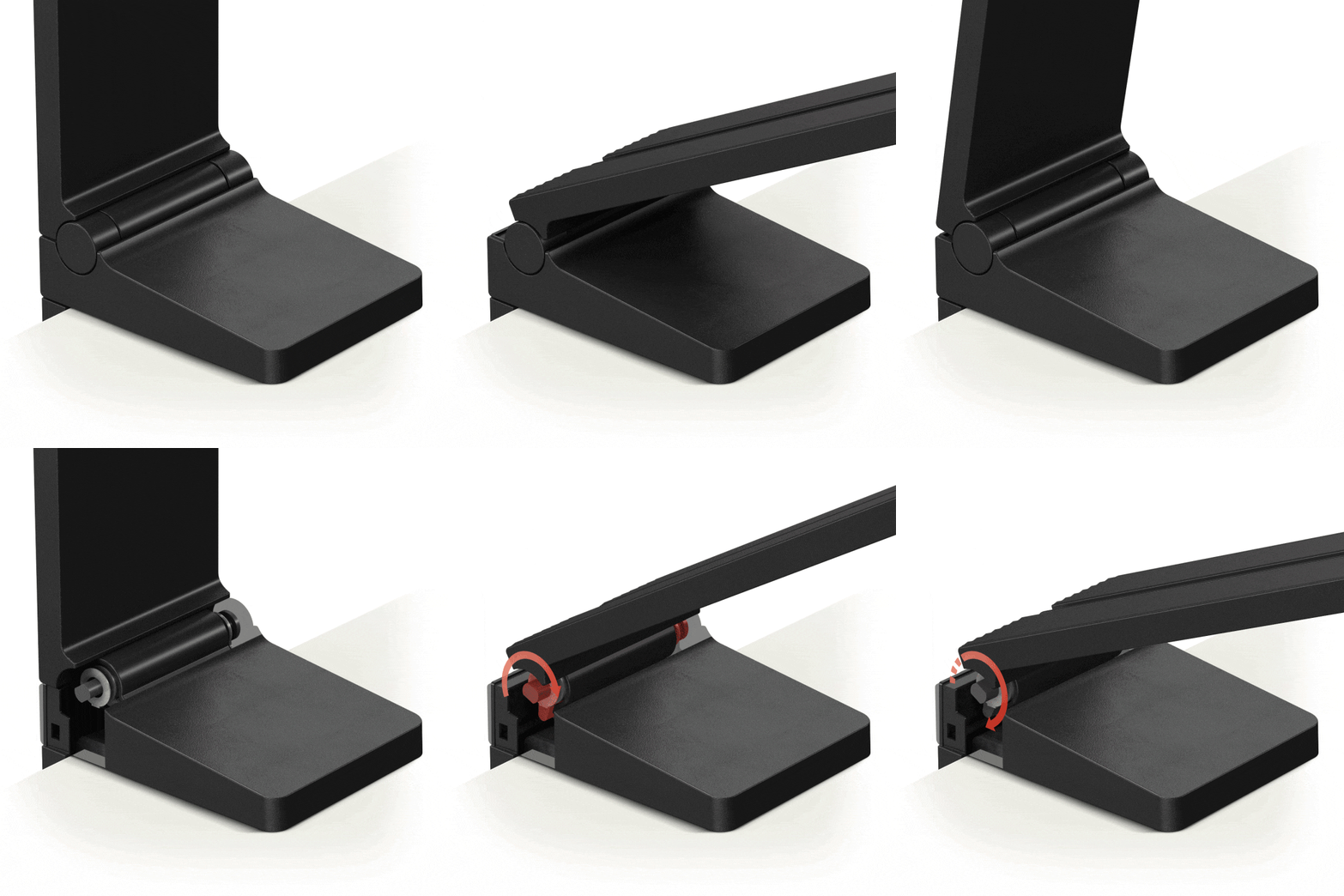
Robuste Scharniere

Die Bildschirmhalterung besteht aus robusten und zuverlässigen Scharnieren, die in internen Tests bewiesen haben, dass sie mindestens 5.000 Mal verstellt werden können. Der Bildschirm lässt sich somit bequem und mit höchster Präzision einstellen.

Immer im Blick

Die Höhe des Space Monitors lässt sich individuell einstellen. Die maximale Einstellspanne von 213 mm bietet einen großzügigen Spielraum, sodass der Monitor sowohl über dem Schreibtisch als auch direkt auf der Tischoberfläche verwendet werden kann.

Auf Augenhöhe einstellbar

Der Samsung Space Monitor kann schnell und einfach auf gewünschte Augenhöhe eingestellt werden. Dadurch eröffnen sich vielseitige Einsatzmöglichkeiten, wie zum Beispiel Zuhause oder in öffentlichen Räumen, wie Bibliotheken oder Schulen.

Multitasking

Bei PBP-Monitoren ist es möglich, Bilder von zwei verschiedenen Quellen in Ihrer Ursprungsqualität anzuzeigen. Mit PIP kann das zweite Bild bis zu 25% des Displays einnehmen und nach Belieben positioniert werden. Und dank Samsungs Easy Setting Box Software können Sie den Bildschirm teilen und die Fenster für optimales Multitasking problemlos anordnen.

Multitasking

Bei PBP-Monitoren ist es möglich, Bilder von zwei verschiedenen Quellen in Ihrer Ursprungsqualität anzuzeigen. Mit PIP kann das zweite Bild bis zu 25% des Displays einnehmen und nach Belieben positioniert werden. Und dank Samsungs Easy Setting Box Software können Sie den Bildschirm teilen und die Fenster für optimales Multitasking problemlos anordnen.

Multitasking

Bei PBP-Monitoren ist es möglich, Bilder von zwei verschiedenen Quellen in Ihrer Ursprungsqualität anzuzeigen. Mit PIP kann das zweite Bild bis zu 25% des Displays einnehmen und nach Belieben positioniert werden. Und dank Samsungs Easy Setting Box Software können Sie den Bildschirm teilen und die Fenster für optimales Multitasking problemlos anordnen.

Einfache Installation

Die Bildschirmhalterung des Samsung Space Monitors kann mit einer Klemme einfach und schnell installiert werden. Die bis zu 90 mm in der Höhe verstellbare Klemme sorgt für eine sichere Befestigung an Schreibtischen und Tischen mit unterschiedlich dicken Tischplatten.

Samsung Flip im Einsatz

Im Einsatz bei Helvetia und MXR

Samsung Flip im Einsatz bei MXR Samsung Flip im Einsatz bei MXR

Samsung Flip im Einsatz

Im Einsatz bei Helvetia und MXR

Im Einsatz bei Helvetia und MXR Im Einsatz bei Helvetia und MXR

Schnelle 144Hz Bildwiederholrate

Die schnelle Bildwiederholrate sorgt mit 144Hz für makellose Szenen. Zusätzlich kann die Bildwiederholrate auf 60Hz und 120Hz angepasst werden, um die optimale Performance in unterschiedlichen Situationen zu liefern.

Spezifikationen

  • Seitenverhältnis

    16:9

  • Helligkeit (typisch)

    250 cd/㎡

  • Statisches Kontrastverhältnis

    3.000:1(Typ.)

  • Bildschirmauflösung

    2.560 x 1.440

  • Reaktionszeit

    4(GTG)

  • Betrachtungswinkel (H x V)

    178°(H)/178°(V)

  • Aktualisierungsrate

    144 Hz

  • EAN

    LS27R750QEUXEN

  • Bildschirmgröße (Zoll)

    27,0

  • Bildschirmgröße (cm)

    68,4

  • Bildschirmgröße (Klasse)

    27

  • Flat / Curved

    Flat

  • Aktive Displaygröße (HxB) (mm)

    596,736 x 335,664 mm

  • Seitenverhältnis

    16:9

  • Paneltyp

    VA

  • Helligkeit (typisch)

    250 cd/㎡

  • Helligkeit (Min.)

    200 cd/㎡

  • Statisches Kontrastverhältnis

    3.000:1(Typ.)

  • Contrast Ratio (Dynamic)

    Mega

  • Bildschirmauflösung

    2.560 x 1.440

  • Reaktionszeit (GTG)

    4(GTG)

  • Betrachtungswinkel (H x V)

    178°(H)/178°(V)

  • Anzahl der Farben

    1 Mrd.

  • Farbumfang (NTSC 1976)

    72%

  • sRGB-Abdeckung

    100%(Typ.)

  • Aktualisierungsrate

    144 Hz

  • Kabelloses Display

    Nein

  • D-Sub

    Nein

  • DVI

    Nein

  • Dual Link DVI

    Nein

  • Display Port

    Nein

  • Display Port Version

    Nein

  • Display Port Out

    Nein

  • Display Port Out Version

    Nein

  • Mini-Display Port

    1  

  • HDMI™

    1  

  • HDMI Version

    2.0

  • Audio Ein

    Nein

  • Kopfhörer

    Nein

  • USB Ports

    Nein

  • USB Hub Version

    Nein

  • USB-C

    Nein

  • Samsung MagicBright

    Ja

  • Samsung MagicUpscale

    Ja

  • Eco Saving Plus

    Ja

  • Augenschonmodus

    Ja

  • Flimmerfrei

    Ja

  • Bild-in-Bild

    Ja

  • Picture-By-Picture

    Ja

  • Game Modus

    Ja

  • Bildgröße

    Ja

  • Easy Setting Box

    Ja

  • Windows-Zertifizierung

    Windows 10

  • FreeSync

    Ja

  • Off Timer Plus

    Ja

  • Lautsprecher

    Nein

  • USB Sound Bar (Ready)

    Nein

  • Temperatur

    10~40 ℃

  • Luftfeuchtigkeit

    10~80%, nicht kondensierend

  • Farben

    Schwarz

  • Standfuß-Typ

    DUAL HINGE

  • HAS (höhenverstellbarer Fuß)

    0~213,9mm

  • Neigbar

    -5,0°(±2,0°)~ 20,0°(±2,0°)

  • Energieeffizienzklasse

    G

  • Stromversorgung

    AC 100~240V

  • Energieverbrauch im Ein-Zustand (W)

    48 W

  • Stromverbrauch (Typ)

    48 W

  • Power Consumption (DPMS)

    Unter 0,3 W

  • Stromverbrauch (ausgeschaltet)

    Unter 0,3 W

  • Stromverbrauch (Jährlich)

    70 kWh/year

  • Typ

    External Adaptor

  • Gerät mit Standfuß (B x H x T)

    614,8 x 730,3 x 115,5 mm

  • Set-Abmessungen ohne Standfuß (B x H x T)

    614,8 x 362,1 x 26,0 mm

  • Paketabmessungen (B x H x T)

    881,0 x 159,0 x 448,0 mm

  • Gewicht mit Standfuß (kg)

    5,8 kg

  • Gewicht ohne Standfuß (kg)

    3,6 kg

  • Gewicht mit Verpackung (kg)

    7,8 kg

  • HDMI-Kabel

    Ja

  • Thunderbolt 3 Cable

    Nein

  • Mini-Display Gender

    Nein

  • Installations CD

    Ja

Bewertungen

The Space S27R750 (27")

4.0

Von 77% der Kunden empfohlen.

Bewertung schreiben
5.0 46%
4.0 23%
3.0 20%
2.0 8%
1.0 5%
Funktionen 4.6
Leistung 4.7
Design 4.2
Zusammenfassung der KI-Bewertung
  • Ein schlankes, platzsparendes Design mit dünnen Rändern und Kabelmanagement-Funktionen bietet der Samsung Space Monitor.
  • Der Bildschirm liefert eine gute Farbgenauigkeit, eine Bildwiederholfrequenz von 144 Hz und eine Reaktionszeit von 1 ms, was ihn für den allgemeinen Büro- und Spieleinsatz geeignet macht.
  • Einige Nutzer berichten jedoch über Kompatibilitäts- und Leistungsprobleme unter macOS sowie Bedenken hinsichtlich der Blickwinkel, des fehlenden USB-C-Anschlusses und des Fehlens von Funktionen wie eingebaute Lautsprecher oder VESA-Halterungsunterstützung.
  • Potenzielle Käufer sollten die Stärken und Grenzen des Monitors sorgfältig abwägen, um zu entscheiden, ob er ihren Anforderungen entspricht.
KI-generiert aus Kundenbewertungen, die gegen Anreiz abgegebene Bewertungen beinhalten können.

Filter

Die Sortierung nach Relevanz zeigt die besten Bewertungen ganz oben an. Wir berücksichtigen Dinge wie Nützlichkeitsstimmen, neueste Bewertungen, Bilder und andere Merkmale, die Leser in ihren Bewertungen suchen.

Sortieren

Filter

40 Bewertungen

Ali Azghar
5 (9,999)

2020-08-13

Größen : 27"
5 (9,999)
Schön, perfekte Bildqualität, genug groß, ohne Standfuß schaut besser aus
Crawl
5 (9,999)

2020-06-12

Größen : 27"
5 (9,999)
Sehr guter Monitor, ideal für Gaming und Office Arbeit
Linds
5 (9,999)

2024-04-11

Größen : 27"
5 (9,999)
Muy funcional, Increíble calidad del monitor. Alternativa Eye saver mode. Colores fieles

Funktionen

5 (9,999)

Leistung

5 (9,999)

Design

5 (9,999)

Nutzen

4 (9,999)
AviationF17
5 (9,999)

2021-01-29

United States

Größen : 27"
5 (9,999)
i use this monitor primarily for editing, the ability to move it from a vertical position to a more level position within seconds is amazing to me. the only con to this is the mounting design and it does not adapt to many desks. the resolution is amazing! no dead pixels and the 5ms vs 1ms on monitors is unnoticeable, i'll never go back to a crappy 1080p 60hz after using this! 2 inputs is great, however instead of mini display port, i wish they'd use usb-c but you cant have everything i guess.
Tisomomo
5 (9,999)

2020-11-09

Größen : 27"
5 (9,999)
high resolution wide screen multiple windows open capacity awesome monitor sleek design modern
Atul
3 (9,999)

2020-09-20

Größen : 27"
3 (9,999)
i like the versatility that it's mounting arm brings to it. it does save space but more than that, it helps bring the screen to whichever level one needs. my only concern was that in less than 3 months it developed a dot up top which appears to be a set of dead pixels. i ignored it as it was small. in another month, a black curve like mark appeared to the right. there is no damage to the screen, nothing hit it or anything but pixels seem to be dying. samsung support has been nice enough to provide a free repair service. i will update the review, if allowed, after the service is done. ideally i would like to buy another one but sadly they don't seem to sell them anymore.
Ankan
5 (9,999)

2020-05-22

Sweden

Größen : 27"
5 (9,999)
I really want to buy this monitor but my desk is a piece of glass of aprox. 7 mm. I would like to know if its possible to fix the stand in a layer of glass and what is the minimum thickness for fixing the stand. Thank you.
Raghu
3 (9,999)

2020-04-28

Atlanta

Größen : 27"
3 (9,999)
I have a Dual monitor Setup, I can't tilt sideways, also it won't support any mount. looked everywhere for after market mount. thinking on returning.
Antwort von Samsung:
2020-05-08

Monitors OBA

Raghu, Thank you for purchasing the Samsung 27" SR75 WQHD LED Space Monitor (LS27R750QENXZA). I am sorry that you have experienced difficulty with tilt and mounting. For complete product specs, please visit samsung.com: https://www.samsung.com/us/support/owners/product/wqhd-space-monitor-sr75-series For assistance with adjusting scaling, please contact Samsung Customer Support and a representative will gladly help you: 1) Phone: 1-800-SAMSUNG 2) LiveChat: https://www.samsung.com/us/support/#contact_us_for_support 3) Facebook Messenger: http://m.me/samsungsupport 4) Twitter: https://twitter.com/messages/compose?recipient_id=18768513 5) The Samsung Members Community is also a great resource for getting help from Samsung moderators and customers: https://us.community.samsung.com Samsung is committed to providing the best possible product experience, quality, and value, and we are always here to help with any of your questions or concerns. Samsung Monitors

Stockholm
1 (9,999)

2020-02-03

Größen : 27"
1 (9,999)
Ska montera det "fantastiska" stativet, men inga skruvar finns med och enligt quick guide finns det inga som ska följa med, jag menar 4700 pix och man snålar in på skruvar. Tummen ner!
Antwort von Samsung:
2020-02-04

Kundsupport Samsung

Hej, Det är tråkigt att höra att du känner dig missnöjd med din Space monitor. Vi rekommenderar att du kontaktar vår tekniska support så att vi kan försöka hjälpa dig vidare med problemet du upplever. Du kan nå oss här: https://www.samsung.com/se/info/contactus/

Honest1Here
2 (9,999)

2019-12-23

Chicago

Größen : 27"
2 (9,999)
Really nice monitor, but already has a dead pixel 1 week into use. It would be the perfect monitor as it has excellent features: Freesync, 144hz, nice and bright panel, picture in picture. The color accuracy is good without tweaking anything and came with the latest update. However, already having a dead pixel for such an expensive monitor is unacceptable. I can excuse having only a displayport mini and an HDMI 2.0 rear I/O as I already use these inputs regularly.
Antwort von Samsung:
2019-12-26

OBA

Honest1Here: Thank you for sharing your experience with the S27R750 Space Monitor. I am very sorry to see that you have encountered an dead pixel with this monitor. I understand your disappointment and hope that you will give us a chance to assist with troubleshooting or warranty service. Samsung products are engineered to the highest standards of performance and quality and we back your Samsung monitor with a 1-year limited manufacturer's warranty, if purchased brand-new from an authorized dealer. For further assistance or begin warranty service, please contact Samsung Customer Support via: 1) Phone: 1-800-SAMSUNG (ask for Monitors) Available 8AM - 12AM EST (Mon-Fri) / 9AM - 11PM EST (Sat-Sun) 2) LiveChat: https://www.samsung.com/us/support/#contact_us_for_support 3) Facebook Messenger: http://m.me/samsungsupport 4) Twitter: https://twitter.com/messages/compose?recipient_id=18768513 The Samsung Members Community is also a great resource for getting help from Samsung moderators and customers: https://us.community.samsung.com/t5/Get-Help/ct-p/get-help If you have not already done so, we invite you to register your new Samsung Monitor at: https://www.samsung.com/us/support/register/ Registering your product gives you access to easy warranty support, convenient opt-in to special promos & offers, faster troubleshooting & service, and quick notification of system updates. Samsung is committed to providing the best possible product experience, quality, and value, and we are always here to help with any of your questions or concerns. We look forward to hearing from you soon. - Samsung Solutions

neo2080
5 (9,999)

2019-10-23

Derby

Größen : 27"
5 (9,999)
[This review was collected as part of a promotion.] I received my Samsung 27” space monitor today and have to say the set up was very quick and easy to do. To be honest it felt a little strange not having a normal stand or wall mount but being able to have the screen flat against the wall or pulled forward for closer viewing is pretty cool. I connected my Xbox One X and the picture was crystal clear and on screen movement without blur or fuzziness! No remote!!! but an easy thumb stick at the rear of the unit deals with that. Minimal and sleek design will look good in any office or man cave. HDMI and PSU cables can be discretely stowed away along the length of the monitor stand. All in all a good all rounder. Very happy.
espy
5 (9,999)

2019-10-23

Upminster

Größen : 27"
5 (9,999)
[This review was collected as part of a promotion.] My new monitor has arrived. Really simple to set up: four screws to fix to the stand and the HDMI and power cables to connect. Up and running in 10 minutes. At maximum resolution, the quality is amazing - I've been looking at some of my photos which I usually shoot at 6000x4000 resolution and I'm seeing much more detail then I did with my old monitors. I like the fact that the stand uses virtually zero desk space but this does have the disadvantage that the monitor only moves along an arc so it is not always possible to place it at exactly the height/distance combination required. That is my day one impression - Now to see what it is like with video and games. p.s. My cat approves of it as well :-)
Anonymous
4 (9,999)

2019-10-23

Milton Keynes

Größen : 27"
4 (9,999)
[This review was collected as part of a promotion.] I am impressed by the space saving design of Samsung Space Monitor. Quite like the design of the hinge that makes the allows the monitor to rest on the table or put it back to the wall. The cable grooves cut into the spine of the monitor is quite a tidy feature and allows me to keep the wires tidy around me. The cable which is in the shape of Y is also designed to save space. A joystick for the menu is a change from usual button design. The menu system also stands out well. LCD Display is consistent, bright and it is good for my office work. The one thing that could be improved is the variation of backlight level across the panel. The one thing I miss is the lack of ports, no aux port. In summary a good monitor with a great design.
she48
4 (9,999)

2019-10-23

LEICESTER

Größen : 27"
4 (9,999)
[This review was collected as part of a promotion.] I received this product as part of a review program in return for an unbiased review. Very pleased with it. Easy to install. But shame Keyboards and Accessories not included. But overall the picture is so clear. Resolution is fantastic and you can do 2 jobs at the same time by using split screen.
jessica1755
5 (9,999)

2019-10-23

Guisborough

Größen : 27"
5 (9,999)
[This review was collected as part of a promotion.] Received the Samsung monitor and upon opening was very impressed with the size and sleek look of the screen. At first the stand is a little fiddly to fix to the screen, but when complete is as sturdy as you can get. Monitor is sharp and my games run fabulously on it. The space saver design is great due to my office set up and has actually made the room quite a bit bigger that it was before as I can now sit further forward under my desk. The power button on the back is very easy to use - this is similar to a joystick to navigate various menus. The 144hz refresh rate is also a great upgrade from any monitor running lower than this. I upgraded from a 60hz screen to this and could see no motion blur what so ever. The recessed cable run down the back of the stand is a very nice touch and helps keep the back of your desk neat and tidy. I'd recommend this to anyone wanting to upgrade their monitor, or if you have a shallow desk. The support arm is extremely sturdy and I was very impressed, I've moved it around a little since initially installing it and it doesn't seem to budge at all only at the two hinge points for lowering the screen. The one downfall I would mention about this screen is the inability to lower the screen but keep the same distance from the screen. I understand this would be difficult to incorporate but for some peoples set up this screen would be a little too high, or, a little to close to the eyes.
ong1010
4 (9,999)

2019-10-23

Slough

Größen : 27"
4 (9,999)
[This review was collected as part of a promotion.] When I took the delivery, I was surprised the box was so light that was totally bring on the curiosity and cannot wait to open it. The monitor itself is indeed very light to my surprise. It come with none standard power supply; it also include a proprietary HDMI cable that allow the power cable to piggy back it to make it looks like there is only one cable need for both video and power. my laptop does not have a HDMI port so I purchased DP to HDMI adaptor. The monitor has display port but it is a mini so you will need extra cable (not included) if you want to use it for video. When I first connect it to my laptop; the video keeps flicking constantly and it took me a while to work it out that I need to adjust the HDMI version in the monitor setting to get perfect picture. You cannot rotate the monitor if you want to change the display to portrait; the monitor stand has fixed height so you cannot adjust the height of the monitor; the only way I can lower the monitor is to tilt forward the monitor arm but this defeat the main feature of the monitor (space saving monitor). The monitor stand has a round padded clamp, so you need to make sure underside of the table has enough clearance to install the clamp properly. The quality of the picture and fast moving video are very clear and crisp; it is important for both gaming and reading documents. I think the monitor is expensive for same resolution and not perfect monitor arm
Niels
3 (9,999)

2019-09-22

Amsterdam

Größen : 27"
3 (9,999)
I love the clean design and the 144 hz refreshrate. Once you worked on 144hz you can't go back, unfortunately the entire market is dominated by the spaceship battlestation gamer monitors. I would have given this monitor a 5/5 star if only it worked properly in macOS. You can't download any drivers and macOS Mojave 10.14.6 doesn't properly recognize the S27R75. On my Macbook Pro 15" mid 2015 it's shows as a 30,5-inch with a resolution of 1920x1080. By default it sets the refreshrate to 60hz. Connected with a mini displayport cable I could set it to 120hz max. But after every reboot the refreshrate is set back to 60hz and the multiple display arrangement is lost. So after every startup you need to reconfigure the display! I am running Win10 as dualboot where I am able to use 144hz and the arrangement gets saved. The recommended LS27R75 icc colour profile is not good, way too purple. I used the Windows S32R75.icm profile in macOS where the colours look rather good. When I am going to calibrate the monitor it would be nice if the menu actually shows what gamma value it uses, instead of mode 1/2/3. I am not sure who is responsible for the drivers, Samsung or Apple, but please figure it out. I have updated the firmware hoping this would solve it. I noticed Freesync support has been added after the firmware update, it would be nice if this works. Compliments to the design department for finding a new typology with the monitor stand. For a next version it would be nice if the height can be adjusted. As retina became a standard for Macs, so should the 144hz refreshrate become the standard for any new monitor. It relieves eye strain and the brain has to work less hard filling in the gaps.
Antwort von Samsung:
2019-09-26

OBA

Niels: Thank you for sharing your experience with the Samsung 27" SR75 WQHD LED Space Monitor. I am sorry you are experiencing issues using it with macOS. So that we can better assist you with interface concerns and display adjustments for your particular usage scenario, we ask that you please contact us and speak with a Samsung Customer Service representative. You can reach us via any of these options: 1) Phone: 1-800-SAMSUNG (ask for Monitors) Available 8AM - 12AM EST (Mon-Fri) / 9AM - 11PM EST (Sat-Sun) 2) LiveChat or Email: https://www.samsung.com/us/support/#contact_us_for_support 3) Facebook Messenger: http://m.me/samsungsupport 4) Twitter: https://twitter.com/messages/compose?recipient_id=18768513 The Samsung Members Community is also a great resource for getting help from Samsung moderators and customers: https://us.community.samsung.com/t5/Get-Help/ct-p/get-help Samsung is committed to providing the best possible product experience, quality, and value, and we are always here to help with any of your questions or concerns. - Samsung Solutions

mickep76
3 (9,999)

2019-09-04

Amsterdam

Größen : 27"
3 (9,999)
The design is clean and the stand is great, however the monitor looks washed out and the colours are not good.
Antwort von Samsung:
2019-09-06

OBA

mickep76: Thank you for purchasing the 27" SR75 WQHD LED Space Monitor. I am sorry to hear that you are not satisfied with the color performance of this model. Please know that this monitor's fast 144 Hz screen refresh rate provides flawlessly smooth scenes and can be adjusted to 60 Hz/120 Hz for optimized monitor performance. Samsung products are engineered to the highest standards of performance and quality and we back the Samsung U28E590D with a 1-year limited manufacturer's warranty, if purchased brand-new from an authorized dealer. To better assist you with step-by-step troubleshooting and picture adjustment, please contact Samsung Customer Support and representative will gladly help you: 1) Phone: 1-800-SAMSUNG (ask for Monitors) Available 8AM - 12AM EST (Mon-Fri) / 9AM - 11PM EST (Sat-Sun) 2) LiveChat or Email: https://www.samsung.com/us/support/#contact_us_for_support 3) Facebook Messenger: http://m.me/samsungsupport 4) Twitter: https://twitter.com/messages/compose?recipient_id=18768513 The Samsung Members Community is also a great resource for getting help from Samsung moderators and customers: https://us.community.samsung.com/t5/Get-Help/ct-p/get-help If you have not already done so, we invite you to register your new Samsung Monitor at: https://www.samsung.com/us/support/register/ Registering your product gives you access to easy warranty support, convenient opt-in to special promos & offers, faster troubleshooting & service, and quick notification of system updates. Samsung is committed to providing the best possible product experience, quality, and value, and we are always here to help with any of your questions or concerns. - Samsung Solutions

KHodson
5 (9,999)

2019-08-30

Größen : 27"
5 (9,999)
I recently transitioned to working solely from home, and was concerned that due to a lack of space I wouldn't be able to work across multiple monitors and my productivity would inevitably take a hit. Thanks to the space-saving design of the Samsung S27R750 stand, I was able to install this as an extra monitor at the rear of my small desk, leaving the main work area accessible to my laptop allowing me to work across dual monitors. The stand functions as a cable tidy allowing me to run multiple HDMI leads neatly from their input area while still leaving my desk tidy and uncluttered. Working in design, I require high resolution screens to ensure my products meet a high standard. The 2560 x 1440 resolution allows me zoom in on specific areas while working across multiple documents side-by-side. While I didn’t buy this monitor specifically for gaming, I have spent a few hours playing Diablo and Overwatch and am amazed at how the refresh rate improves the feel of the game. I have never played at 144Hz before this and I doubt I will ever be able to go back to anything less. I did however find that out of the box the screen was too bright for my eyes. This was simply resolved by using the simple On-Screen controls which made navigation and altering the brightness settings effortless. Pros: Fantastic resolution and high refresh rate. Space-saving design of the stand which easily clips onto the desk. Ergonomic designing allowing adjustment of the screen to eye level. Cons: You cannot rotate or twist the screen. It is very high so you have to bring it forward which uses desk space. No USB port for connectivity. Overall, I would definitely recommend this monitor and seriously considering buying a second one.

Funktionen

5 (9,999)

Leistung

5 (9,999)

Design

5 (9,999)

Nutzen

5 (9,999)
KatieLO
5 (9,999)

2019-08-27

Größen : 27"
5 (9,999)
Having taken delivery of the Space Saving Monitor on Saturday, we havent really had enough time with the product to put it through its paces with regards to gamin, but my first thoughts are as follows. Product came securely packaged and was simple to put together, all be it a bit fiddly to screw in the stand (You may need two people for this!). I was super impressed with the two in one cable for power and HDMI - this is is such a great idea! The screen resolution is brilliant, crisp colours and a speedy refresh rate. Works well on split screen (for those that are used to using two screens) and does what it says on the tin - saves space on your desk as you can pus the monitor so it sits flat against the wall and bring it forward when in use. So far so good! Once I have had the time to get on it and do some gaming, I will write another testimonial. UPDATE - After building a new PC (as ours was approx 7 years old and unable to use the full resolution), I can happily say that this monitor is brilliant. Amazing resolution and perfect for small desks.

Funktionen

5 (9,999)

Leistung

5 (9,999)

Design

4 (9,999)

Nutzen

5 (9,999)
emmaj1983
4 (9,999)

2019-08-21

Größen : 27"
4 (9,999)
The box was extremely lightweight for such a size of monitor which was a pleasant surprise when it was delivered to my neighbour and I had to carry it home. It was very easy to assemble without instructions. The clamp fitting is sturdy and secure and does leave more space on the desk than you would get with a standard monitor - I have ample space for a laptop, keyboard, mouse and notes . It is not height adjustable though so i've had to angle it down slightly to fit under my slanted ceiling. This actually works well for me but might be an issue for others if their seat is not height adjustable and they want to work in the most ergonomic position. One slight hitch is that now i've attached the 3 point plug (it comes with a UK or EU plug adaptor) I now can't seem to wrestle it free. I don't intend to remove it but I assume it should be able to be released somehow. When setting it up I also realised that my laptop doesn't have an HDMI port but I got a DP to HDMI adaptor delivered the next day for a few pounds so it wasn't too much hassle. I was also not aware prior to ordering this that my laptop won't let me change the resolution to the recommended settings. It recommends 2560 x 1440 WQHD but the best I can manage is 1980 x 1080. I obviously need a new laptop! As you would expect for a monitor at this price the image is very clear and has made my job working with images and video much easier. The settings are simple to adjust; the off timer covers an off and an eco timer, and you can set the picture to 'eye saver mode' which I find helpful when I need to look at the screen for extended periods as it reduces eye strain. Overall a very easy to set up, crisp and clever monitor which does what it says, it saves space and has the quality you expect from Samsung.

Funktionen

4 (9,999)

Leistung

4 (9,999)

Design

4 (9,999)

Nutzen

3 (9,999)
Espy_sp
4 (9,999)

2019-08-10

Größen : 27"
4 (9,999)
The monitor is really simple to set up: four screws to fix to the stand and the HDMI and power cables to connect. Up and running in 10 minutes. At maximum resolution, the quality is amazing - I've been looking at some of my photos which I usually shoot at 6000x4000 resolution and I'm seeing much more detail then I did with my old monitors. I like the fact that the stand uses virtually zero desk space but this does have the disadvantage that the monitor only moves along an arc so it is not always possible to place it at exactly the height/distance combination required. That is my day one impression - Now to see what it is like with video and games.

Funktionen

4 (9,999)

Leistung

5 (9,999)

Design

3 (9,999)

Nutzen

3 (9,999)
Caz00
5 (9,999)

2019-08-09

Größen : 27"
5 (9,999)
I’ve now had this monitor for a few weeks and I must say, it is a great monitor that does exactly what I wanted it to do! It’s great for saving space on my desk because of its really useful hinged desk mount. I actually have room on my desk again, and I can pull the monitor closer if I want to play games or push it away up flat against the wall if I want to do some hand notes for work. I also love how the cable runs up the back of the desk mount as it makes it look a lot neater and means that I can cable manage my system even better than before! The included HDMI cable is also a power cable, so less cabling is required to go from the desktop to the monitor as the power plugs into the HDMI cable near the PC output. As I said, I have used this monitor for both work and personal use. For work it’s a great monitor, whose size and adjustability make it very easy for me to work with and has increased my productivity. The extra desk space is a blessing that means I actually have room for pen and paper when needed without losing any space for my keyboard and mouse. For gaming it’s size, response time, clarity, and colour make it great for either playing any of the games I have. I find it very useful for FPS games just because its size means that I can clearly see more of the playing field and more of an opponent! Overall, I rate this monitor very highly, and may have to buy a second one for my other half who has been looking over at mine with jealousy. I would definitely recommend it to someone who wants a very good monitor that saves space on their desk and looks really good while doing it!

Funktionen

5 (9,999)

Leistung

5 (9,999)

Design

5 (9,999)

Nutzen

5 (9,999)
Oznel
2 (9,999)

2019-08-02

Columbia, SC

Größen : 27"
2 (9,999)
Pros: Quality Design Cons: Lack of freesync Random Static when playing Overwatch requiring restarts of monitor to clear.
Antwort von Samsung:
2019-08-07

OBA

Oznel: I am very sorry to see that you have encountered issues with the Samsung S27R750 Space Monitor. Your thoughts are very important to Samsung and will be shared with our internal teams. We encourage you to contact our customer support team to trouble-shoot the static issue. Please contact Samsung Customer Support via any of the following options: 1) Phone: 1-800-SAMSUNG (ask for Monitors) Available 8AM - 12AM EST (Mon-Fri) / 9AM - 11PM EST (Sat-Sun) 2) LiveChat or Email: https://www.samsung.com/us/support/#contact_us_for_support 3) Facebook Messenger: http://m.me/samsungsupport 4) Twitter: https://twitter.com/messages/compose?recipient_id=18768513 The Samsung Monitor Community is also a great resource for getting help from Samsung moderators and customers: https://us.community.samsung.com/ If you have not already done so, we invite you to register your new Samsung Monitor at: https://www.samsung.com/us/support/register/ Registering your product gives you access to easy warranty support, convenient opt-in to special promos & offers, faster troubleshooting & service, and quick notification of system updates. Samsung is committed to providing the best possible product experience, quality, and value, and we are always here to help with any of your questions or concerns. - Samsung Solutions

Purpleallium
4 (9,999)

2019-07-31

Größen : 27"
4 (9,999)
I have been using my 27" Samsung Space Monitor for a week now. Setup required two people as the stand is quite heavy and I was scared of dropping it on my own, but the process itself was very straightforward and intuitive. I work from home and my work involves a great deal of research, both online and using books and dictionaries. I therefore usually struggle for space on my work surface. The monitor’s footprint on the desk is tiny, freeing up much more space for my books, dictionaries, keyboard and client documentation. I am not used to using such a large monitor, but it has been a revelation to me and I wonder how I always managed with a smaller monitor. I use a second screen (usually either a second monitor or a MacBook Pro laptop) so that I can have two screens with documents in both source and target language and this works very well with the Samsung Space Monitor as I can position it either flat against the wall, or pulled forward over my books etc. for closer view. I also partition the screen into multiple sections, which really improves my workflow. I like the fact that all the cables are concealed and not on show, which looks much smarter. The Space Monitor’s WQHD (2560 x 1440) screen resolution is crisp, sharp and colours are true to life. I am a keen amateur photographer and editing and organising my photos on screen has been a pleasure. I am really impressed so far with the monitor and so far can see very few, if any, downsides. I hope that the stands does not leaves marks on my desk where it clips into place, but time will tell…

Funktionen

4 (9,999)

Leistung

4 (9,999)

Design

4 (9,999)

Nutzen

3 (9,999)
Jessmilo
5 (9,999)

2019-07-30

Größen : 27"
5 (9,999)
Received the Samsung monitor and upon opening was very impressed with the size and sleek look of the screen. At first the stand is a little fiddly to fix to the screen, but when complete is as sturdy as you can get. Monitor is sharp and my games run fabulously on it. The space saver design is great due to my office set up and has actually made the room quite a bit bigger that it was before as I can now sit further forward under my desk. The power button on the back is very easy to use - this is similar to a joystick to navigate various menus. The 144hz refresh rate is also a great upgrade from any monitor running lower than this. I upgraded from a 60hz screen to this and could see no motion blur what so ever. The recessed cable run down the back of the stand is a very nice touch and helps keep the back of your desk neat and tidy. I'd recommend this to anyone wanting to upgrade their monitor, or if you have a shallow desk. The support arm is extremely sturdy and I was very impressed, I've moved it around a little since initially installing it and it doesn't seem to budge at all only at the two hinge points for lowering the screen. The one downfall I would mention about this screen is the inability to lower the screen but keep the same distance from the screen. I understand this would be difficult to incorporate but for some peoples set up this screen would be a little too high, or, a little to close to the eyes.

Funktionen

5 (9,999)

Leistung

5 (9,999)

Design

5 (9,999)

Nutzen

5 (9,999)
She52
4 (9,999)

2019-07-25

Größen : 27"
4 (9,999)
I received this product as part of a review program in return for an unbiased review. Very Easy to assemble. Stays on the Desk clipped with the steady stand. Very Good Picture and brightness. It is only a Monitor. But would be nice a Keyboard and Accessories were included.

Funktionen

4 (9,999)

Leistung

4 (9,999)

Design

3 (9,999)

Nutzen

3 (9,999)
abhinavg1
5 (9,999)

2019-06-21

Hillsboro

Größen : 27"
5 (9,999)
[This review was collected as part of a promotion.] I ordered the 27" space monitor from Samsung. I was taken aback by the ergonomic design by which I could adjust the monitor to a number of degrees of freedom. The design allowed me to mount it with clamps to my work table and thus saved on tones of space which is usually taken by the base of the normal monitors. In terms of resolution and display quality, its so clear that I would probably want to use it not just for work stuff but also maybe now or then see a movie. I dont think there is a comparable monitor in the market and is totally a no brainer to purchase for your home office. I am really happy with my purchase and recommend it to all.
Maya00
5 (9,999)

2019-06-21

Hutto

Größen : 27"
5 (9,999)
[This review was collected as part of a promotion.] This is a review for the 27 inch 1440p version of the Space monitor. Pros: Design - The design is beautiful. The mount, the hinge, the cable concealing, the thin bezels, everything. Setup - Simple as can be, attach the monitor to a desk, plug everything in and go. Cable Management - Usually not a thought for monitors, but it's an underrated part of this product for sure. Screen Quality - The monitor looks great in 1440p, the 144Hz refresh rate is perfect for gaming and the 1MS reponse time is great as well. Cons (mostly nitpicks) - Color Accuracy - If you're using this for photo editing or something where color accuracy is VERY important , you may find better products in this price range. Viewing angle - Not the best, but not a big deal if you're using this in a standard desk setup. Ports - I would have appreciated a USB passthrough or Thunderbolt/USB C. Additionally, having only 2 inputs is a bummer as well. Overall I've really enjoyed using this monitor and would recommend it to almost everyone, unless you fall into a few niche scenarios. Samsung knocked it out of the park with this design at this price point, to go with these specs.
Anonymous
5 (9,999)

2019-06-21

Brooklyn

Größen : 27"
5 (9,999)
[This review was collected as part of a promotion.] The Samsung Space S27R750 is an all-new concept that combines a unique and functional design with high-performance specifications to push trends further. This latest release from the Korean tech giant also holds a 144Hz refresh rate VA panel that should be perfect for games as it is for productivity. The form factor is what makes this good. Being able to drag the monitor closer to you while still having the space under neath it is what makes this good. Makes it look like a bezel-less floating screen on your desk even when you have a small desk. The setup is very simple and worked fine on a desk with angled edge. The image quality is very nice, but viewing angle isn't as good as other monitors. For office and gamin work however it's perfect.
ray102382
5 (9,999)

2019-06-21

Cathedral City

Größen : 27"
5 (9,999)
[This review was collected as part of a promotion.] Recently I have acquired the New Samsung 27" SR75 monitor, and I must say, It was a great investment on my behalf, Not only is the Monitor relatively affordable, but the build quality possess a slick and distinguished design. Having the Ability to set up a 27" Monitor and not compromise any Desk space is a huge Benefit; especially for the average student, Employee, Home user, etc. The set up is very simple and straightforward, Adjusting the monitor settings is easy and simple to navigate through using the power toggle button; and If the monitor isn't needed, you can simply prop the screen at its highest point or bring the screen closer to the user for a more engaging experience. The quality of the 1440p display is a lot better than I had anticipated it to be when looking at the monitor from various angles the screen doesn't diminish like most LED monitors. The factory settings right out of the box are impressive, and do not require any adjusting really, with the exception of turning on the "Eye Saver Mode". Also, the picture quality doesn't lessen when the "Eye Saver Mode" is turned on, the refresh rate on the monitor could be a little better, however, this monitor is well suited for the office environment rather than for gaming use. The Stability of the Monitor could be a little less wobbly, I'm not much of an OCD Freak, however; I do have a cat that lays under the monitor and on occasion bumps into the SR75 making the screen wobble, not a big issue, but could use a little improvement. Another Benefit with this Monitor is the Cable Management, the little channel that is located on the back of the Monitor allows for the Y-cable to elegantly run down the spin of the monitor stand. The Y-cable design is an ingenious mechanism on Samsung's behalf, No one likes having excess cabling to clean up or zip tip together. Samsung took all the ache out of the cleanup portion and made the best Monitor option for Work, Play and space saving.
Harvest0099
5 (9,999)

2019-06-21

Cleveland

Größen : 27"
5 (9,999)
[This review was collected as part of a promotion.] I love the beauty of the screen it has excellent color contrast. I think i can use this as a television also and that's good i would recommend this monitor. It's not to big or too small just right
atehrani99
4 (9,999)

2019-06-14

Temecula

Größen : 27"
4 (9,999)
[This review was collected as part of a promotion.] If your table can support it and you really want to save space, this monitor is for you. It is very easy to install and I really like that the wires hideaway. The most notable feature is the space saving design. You can push the monitor up and away from you when you don't need it. When you do, you can bring it down. Depending on your table, getting the monitor at a good height and not too close to your face might be challenging, so keep that in mind. Also, It would be nice to have the monitor swivel and possibly rotate. Yes you can purchase a stand to do this but YMMV. This product comes all ready to go and is stable. Would recommend if saving space it a priority.
PseudoGrafx
3 (9,999)

2019-04-16

CZ

Größen : 27"
3 (9,999)
I was considering getting this one as many of the specs are nice and I actually tried it, but lack of Freesync is a real showstopper for me. And besides that, it lacks VESA mount holes.
Antwort von Samsung:
2019-04-19

OBA

PseudoGrafx: Thank you for sharing your thoughts about FreeSync and VESA mount holes on this Samsgun S27R750 Space Monitor. Samsung greatly values our customers’ feedback and we utilize your concerns and opinions in our relentless efforts towards delivering world-class products. Your review will be shared with our Monitor team. Should you ever have questions or need assistance, please know that Samsung is always here to help. You can reach us at any of the following options: 1) Phone: 1-800-SAMSUNG (ask for Monitors) Available 8AM - 12AM EST (Mon-Fri) / 9AM - 11PM EST (Sat-Sun) 2) LiveChat or Email: https://www.samsung.com/us/support/#contact_us_for_support 3) Facebook Messenger: http://m.me/samsungsupport 4) Twitter: https://twitter.com/messages/compose?recipient_id=18768513 The Samsung Monitor Community is also a great resource for getting help from Samsung moderators and customers: https://us.community.samsung.com/t5/Monitors/bd-p/monitors Samsung is committed to providing the best possible product experience, quality, and value, and we are always here to help with any of your questions or concerns. - Samsung Solutions

MinhTâm
3 (9,999)

2019-03-18

Vietnam

Größen : 27"
3 (9,999)
Well, I bought Samsung Space Monitor (SR75) for only $350 in Vietnam and It seem good but Lack of Freesync ....
Antwort von Samsung:
2019-03-21

OBA

MinhTâm: Thank you for sharing your experience with the S27R750 Space Monitor. I am sorry that you found FreeSync to be lacking. Your thoughts on this will be shared with our Monitor team. If you ever have questions or need assistance, please know that Samsung is always here to help. You can reach us at any of the following options: 1) Phone: 1-800-SAMSUNG (ask for Monitors) Available 8AM - 12AM EST (Mon-Fri) / 9AM - 11PM EST (Sat-Sun) 2) LiveChat or Email: https://www.samsung.com/us/support/#contact_us_for_support 3) Facebook Messenger: https://www.facebook.com/samsungsupport 4) Twitter: https://twitter.com/SamsungSupport The Samsung Monitor Community is also a great resource for getting help from Samsung moderators and customers: https://us.community.samsung.com/t5/Monitors/bd-p/monitors Samsung is committed to providing the best possible product experience, quality, and value, and we are always here to help with any of your questions or concerns. - Samsung Solutions

homegrownhero
4 (9,999)

2019-03-07

San Francisco

Größen : 27"
4 (9,999)
The 32in 4k screen is pretty good. In terms of colour accuracy I feel the Dell U2717D which I upgraded from is a little better, and obviously for gaming there are screens out there that better serves your need for potentially less. However, its still a really good OLED panel from Samsung. The form factor is what makes this good. Being able to drag the monitor closer to you while still having the space under neath it is what makes this good. Makes it look like a bezel-less floating screen on your desk. Other good things thats not immediately apparent: -the bottom jaw for the clamp can be removed for easier installation and if you need to attach it to a THICK table. -from the way it can bend forward accessing the rear of the screen is also much easier than other monitors. Things I dislike (lots of nitpicking) -the UI/controls are kind of annoying and limited. The DELL I had is better at this and the colour options are better too. -limited I/O. I mean HDMI and ONLY mini-DP? Feels more useful if they had 2x HDMI instead. -no USB-C thunderbolt. yes this gets very nitpicky, but its 2019.
SamsungCustomer1234
1 (9,999)

2019-03-01

Größen : 27"
1 (9,999)
I bought the 27 inch monitor and expected the 1440p 144hz screen, but it is only showing up as 60 Hz in settings. I am not able to change this and I have tried it with 3 different computers. Everything else about the monitor is working, except for this. Does anyone else have this issue?
Antwort von Samsung:
2019-03-01

OBA

SamsungCustomer1234 : Thank you for sharing your review of the Samsung S27R750 Monitor. I am very sorry to see that you are having issues with the screen only showing 60hz in settings. Please double check that your video card supports 144hz. If it does indeed support it and you still continue to have this issue, you may need to update the drivers to ensure they are up to date. I hope this helps to improve your experience with this monitor. Please feel free to reach out to us for further assistance via any of the below options: 1) Phone: 1-800-SAMSUNG (ask for Monitors) Available 8AM - 12AM EST (Mon-Fri) / 9AM - 11PM EST (Sat-Sun) 2) LiveChat or Email: https://www.samsung.com/us/support/#contact_us_for_support 3) Facebook Messenger: https://www.facebook.com/samsungsupport 4) Twitter: https://twitter.com/SamsungSupport The Samsung Monitor Community is also a great resource for getting help from Samsung moderators and customers: https://us.community.samsung.com/t5/Monitors/bd-p/monitors Samsung is committed to providing the best possible product experience, quality, and value, and we are always here to help with any of your questions or concerns. - Samsung Solutions

shoejam
3 (9,999)

2019-02-28

Seattle

Größen : 27"
3 (9,999)
i really like this monitor, a lot of the issues people are complaining about don't really bother me. such as the fact that the monitor does not swivel and you can adjust the height without pulling the screen forward. i do have an issue with that fact that there is more of a bezel than advertised. the images on the website show nearly no bezel at all, and in fact there is about a 1/4 inch from the actual edge of the image to the plastic edge of the monitor. this means that if if were to get a second one for dual screen purposes there'd be about a half inch of black between the images.
Ioppp
2 (9,999)

2019-02-04

Größen : 27"
2 (9,999)
Where is the IPS technology? Where is the USB C? Where is the P3 color gamut? Colors get washed out when watched from different angles.
NeedsUSBC
3 (9,999)

2019-01-30

Größen : 27"
3 (9,999)
It's 2019, how do you not have USB-C? Anything over 1ms hurts my eyes as well. I don't like using dongles. At least it looks nice and has 144hz, but it's unusable.
Antwort von Samsung:
2019-02-28

OBA

NeedsUSBC: Thank you for taking the time to share your thoughts on our new Space Monitor. This new series features an innovative monitor arm with concealed cable management, mainstream HDMI and mini Display Port for connectivity convenience, and a 144Hz refresh rate plus 4ms (GTG) response time for flawlessly smooth video. MagicUpscale and Eye Saver Mode further ensure comfortable flicker-free viewing. We greatly appreciate your thoughts on USB-C and response time and will share them with our internal teams for future consideration. If USB-C is a must-have feature, you may want to consider our family of 34” Curved QHD Monitors: C34F791 and C34H890 support USB-C; C34J791 supports Thunderbolt3 with a USB-C Interface. To see our complete Monitor line-up, please go to: https://www.samsung.com/us/computing/monitors/

Nutzerhandbuch und Downloads Produktdatenblatt

Benutzerhandbuch

Version 1.0 | 1.59 MB

15.10.2019

ENGLISCH

Benutzerhandbuch

Version 1.0 | 1.64 MB

15.10.2019

DEUTSCH

Benutzerhandbuch

Version 1.0 | 1.65 MB

15.10.2019

SLOWENISCHE

Produktsupport

Finde Antworten zu deinen Fragen rund um das Produkt

Produktsupport

Hol das Beste aus Geräten und Diensten von Samsung heraus.

Live-Chat

Sieh dir Produkte genau an und erhalte Tipps, welches zu dir passt.