Space Monitor 27" LS27R750

{{priceAnchor.priceWrapper.info.noLineOrignal}}

{{priceAnchor.priceWrapper.info.totalPrice}}
{{priceAnchor.priceWrapper.info.totalPriceMonthly}}

{{priceAnchor.priceWrapper.info.ceExchangePrice}}

{{priceAnchor.priceWrapper.info.orignalPriceAddText}}
{{priceAnchor.priceWrapper.info.lowestWasPricetext}}
{{priceAnchor.priceWrapper.info.orignalPrice}}
{{priceAnchor.priceWrapper.info.savePrice}}
{{priceAnchor.priceWrapper.info.disclaimer}}

Elige tu Tamaño

Space Monitor 27" LS27R750
27"

{{item.name}}

{{item.summaryPrice}}

Puntos Samsung Rewards

Los puntos Samsung Rewards pueden canjearse en Samsung.com. ¿Aún no eres miembro? Puedes unirte una vez que hayas completado tu pedido y obtener los puntos. ¿Aún no eres miembro de Samsung Rewards? No te preocupes, puedes unirte al finalizar tu pedido. Los puntos Samsung Rewards se basan en el nivel de Rewards y el límite máximo establecido.
Los puntos Samsung Rewards pueden canjearse en Samsung.com. ¿Aún no eres miembro? Puedes unirte una vez que hayas completado tu pedido y obtener los puntos. ¿Aún no eres miembro de Samsung Rewards? No te preocupes, puedes unirte al finalizar tu pedido.

{{rewards.formatted.totalPoint}}

{{rewards.rewardsDescription}}

{{price.priceWrapper.info.totalPrice}} {{price.priceWrapper.info.vatText}}

{{price.priceWrapper.info.orignalPriceAddText}}

{{price.priceWrapper.info.lowestWasPricetext}}

{{price.priceWrapper.info.orignalPrice}} {{price.priceWrapper.info.savePrice}}

Earn 5% back in rewards

{{price.priceWrapper.info.walkoutQtyText}}

{{price.priceWrapper.info.homeDeliveryQtyText}}

{{price.priceWrapper.info.salesPitch}}

{{price.priceWrapper.info.text}}

{{price.priceWrapper.info.text2}}

{{price.priceWrapper.info.text3}}

{{price.priceWrapper.info.shippingOrBack}}

{{price.priceWrapper.info.taxPriceDisplay}}

Lo sentimos, el producto ya no está disponible

{{upgrade.title}}

{{upgrade.learnMoreCta.text}}

{{upgrade.description}}

{{upgradeResult.displayModelName}}

{{upgradeResult.discountText1}}

{{upgradeResult.description1}}

{{upgradeResult.description2}}

{{offerFinance.title}}

{{offerFinance.learnMoreCta.text}}

{{offerFinance.description}}

{{galaxyForever.title}}

{{galaxyForever.learnMoreCta.text}}

{{galaxyForever.description}}

{{galaxyForeverResult.displayModelName}}

{{galaxyForeverResult.discountText1}}

{{galaxyForeverResult.description1}}

{{galaxyForeverResult.description2}}

Elige tu marco

Marcos personalizables de venta por separado

Elige el color de tu Freestyle

Fundas personalizables vendidas por separado

  • {{item.name}}

    Agotado

Color de marco

  • {{item.name}}

    Agotado

Tipo biselado

  • {{item.name}}

    Agotado

Colores adicionales

  • {{item.name}}

    Agotado

{{shippingOrBack.shippingOrBack}}
{{deliveryMessage.deliveryMessage}}

{{tradeIn.title}}

{{tradeIn.learnMoreCta.text}}

{{tradeIn.description}}

You have maximum number of Trade-in in cart already. If you wish to add in Trade-in, please remove from cart.

{{tradeInResult.displayModelName}}

{{tradeInResult.discountText1}}

{{tradeInResult.discountText2}}

{{tradeInResult.discountText3}}

{{tradeInResult.discountText4}}

{{tradeInResult.discountText5}}

{{tradeInResult.discountText6}}

{{tradeInResult.specialDiscountText}}

{{tradeInResult.description}}

{{tradeInResult.contentText}}

Dealer stock quantity

You can check the stock quantity for each region

Please select city

Only {0} left in stock.

Sorry, this product is not currently available in selected city.

{{assuredBuyBack.title}}

{{newAssuredBuyBack.title}}

{{newAssuredBuyBack.learnMoreCta.text}}

{{newAssuredBuyBack.description}}

Please select Samsung Assured Buyback or no coverage

{{care.title}}

{{care.learnMoreCta.text}}

{{care.description}}

Selecciona "Samsung Care+" o "No" para continuar

  • {{item.specialText}}

*La franquicia se abona en caso de que el siniestro haya sido aprobado

{{warranty.title}}

{{warranty.learnMoreCta.text}}

{{warranty.description}}

{{warrantyResult.displayModelName}}

{{warrantyResult.discountText1}}

{{warrantyResult.description1}}

{{warrantyVd.description}}

{{warrantyVdResult.title}}

{{warrantyVdResult.priceDisplay}}

{{delivery.headline}}

{{delivery.errorMessage}}

Aplicar

{{deliveryResult.priorityText}}

{{deliveryResult.mainText}}

{{deliveryResult.subText}}
Standard installation charges may apply.Click here for more details.

{{deliveryResult.decText}}

{{item.disclaimer}}

{{tariffOption.headline}}

Más información

{{tariffOption.description}}

{{tariffOptionResult.displayModelName}}

{{tariffOptionResult.discountText1}}

{{tariffOptionResult.description1}}

{{tariffOptionResult.description2}}

{{tariffOptionResult.description}}

{{tariffOptionResult.price}}

{{tariffOptionResult.disclaimer}}

{{embedAddon.title}}

{{embedAddon.description}}

  • {{item.imgAlt}} {{item.imgAlt}}
    {{item.iconTitle}}

    {{item.name}}

    {{item.modelCode}}

    {{item.description}}

    {{item.finalPrice}}

    {{item.originalPrice}} {{item.savePrice}} Agotado
  • {{item.imgAlt}} {{item.imgAlt}}
    {{item.iconTitle}}

    {{item.name}}

    {{item.modelCode}}

    {{item.description}}

    • {{item.dotList1}}
    • {{item.dotList2}}
    • {{item.dotList3}}

    {{item.finalPrice}}

    {{item.originalPrice}} {{item.savePrice}} Agotado
{{message.item.offerTitle}}

{{message.item.offerTooltip}}

{{message.item.linkText}}

{{message.item.tcCTAText}}

{{message.item.periodText}}

{{finance.item.emiText}} {{finance.item.emiText}}

{{finance.item.offerTooltip}}

{{finance.item.cta.label}}

Destacados

Resolución WQHD

Resolución WQHD (2560x1440)

Bisagra robusta

Bisagra robusta

HAS de nivel cero

HAS de nivel cero

Tasa de refresco de 144 Hz

Tasa de refresco de 144 Hz

Características

Recupera tu espacio

Reconquista tu espacio Reconquista tu espacio

Diseñado para ahorrar espacio

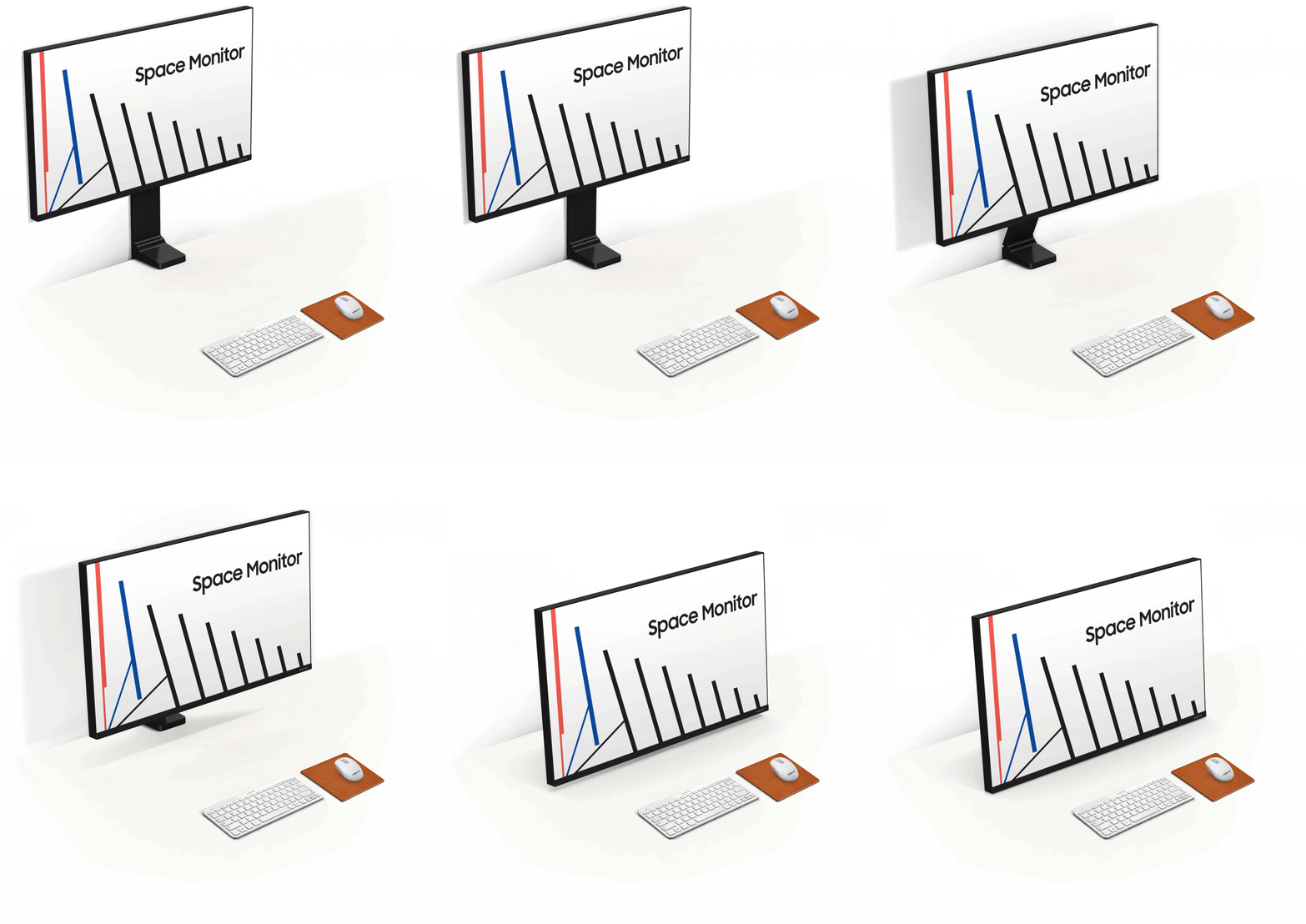
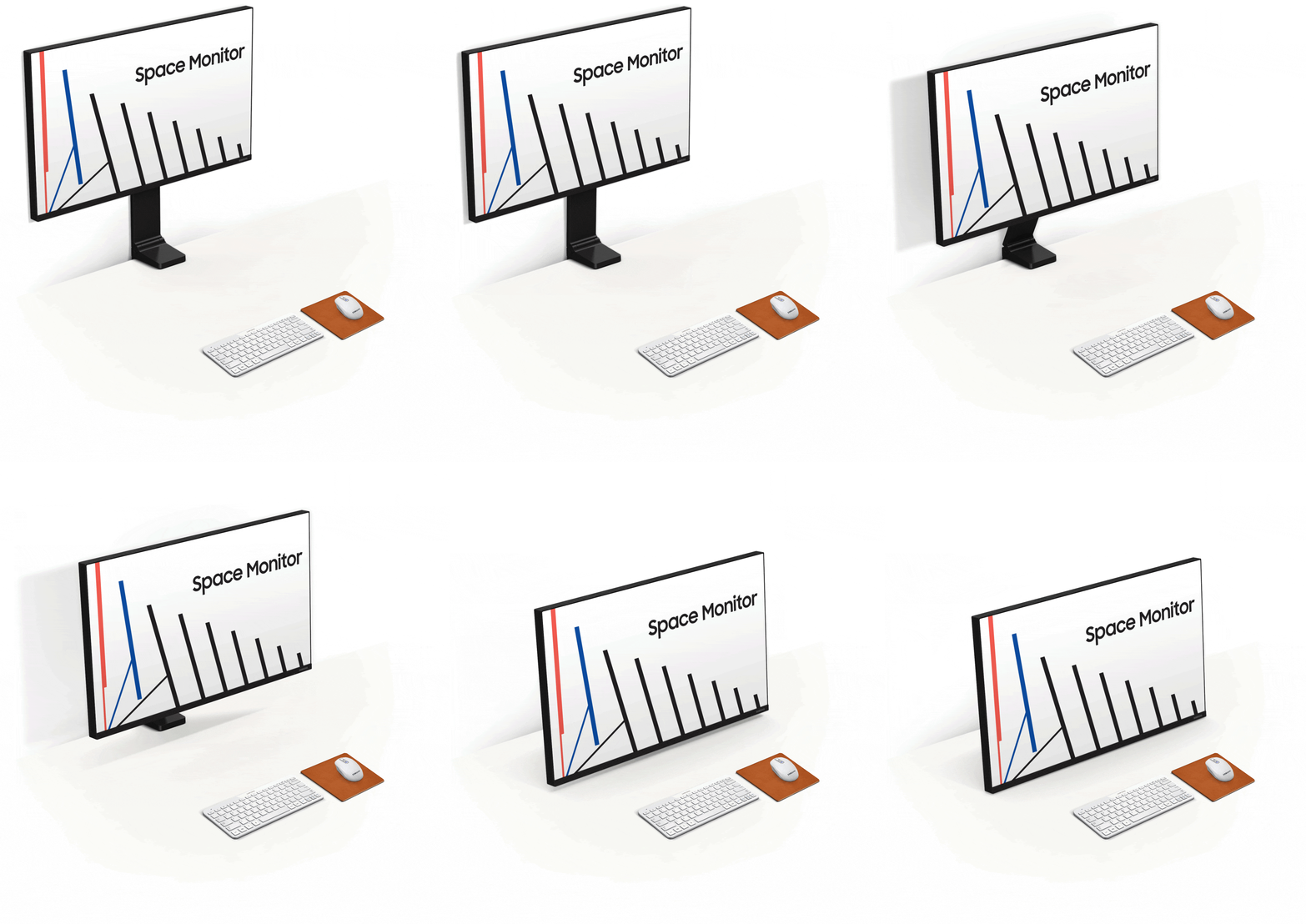
Cuando no lo usas, el monitor Samsung Space permanece completamente pegado a la pared liberando tu espacio de trabajo. Cuando lo necesites, simplemente tira de él hacia ti y ajústalo a la posición que tú prefieras.

Maximiza el espacio de tu escritorio

Aprovecha mejor tu superficie de trabajo con el Samsung Space Monitor. Sobre una mesa de 120 x 50 cm (47,2 x 19,7 pulgadas), el Space Monitor ofrece hasta un 40 % más de espacio utilizable en comparación con un monitor convencional de tamaño equivalente (Samsung SD850).

Resolución WQHD

Casi multiplicando por 1.7 la densidad de píxeles del Full HD, la resolución WQHD del Space Monitor de 27" (2560x1440) no solo ofrece imágenes increíblemente nítidas y detalladas, si no que también crea un espacio de trabajo mucho más amplio que te permite visualizar más documentos y páginas web en la pantalla con menos scroll y zoom.

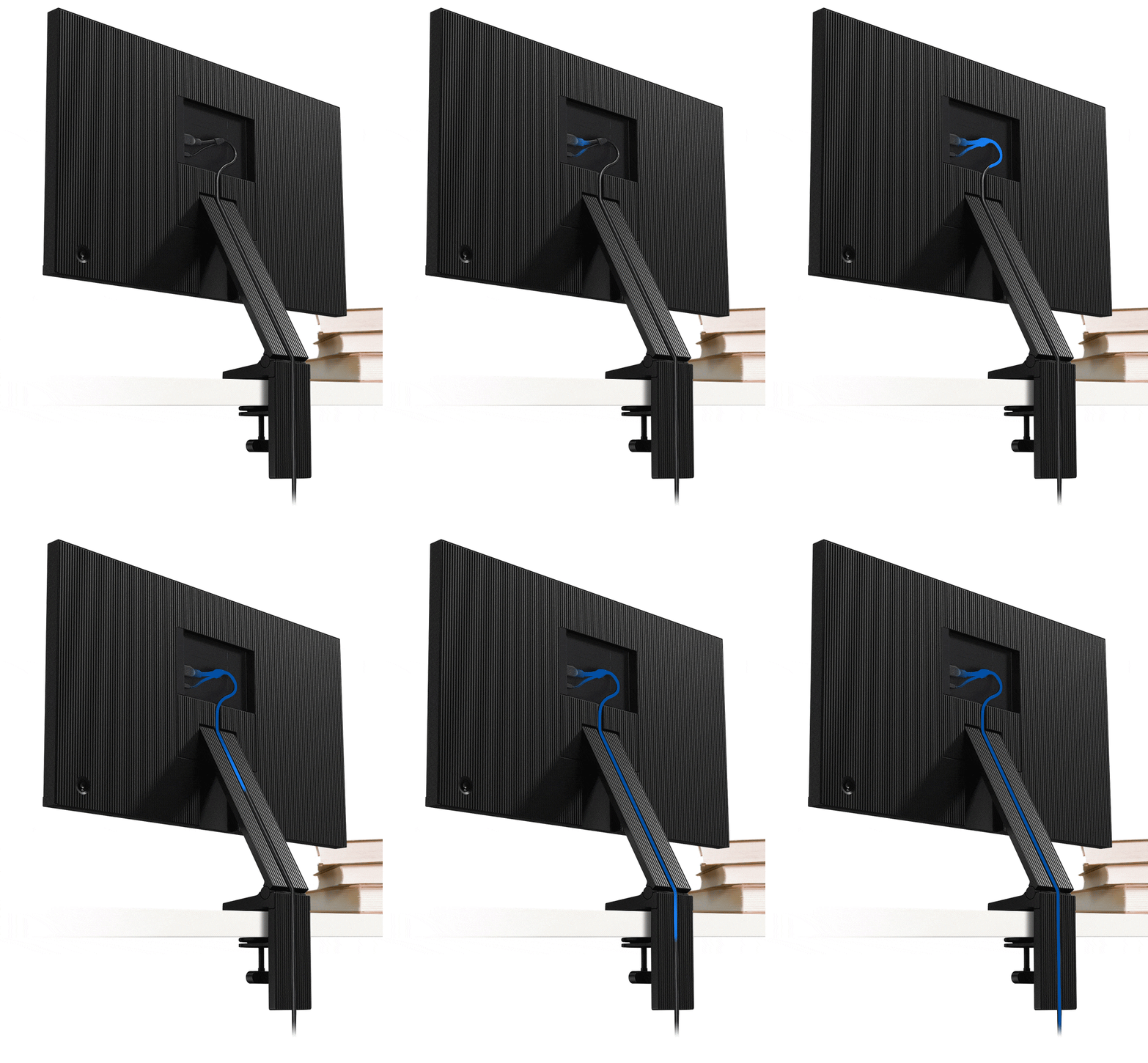
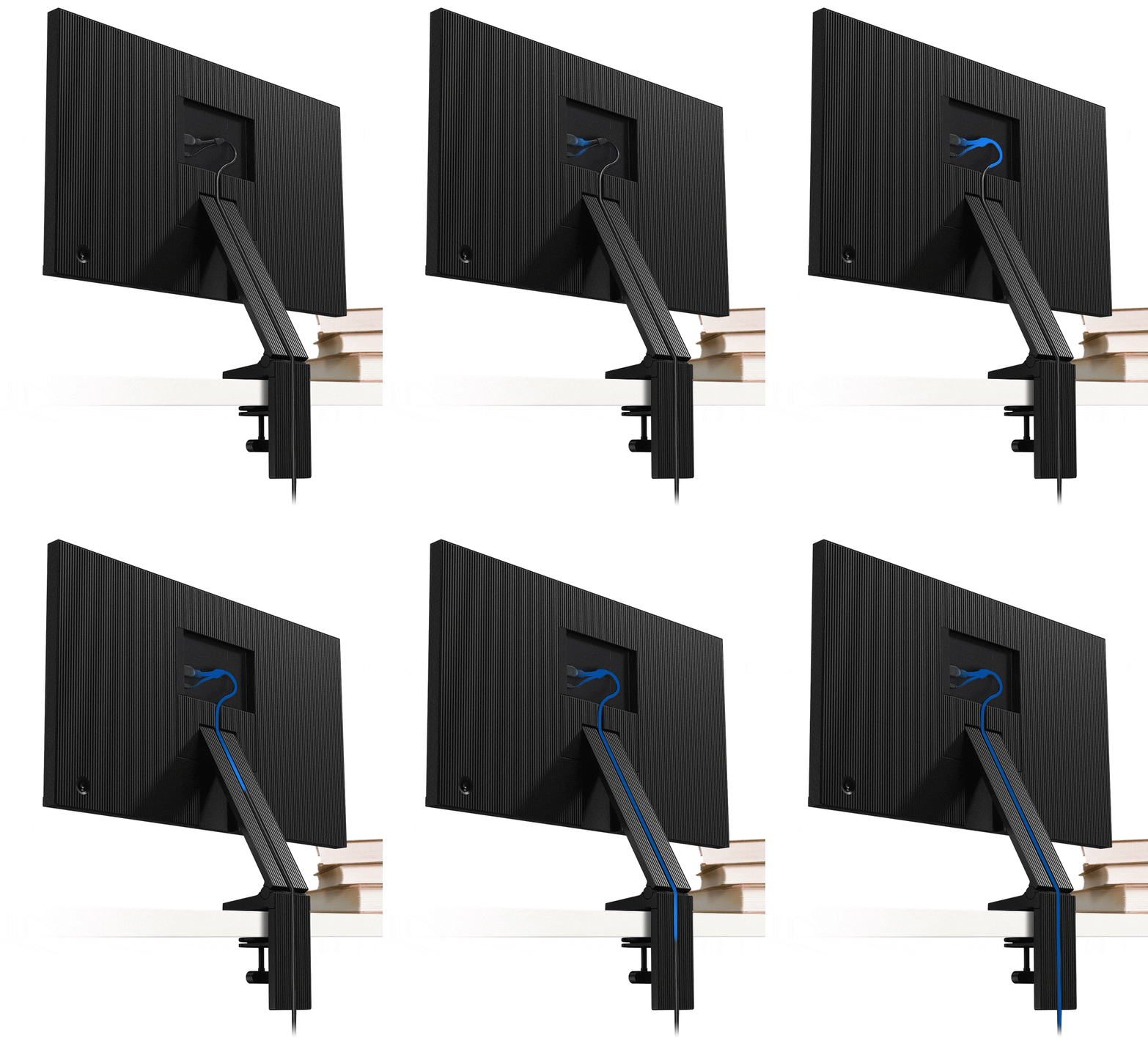
Cables ocultos

El soporte del Samsung Space Monitor oculta perfectamente el cable en Y de alimentación/HDMI en una guía para evitar enredos y mantener tu espacio de trabajo limpio y en orden.

Elegante diseño

Con su delgado panel y su pantalla sin marco en 3 lados, el Samsung Space Monitor ofrece una solución discreta para cualquier lugar de trabajo u hogar.

Bisagra robusta

El soporte del Samsung Space Monitor utiliza una bisagra robusta que asegura un funcionamiento seguro y resistente.

HAS de nivel cero

El ajuste de altura Zero-Level del Samsung Space Monitor te permite posicionar fácilmente la pantalla para un optimo confort. Cuenta con el mejor rango de regulación permitiendo la visualización desde una altura de 21,3 cm sobre la mesa (pantalla de 27'') hasta poder colocarlo sobre la superficie de la mesa.

Regulable a la altura de los ojos

El Samsung Space Monitor se puede elevar o bajar fácil y rapidamente hasta alcanzar la altura de visualización óptima para cualquier usuario y necesidad, lo que lo convierte en una solución versatil para su uso en casa o en espacios públicos como librerias.

Multitarea

El modo PBP muestra en pantalla dos fuentes de entrada a sus resoluciones nativas. El modo PIP permite reposicionar una segunda entrada y redimensionarla hasta ocupar un 25 % de la pantalla. Con el software de división de pantalla Easy Setting Box de Samsung podrás organizar las ventanas al instante para una óptima multitarea.

Multitarea

El modo PBP muestra en pantalla dos fuentes de entrada a sus resoluciones nativas. El modo PIP permite reposicionar una segunda entrada y redimensionarla hasta ocupar un 25 % de la pantalla. Con el software de división de pantalla Easy Setting Box de Samsung podrás organizar las ventanas al instante para una óptima multitarea.

Multitarea

El modo PBP muestra en pantalla dos fuentes de entrada a sus resoluciones nativas. El modo PIP permite reposicionar una segunda entrada y redimensionarla hasta ocupar un 25 % de la pantalla. Con el software de división de pantalla Easy Setting Box de Samsung podrás organizar las ventanas al instante para una óptima multitarea.

Fácil instalación

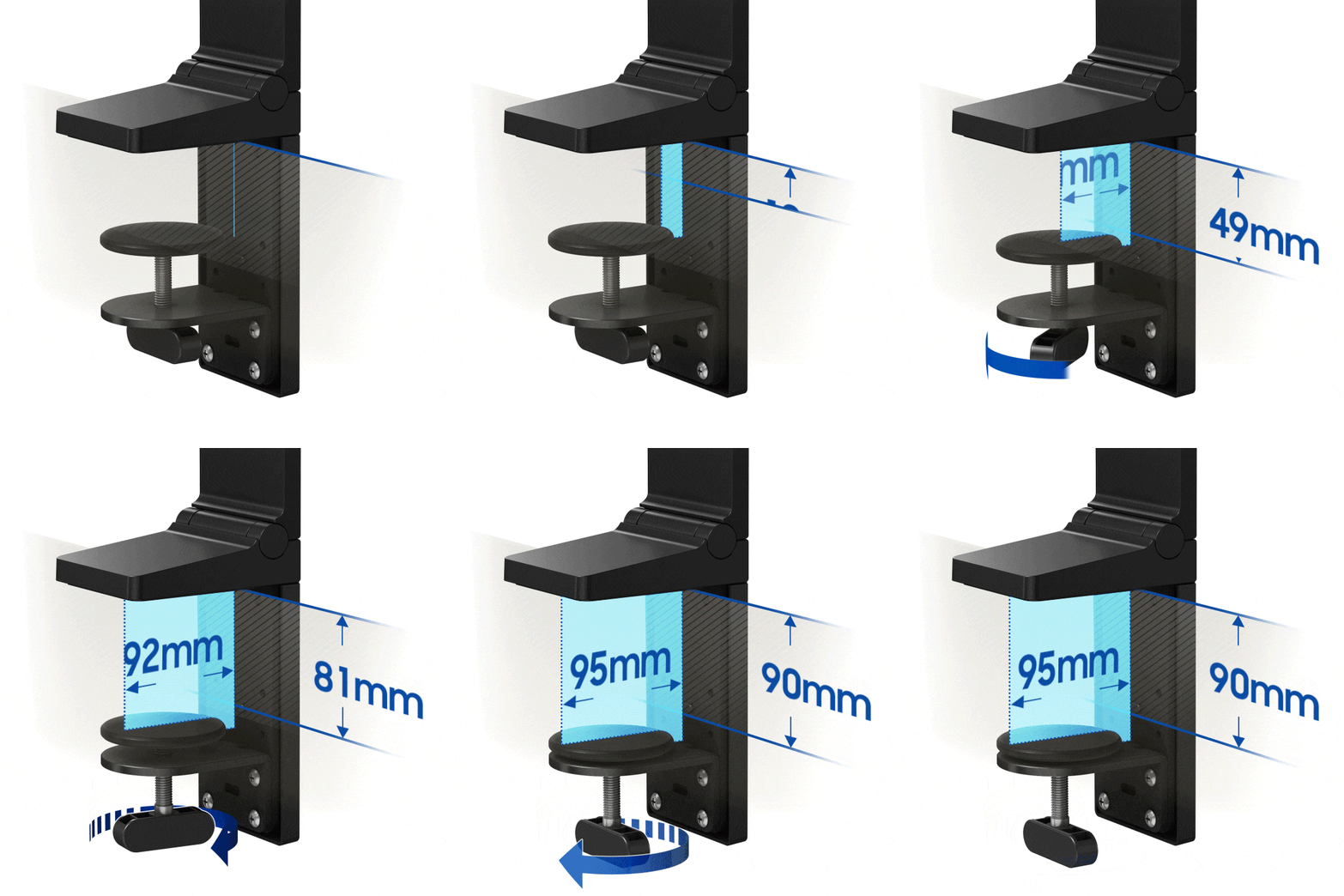
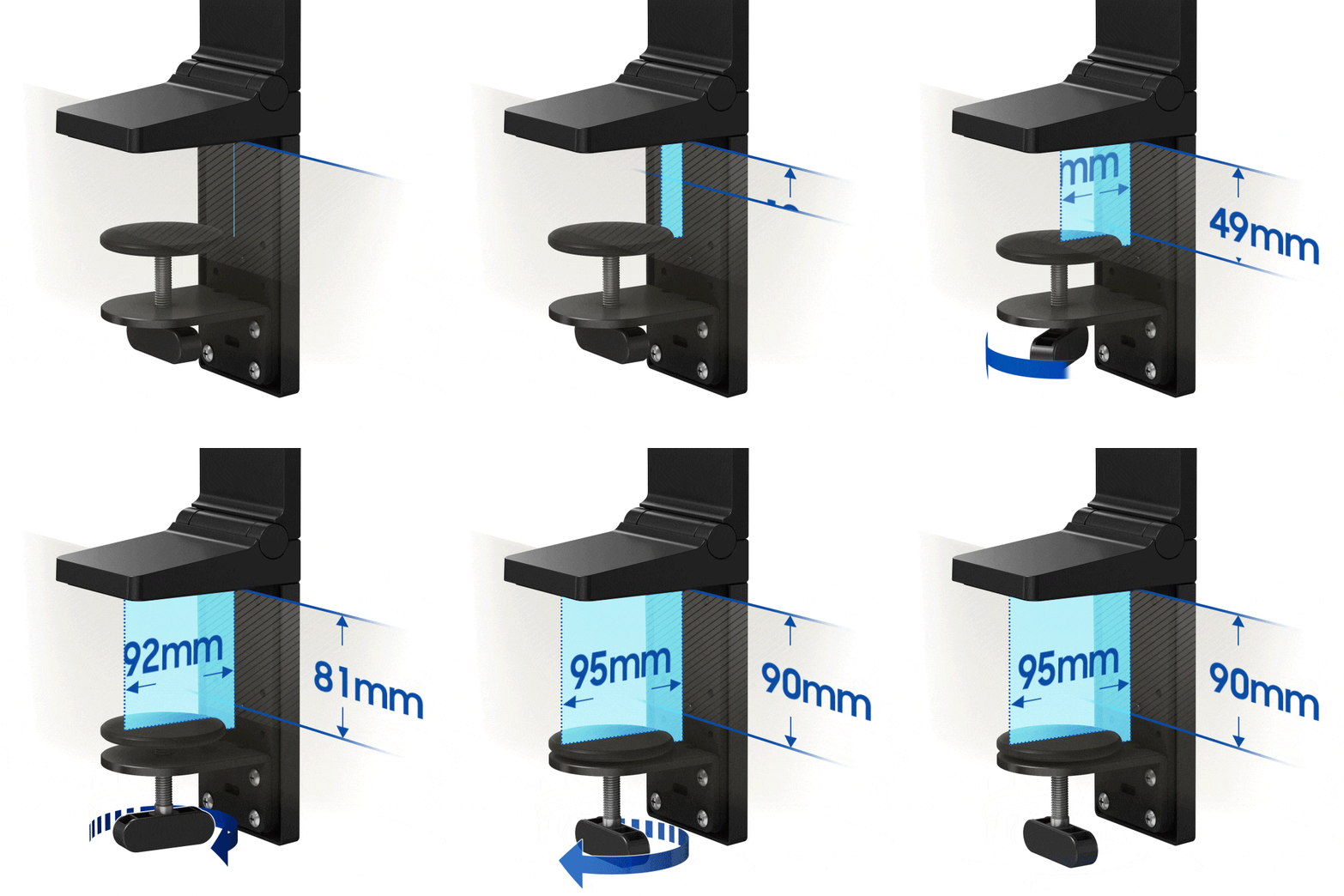
El soporte del Samsung Space Monitor integra una pinza para una instalación rápida y fácil. La pinza se puede ajustar hasta los 90 mm, y permite fijar el Space Monitor de forma segura a mesas y superficies de distintos grosores.

Tasa de refresco de 144 Hz

La tasa de refresco de 144 Hz del Space Monitor de 27" te asegura escenas de acción implecablemente nítidas incluso en juegos con alto ratio de frames. Y podrás ajustar la tasa de refresco a 60 Hz o 120 Hz cuando sea necesario.

Especificaciones

  • Relación de aspecto

    16:9

  • Brillo (Normal)

    250 cd/㎡

  • Relación de contraste estático

    3,000:1(Typ.)

  • Resolución

    2,560 x 1,440

  • Tiempo de Respuesta

    4(GTG)

  • Ángulo de Visión (H/V)

    178°(H)/178°(V)

  • Refresco

    144Hz

  • Pantalla (pulgadas)

    27.0

  • Pantalla (cm)

    68.4

  • Tamaño de pantalla (Class)

    27

  • Plana / Curva

    Flat

  • Active Display Size (HxV) (mm)

    596.736 x 335.664mm

  • Relación de aspecto

    16:9

  • Panel

    VA

  • Brillo (normal)

    250 cd/㎡

  • Brillo (Min)

    200 cd/㎡

  • Ratio de contraste (Estático)

    3,000:1(Typ.)

  • Ratio de contraste (Dinámico)

    Mega

  • Resolución

    2,560 x 1,440

  • Tiempo de Respuesta

    4(GTG)

  • Ángulo de Visión (H/V)

    178°(H)/178°(V)

  • Soporte de color

    1B

  • Color Gamut (NTSC)

    72%

  • Color Gamut (sRGB Coverage)

    100%(Typ.)

  • Frecuencia de Imagen

    144Hz

  • Samsung MagicBright

  • Samsung MagicUpscale

  • Eco Saving Plus

  • Modo Eye Saver

  • Flicker Free

  • Picture-In-Picture

  • Imagen a imagen

  • Modo gaming

  • Tamaño de imagen

  • Easy Setting Box

  • Certificación de Windows

    Windows 10

  • FreeSync

  • Off Timer Plus

  • Wireless Display

    No

  • D-Sub

    No

  • DVI

    No

  • Dual Link DVI

    No

  • Display Port

    No

  • Display Port Version

    No

  • Salida Display Port

    No

  • Versión de salida Display Port

    No

  • Mini-Display Port

    1 EA

  • HDMI

    1 EA

  • HDMI Version

    2.0

  • Entrada Audio

    No

  • Auriculares

    No

  • USB Ports

    No

  • USB Hub Version

    No

  • USB-C

    No

  • Altavoz

    No

  • USB Sound Bar (Ready)

    No

  • Temperatura

    10~40 ℃

  • Humedad

    10~80,non-condensing

  • Color

    BLACK

  • Tipo de peana

    DUAL HINGE

  • HAS(Height Adjustable Stand)

    0~213.9mm

  • Inclinación

    -5.0°(±2.0°)~ 20.0°(±2.0°)

  • Clase de eficiencia energética

    G

  • Fuente de alimentación

    AC 100~240V

  • Consumo de energía (máx.)

    48 W

  • Consumo típico

    48 W

  • Consumo (DPMS)

    Less than 0.3 W

  • Consumo (Apagado)

    Less than 0.3 W

  • Consumo anual

    70 kWh/year

  • Tipo

    External Adaptor

  • Dimensiones Netas con Peana (AnxAltxProf)

    614.8 x 730.3 x 115.5 mm

  • Dimensiones Netas sin Peana (AnxAltxProf)

    614.8 x 362.1 x 26.0 mm

  • Dimensiones embalado (AnxAltxProf)

    881.0 x 159.0 x 448.0 mm

  • Peso con peana

    5.8 kg

  • Peso sin peana

    3.6 kg

  • Peso paquete

    7.8 kg

  • Cable HDMI

  • Thunderbolt 3 Cable

    No

  • Mini-Display Gender

    No

  • CD de instalación

Reseñas

Space Monitor 27" LS27R750

4.3

Recomendado por el 100% de los clientes.

Escribir una reseña
5.0 50%
4.0 44%
3.0 0%
2.0 0%
1.0 6%
Características 4.6
Rendimiento 4.7
Diseño 4.2
Valor 4.0

Filtros

La ordenación por relevancia muestra las mejores reseñas primero. Consideramos elementos como votos útiles, reseñas más recientes, imágenes y otras características que los lectores buscan en sus reseñas.

Ordenar

Filtros

16 Reseñas

Espy_sp
4 (9,999)

2019-08-10

Tamaño : 27"
4 (9,999)
The monitor is really simple to set up: four screws to fix to the stand and the HDMI and power cables to connect. Up and running in 10 minutes. At maximum resolution, the quality is amazing - I've been looking at some of my photos which I usually shoot at 6000x4000 resolution and I'm seeing much more detail then I did with my old monitors. I like the fact that the stand uses virtually zero desk space but this does have the disadvantage that the monitor only moves along an arc so it is not always possible to place it at exactly the height/distance combination required. That is my day one impression - Now to see what it is like with video and games.

Características

4 (9,999)

Rendimiento

5 (9,999)

Diseño

3 (9,999)

Valor

3 (9,999)
neo2080
5 (9,999)

2019-10-23

Derby

Tamaño : 27"
5 (9,999)
[This review was collected as part of a promotion.] I received my Samsung 27” space monitor today and have to say the set up was very quick and easy to do. To be honest it felt a little strange not having a normal stand or wall mount but being able to have the screen flat against the wall or pulled forward for closer viewing is pretty cool. I connected my Xbox One X and the picture was crystal clear and on screen movement without blur or fuzziness! No remote!!! but an easy thumb stick at the rear of the unit deals with that. Minimal and sleek design will look good in any office or man cave. HDMI and PSU cables can be discretely stowed away along the length of the monitor stand. All in all a good all rounder. Very happy.
espy
5 (9,999)

2019-10-23

Upminster

Tamaño : 27"
5 (9,999)
[This review was collected as part of a promotion.] My new monitor has arrived. Really simple to set up: four screws to fix to the stand and the HDMI and power cables to connect. Up and running in 10 minutes. At maximum resolution, the quality is amazing - I've been looking at some of my photos which I usually shoot at 6000x4000 resolution and I'm seeing much more detail then I did with my old monitors. I like the fact that the stand uses virtually zero desk space but this does have the disadvantage that the monitor only moves along an arc so it is not always possible to place it at exactly the height/distance combination required. That is my day one impression - Now to see what it is like with video and games. p.s. My cat approves of it as well :-)
Linds
5 (9,999)

2024-04-11

Tamaño : 27"
5 (9,999)
Muy funcional, Increíble calidad del monitor. Alternativa Eye saver mode. Colores fieles
[D] Alternative Text [D] Alternative Text

Características

5 (9,999)

Rendimiento

5 (9,999)

Diseño

5 (9,999)

Valor

4 (9,999)
Anonymous
4 (9,999)

2019-10-23

Milton Keynes

Tamaño : 27"
4 (9,999)
[This review was collected as part of a promotion.] I am impressed by the space saving design of Samsung Space Monitor. Quite like the design of the hinge that makes the allows the monitor to rest on the table or put it back to the wall. The cable grooves cut into the spine of the monitor is quite a tidy feature and allows me to keep the wires tidy around me. The cable which is in the shape of Y is also designed to save space. A joystick for the menu is a change from usual button design. The menu system also stands out well. LCD Display is consistent, bright and it is good for my office work. The one thing that could be improved is the variation of backlight level across the panel. The one thing I miss is the lack of ports, no aux port. In summary a good monitor with a great design.
she48
4 (9,999)

2019-10-23

LEICESTER

Tamaño : 27"
4 (9,999)
[This review was collected as part of a promotion.] I received this product as part of a review program in return for an unbiased review. Very pleased with it. Easy to install. But shame Keyboards and Accessories not included. But overall the picture is so clear. Resolution is fantastic and you can do 2 jobs at the same time by using split screen.
She52
4 (9,999)

2019-07-25

Tamaño : 27"
4 (9,999)
I received this product as part of a review program in return for an unbiased review. Very Easy to assemble. Stays on the Desk clipped with the steady stand. Very Good Picture and brightness. It is only a Monitor. But would be nice a Keyboard and Accessories were included.

Características

4 (9,999)

Rendimiento

4 (9,999)

Diseño

3 (9,999)

Valor

3 (9,999)
KatieLO
5 (9,999)

2019-08-27

Tamaño : 27"
5 (9,999)
Having taken delivery of the Space Saving Monitor on Saturday, we havent really had enough time with the product to put it through its paces with regards to gamin, but my first thoughts are as follows. Product came securely packaged and was simple to put together, all be it a bit fiddly to screw in the stand (You may need two people for this!). I was super impressed with the two in one cable for power and HDMI - this is is such a great idea! The screen resolution is brilliant, crisp colours and a speedy refresh rate. Works well on split screen (for those that are used to using two screens) and does what it says on the tin - saves space on your desk as you can pus the monitor so it sits flat against the wall and bring it forward when in use. So far so good! Once I have had the time to get on it and do some gaming, I will write another testimonial. UPDATE - After building a new PC (as ours was approx 7 years old and unable to use the full resolution), I can happily say that this monitor is brilliant. Amazing resolution and perfect for small desks.

Características

5 (9,999)

Rendimiento

5 (9,999)

Diseño

4 (9,999)

Valor

5 (9,999)
Stockholm
1 (9,999)

2020-02-03

Tamaño : 27"
1 (9,999)
Ska montera det "fantastiska" stativet, men inga skruvar finns med och enligt quick guide finns det inga som ska följa med, jag menar 4700 pix och man snålar in på skruvar. Tummen ner!
Respuesta de Samsung:
2020-02-04

Kundsupport Samsung

Hej, Det är tråkigt att höra att du känner dig missnöjd med din Space monitor. Vi rekommenderar att du kontaktar vår tekniska support så att vi kan försöka hjälpa dig vidare med problemet du upplever. Du kan nå oss här: https://www.samsung.com/se/info/contactus/

Jessmilo
5 (9,999)

2019-07-30

Tamaño : 27"
5 (9,999)
Received the Samsung monitor and upon opening was very impressed with the size and sleek look of the screen. At first the stand is a little fiddly to fix to the screen, but when complete is as sturdy as you can get. Monitor is sharp and my games run fabulously on it. The space saver design is great due to my office set up and has actually made the room quite a bit bigger that it was before as I can now sit further forward under my desk. The power button on the back is very easy to use - this is similar to a joystick to navigate various menus. The 144hz refresh rate is also a great upgrade from any monitor running lower than this. I upgraded from a 60hz screen to this and could see no motion blur what so ever. The recessed cable run down the back of the stand is a very nice touch and helps keep the back of your desk neat and tidy. I'd recommend this to anyone wanting to upgrade their monitor, or if you have a shallow desk. The support arm is extremely sturdy and I was very impressed, I've moved it around a little since initially installing it and it doesn't seem to budge at all only at the two hinge points for lowering the screen. The one downfall I would mention about this screen is the inability to lower the screen but keep the same distance from the screen. I understand this would be difficult to incorporate but for some peoples set up this screen would be a little too high, or, a little to close to the eyes.

Características

5 (9,999)

Rendimiento

5 (9,999)

Diseño

5 (9,999)

Valor

5 (9,999)
jessica1755
5 (9,999)

2019-10-23

Guisborough

Tamaño : 27"
5 (9,999)
[This review was collected as part of a promotion.] Received the Samsung monitor and upon opening was very impressed with the size and sleek look of the screen. At first the stand is a little fiddly to fix to the screen, but when complete is as sturdy as you can get. Monitor is sharp and my games run fabulously on it. The space saver design is great due to my office set up and has actually made the room quite a bit bigger that it was before as I can now sit further forward under my desk. The power button on the back is very easy to use - this is similar to a joystick to navigate various menus. The 144hz refresh rate is also a great upgrade from any monitor running lower than this. I upgraded from a 60hz screen to this and could see no motion blur what so ever. The recessed cable run down the back of the stand is a very nice touch and helps keep the back of your desk neat and tidy. I'd recommend this to anyone wanting to upgrade their monitor, or if you have a shallow desk. The support arm is extremely sturdy and I was very impressed, I've moved it around a little since initially installing it and it doesn't seem to budge at all only at the two hinge points for lowering the screen. The one downfall I would mention about this screen is the inability to lower the screen but keep the same distance from the screen. I understand this would be difficult to incorporate but for some peoples set up this screen would be a little too high, or, a little to close to the eyes.
ong1010
4 (9,999)

2019-10-23

Slough

Tamaño : 27"
4 (9,999)
[This review was collected as part of a promotion.] When I took the delivery, I was surprised the box was so light that was totally bring on the curiosity and cannot wait to open it. The monitor itself is indeed very light to my surprise. It come with none standard power supply; it also include a proprietary HDMI cable that allow the power cable to piggy back it to make it looks like there is only one cable need for both video and power. my laptop does not have a HDMI port so I purchased DP to HDMI adaptor. The monitor has display port but it is a mini so you will need extra cable (not included) if you want to use it for video. When I first connect it to my laptop; the video keeps flicking constantly and it took me a while to work it out that I need to adjust the HDMI version in the monitor setting to get perfect picture. You cannot rotate the monitor if you want to change the display to portrait; the monitor stand has fixed height so you cannot adjust the height of the monitor; the only way I can lower the monitor is to tilt forward the monitor arm but this defeat the main feature of the monitor (space saving monitor). The monitor stand has a round padded clamp, so you need to make sure underside of the table has enough clearance to install the clamp properly. The quality of the picture and fast moving video are very clear and crisp; it is important for both gaming and reading documents. I think the monitor is expensive for same resolution and not perfect monitor arm
Purpleallium
4 (9,999)

2019-07-31

Tamaño : 27"
4 (9,999)
I have been using my 27" Samsung Space Monitor for a week now. Setup required two people as the stand is quite heavy and I was scared of dropping it on my own, but the process itself was very straightforward and intuitive. I work from home and my work involves a great deal of research, both online and using books and dictionaries. I therefore usually struggle for space on my work surface. The monitor’s footprint on the desk is tiny, freeing up much more space for my books, dictionaries, keyboard and client documentation. I am not used to using such a large monitor, but it has been a revelation to me and I wonder how I always managed with a smaller monitor. I use a second screen (usually either a second monitor or a MacBook Pro laptop) so that I can have two screens with documents in both source and target language and this works very well with the Samsung Space Monitor as I can position it either flat against the wall, or pulled forward over my books etc. for closer view. I also partition the screen into multiple sections, which really improves my workflow. I like the fact that all the cables are concealed and not on show, which looks much smarter. The Space Monitor’s WQHD (2560 x 1440) screen resolution is crisp, sharp and colours are true to life. I am a keen amateur photographer and editing and organising my photos on screen has been a pleasure. I am really impressed so far with the monitor and so far can see very few, if any, downsides. I hope that the stands does not leaves marks on my desk where it clips into place, but time will tell…

Características

4 (9,999)

Rendimiento

4 (9,999)

Diseño

4 (9,999)

Valor

3 (9,999)
Caz00
5 (9,999)

2019-08-09

Tamaño : 27"
5 (9,999)
I’ve now had this monitor for a few weeks and I must say, it is a great monitor that does exactly what I wanted it to do! It’s great for saving space on my desk because of its really useful hinged desk mount. I actually have room on my desk again, and I can pull the monitor closer if I want to play games or push it away up flat against the wall if I want to do some hand notes for work. I also love how the cable runs up the back of the desk mount as it makes it look a lot neater and means that I can cable manage my system even better than before! The included HDMI cable is also a power cable, so less cabling is required to go from the desktop to the monitor as the power plugs into the HDMI cable near the PC output. As I said, I have used this monitor for both work and personal use. For work it’s a great monitor, whose size and adjustability make it very easy for me to work with and has increased my productivity. The extra desk space is a blessing that means I actually have room for pen and paper when needed without losing any space for my keyboard and mouse. For gaming it’s size, response time, clarity, and colour make it great for either playing any of the games I have. I find it very useful for FPS games just because its size means that I can clearly see more of the playing field and more of an opponent! Overall, I rate this monitor very highly, and may have to buy a second one for my other half who has been looking over at mine with jealousy. I would definitely recommend it to someone who wants a very good monitor that saves space on their desk and looks really good while doing it!

Características

5 (9,999)

Rendimiento

5 (9,999)

Diseño

5 (9,999)

Valor

5 (9,999)
KHodson
5 (9,999)

2019-08-30

Tamaño : 27"
5 (9,999)
I recently transitioned to working solely from home, and was concerned that due to a lack of space I wouldn't be able to work across multiple monitors and my productivity would inevitably take a hit. Thanks to the space-saving design of the Samsung S27R750 stand, I was able to install this as an extra monitor at the rear of my small desk, leaving the main work area accessible to my laptop allowing me to work across dual monitors. The stand functions as a cable tidy allowing me to run multiple HDMI leads neatly from their input area while still leaving my desk tidy and uncluttered. Working in design, I require high resolution screens to ensure my products meet a high standard. The 2560 x 1440 resolution allows me zoom in on specific areas while working across multiple documents side-by-side. While I didn’t buy this monitor specifically for gaming, I have spent a few hours playing Diablo and Overwatch and am amazed at how the refresh rate improves the feel of the game. I have never played at 144Hz before this and I doubt I will ever be able to go back to anything less. I did however find that out of the box the screen was too bright for my eyes. This was simply resolved by using the simple On-Screen controls which made navigation and altering the brightness settings effortless. Pros: Fantastic resolution and high refresh rate. Space-saving design of the stand which easily clips onto the desk. Ergonomic designing allowing adjustment of the screen to eye level. Cons: You cannot rotate or twist the screen. It is very high so you have to bring it forward which uses desk space. No USB port for connectivity. Overall, I would definitely recommend this monitor and seriously considering buying a second one.

Características

5 (9,999)

Rendimiento

5 (9,999)

Diseño

5 (9,999)

Valor

5 (9,999)
emmaj1983
4 (9,999)

2019-08-21

Tamaño : 27"
4 (9,999)
The box was extremely lightweight for such a size of monitor which was a pleasant surprise when it was delivered to my neighbour and I had to carry it home. It was very easy to assemble without instructions. The clamp fitting is sturdy and secure and does leave more space on the desk than you would get with a standard monitor - I have ample space for a laptop, keyboard, mouse and notes . It is not height adjustable though so i've had to angle it down slightly to fit under my slanted ceiling. This actually works well for me but might be an issue for others if their seat is not height adjustable and they want to work in the most ergonomic position. One slight hitch is that now i've attached the 3 point plug (it comes with a UK or EU plug adaptor) I now can't seem to wrestle it free. I don't intend to remove it but I assume it should be able to be released somehow. When setting it up I also realised that my laptop doesn't have an HDMI port but I got a DP to HDMI adaptor delivered the next day for a few pounds so it wasn't too much hassle. I was also not aware prior to ordering this that my laptop won't let me change the resolution to the recommended settings. It recommends 2560 x 1440 WQHD but the best I can manage is 1980 x 1080. I obviously need a new laptop! As you would expect for a monitor at this price the image is very clear and has made my job working with images and video much easier. The settings are simple to adjust; the off timer covers an off and an eco timer, and you can set the picture to 'eye saver mode' which I find helpful when I need to look at the screen for extended periods as it reduces eye strain. Overall a very easy to set up, crisp and clever monitor which does what it says, it saves space and has the quality you expect from Samsung.

Características

4 (9,999)

Rendimiento

4 (9,999)

Diseño

4 (9,999)

Valor

3 (9,999)

Manual de usuario y descargas Ficha técnica del producto

Manual de Usuario

Versión 1.0 | 1.59 MB

15.10.2019

INGLÉS

Manual de Usuario

Versión 1.0 | 1.62 MB

15.10.2019

ESPAÑOL

Soporte del producto

Encuentra respuestas a las pregunta que tienes sobre el producto

Soporte del producto

Aprovecha al máximo el dispositivo y los servicios de Samsung.

chat en directo

Conoce los productos y descubre qué modelos se ajustan mejor a ti.