APN settings for Gulf region service providers
How to Set Up APN for Mobile Data in Gulf Region Samsung Galaxy Devices
If your Samsung Galaxy phone isn't connecting to mobile data in the Gulf region, incorrect Access Point Name (APN) settings could be the cause. Follow these steps to manually configure APN settings for service providers like Etisalat, Du, Ooredoo, and more.
1. Why Do I Need to Configure APN Settings?
APN settings are essential for your Samsung Galaxy device to connect to your mobile carrier's network for services like mobile data, MMS, and internet browsing. Incorrect or missing APN configurations can lead to connectivity issues.
- APN settings define how your device connects to your carrier's network for data services.
- Manual configuration is required if automatic settings fail or if you switch carriers.
- APN settings vary by region and carrier, so Gulf-specific configurations are necessary.
2. Supported Samsung Galaxy Devices
These APN settings apply to most Samsung Galaxy devices, including the Galaxy S24, Galaxy S25, Galaxy Z Fold, Galaxy Z Flip, and Galaxy A series. Ensure your device supports LTE or 5G networks for optimal performance.
3. How to Configure APN Settings for Gulf Region Carriers
Follow these steps to manually set up APN settings on your Samsung Galaxy device:
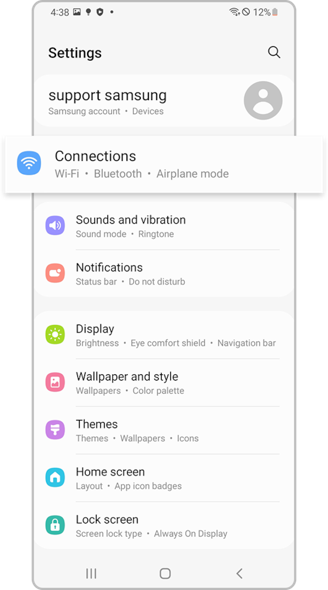
- Go to Settings > Connections > Mobile Networks > Access Point Names.
- Tap the + icon to add a new APN.
- Enter the details provided by your carrier (see below for Gulf region-specific settings).
- Save the configuration and enable Mobile Data to test the connection.
4. APN Settings for Gulf Region Carriers
Below are the APN settings for major carriers in the Gulf region. Use these configurations to ensure proper connectivity.
4.1 United Arab Emirates
Etisalat:
- APN: etisalat.ae
- APN Name: Data Package etisalat.ae
- MMSC: 10.12.0.32
- MMS Proxy: 8080
- MCC: 424
- MNC: 02
- APN Type: default supl mms
Du:
- APN: du
- APN Name: DU du
- MCC: 424
- MNC: 02
- APN Type: default supl mms
4.2 Bahrain
STC:
- APN: internet
- APN Name: Ooredoo internet
- MCC: 426
- MNC: 4
- APN Type: default supl
4.3 Qatar
Ooredoo:
- APN: Data
- APN Name: Ooredoo internet
- MMSC: 10.23.8.3
- MMS Proxy: 8080
- MCC: 427
- MNC: 01
- APN Type: default supl mms
4.4 Kuwait
Ooredoo:
- APN: Ooredoo internet
- APN Name: Ooredoo internet
- MCC: 419
- MNC: 03
- APN Type: default supl Xcap
4.5 Oman
Omantel:
- APN: Oman Mobile Internet
- APN Name: Oman Mobile Internet
- MCC: 422
- MNC: 2
- APN Type: Default supl
5. Additional Things to Check
If mobile data still doesn't work after configuring APN settings, consider the following:
- Ensure your SIM card is activated and has an active data plan.
- Restart your Samsung Galaxy device after applying APN changes.
- Verify that your device supports the carrier's network frequency bands.
- Contact your carrier for further troubleshooting if issues persist.
6. Related Samsung Support Topics
Thank you for your feedback!
Please answer all questions.