How to use Samsung Members Diagnostics
How to Use Samsung Members Diagnostics on Galaxy Devices
Samsung Members Diagnostics helps you test your Galaxy device's hardware and software performance to identify potential issues. This feature is available on most Samsung Galaxy smartphones, including the Galaxy S24, Galaxy Z Fold, and Galaxy A series. To use Diagnostics, ensure your device's software and apps are updated, and verify your Samsung account.
1. How to Access Samsung Members Diagnostics
To access the Diagnostics feature:
- Open the Samsung Members app on your Galaxy device.
- Sign in with your Samsung account if prompted.
- Tap on the "Diagnostics" option in the app menu.
- Follow the on-screen instructions to begin testing your device's performance.
2. What Can Samsung Members Diagnostics Test?
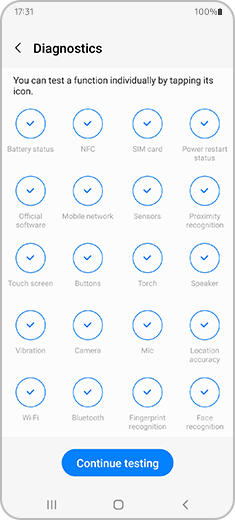
Samsung Members Diagnostics can test various aspects of your Galaxy device, including:
- Display functionality (touchscreen responsiveness, screen brightness)
- Audio performance (speaker, microphone, and headset functionality)
- Camera and flash functionality
- Battery and charging performance
- Sensor accuracy (gyroscope, accelerometer, etc.)
3. How to Run a Diagnostic Test
To run a diagnostic test:
- Open the Samsung Members app and navigate to Diagnostics.
- Select the specific function you want to test (e.g., display, audio, camera).
- Follow the on-screen instructions to complete the test.
- Review the results to determine if any issues are detected.
4. How to Report an Error Using Samsung Members
If a diagnostic test reveals an issue, you can report it directly through the Samsung Members app:
- After completing the diagnostic test, tap on the "Report Issue" option.
- Provide detailed information about the problem, including any error messages or symptoms.
- Attach screenshots or videos if necessary to help explain the issue.
- Submit the report for further assistance from Samsung support.
5. Supported Samsung Galaxy Devices
Samsung Members Diagnostics is compatible with most Galaxy devices, including:
Galaxy S24, Galaxy S25, Galaxy S26, Galaxy Z Fold, Galaxy Z Flip, and Galaxy A series.
6. Additional Things to Check
Before using Samsung Members Diagnostics, ensure the following:
- Your device's software is up to date (Settings > Software Update).
- The Samsung Members app is installed and updated to the latest version.
- Your Samsung account is verified and signed in.
Related Samsung Support Topics
Thank you for your feedback!
Please answer all questions.