What is Power Saving Mode on a Galaxy phone?
How to Use Power Saving Mode on Samsung Galaxy Devices
Power Saving Mode on Samsung Galaxy devices helps conserve battery life by limiting background activities, reducing system performance, and disabling non-essential features. This mode is ideal for extending usage time when your battery is running low.
1. What Is Power Saving Mode?
Power Saving Mode is a built-in feature designed to extend your Samsung Galaxy device's battery life by restricting certain functions such as background app activity, screen brightness, and processor performance. It offers customizable settings to tailor power conservation according to your needs.
2. How to Activate Power Saving Mode
Follow these steps to enable Power Saving Mode on your Samsung Galaxy device:
- Open the Settings app on your device.
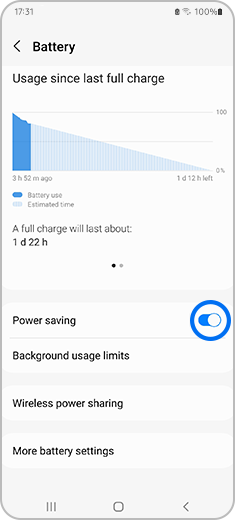
- Navigate to Battery and device care > Battery.
- Select Power saving and toggle the switch to turn it on.
3. Customizing Power Saving Mode Options
Once Power Saving Mode is activated, you can customize various settings to optimize battery conservation:
- Turn off Always On Display
- Limit processor speed to 70%
- Decrease brightness by 10%
- Turn off 5G connectivity
- Limit apps and home screen functionality
4. Managing Apps in Power Saving Mode
Power Saving Mode allows you to control which apps are accessible while the feature is active. Here's how to add or remove apps:
How to Add Apps
- Go to Settings > Battery and device care > Battery > Power saving.
- Tap on Limit apps and Home screen.
- Select Add apps and choose the applications you want to allow.
How to Remove Apps
- Navigate to Settings > Battery and device care > Battery > Power saving.
- Tap on Limit apps and Home screen.
- Select Remove apps and choose the applications you want to restrict.
Note: The steps may vary slightly depending on your specific Samsung Galaxy model.
5. Supported Samsung Galaxy Devices
Power Saving Mode is available on most Samsung Galaxy devices, including the Galaxy S24, Galaxy S25, Galaxy S26, Galaxy Z Fold series, Galaxy Z Flip series, and Galaxy A series.
6. Why Use Power Saving Mode?
Power Saving Mode is particularly useful in situations where you need to maximize your device's battery life, such as during travel, outdoor activities, or when charging options are unavailable. By limiting background processes and reducing energy consumption, this mode ensures your device remains functional for longer periods.
Related Samsung Support Topics
Thank you for your feedback!
Please answer all questions.