

“This is a do-it-all monitor and TV,
perfect for work and play”
Smart Monitor M9 (M90SF)
Techaeris


"functions as a standalone entertainment center, productivity station, and gaming console"
Smart Monitor M9 (M90SF)
HomeTheater Review


“M9 features Samsung Vision AI,
providing advanced upscaling and
picture optimization features”
Smart Monitor M9 (M90SF)
Tom’s Guide, 07/2025


A Monitor & Streaming TV
All in One

Watch Together with Your AI Companion


Ask your companion anything
Samsung Vision AI Companion1
Getting help from an AI companion has never been more visualised and comprehensive with multiple AI agents available —whether it’s questions about a scene now playing, recommending what to wear for trending clothing styles, or finding a restaurant nearby. Responses come instantly with related video/image options to choose from, making your discovery feel personalised. ¹


Meet Copilot. Now on Smart Monitor
Copilot2
Whether you're looking for answers to complex questions, learn a new language, or prep for an interview —just ask and Copilot responds with smooth, natural-like voice-based answers . Enjoy effortless handsfree conversation right on your monitor.²


Quick access to your favourite streaming content
Smart TV Apps3
Enjoy your favourite content straight from your Smart Monitor, no PC required. Stream content directly, or tune into Samsung TV Plus to get live TV channels and on-demand shows.³


Enjoy 7 years of
Monitor upgrades
for free⁴
One UI Tizen4


AI-powered Immersive Experiences


Optimally tailored visuals with AI
AI Picture Optimiser6
Whether you’re comfortably working on documents, fully engaging in games with deep and rich blacks, or indulging in vibrant colours while watching videos, AI Picture Optimiser gives you a dynamically optimised viewing experience that matches your content.⁶


Enhanced dialogue clarity with AI


Boost Productivity with Seamless Connection


Smart home management, made simple
SmartThings8
Manage your smart home with ease. See all connected devices at a glance with 3D Map View, monitor energy usage by device and activate energy-saving mode. Simply use your mobile phone or voice commands to access the IoT hub — all while staying immersed in your entertainment.⁹


Your Privacy. Secured on Samsung monitor.
Knox Security9
Rest assured that your sensitive data and IoT connections made through your Smart Monitor are secured. Powered by Samsung Knox, your Smart Monitor is protected with robust, multi-layered security and tightly controlled access. Plus, Knox Vault adds an extra layer of protection, safeguarding your information from physical attacks.¹⁰


Work smarter with easy access to tools
Workspace10
Dive straight into tasks and boost your productivity. Control your PC remotely, access embedded productivity apps like Microsoft 365, and use Multi View to see apps side by side on the same screen.¹¹


Expand your workflow with seamless control


Easy calls with clear video quality
Webcam
Experience crystal-clear video calls effortlessly. The Smart Monitor's high-quality camera captures every detail with clarity, allowing you to show your good side while staying seamlessly connected with your friends, family and coworkers.


Comfort in Style


Sleek design for a modern workspace
Elevate your workspace with a stylish look. The M9's slim metal design and M8's iconic slim design add a refined, modern touch to your workspace while giving you enough room for seamless productivity.
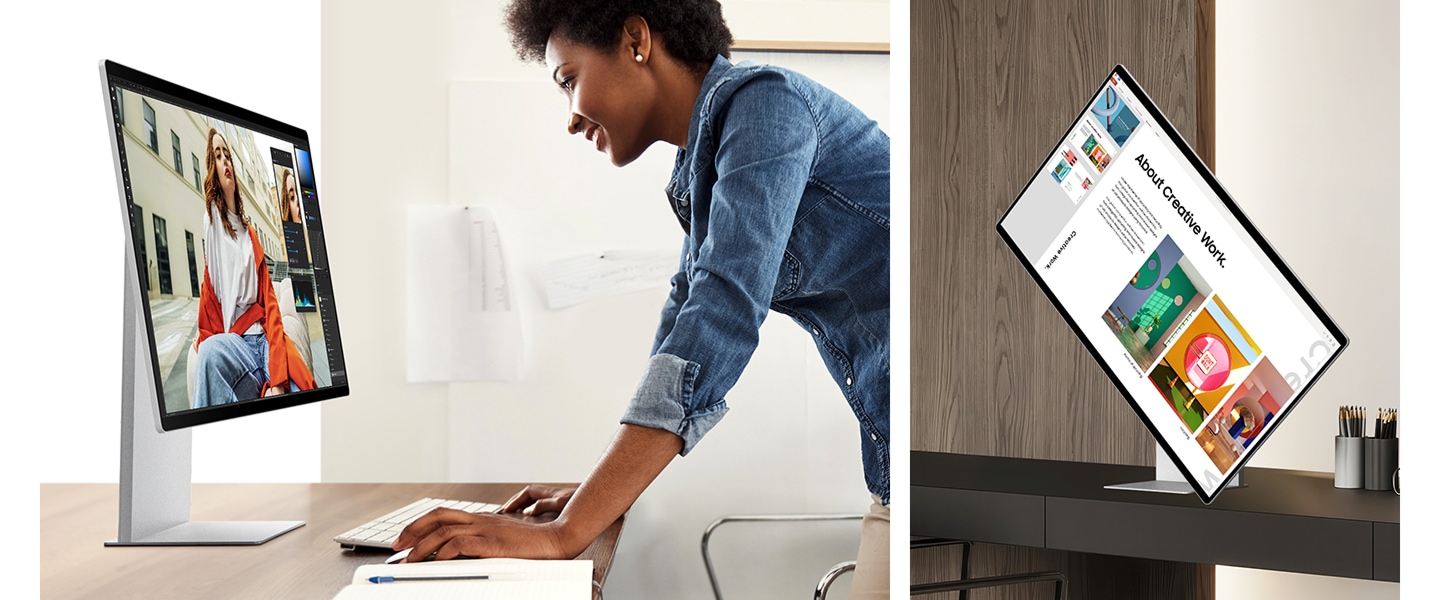

Ergonomic Design12
Stay comfortable and productive all day. Smart Monitor's height-adjustable screen with tilt functionality helps you keep a better posture and maintain focus. Plus, the 90-degree pivot feature makes it easier to view long documents with less scrolling.
Choose your Smart Monitor
| table product |


|


|


|
|---|---|---|---|
| Screen Size | 32" | 32" | 32" / 43" |
| Resolution | 4K UHD (3840 x 2160) | 4K UHD (3840 x 2160) | 4K UHD (3840 x 2160) |
|
Upscaling
Upscaling is the process of enhancing the resolution of an image or video. This makes your content look rich and sharp, allowing you to see more details with clarity. |
4K AI Upscaling Pro | 4K AI Upscaling | N/A |
| Panel Type | QD-OLED | VA | VA |
|
Refresh Rate
Refresh Rate refers to how often a display updates an image per second. A high refresh rate delivers ultra-smooth and sharp visuals with less lag, even during intense gaming sessions. |
165Hz | 60Hz | 60Hz |
|
Smart TV Apps
Smart TV Apps are applications that provide access to a wide range of streaming content directly from the monitor. |
Yes | Yes | Yes |
|
SmartThings
SmartThings is a platform developed by Samsung that allows you to connect and manage your smart devices in your home seamlessly. |
Yes | Yes | Yes |
| Speaker | Yes | Yes | Yes |
| Camera | 4K Built-in Camera | SlimFit Camera | N/A |
| Stand | HAS, Pivot, Tilt | HAS, Pivot, Tilt | Tilt |
| Connectivity | USB-C, USB-A(2DN), DP, HDMI | USB-C, USB-A(2DN), HDMI | USB-C, USB-A(3DN), HDMI(2) |
| table item cta |
-
Bisakah saya membeli Samsung Smart Monitor dengan cicilan bulanan 0%?Ya. Samsung Indonesia menawarkan cicilan 0% hingga 24 bulan menggunakan kartu kredit bank. Pilih opsi cicilan saat checkout, karena kelayakan tergantung pada pembelian dan penerbit kartu.
-
Apakah ada penawaran yang tersedia untuk Samsung Smart Monitor?Penawaran pada Samsung Smart Monitor dapat berubah, jadi periksa halaman produk untuk promosi terbaru Samsung Indonesia sebelum membeli.
-
Opsi pembayaran apa saja yang tersedia saat membeli Samsung Smart Monitor di Indonesia?Samsung Indonesia menerima berbagai metode pembayaran melalui gateway pembayaran Midtrans. Anda dapat membayar penuh dengan kartu kredit, memilih paket cicilan kartu kredit 0%, atau menggunakan opsi cicilan tanpa kartu kredit seperti SPayLater, Kredivo, Indodana, atau Home Credit. Opsi yang tersedia untuk Anda akan muncul saat checkout.
-
Apa saja manfaat yang saya dapatkan saat membeli Smart Monitor dari Samsung Indonesia?Membeli langsung dari Samsung Indonesia memberikan Anda poin Samsung Rewards, penjadwalan pengiriman yang fleksibel, opsi cicilan 0% dengan kartu kredit bank yang memenuhi syarat, dan garansi resmi Samsung. Samsung Premium Care tersedia untuk perlindungan tambahan.
-
Apa perbedaan Samsung Smart Monitor dengan monitor gaming?Samsung Smart Monitor menggabungkan fungsi monitor dengan fitur pintar seperti aplikasi streaming, konektivitas Wi-Fi, alat produktivitas, dan integrasi rumah pintar. Monitor gaming lebih menekankan performa yang berfokus pada gaming.
-
Bagaimana cara mendaftarkan Samsung Smart Monitor saya?Anda dapat mendaftarkan Smart Monitor Anda secara online melalui halaman garansi Samsung Indonesia atau dari Halaman Saya di akun Samsung Anda. Pendaftaran memberikan dukungan lebih cepat dan memungkinkan Anda memeriksa status garansi di satu tempat.
-
Detail apa saja yang diperlukan untuk mendaftarkan Samsung Smart Monitor?Biasanya Anda akan membutuhkan kode model dan nomor seri Samsung Smart Monitor Anda. Gunakan nomor seri yang tercetak di monitor daripada kemasan, dan periksa dengan teliti karena "O" dan "0" mudah tercampur.
-
Fitur Samsung Smart Monitor mana yang berguna untuk penggunaan sehari-hari?Untuk penggunaan sehari-hari, Samsung Smart Monitor menawarkan streaming bawaan melalui One UI Tizen dan Samsung TV Plus tanpa PC. Remote Access memungkinkan Anda terhubung ke PC dari monitor, AI companion (Samsung Vision AI) membantu menjawab pertanyaan sehari-hari, dan rangkaian ini mencakup 7 tahun pembaruan perangkat lunak gratis.
-
Apakah Samsung Smart Monitor dapat digunakan untuk pengeditan foto dan video?Smart Monitor bekerja dengan baik untuk produktivitas umum dan penggunaan komputer sehari-hari. Untuk pekerjaan kreatif spesialis, pertimbangkan resolusi dan kebutuhan citra dari alur kerja Anda.
-
Apa perbedaan Monitor Pintar Samsung dengan monitor melengkung?"Pintar" menggambarkan fungsi monitor yang terhubung, sedangkan melengkung menggambarkan bentuk fisik layar.
-
Apakah Samsung Smart Monitor bisa digunakan untuk gaming PC?Ya. Smart Monitor cocok untuk gaming sehari-hari, dan flagship M9 mendukung refresh rate 165Hz, waktu respons 0,03ms, serta kompatibilitas NVIDIA G-SYNC. Untuk opsi gaming yang lebih kompetitif, lihat jajaran Odyssey.
-
Apa yang harus saya pertimbangkan saat memilih Samsung Smart Monitor untuk penggunaan jangka panjang?Perlu dipertimbangkan resolusi, ukuran layar, konektivitas, dan fitur pintar yang Anda butuhkan untuk pekerjaan dan hiburan. Fitur "Help Me Choose" dari Samsung juga dapat membantu Anda membandingkan berbagai opsi Smart Monitor dan menemukan model yang paling sesuai dengan kebutuhan kerja dan hiburan Anda.
1. Feature available in certain regions and models. Feature specific to M9, M8 and M7 models. Availability and supported features may vary by region and watching conditions. Voice commands recognize English, French, Spanish, Portuguese, German, Italian, and Korean, but not all accents, dialects, and expressions are recognised. This feature provides AI-created content, with accuracy not guaranteed — please check results. Requires certain Bluetooth remote (TM2560E/TM2360E/TM2561E/TM2361E) (sold separately on some models). The design of the remote control may vary depending on the model. Feature accessible by the AI button, or by the Home button (long press) on the remote control without an AI button. Screen images are simulated for illustrative purposes. The images were generated with the assistance of AI tools.
2. Feature specific to M9, M8 and M7 models. The recommended content by Copilot may require a separate purchase or subscription on the platform hosting the content. It may require a Microsoft account log in and agreement to use the Copilot service. Some features and language availability may differ based on geographic location and launch timing. Specifications and availability of remote control may vary by region.
3. Features, services and app availability may vary by country and region. Samsung TV Plus and Universal Guide may not be available in some regions. Some features may require separate subscriptions. The user interface is subject to change without notice. Smart Monitor does not include a TV tuner, which is not necessary for streaming apps. Internet connection is required. Remote control specifications vary by country and region. Keyboard and mouse control compatibility varies by app. Access to the full range of smart features, such as network-based services, applications (including games and streaming services), and smart home functionality requires a Samsung Account. Without logging in, functionality is limited to external devices, e.g. via HDMI. You can sign up for a free Samsung Account at https://account.samsung.com; Terms and Conditions apply.
4. Content and services may vary by region and are subject to change without notice. Agreement to Smart Hub Terms and Conditions and Privacy Policy is required before use. Some content and services require registration and subscription. Requires Samsung account. Tizen OS upgrades will be supported for up to 7 years starting from 2025, for products released in the year 2025. Please note that the upgrade does not cover hardware-related performance, features or durability.
5. Feature specific to M9 model. Viewing experience may vary according to types of content and format. Upscaling may not apply to PC connection and Game Mode. Screen images simulated for illustrative purposes.
6. Feature specific to M9, M8 and M7 models. Only available when using a PC connection. The supported image quality may vary based on the type of content detected by the function.
7. Screen images simulated for illustrative purpose. Feature may vary by models.
8. Available technology, functions and features may vary by country, service provider, network environment or product, and are subject to change without notice. Requires a Wi-Fi, Bluetooth or other wireless network connection and devices registered to SmartThings app. Connected devices are sold separately. For full compatible device list, please check https://www.smartthings.com/products.
9. Samsung Knox safeguards the Smart Monitor and its IoT connections via the SmartThings app. It does not provide direct protection against hacking or physical attacks on IoT devices. Security software updates are guaranteed for at least five years from product launch. Latest software update is required. Knox Vault is supported only in M9 and M8 models.
10. Feature specific to M9, M8 and M7 models. Microsoft 365 requires Microsoft account. Some Microsoft 365 features require subscription. Windows 10 Pro, Mac OS 10.5 or higher, and compatible network settings are required for this feature.
11. Feature specific to M9, M8 and M7 models. Each device must be registered with a single Samsung Account and connected to the same Wi-Fi network. Multi control requires updated Galaxy phones and tablets with One UI 5.1.1 or above, and Galaxy Book series devices released in 2021 or later with Samsung Settings v1.5 (Intel) or Samsung Settings v3.3 (ARM). Some functions (such as Copy & Paste or Drag & Drop) may not be available when using certain device models and apps. Feature availability may vary by region(e.g. not provided in People’s Republic of China).
12. Feature specific to M9 and M8 models.
