Customize the Homepage in Samsung Browser on your Galaxy phone or tablet
The Samsung Browser app allows you to personalize your browsing experience by customizing the homepage. Whether you want to set a specific website as your homepage or organize your bookmarks for quick access, this guide will walk you through the steps to tailor the homepage to your preferences. Enhance your browsing experience on your Galaxy phone or tablet with these simple customization options.

Customize the Homepage in Samsung Browser on your Galaxy phone or tablet
The Homepage in Samsung Browser is the page that loads when you first open the app. If there is a certain page you'd like to see right away, you can customize the Homepage to your liking.
Open the Samsung Browser app, then tap the Tools icon (the three vertical dots), and then tap Settings. Next, tap Homepage. The following options will be available:
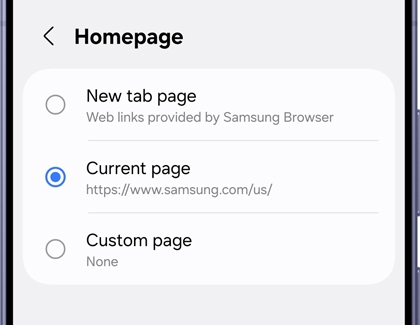
- Default: The default Homepage in Samsung Browser will vary depending on what carrier you have. Select this option to keep the current default page as your Homepage.
- New tab page: Your Homepage will have a selection of links to different pages, such as news articles and social media apps. Tap the Settings icon to edit shortcuts, other content to show, or to change the Home page wallpaper.
- Current page: The page you are currently viewing will be set as your Homepage. For example, if you are currently viewing a news website, it will become your Homepage.
- Custom page: You can enter a web address of your choice to set as the Homepage. Tap Save when you're finished.
Recommended Articles
We're here for you
Contact Samsung Support
Contact us online through chat and get support from an expert on your computer, mobile device, or tablet. Support is also available on your mobile device through the Samsung Members App.

