Galaxy Store: Get a refund for a Roblox game item purchase

If you've purchased a Roblox game item on your Galaxy phone or tablet and need a refund, follow these steps to initiate the process through the Galaxy Store. This guide outlines the necessary information and procedures to help you get a refund for your purchase.
Galaxy S25 Ultra showing the Roblox app page with circular arrows representing the update process.

Galaxy Store: Get a refund for a Roblox game item purchase

Get a refund for a Roblox game item

Refunds for Roblox games are processed through the Galaxy Store. To request a refund, provide the purchase information (order number) and the reason for the refund request. This helps us verify and proceed with your request.

Purchased apps are typically not eligible for refunds or cancellations once the download begins. However, if an app has a material defect, it will be replaced, downloaded again, or a coupon will be provided for the equivalent purchase value.

To submit your refund request:

  1. Navigate to and open the Galaxy Store app, and then tap the Menu at the bottom of the screen.
  2. Tap My apps, and then tap Roblox from the list.
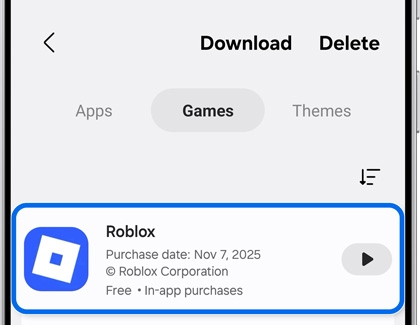
    Galaxy S25 Ultra displaying the download screen in the Galaxy Store with the Roblox game listed under Games.
  3. Tap More options (the three vertical dots), then tap Report, and then submit your information, including the reason for the refund request and the order number.
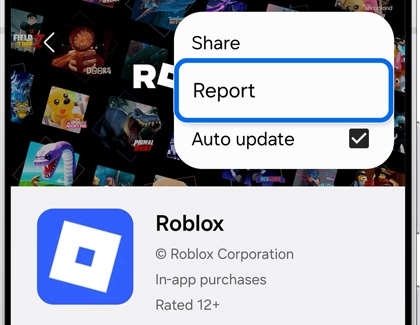
    Galaxy S25 Ultra showing the Roblox app page in the Galaxy Store with the Report option highlighted in the menu.
Read more
Read less

Get a refund for a Roblox gift card

Refunds for Roblox gift cards cannot be processed through the Galaxy Store. For assistance with using, exchanging, or refunding Roblox gift cards, please contact Roblox directly.
Read more
Read less

Get a refund for an item purchased with a Roblox gift card

Refunds for purchases made with a Roblox gift card are managed by Roblox, not the Galaxy Store. If you need help with using, exchanging, or getting a refund for these items, reach out to Roblox directly.
Read more
Read less
Was this content helpful?
We're here for you

Contact Samsung Support

Contact us online through chat and get support from an expert on your computer, mobile device or tablet. Support is also available on your mobile device through the Samsung Members App.
auto-contact_us-pc-2x auto-contact_us-pc-2x