Galaxy Z TriFold: Always On Display options unavailable on main screen

If you cannot select the 'Always' option in the AOD menu or set AOD to always display on the main screen of the Galaxy Z TriFold, this is by design. The main screen is configured to turn on AOD temporarily using the 'Tap to show' option to optimize battery performance.
A Galaxy Z TriFold in its folded state resting on a wooden desk showing the cover screen clock.

Galaxy Z TriFold: Always On Display options unavailable on main screen

Why this happens

The Galaxy Z TriFold's large main screen is designed to minimize power consumption. Keeping AOD on for an extended period can significantly increase power usage. To prevent excessive battery drain, the device uses the 'Tap to show' option, which activates AOD temporarily when you tap the screen.
Read more
Read less

How to adjust AOD settings

Use the 'Tap to show' option to conserve battery life while still enjoying AOD functionality.

  1. Swipe down from the top of the screen to open the Quick panel settings.
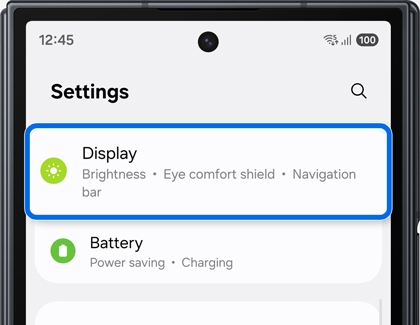
  2. Tap Settings (it looks like a gear), and then tap Display.
    A close up of the Settings menu on a Galaxy Z TriFold with the Display option highlighted by a blue rounded box.
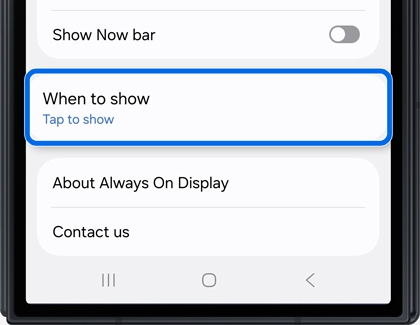
  3. Tap Always On Display, and then tap When to show.
    A Galaxy Z TriFold showing the Always On Display settings menu with the When to show option highlighted by a blue rounded box.
  4. Select the Tap to show to enable AOD temporarily.
    A Galaxy Z TriFold showing the When to show menu with the Tap to show radio button option highlighted by a blue rounded box.  

Explore other AOD customization options to personalize your display.

Read more
Read less
Was this content helpful?
We're here for you

Contact Samsung Support

Contact us online through chat and get support from an expert on your computer, mobile device or tablet. Support is also available on your mobile device through the Samsung Members App.
auto-contact_us-pc-2x auto-contact_us-pc-2x

