Samsung Browser is slow or lagging

As you visit websites, the Samsung Internet browser downloads files, cookies, and other data. Sometimes, too much data builds up over time and slows down the browser. To fix this problem, you need to clear the cached data from the browser.

Samsung Browser is slow or lagging

1

Open the Samsung Browser app.

If you don't see the app, check inside the Samsung folder.
2

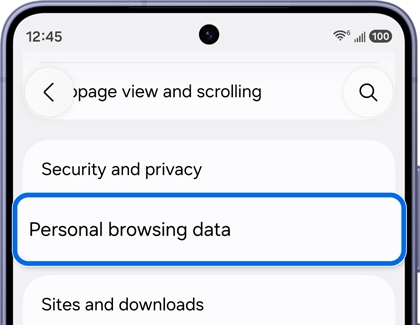
Navigate to Personal browsing data.

Tap the three vertical dots in the lower right corner, and then tap Settings. Tap Personal browsing data.
3

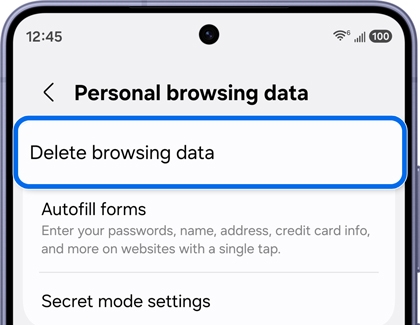
Delete browsing data.

Tap Delete browsing data. select from the options, and tap Delete data. Tap Delete to confirm.
4

Close unused tabs.

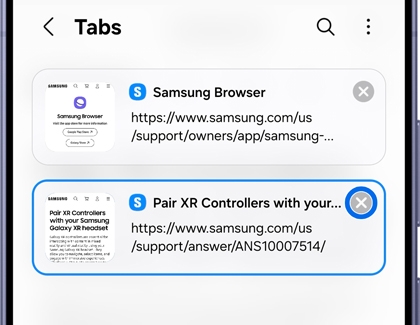
In the bottom row of the Samsung Browser app, you'll see a square with a number in it. This is the tab icon and it shows the number of tabs you have open.

Tap the Tabs icon to see your open tabs, and then tap the X to close any you no longer need.
 

Was this content helpful?
We're here for you

Contact Samsung Support

Contact us online through chat and get support from an expert on your computer, mobile device or tablet. Support is also available on your mobile device through the Samsung Members App.
auto-contact_us-pc-2x auto-contact_us-pc-2x