
Samsung Voice Recorder app crashes after One UI 8.5 update

If the Voice Recorder app crashes when using Summarize transcripts after updating to One UI 8.5, this issue may occur if the app is not updated to the latest version. To resolve this, update the Voice Recorder app to version 21.5.86.26 or later through the Galaxy Store. This article provides steps to update the app and ensure smooth functionality.
A Galaxy S26 Ultra showing the Voice Recorder app page in the Galaxy Store with an Update button.

Samsung Voice Recorder app crashes after One UI 8.5 update

1

Update the Voice Recorder app.

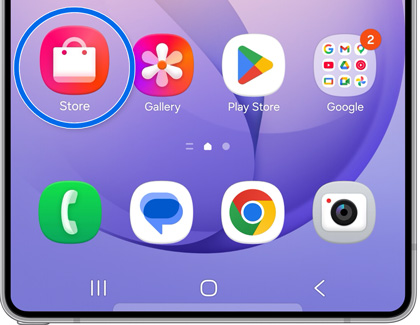
Open the Galaxy Store app on your device. Tap the Search field, enter "Voice Recorder," and select the app.
A Galaxy S25 Ultra home screen with the Galaxy Store app icon highlighted in a blue circle.

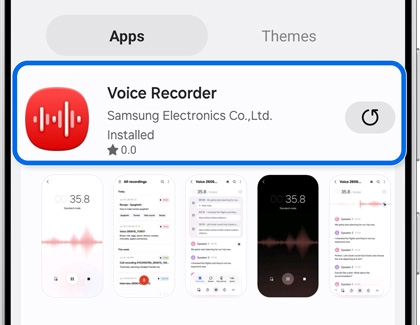
If an update is available, tap Update and follow the prompts to install the latest version (v21.5.86.26 or later). If no updates are available, check back later.
A Galaxy S25 Ultra showing the Voice Recorder app search result in the Galaxy Store highlighted in blue.

Note
Keep your app updated regularly to access the latest features, improvements, and enhancements.
2

Restart your device.

After updating, restart your device to ensure the changes take effect. Swipe down with two fingers from the top of the screen to open the Quick settings panel. Tap the Power icon at the top of the screen.

Power off icon highlighted in the Quick panel on a Galaxy phone

Tap Restart, then confirm by tapping Restart again. Your device will shut down and automatically reboot.

Restart icon highlighted on a Galaxy phone

Was this content helpful?
We're here for you

Contact Samsung Support

Contact us online through chat and get support from an expert on your computer, mobile device, or tablet. Support is also available on your mobile device through the Samsung Members App.