Why the noise canceling level changes on your Samsung Galaxy Buds

If the Active noise canceling level on your Galaxy Buds feels inconsistent or weak, this may be due to Adaptive Active noise canceling. This feature automatically adjusts noise canceling based on how you wear the earbuds and your surroundings. Changes in Active noise canceling performance are normal. If needed, try changing the ear tip size for a better fit or adjust the settings below.
A woman wearing a silver Galaxy Buds4 Pro earbud in her ear.

Why the noise canceling level changes on your Samsung Galaxy Buds

If the Active noise canceling level on your Galaxy Buds feels inconsistent or weak, this may be due to Adaptive Active noise canceling. This feature automatically adjusts noise canceling based on how you wear the earbuds and your surroundings. Changes in Active noise canceling performance are normal. If needed, try changing the ear tip size for a better fit or adjust the settings below.

Note
Active noise canceling is supported only on the Galaxy Buds4 and Buds3 series.

When Active noise canceling level feels uncomfortable

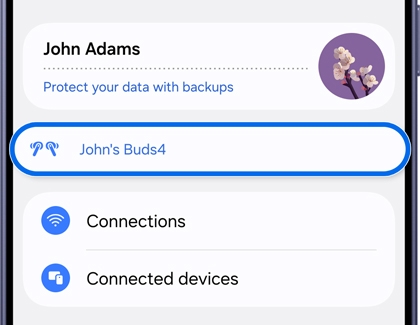
  1. Open Settings. Then, tap your Galaxy Buds.
    Settings menu with Galaxy Buds highlighted.
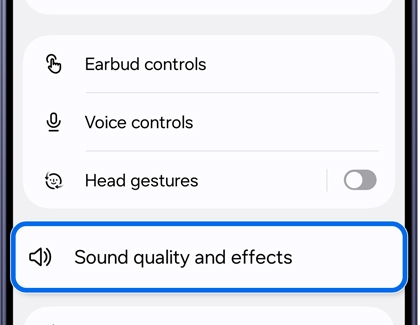
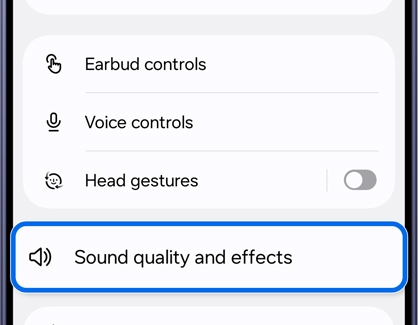
  2. Tap Sound quality and effects.
    Galaxy Buds screen with Sound quality and effects highlighted.
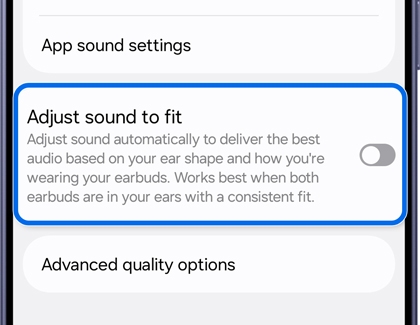
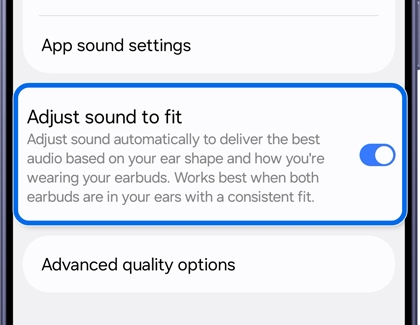
  3. Turn off Adjust sound to fit.
    Sound quality and effects screen with Adjust sound to fit turned off.


Read less

When Active noise canceling level feels weak

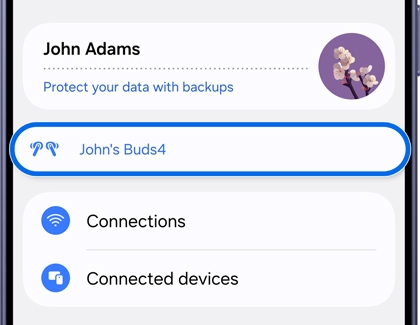
  1. Open Settings. Then, tap your Galaxy Buds.
    Settings menu with Galaxy Buds highlighted.
  2. Tap Sound quality and effects.
    Galaxy Buds screen with Sound quality and effects highlighted.
  3. Turn on Adjust sound to fit.
    Sound quality and effects screen with Adjust sound to fit turned on.
Read less
Note
For more information on how to wear and use your Galaxy Buds, refer to this guide.
Was this content helpful?
We're here for you

Contact Samsung Support

Contact us online through chat and get support from an expert on your computer, mobile device, or tablet. Support is also available on your mobile device through the Samsung Members App.

